Hello! Welcome to the first lesson in our course on advanced Linux kernel development.
Given your extensive experience in embedded systems, you're already familiar with the core idea of an operating system managing hardware. This course is designed to take that understanding to a much deeper level, preparing you for the most challenging technical interviews and enabling you to contribute to projects like the Linux kernel and QEMU.
This first lesson addresses a foundational learning outcome: describing the high-level architecture of the Linux kernel, its major subsystems, and their interactions. Think of this as creating a "world map" of the kernel. Before we can explore any specific region in depth, we need to understand the main continents and the oceans that connect them. Mastering this high-level view is the critical first step toward the deep, practical knowledge you're aiming for.
1. The Fundamental Divide: User Space vs. Kernel Space
The most fundamental concept in the Linux architecture is the strict separation between user space and kernel space.
- User Space: This is where your applications run (e.g., a web server, a shell, or the embedded applications you've developed). Processes in user space have restricted access to hardware and memory. This is a crucial security and stability feature; a crashing application shouldn't be able to bring down the entire system.
- Kernel Space: This is where the kernel—the core of the OS—executes. Code running in kernel space has full, privileged access to all hardware and memory on the system. It's the kernel's job to manage these resources on behalf of all user-space processes.
To get a formal understanding of these concepts, please start by reading the following sections from the provided text, "Introduction — The Linux Kernel documentation".
Introduction — The Linux Kernel documentation
This reading introduces the foundational concepts of operating systems, which are essential for understanding the kernel's architecture. It formally defines the user/kernel separation and the idea of address spaces.
Please read the following sections: 'User vs Kernel', 'Typical operating system architecture', 'Address space', and 'User and kernel sharing the virtual address space'. Focus on the distinction between execution modes (user/kernel mode) and memory protection (user/kernel space).
The Bridge: System Calls
So, if an application in user space needs to perform a privileged action like writing to a file, accessing a network card, or requesting more memory, how does it do it? It can't access the hardware directly.
The answer is system calls. A system call is a controlled entry point into the kernel, allowing a user-space process to request a service from the kernel. This transition involves switching the processor from the unprivileged user mode to the privileged kernel mode.
The diagram below illustrates this control flow.

2. The Kernel's Blueprint: A Modular Monolith
You might have encountered different kernel designs in your automotive work, such as microkernels (like QNX). A microkernel is minimal, with most OS services (like file systems, device drivers, and networking) running as separate processes in user space.
Linux, in contrast, is a monolithic kernel. This means all those core OS services—process scheduling, memory management, VFS, device drivers, networking stacks—run in a single, large address space within the kernel.
However, it's crucial to understand that "monolithic" does not mean "messy" or "inflexible". The Linux kernel is extremely modular. You can load and unload device drivers and other features as kernel modules at runtime without rebooting.
The following reading provides a clear comparison of these architectural styles.
Introduction — The Linux Kernel documentation
This section of the same document explains the distinction between monolithic and microkernel designs, which is a common topic in OS theory and interviews.
Please read the sections titled 'Monolithic kernel' and 'Micro kernel'. Pay attention to the performance trade-offs and how monolithic kernels like Linux achieve modularity.
3. Meet the Subsystems: The Core Components
Now, let's explore the "continents" on our map. The Linux kernel is logically divided into several major subsystems, each responsible for a specific domain.
This interactive map provides a great, albeit dense, visual overview of the kernel's structure. Don't worry about understanding every box and line right now. Just use it to get a feel for the complexity and the major functional blocks.
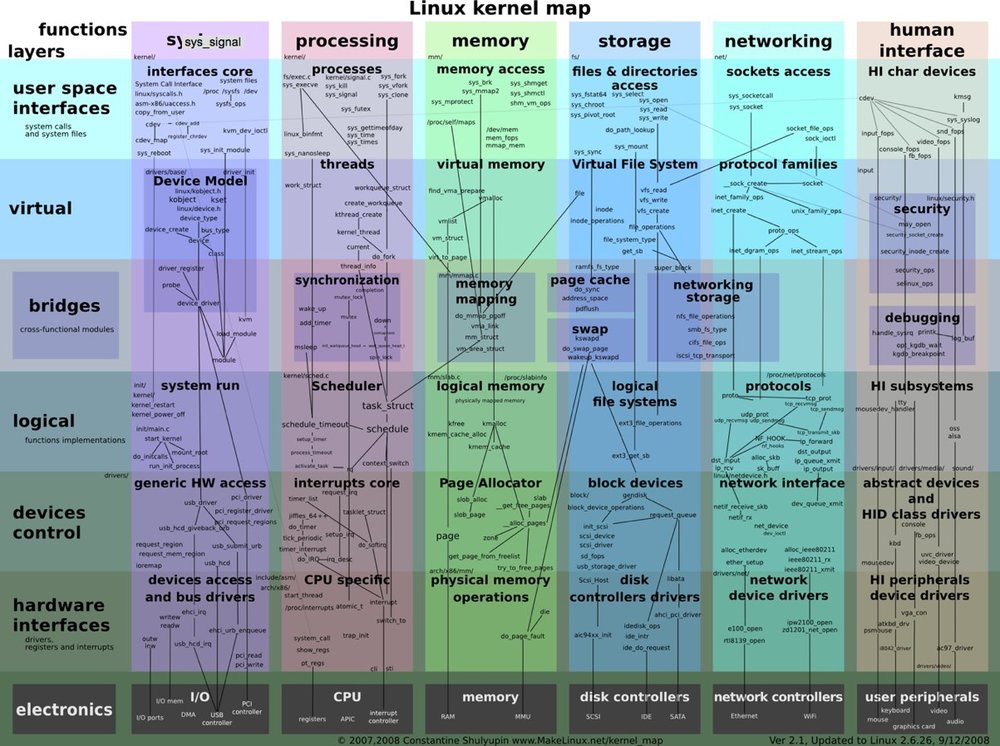
To get a more guided tour, please watch the following segment from a Linux Foundation talk.
Getting to Know the Linux Kernel: A Beginner's Guide - Kelsey Steele & Nischala Yelchuri, Microsoft
This video provides a friendly, high-level introduction to the primary subsystems within the kernel, giving you a quick orientation.
Watch from 01:56 to 05:30. The speaker will briefly introduce the purpose of the Process Subsystem, Memory Subsystem, File System (VFS), Networking Stack, Device Drivers, and Architecture-Specific Logic.
Building on that introduction, here is a summary of the key subsystems. This is the core knowledge for this lesson.
- Process Management & Scheduler: This subsystem is responsible for creating, managing, and terminating processes and threads. Its most famous component is the scheduler (e.g., the Completely Fair Scheduler or CFS), which decides which process gets to run on the CPU at any given time.
- Memory Management (MM): Manages the system's memory. It handles both physical RAM and virtual memory (the private address space each process sees). It's responsible for allocating and freeing memory, page tables, swapping to disk, and providing allocators like
kmallocfor other kernel subsystems. - Virtual File System (VFS): A brilliant abstraction layer that provides a single, uniform interface for user-space applications to interact with all filesystems (e.g., ext4, Btrfs, XFS, NFS). When your application calls
open()orread(), it's the VFS that receives the request before passing it to the specific filesystem driver. - Networking Stack: Manages all network communications. It implements protocols like TCP/IP, handles routing, filtering (firewalls), and provides the socket API that applications use to send and receive data over a network.
- Device Drivers & The Device Model: This is the vast collection of code that communicates directly with hardware devices (e.g., storage controllers, GPUs, USB devices, I2C buses). These drivers are organized by the Linux Device Model, which provides a unified way to represent devices, drivers, and the buses that connect them.
- Architecture-Specific Code (
arch): While most of the kernel is written in portable C, some parts must be tailored to the specific CPU architecture (e.g., x86_64, arm64, RISC-V). This code, found in thearch/directory, handles things like boot-up, memory management unit (MMU) specifics, interrupt handling, and system call entry/exit.
4. An Interview Scenario: Tracing a System Call
To solidify your understanding and prepare you for the kind of questions you'll face, let's consider a classic scenario: "At a high level, what happens in the kernel when a user-space program calls printf(\"hello world\\n\");?"
- The
printffunction is part of a user-space library (libc). It formats the string and then needs to write it to the console (standard output). - To do this,
libcinvokes thewrite()system call, passing it the file descriptor for standard output and the "hello world" string. - This triggers a switch into kernel mode. The CPU hands control over to the kernel's system call dispatcher.
- The dispatcher identifies the request as
sys_write()and passes it to the Virtual File System (VFS) subsystem, as writing to the console is treated like writing to a file. - The VFS sees that the file descriptor points to a terminal device (TTY). It then passes the request to the specific TTY device driver.
- The TTY driver interacts with the relevant hardware driver (e.g., a serial port driver or a graphics card's console driver) to actually display the characters on the screen.
- Once the operation is complete, control returns through the layers and finally back to the user-space application.
This simple printf call has taken us on a journey through the system call interface, the VFS, and device drivers, all while being managed by the process scheduler and memory manager.
To see how a seasoned kernel developer explores these interactions in practice, watch this segment from Steven Rostedt, the author of the kernel's ftrace tracer.
Steven Rostedt - Learning the Linux Kernel with tracing
This segment is a masterclass in applied kernel exploration. Steven Rostedt uses the ftrace tool to follow the write() system call for 'hello world' through the kernel. This directly demonstrates the subsystem interactions we've just discussed.
Watch from 31:03 to 40:34. Don't worry about mastering the ftrace commands just yet (we'll cover tracing tools later). Focus on how he follows the call from the generic sys_write into the VFS (vfs_write) and then down into the TTY-specific functions. This is a practical demonstration of the abstract architectural layers.
Key Takeaways
- The Linux kernel has a monolithic architecture but is highly modular.
- The fundamental design principle is the separation between privileged kernel space and unprivileged user space.
- System calls are the controlled interface for applications to request services from the kernel.
- The kernel is composed of major subsystems: Process Management, Memory Management, VFS, Networking, and Device Drivers.
- These subsystems are deeply interconnected and constantly interact to fulfill requests from user space.
This lesson has equipped you with a high-level map of the Linux kernel. In the next lesson, we will begin our practical exploration by learning how to navigate the Linux kernel source tree to find where these subsystems and their components are actually implemented.