Introduction
In our last lesson, we focused on how a PCIe device can signal the CPU using MSI and MSI-X interrupts. We can now write to a device's registers using MMIO and receive notifications from it. The next logical step for a high-performance device is to transfer large amounts of data to and from system memory without involving the CPU for every byte. This mechanism is called Direct Memory Access (DMA).
While DMA is essential for performance, it introduces a significant security challenge. A device with DMA capability can, in principle, write to any physical address in memory. A buggy driver or a malicious device could corrupt kernel code, access sensitive data from other processes, or take over the entire system.
This lesson addresses the hardware mechanism that solves this problem. Our objective is to explain how the IOMMU enables secure DMA and device isolation for security and virtualization. We will explore how this crucial piece of hardware acts as a "firewall" for DMA, and how it forms the foundation for securely passing through physical devices to virtual machines.
1. The Power and Peril of Direct Memory Access (DMA)
In modern systems, especially with high-speed buses like PCIe, peripheral devices are "bus masters." This means they can initiate transactions on the bus and write directly to system memory. This is a huge leap from older architectures that required a centralized DMA controller.
To understand why this bus mastering is both powerful and potentially dangerous, let's watch a short video that introduces the concept.
DMA Controller: How Peripheral Devices Transfer Data to RAM
This video from BitLemon explains the evolution of DMA. As you watch, focus on the transition from a centralized 'third-party' DMA controller to the 'first-party' bus mastering model used in PCIe.
Watch the section describing bus mastering from 01:51 to 03:53. Note how each device gets its own internal DMA controller, allowing it to independently request access to the bus and transfer data.
The key takeaway is that a PCIe device driver tells the device which physical memory address to write to. Without any protection, the system is trusting the device and its driver completely. This leads to two major risks:
- Buggy Drivers: A bug in a driver could calculate an incorrect physical address, causing the device to overwrite critical kernel data structures, leading to a system crash (a "Heisenbug" that is hard to reproduce).
- Malicious Devices/Attacks: A compromised device or a malicious user with access to a device that supports DMA (like FireWire or Thunderbolt) could intentionally read or write to arbitrary physical memory. This is a well-known attack vector called a DMA attack, which can be used to bypass all OS-level security.
This diagram illustrates the problem. The device driver provides a physical address for its I/O buffer, but without any hardware enforcement, nothing stops a buggy or malicious DMA from targeting other critical memory regions.
Virtualizing IO through THE IO Memory Management Unit (IOMMU)
This slide deck from an ASPLOS tutorial visually demonstrates the problem. Slides 10-12 (pages 10-12 in the PDF) show a DMA request targeting a wrong location, highlighting that there is no protection from malicious devices or buggy drivers without a hardware enforcement mechanism.
2. The IOMMU: An MMU for I/O Devices
The solution to insecure DMA is a hardware component called the Input/Output Memory Management Unit (IOMMU). Its function is analogous to the CPU's Memory Management Unit (MMU):
- The MMU translates virtual addresses used by software running on the CPU into physical memory addresses.
- The IOMMU translates virtual addresses used by I/O devices into physical memory addresses.
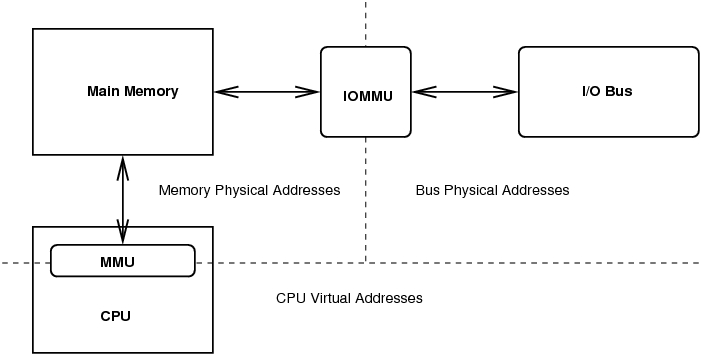
The IOMMU provides two fundamental capabilities:
- Address Translation: It translates addresses from a device-specific address space (called an I/O Virtual Address, or IOVA) to the system's physical addresses. This allows a device to operate in its own virtual address space, just like a user-space process. For example, it can enable a 32-bit device to perform DMA to memory above the 4GB boundary in a 64-bit system.
- Memory Protection: The kernel programs the IOMMU with a set of "I/O page tables" for each device. These tables explicitly define which memory regions a device is allowed to access. If a device attempts a DMA transaction to an address not mapped in its I/O page table, the IOMMU blocks the access and reports a fault to the system.
This video provides a concise summary of the IOMMU's role.
DMA Controller: How Peripheral Devices Transfer Data to RAM
Let's return to the BitLemon video to see how the IOMMU is introduced as the solution to the DMA problem.
Watch the final section from 07:00 to 08:07. It explains how the IOMMU uses I/O page tables to translate addresses and enforce memory protection, preventing devices from accessing memory they don't own.
By enforcing these boundaries, the IOMMU effectively contains each device within its own sandbox, preventing buggy or malicious DMA from affecting the rest of the system.
3. IOMMU and Virtualization: Enabling Secure Device Passthrough
The IOMMU's capabilities are not just for security in a single OS; they are the cornerstone of high-performance I/O in virtualized environments, a key area of interest for you.
Without an IOMMU, a hypervisor like KVM has two slow options for device I/O:
- Full Emulation: The hypervisor emulates a fake device (e.g., an old Realtek network card) for the guest. When the guest driver tries to access this fake device, it triggers a VM exit. The hypervisor traps the access, figures out what the guest wants to do, performs the action on the real hardware, and then resumes the guest. This involves constant context switching and is extremely slow.
- Paravirtualization (VirtIO): The guest uses a special
virtiodriver that knows it's running in a VM. It communicates with the hypervisor through a highly optimized channel. This is much faster than emulation but still involves hypervisor mediation for I/O operations.
The fastest method is device passthrough (also called direct I/O or VT-d/AMD-Vi), where a physical PCIe device is assigned directly to a guest VM. The guest OS loads its native driver for the device and can interact with it directly, achieving near-native performance.
The IOMMU is what makes this passthrough secure.
Here's how it works:
- The guest VM operates using its own memory view, known as Guest Physical Addresses (GPAs).
- The hypervisor manages the actual machine memory, known as System Physical Addresses (SPAs).
- When the guest driver programs the passed-through device for a DMA operation, it uses a GPA.
- The IOMMU, which is controlled by the hypervisor, intercepts the DMA. It is programmed with page tables that translate the GPA from the device into the correct SPA in host memory.
- Crucially, these IOMMU page tables only contain mappings for the memory that the hypervisor has allocated to that specific guest VM. If the device tries to access any memory outside its VM's assigned boundaries (e.g., the hypervisor's memory or another VM's memory), the IOMMU will block it.
The following document provides an excellent, detailed explanation of this process.
An Introduction to IOMMU Infrastructure in the Linux Kernel
This paper from Lenovo, 'An Introduction to IOMMU Infrastructure in the Linux Kernel', is a fantastic resource that details how the IOMMU is used for virtualization. We will focus on the core concepts.
Please read the following sections: 'Introduction' and 'PCI Device Virtualization Models' (page 3-4): Focus on understanding the difference between the 'Emulation Model' and the 'Pass-through Model'. 'Two-level Address Translation' (page 7): This is the most critical part. Understand how the IOMMU performs a nested translation from Guest Virtual Address (GVA) -> Guest Physical Address (GPA) -> System Physical Address (SPA). 'Linux Kernel IOMMU: DMA Translation Mode versus Pass-through Mode' (page 11-13): This section explains how the hypervisor uses the IOMMU in 'passthrough mode' to enable direct device access for guests and introduces the VFIO framework.
The VFIO (Virtual Function I/O) framework mentioned in the document is the modern Linux kernel infrastructure for exposing devices to user-space (like QEMU) for passthrough. It works with the IOMMU driver to set up the isolated memory mappings for the guest.

4. IOMMU Groups: The Practical Unit of Isolation
Theoretically, an IOMMU can isolate any individual PCIe device. In practice, however, the isolation granularity is limited by the platform's PCIe topology. Devices that are behind the same PCI-to-PCI bridge may not be isolatable from each other.
The Linux kernel reflects this physical limitation through the concept of IOMMU groups. An IOMMU group is the smallest set of devices that can be isolated. If you want to pass through a device to a VM, you must pass through all devices in its IOMMU group, or none at all.
You can inspect these groups on your system in the /sys/kernel/iommu_groups/ directory. Each numbered subdirectory represents a group and contains symbolic links to the devices within it.
$ ls /sys/kernel/iommu_groups/
0  1  10  11  12  13  14  15  16  17  18  19  2  20  ...

$ ls /sys/kernel/iommu_groups/16/devices/
0000:09:00.0
In this example, IOMMU group 16 contains only one device (0000:09:00.0), which is ideal for passthrough. If other devices were also in this group, it could complicate or prevent passthrough if those devices are essential to the host OS.
5. Interview Scenario
Interviewer: "You are trying to pass a high-performance network card to a KVM guest to run a packet processing application. You've enabled VT-d in the BIOS and you're using QEMU with VFIO. When you start the VM, it fails with an error indicating the IOMMU group is 'not viable' because it contains multiple devices. What does this mean, and what are your debugging and resolution steps?"
Click for Analysis
This is a very practical problem that anyone who has set up device passthrough has likely faced. It tests your understanding of IOMMU limitations and your problem-solving skills.
Analysis:
-
What it means: The error means the network card is in an IOMMU group with at least one other device. The VFIO framework requires that it be given exclusive ownership of all devices in a group to ensure isolation. If one of the other devices in the group is a critical component needed by the host (like the primary SATA controller or a root port a boot device is connected to), the hypervisor cannot give up the whole group, making it "not viable" for passthrough.
-
Debugging Steps:
- Identify the device's BDF address: Use
lspcito find the Bus:Device.Function address of the network card (e.g.,03:00.0). - Find the IOMMU group: Use a script or command to find which group it belongs to. For example:
This will show you the path, likefind /sys/kernel/iommu_groups/ -type l | grep '03:00.0'/sys/kernel/iommu_groups/12/devices/0000:03:00.0. The group is12. - List all devices in the group:
ls -l /sys/kernel/iommu_groups/12/devices/ - Identify the other devices: Use
lspci -s <bdf>on the other device addresses found in the group to see what they are. You will likely find a PCI bridge or another endpoint device sharing the group.
- Identify the device's BDF address: Use
-
Resolution Strategies:
- Physical Relocation (Best solution): The most reliable solution is to physically move the network card to a different PCIe slot. IOMMU grouping depends on the physical topology of the motherboard. Slots connected directly to a CPU's root complex are more likely to have better isolation (i.e., single-device groups) than slots hanging off a PCH chipset bridge.
- BIOS/UEFI Update: Check for motherboard firmware updates. Sometimes, updates can improve how the platform reports PCIe topology, leading to better IOMMU groups.
- ACS Override Patch (Advanced/Risky): As a last resort, one can use a custom-patched kernel with the ACS (Access Control Services) override patch. This patch forces the kernel to ignore the hardware-reported grouping and treat devices as individually isolatable. This is a hack and can break the security guarantee of the IOMMU if the underlying hardware truly can't enforce isolation between the devices. Mentioning this demonstrates deep, practical knowledge but should be framed as a risky workaround.
Conclusion
In this lesson, we've seen how the IOMMU is an indispensable hardware component for building secure and high-performance systems. It closes the security hole opened by DMA and is the fundamental technology enabling efficient I/O virtualization.
Key Takeaways:
- DMA is powerful but insecure: Without protection, bus-mastering devices can access any physical memory.
- The IOMMU is an "MMU for devices": It sits between devices and memory, translating I/O addresses and enforcing memory protection via I/O page tables.
- IOMMU is critical for virtualization: It enables secure, high-performance device passthrough by translating a guest's physical addresses (GPAs) to the host's system physical addresses (SPAs), isolating the guest and its device from the rest of the system.
- IOMMU groups are the practical unit of isolation: Hardware topology determines which devices are grouped together, and a whole group must be assigned to a guest for passthrough to work.
We have now covered how to talk to a device (MMIO), get signals from it (MSI), and allow it to safely transfer data (DMA with IOMMU). We're building a solid foundation in the PCIe subsystem. In our next lesson, we'll explore how to configure and observe PCIe device power management (ASPM) state transitions, another critical aspect of modern embedded systems.