Introduction
In our last lesson, we explored the Completely Fair Scheduler (CFS), the default scheduler for normal processes in Linux. We learned that its primary goal is fairness, which it achieves by using a clever accounting mechanism called virtual runtime (vruntime). CFS always tries to run the task with the lowest vruntime, ensuring that over time, every task gets its proportional share of the CPU.
However, in many embedded systems, fairness is secondary to a more critical requirement: predictability. For a task controlling a robot arm or reading a critical sensor, it's not enough to be fair; the task must execute within a strict deadline. For these scenarios, Linux provides a different set of scheduling policies.
Today, we will compare CFS with real-time scheduling policies (SCHED_FIFO and SCHED_RR) and identify their appropriate use cases. We'll examine how these policies abandon the goal of fairness in favor of strict, priority-based execution to meet the demands of time-sensitive applications.
1. Scheduling Classes and Real-Time Priority
The Linux scheduler is designed hierarchically using scheduling classes. A task in a higher-priority class will always preempt a task in a lower-priority class.

As the diagram illustrates, real-time tasks (SCHED_FIFO and SCHED_RR) are in a higher class than normal tasks managed by CFS (SCHED_NORMAL/SCHED_OTHER). This has a crucial implication:
If a real-time task with priority 1 is ready to run, it will preempt a CFS task, even if that CFS task has the highest possible nice value of -20.
The core difference is the priority mechanism:
- CFS: Uses a dynamic priority based on
nicevalues, which influences the rate at whichvruntimeaccumulates. The goal is to balancevruntimeacross all tasks. - Real-Time Policies: Use a simple, static priority system. Priorities range from 1 (lowest) to 99 (highest). The scheduler's logic is straightforward: run the runnable task with the highest static priority number.
Let's explore the two main real-time policies.
Challenges Using Linux as a Real-Time Operating System
To understand the formal definitions and distinctions, we will read a section from a NASA technical report on using Linux for real-time systems. This document provides a clear breakdown of the real-time and normal scheduling policies.
Please read section VII.A, titled 'Scheduling Policy and Priority'. It starts on page 6. Focus on the descriptions of SCHED_FIFO and SCHED_RR and how their priority scheme (1-99) fundamentally differs from the normal policies that CFS uses.
2. SCHED_FIFO: First-In, First-Out
The SCHED_FIFO policy is the simplest real-time policy. As its name implies, for all tasks at a given priority level, they are scheduled in the order they become ready to run.
A SCHED_FIFO task will run until one of the following occurs:
- A higher-priority real-time task becomes runnable.
- The task itself blocks (e.g., waiting for I/O, a timer, or a mutex).
- The task voluntarily yields the CPU (e.g., by calling
sched_yield()). - The task terminates.
The most important characteristic of SCHED_FIFO is that it does not use time slices. A CPU-bound SCHED_FIFO task will run uninterrupted, potentially monopolizing the CPU and starving all tasks with lower or equal priority indefinitely. This makes it powerful but also dangerous if not used carefully.
3. SCHED_RR: Round-Robin
The SCHED_RR policy is a modification of SCHED_FIFO that addresses the risk of CPU monopolization by tasks of the same priority. It behaves exactly like SCHED_FIFO with one key difference: it adds a time slice, also known as a quantum.
Here's how it works:
- Like
SCHED_FIFO, the scheduler will always pick the highest-priority runnable task. - If multiple
SCHED_RRtasks have the same (highest) priority, they will share the CPU in a round-robin fashion. - Each task runs for a maximum duration of its time slice. When the slice expires, the task is moved to the end of the queue for its priority level, and the next task in that queue gets to run.
This ensures a degree of "fairness" among a group of equally important real-time tasks, preventing any single one from hogging the CPU from its peers.
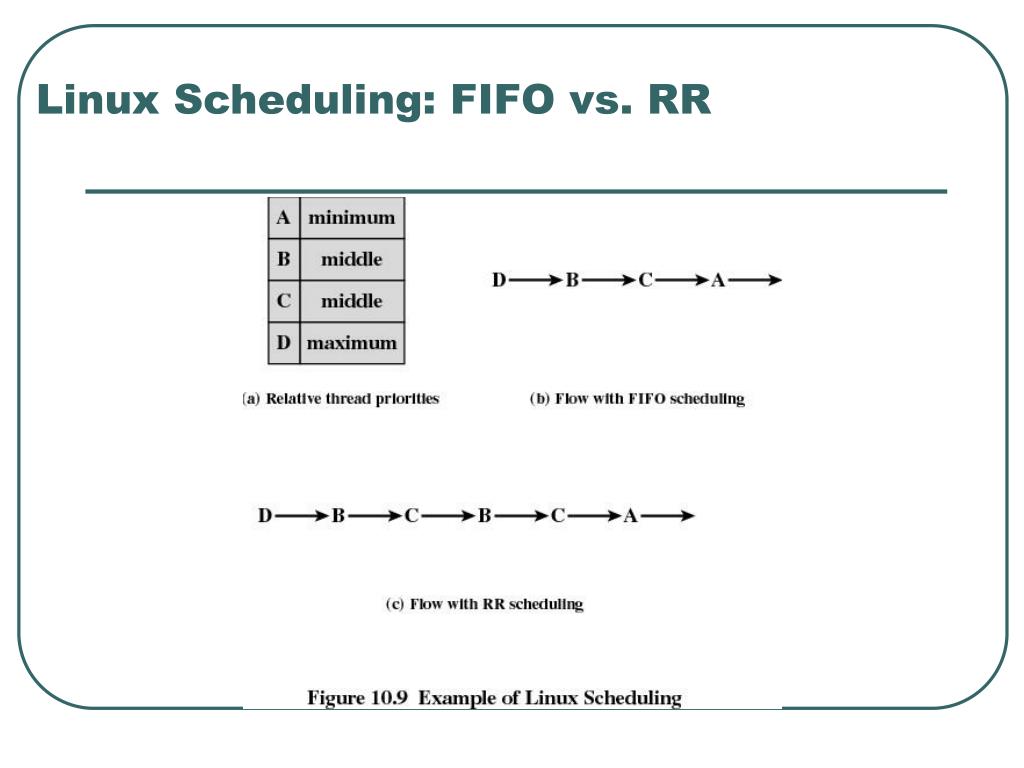
4. Comparison and Use Cases
Now that we understand the mechanics, let's summarize and identify where to use each policy. This is a very common topic in senior embedded developer interviews.
| Feature | CFS (SCHED_NORMAL) |
SCHED_FIFO |
SCHED_RR |
|---|---|---|---|
| Primary Goal | Fairness, throughput, interactivity | Predictability, minimal latency | Predictability with fairness among equal-priority peers |
| Priority Mechanism | Dynamic: nice value affects vruntime accumulation. |
Static: Fixed priority from 1 to 99. | Static: Fixed priority from 1 to 99. |
| Scheduler Logic | Picks task with the lowest vruntime. |
Always picks the highest-priority runnable task. | Always picks the highest-priority runnable task. |
| Time Slicing | Yes, variable slice based on load and priority weight. | No. Runs until it blocks, yields, or is preempted by a higher priority. | Yes, fixed-length time slice for sharing among equal-priority tasks. |
| Typical Use Case | General purpose computing: desktops, file/web servers. | A single, critical task like a control loop or a high-resolution timer handler that must execute without interruption from peers. | Multiple real-time tasks of the same importance, like processing data from several independent sensors. |
5. Interview Scenario Analysis
Your experience in automotive systems provides a great context for these trade-offs. Let's analyze a common design problem.
Scenario: You're designing the software for an engine control unit (ECU). You have the following tasks:
- Task A: A critical task that reads crank-angle sensor data and calculates fuel injection timing. It must run precisely every 2 milliseconds. Missing a deadline could cause engine misfire.
- Task B: A task that monitors engine temperature and adjusts the cooling fan speed. It needs to run every 100 milliseconds but can tolerate a few milliseconds of jitter.
- Task C: A diagnostics task that communicates with an external tool over a CAN bus. It has no strict timing requirements and should only run when the CPU is not busy with critical work.
How would you assign scheduling policies and priorities?
-
Task A (Fuel Injection): This is the most critical task with a hard deadline. It needs to preempt everything else and run without interruption.
- Policy:
SCHED_FIFO. We want it to run to completion as soon as it's triggered. There is only one such task, so there's no need for round-robin sharing. - Priority: The highest priority, e.g., 99.
- Policy:
-
Task B (Cooling Fan): This task is important and has real-time needs but is less critical than fuel injection.
- Policy:
SCHED_RR. UsingSCHED_RRis a safe choice for real-time tasks. If we later added another monitoring task at the same priority (e.g., oil pressure),SCHED_RRwould ensure they share the CPU and neither starves the other. - Priority: A high priority, but lower than Task A, e.g., 80.
- Policy:
-
Task C (Diagnostics): This is a background task. It should never interfere with the real-time work.
- Policy:
SCHED_NORMAL(CFS). This ensures it will only get CPU time when no real-time tasks are runnable. - Priority: Default
nice 0. The static priority of real-time tasks will always ensure they run first, so thenicevalue of this task is less important relative to the RT tasks.
- Policy:
This approach creates a predictable system where tasks are serviced according to their criticality, a core requirement for reliable embedded systems.
Challenges Using Linux as a Real-Time Operating System
The NASA document also discusses the advantages and considerations of running tasks under a real-time policy versus a normal one. This reinforces our scenario analysis.
Read the subsection 'Should asynchronous tasks have normal or real-time policy?' (begins on page 7). This section lists several benefits of using a real-time policy, such as increased repeatability and avoiding the computational overhead of CFS, which directly map to our reasoning in the ECU scenario.
6. A Note on Practical Implementation
While this lesson focuses on the concepts, it's useful to know how these policies are set. From a C program, you can use the sched_setscheduler() system call to change the policy and priority of a process.
For hands-on experimentation, the chrt command-line utility allows you to run a command with a specific scheduling policy. For example:
# Run a process 'my_critical_task' with SCHED_FIFO at priority 90
chrt -f -p 90 <pid_of_my_critical_task>
The resource below contains configurations for experiments that demonstrate these differences in practice, which you may find useful for self-study.
Linux kernel Scheduler - HackMD
This article provides practical configurations for experiments to visualize the behavior of SCHED_FIFO and SCHED_RR.
Briefly look at the section 'FIFO v.s. RR' and the 'Expecting Result' section. You don't need to run the experiments now, but see how they are structured to show SCHED_RR tasks sharing a CPU while SCHED_FIFO tasks run to completion. This is a great example of how you can verify scheduling behavior in practice.
Conclusion
Today we've drawn a clear line between the "fairness" model of CFS and the "predictability" model of real-time schedulers. This distinction is fundamental to Linux kernel engineering and a critical piece of knowledge for any senior embedded developer.
Key Takeaways:
- Hierarchy: Real-time scheduling policies (
SCHED_FIFO,SCHED_RR) belong to a higher-priority scheduling class than CFS and will always preempt normal tasks. - Goal: RT policies prioritize meeting deadlines over fair resource distribution. They use simple, static priorities (1-99).
SCHED_FIFO: Runs a task until it blocks, yields, or is preempted by a higher-priority task. It has no time slice, making it ideal for a single, hyper-critical task.SCHED_RR: Adds a time slice toSCHED_FIFO, allowing multiple tasks at the same priority level to share the CPU in a round-robin fashion.- Use Cases: The choice of policy depends directly on the task's role—CFS for general work,
SCHED_FIFO/SCHED_RRfor time-sensitive operations.
Understanding the theory is the first step. The next is to see it in action. In our upcoming lesson, we will learn how to use kernel tracing tools to observe context switches and scheduling decisions on a running system. This will allow you to see firsthand how the kernel switches between CFS and real-time tasks based on the rules we've discussed today.