Introduction
In our last lesson, you learned how to identify a suitable first contribution opportunity, such as a documentation fix, a coding style cleanup, or a bug reported by Syzbot. This is a crucial step in engaging with the kernel community.
Now, let's assume you've made your code change. The next step isn't to immediately send it off; it's to craft the message that will accompany it. This lesson focuses on a skill just as important as the code itself: writing a kernel commit message that follows community standards, clearly explaining the problem and your solution.
A commit message in the Linux kernel is far more than a simple log entry. It is your primary communication tool. It serves as an explanation for reviewers, a permanent record for future developers trying to understand your change, and a key data point for tools that track bugs and manage stable kernel releases. A well-written message demonstrates your technical understanding and respect for the community's time, significantly increasing the chances of your patch being accepted.
1. The Anatomy of a Kernel Commit Message
Before we dive into the specifics of each part, it's essential to understand that a good commit message tells a story. It should clearly explain why the change is necessary, not just what was changed. The code itself shows what was changed; your message provides the context and justification.
The official kernel documentation, "Submitting patches," is the definitive guide on this topic. We will be referencing it throughout this lesson as the primary source of truth. Let's start by getting an overview of the canonical format.
Submitting patches: the essential guide to getting your code into the ...
Please read this section from the official kernel documentation, 'Submitting patches: the essential guide to getting your code into the kernel'. It outlines the complete structure of a kernel commit message, from the subject line to the diff.
Read the section titled 'The canonical patch format'. This will give you a high-level map of the components we will be dissecting: the Subject line, the 'from' line, the explanation body, the 'Signed-off-by' tags, and the '---' marker.
As you just read, a commit message is broken down into several distinct parts. We will now explore each one in detail.
2. The Subject Line: Your First Impression
The subject line is the most visible part of your commit. It's what maintainers see in their crowded inboxes and what developers see when scanning logs with git log --oneline. It must be both concise and descriptive.
The standard format is:
subsystem: A short, imperative summary of the change
For example: usb: gadget: Fix null pointer dereference on disconnect
Key Rules:
- Subsystem Prefix: Clearly identify the area of the kernel your patch affects. If you're unsure, a great way to find the right prefix is to look at the history of the file you're changing:
git log --oneline path/to/file.c. - Imperative Mood: Write the summary as a command. "Fix bug" or "Add feature," not "Fixes bug" or "Added feature." You are instructing the codebase to change its behavior.
- Concise Summary: Briefly describe what the patch does. It should be specific enough to be unique.
- Length: Aim for about 50 characters, with a hard limit of around 75.
This video provides a practical demonstration of writing a commit message, highlighting the importance of the subject line's length.
Creating And Submitting Patches to the Linux kernel community
Watch this segment to see how a commit message is constructed in an editor. The syntax highlighting provides a helpful visual cue for the recommended subject line length.
Watch from 22:54 to 23:41. Notice how the editor changes the color of the text when the subject line exceeds 50 characters, reinforcing the community convention.
3. The Body: Telling the Story
This is the core of your commit message. After the subject, leave one blank line and then begin the body. The goal here is to explain the "why."
The structure is simple but powerful:
- Describe the problem. What was broken? What was the user-visible impact (e.g., a crash, a performance drop, incorrect behavior)? If you have them, include kernel logs, oops messages, or simple steps to reproduce the issue. This convinces the reviewer that there is a problem worth fixing.
- Describe your solution. Explain how your change fixes the problem. You don't need to describe the code line-by-line, but you should explain the logic of your approach. Why is this the right way to fix it?
- Mention testing. Briefly describe how you tested the change to verify the fix and ensure no new bugs (regressions) were introduced.
The following document provides excellent detail on how to articulate your changes.
Submitting patches: the essential guide to getting your code into the ...
Let's return to the official documentation to understand the depth required in the explanation.
Read the sections 'Describe your changes' and 'Explanation Body'. Pay close attention to the advice to quantify optimizations, describe user-visible impact, and write the description in a way that will make sense to someone years from now.
Here is a great example of a real-world commit message that clearly separates the problem from the solution.

4. The Tags: Credit, Context, and Certification
After the body of the commit message, leave another blank line, and then add the relevant tags. These are machine-readable lines that provide crucial metadata.
The Signed-off-by: Tag (Mandatory)
This is the most important tag and is required on every patch. It is your certification that you have the right to submit this work under an open-source license. It is based on the Developer's Certificate of Origin (DCO).
Adding this line is a formal process. You do it by using the -s or --signoff flag when you commit:git commit -s
This will automatically append a line like this to your commit message:Signed-off-by: Your Real Name <your.email@example.com>
Submitting patches: the essential guide to getting your code into the ...
To fully grasp the legal and procedural importance of the Signed-off-by: tag, please read this section from the kernel documentation.
Read the section 'Sign your work - the Developer’s Certificate of Origin'. This explains the DCO that you are agreeing to when you add your sign-off.
Other Common Tags
Many other tags provide valuable context:
Fixes: <commit-id> ("subsystem: summary of bad commit")
If your patch fixes a bug introduced by a specific earlier commit, this tag is essential. It helps tools automatically identify which stable kernel versions need the fix. You can find the original commit usinggit blameorgit log -S'buggy_code'.Reported-by:,Tested-by:,Reviewed-by:,Acked-by:
These tags give credit to people who reported the bug, tested your patch, or reviewed it. They are added in response to feedback on the mailing list.Link:
Use this to link to any relevant mailing list discussions or bug reports (e.g., onlore.kernel.org).
This article provides a great, modern summary of the key components, including the tags.
Becoming a Kernel Developer (1/3): Posting Your First Patch - Linaro
This blog post from Linaro offers a very clear and practical breakdown of writing a commit message.
Read the section 'Step 5: Describe your changes'. It provides an excellent, concise summary of the Subject, Body, and Tags. Pay special attention to the note about not using AI tools to generate commit messages. Your message is proof of your understanding.
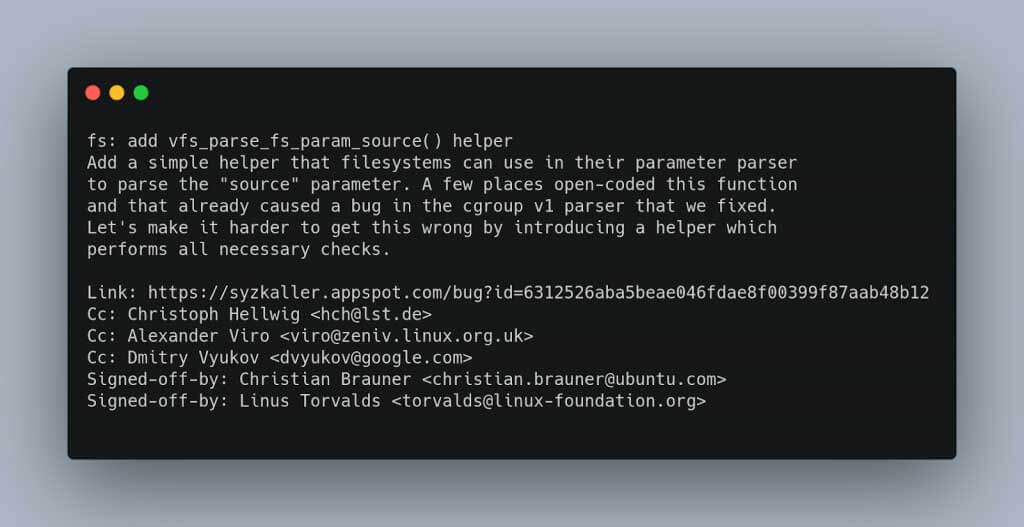
Here is an example of a commit that has passed through several maintainers, accumulating multiple Cc: and Signed-off-by: tags along the way.
5. Putting It All Together: An Exercise
Let's walk through a scenario. Based on the previous lesson, you decided to fix a coding style issue reported by checkpatch.pl in drivers/staging/some-driver/some-file.c. The script warned:WARNING: Use of BIT() is recommended instead of (1 << 12)
You made the change, replacing (1 << 12) with BIT(12). Now you need to write the commit message.
Bad Commit Message:
Subject: fix

fixed it.
This is unhelpful. It doesn't say what was fixed, where, or why.
Good Commit Message:
Subject: staging: some-driver: Use BIT() macro instead of left-shift

The checkpatch.pl script warns that using the BIT() macro is preferred over
manual left-shifting for creating bitmasks. This improves code readability
and consistency with the rest of the kernel.

Replace the use of (1 << 12) with the BIT(12) macro to address this
warning.

Signed-off-by: Your Real Name <your.email@example.com>
Your Turn: Practical Exercise
Imagine you found another checkpatch.pl warning in the same file: "line over 80 characters". You fixed it by breaking a long line into two.
Task: In a text editor or your head, formulate the commit message for this change. Think about the subject, the problem description, and the solution.
Click here to see a model answer.
Subject: staging: some-driver: Fix line exceeding 80 characters

The checkpatch.pl script reports a warning for a line that exceeds the
80-character limit, which harms readability on standard terminals and
violates the kernel coding style.

Break the long function call into multiple lines to resolve the warning
and improve code clarity.

Signed-off-by: Your Real Name <your.email@example.com>
This exercise demonstrates that even for a trivial one-line change, a proper commit message provides essential context and shows professionalism.
Conclusion
You now have a detailed understanding of how to construct a high-quality kernel commit message. This is a fundamental skill for any open-source contributor.
Key Takeaways:
- A commit message tells the story of why a change was made.
- The subject line (
subsystem: summary) is your first impression and must be concise and descriptive. - The body must clearly state the problem, the solution, and any testing performed.
- The
Signed-off-by:tag is a mandatory legal certification (the DCO). Usegit commit -s. - Use other tags like
Fixes:andLink:to provide valuable, machine-readable context. - Never use AI to write your commit message; it's a demonstration of your own understanding.
Preview of the Next Lesson:
Now that you have your change ready and have crafted the perfect commit message, what's next? In the following lesson, we will focus on the mechanics of submission. You will learn how to use kernel development scripts (checkpatch.pl, get_maintainer.pl) to validate your patch and identify the correct recipients, preparing you to finally send your contribution to the community.