Introduction
In our last lesson, we explored how KVM leverages hardware features like EPT/NPT to virtualize memory efficiently. We saw that the hardware handles the complex GVA -> GPA -> HPA address translations, and KVM only intervenes to handle faults, such as an EPT violation.
This lesson builds directly on that concept. We now turn our attention to the final piece of core system virtualization: Input/Output (I/O). A guest OS believes it is communicating directly with hardware devices like network cards, disk controllers, and serial ports. In reality, these devices don't exist physically for the VM. How does the system trick the guest into thinking they do?
This is where I/O interception comes in. Our learning outcome is to explain the I/O interception process in KVM and how it enables emulated device access. We will dissect the "trap-and-emulate" model, which is the fundamental mechanism for handling virtual I/O.
By the end of this lesson, you will be able to:
- Differentiate between Port I/O (PIO) and Memory-Mapped I/O (MMIO).
- Explain how KVM traps both PIO and MMIO operations, causing a VM exit.
- Describe the complete loop: from a guest I/O instruction to KVM trapping it, QEMU emulating it, and the guest resuming execution.
- Analyze the performance implications of this full emulation model.
1. How CPUs Talk to Devices: PIO and MMIO
As an embedded engineer, you're certainly familiar with the two primary methods a CPU uses to communicate with peripheral devices on the x86 architecture. Let's quickly review them in the context of virtualization:
-
Port I/O (PIO): The CPU uses special instructions,
inandout, to communicate with devices over a dedicated I/O address space (or "port space"). This is common for legacy devices like PS/2 keyboards and serial ports. -
Memory-Mapped I/O (MMIO): The device's control registers are mapped into the same physical address space as main memory. The CPU uses standard memory access instructions, like
mov, to read from and write to the device. This is the standard for modern devices, such as those on the PCIe bus.
A hypervisor must be able to intercept both types of I/O to emulate the device's behavior for the guest.
2. The Trap-and-Emulate Model for I/O
The core strategy for emulating I/O is called trap-and-emulate. The hypervisor configures the hardware to trap any attempt by the guest to perform I/O. This trap causes a VM exit, transferring control from the guest to the hypervisor, which can then emulate the intended action.
Trapping Port I/O (PIO)
Intercepting PIO is straightforward. The Virtual Machine Control Structure (VMCS) contains an I/O bitmap. KVM can set bits in this bitmap corresponding to I/O ports it wants to intercept. When the guest executes an in or out instruction targeting one of these ports, the CPU automatically triggers a VM exit without even consulting the bitmap. More advanced configurations can use the bitmap to allow certain I/O operations to pass through without an exit, but for full emulation, KVM simply configures the CPU to trap all of them.
Trapping Memory-Mapped I/O (MMIO)
Intercepting MMIO leverages the exact same mechanism we saw in the last lesson for on-demand paging: EPT violations.
- When QEMU creates an emulated device (like a virtual network card), it reserves a range of Guest Physical Addresses (GPAs) for that device's MMIO region.
- It communicates this GPA range to KVM.
- Crucially, KVM does not create a valid mapping for this GPA range in the EPT tables.
- When the guest OS tries to access this MMIO region using a
movinstruction, the CPU walks the EPT tables to translate the GPA to an HPA. It finds no valid entry. - This failure triggers an EPT violation, causing a VM exit.
Control is now with KVM, which knows this exit was not for a regular memory access but for an MMIO operation.
3. The KVM and QEMU Emulation Loop
Once a VM exit occurs, a coordinated dance begins between KVM (in the kernel) and QEMU (in userspace).
Virtualization and Cloud Computing Lecture 4: Hardware-assisted CPU virtualization in KVM/QEMU
Before we dive into the specifics of I/O exits, let's watch a quick review of the general KVM/QEMU architecture. This video from Mythili Vutukuru's course explains the relationship between the QEMU process, the KVM kernel module, and the KVM_RUN command that forms the basis of the emulation loop.
Watch the following segments: The KVM Run Command (05:11 - 06:42): Focus on how KVM_RUN blocks the QEMU process, runs the guest, and returns control to QEMU upon a VM exit. CPU Mode Switching (06:42 - 09:14): This visualizes the transition from host (root mode) to guest (VMX non-root mode) and back to the host upon an exit. Notice the mention of I/O as a trigger for exits. Guest OS Execution Restrictions (15:48 - 18:05): This part explicitly states that KVM can configure the guest to exit on I/O instructions, enabling the trap-and-emulate model.
As the video explains, the process is as follows:
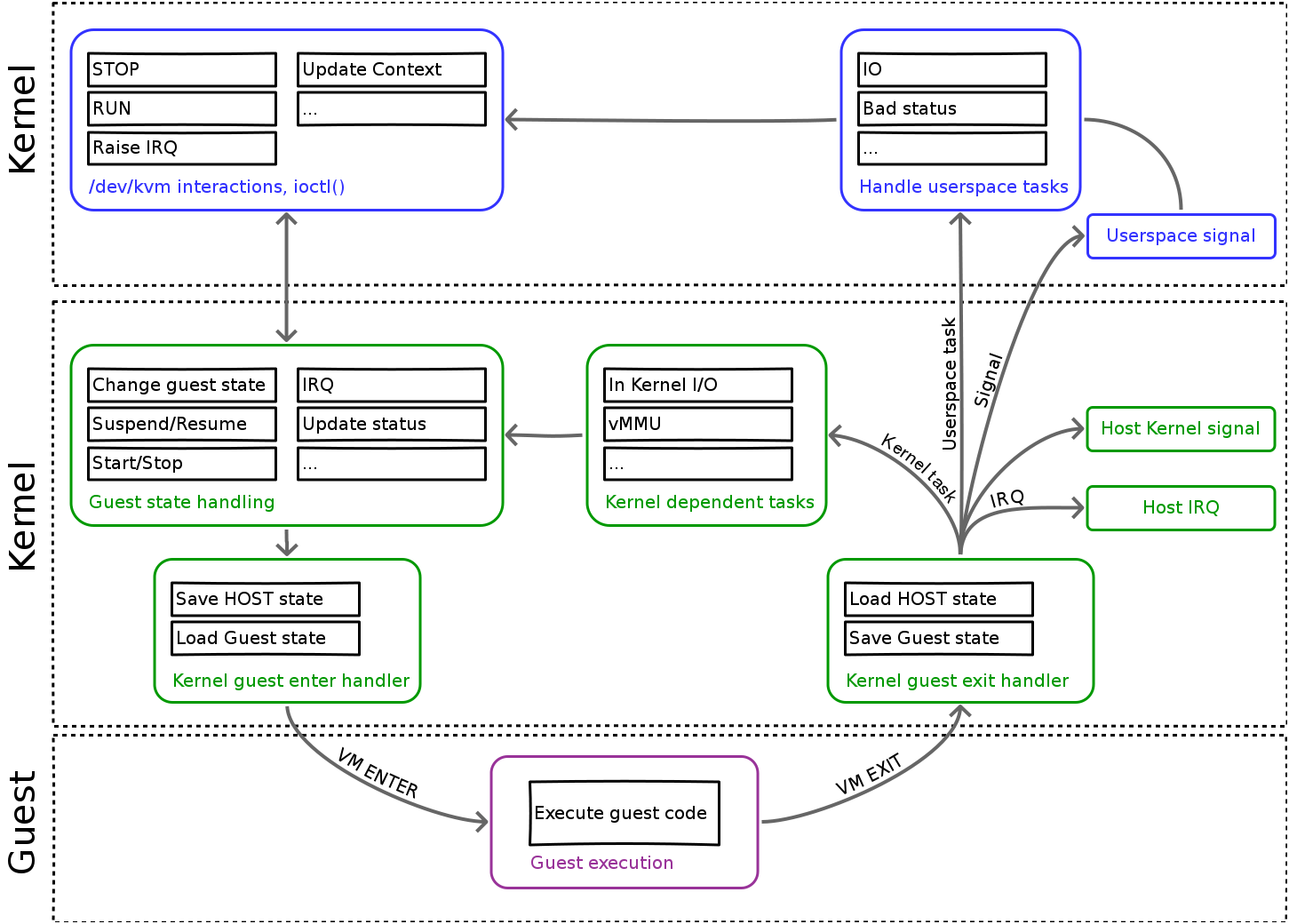
- VM Exit: The guest attempts an I/O operation, which is trapped by the hardware, causing a VM exit. Control passes to KVM.
- Exit Reason: KVM inspects the VMCS to determine the cause of the exit.
- For PIO, the exit reason is
KVM_EXIT_IO. - For MMIO, the exit reason is
KVM_EXIT_MMIO.
- For PIO, the exit reason is
- Return to Userspace: The
KVM_RUNioctl, which QEMU called to start the guest, returns. KVM passes information about the exit (the reason, port number, memory address, data, etc.) back to QEMU in a shared data structure (struct kvm_run). - Emulation in QEMU: QEMU inspects the exit information. It identifies which virtual device the I/O was for and calls the corresponding emulation code. For example, if the guest wrote to the data register of an emulated serial port, QEMU's serial port model might print the character to the host's standard output.
- VM Entry: After handling the I/O, QEMU calls
KVM_RUNagain to resume guest execution.
The diagram below illustrates this high-level architecture. An I/O request from the guest triggers a VM Exit, which is handled first by KVM in the kernel, and then passed to the userspace QEMU process for device emulation.
4. A Code-Level Look at I/O Interception
To make this concrete, let's look at a minimal example that uses the KVM API directly to run a tiny piece of code that performs an out instruction to a serial port. This strips away all the complexity of QEMU and shows the raw I/O interception mechanism.
The LWN.net article 'Using the KVM API' provides a fully functional, minimal KVM host program. We will focus on the part that handles I/O exits, which demonstrates the trap-and-emulate loop in practice.
Please read through the article, paying close attention to these parts: Definition of the sample virtual machine: Note the simple x86 assembly code. It writes the result of 2+2 to I/O port 0x3f8 (a standard serial port address). Building a virtual machine: Skim this section to understand the setup: opening /dev/kvm, creating a VM and VCPU, mapping memory, and setting initial register state. The KVM_RUN loop and KVM_EXIT_IO: This is the most important part. Study the while(1) loop containing the KVM_RUN ioctl. Specifically, look at the case KVM_EXIT_IO: block. See how the userspace code checks the I/O direction, port, and size, and then emulates the write by calling putchar().
The key piece of code from that article is the handler for KVM_EXIT_IO:
case KVM_EXIT_IO:
    if (run->io.direction == KVM_EXIT_IO_OUT && run->io.size == 1 && run->io.port == 0x3f8 && run->io.count == 1)
        putchar(*(((char *)run) + run->io.data_offset));
    else
        errx(1, "unhandled KVM_EXIT_IO");
    break;
This is the "emulate" step in our "trap-and-emulate" model, implemented in just a few lines of C. The host process running this code acts as the VMM, catching the I/O operation and performing an action on the host system—in this case, printing a character to the console.
5. The Inefficiency of Full Emulation
This trap-and-emulate model is extremely flexible and allows QEMU to emulate a vast array of hardware for any guest OS. However, it comes at a significant performance cost.
Think about the steps involved for every single I/O operation, for example a network packet being sent:
- Guest writes to MMIO register.
- VM Exit (EPT Violation). Context switch from guest to host kernel (KVM).
- KVM processes the exit, copies exit information.
- Context switch from kernel to userspace (QEMU).
- QEMU decodes the exit information, finds the emulated device.
- QEMU emulates the register write, which might involve a
write()syscall to send data to a hosttapdevice. - Context switch from QEMU to the host kernel to handle the syscall.
- Kernel sends the packet. Context switch back to QEMU.
- QEMU calls
KVM_RUN. Context switch from userspace to kernel. - VM Entry. Context switch from host to guest.
This sequence of multiple, expensive context switches for each I/O operation creates a major performance bottleneck, especially for I/O-intensive workloads.
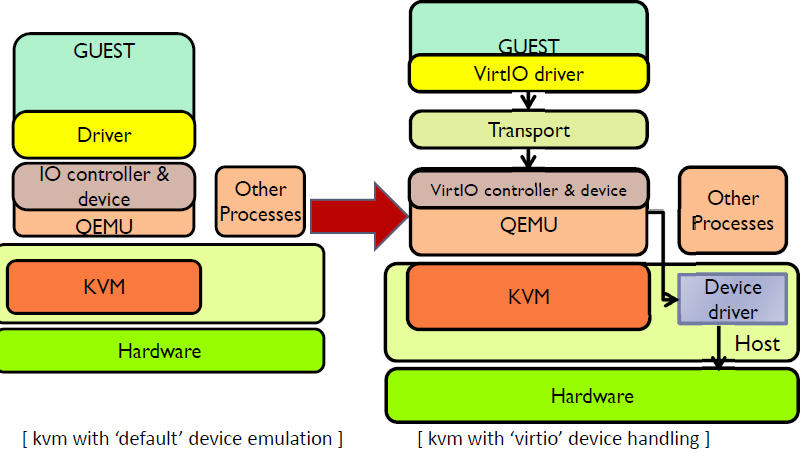
Deep dive into Virtio-networking and vhost-net
This article from Red Hat provides an excellent summary of the inefficiencies inherent in the full QEMU emulation model, setting the stage for understanding why more advanced techniques were developed.
Read the following sections: QEMU and device emulation: Reinforces how guest access to device memory regions causes control to be returned to QEMU. KVM: Briefly reviews how KVM pauses the vCPU and informs QEMU on special instructions (vmexit). Vhost protocol: Introduction: This is the key section. It explicitly lists the inefficiencies of the QEMU-based approach, such as the expensive context switches and syscall overhead. This is a perfect summary of the problem we've been discussing.
The diagram below contrasts the "default" emulation path we've just described with the more efficient virtio path, which we will cover in a future lesson. For now, focus on the left side, which clearly shows the multiple layers involved: Guest Driver -> QEMU Emulated Controller -> QEMU Emulated Device -> KVM -> Host Driver.
Conclusion
In this lesson, we demystified the process of I/O interception in KVM. We learned that the system relies on a robust trap-and-emulate model, where the hardware is configured to trap guest I/O attempts and hand control over to KVM and QEMU to simulate the device's behavior.
Key Takeaways:
- I/O Trapping: KVM intercepts Port I/O by trapping
in/outinstructions and intercepts Memory-Mapped I/O by using the EPT mechanism to cause a VM exit on access to an emulated device's memory region. - The Emulation Loop: A guest I/O attempt triggers a VM exit. KVM identifies the exit reason (
KVM_EXIT_IOorKVM_EXIT_MMIO) and passes the details to the QEMU userspace process. QEMU emulates the device behavior and then resumes the guest. - Performance Cost: This full emulation model is flexible but slow due to the numerous context switches required between the guest, kernel (KVM), and userspace (QEMU) for every I/O operation.
Answering an interview question like "Explain how a guest VM communicates with an emulated network card" would involve describing this entire trap-and-emulate process, from the guest driver's MMIO write to the EPT violation, the exit to KVM, the handoff to QEMU, and QEMU's interaction with the host's networking stack.
Preview of the Next Lesson:
The performance bottleneck of full emulation is a significant problem. How do we solve it? The solution is to make the guest aware that it is running in a virtual environment and provide it with a more direct, efficient path to the hypervisor. This is called paravirtualization. In our next lesson, we will describe paravirtualization and how the virtio framework provides efficient I/O between guest and host, bypassing much of the costly QEMU emulation path.