Introduction
Welcome back! In our previous lesson, we explored the low-level hardware mechanisms that enable modern virtualization: Intel VT-x and AMD-V. You learned about the new CPU operational modes (VMX root and non-root), the critical role of the Virtual Machine Control Structure (VMCS), and how the cycle of VM Entry and VM Exit allows a hypervisor to maintain control over a guest operating system.
Now, we will bridge the gap from raw hardware capabilities to a real-world implementation within the Linux ecosystem. This lesson focuses on the Kernel-based Virtual Machine (KVM), the component that transforms the Linux kernel itself into a powerful, high-performance hypervisor.
Our learning outcome for today is to: Describe the KVM architecture and how it exposes hardware virtualization capabilities to user-space. We will dissect the relationship between KVM in the kernel and a user-space program like QEMU, answering the fundamental question: How does a user-space process manage and run a complete, isolated guest operating system?
By the end of this lesson, you will understand:
- The distinct roles of KVM and QEMU in a complete virtualization stack.
- The KVM API, centered around the
/dev/kvmdevice file andioctlsystem calls. - The lifecycle of a VM from a user-space perspective: creating the VM, allocating memory, creating virtual CPUs (vCPUs), and managing the execution loop.
1. The KVM and QEMU Partnership
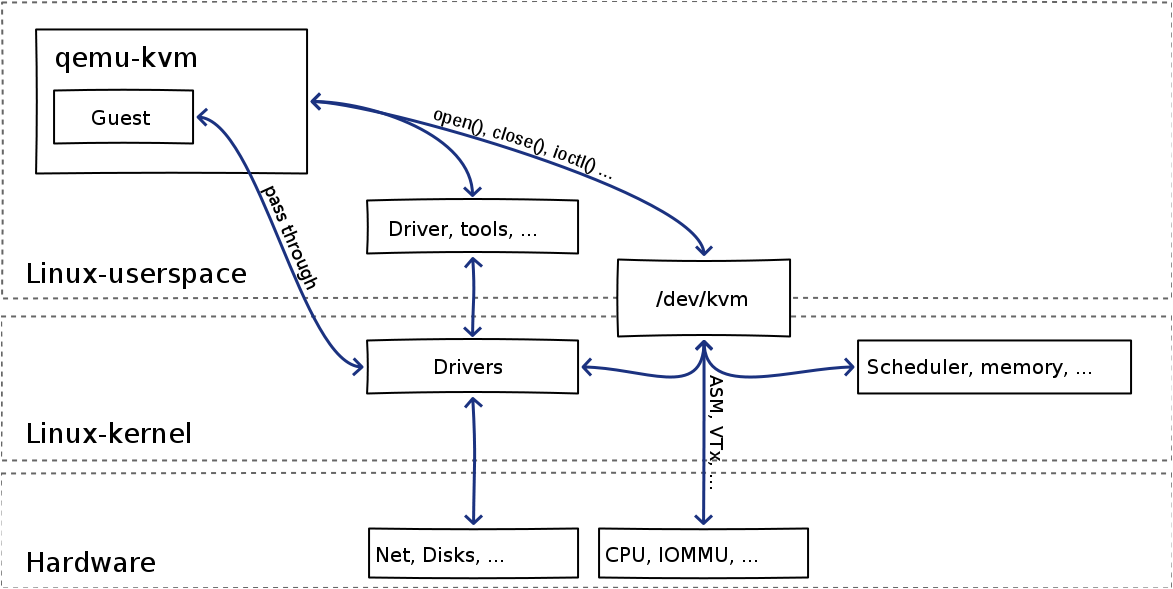
A common point of confusion is the relationship between KVM and QEMU. They are not the same thing, but rather two components that work together to provide a full virtualization solution. KVM provides the core CPU and memory virtualization, while QEMU provides everything else.
-
KVM (Kernel-based Virtual Machine): A Linux kernel module (
kvm.ko, pluskvm-intel.koorkvm-amd.ko). It is a "Type-1" or "native" hypervisor. Its primary job is to use the hardware virtualization extensions (VT-x/AMD-V) we discussed previously. It does not emulate hardware like disk drives or network cards. Instead, it exposes the hardware's virtualization capabilities to user-space through a character device file:/dev/kvm. -
QEMU (Quick EMUlator): A powerful user-space machine emulator and virtualizer. QEMU can emulate a full system (CPU, memory, and peripherals) entirely in software. However, when used with KVM, it changes its role. It offloads the CPU-intensive work to KVM for near-native performance and focuses on emulating the other machine hardware (e.g., a storage controller, a USB bus, a network interface card).
The following video provides an excellent overview of this division of labor.
Linux Hypervisor Setup (libvirt/qemu/kvm)
This video from octetz clarifies the distinct roles of KVM, QEMU, and another component called libvirt (which we'll consider out of scope for now). Pay close attention to the separation of duties: KVM for CPU performance, and QEMU for hardware resource emulation.
Watch the segment from 00:41 to 03:32. Focus on how the speaker describes KVM as the low-level kernel component for CPU access, and QEMU as the higher-level emulator for peripherals like storage and USB.
This architectural separation is key. QEMU runs as a standard Linux process. When it needs to run guest code, it doesn't emulate the CPU instructions itself; it tells KVM to do it. KVM then uses the hardware extensions to run the guest code directly on the physical CPU. When the guest needs to access a piece of emulated hardware (like writing to a virtual disk), a VM Exit occurs. KVM passes control back to the QEMU process, which handles the request, and then tells KVM to resume the guest.
2. The KVM API: A Device Driver Model
Since you have experience with virtual device drivers, the KVM interface model should feel familiar. KVM exposes its functionality through a character device, /dev/kvm. A user-space program like QEMU interacts with this device using file operations, primarily open() and ioctl().
Each core object in the KVM world—the VM itself, and each virtual CPU (vCPU)—is represented by a file descriptor.
- System File Descriptor: Obtained by
open("/dev/kvm", O_RDWR). This is the main entry point to the KVM subsystem. - VM File Descriptor: Created by an
ioctl()on the system file descriptor. This represents an entire virtual machine, including its memory address space and other system-wide attributes. - vCPU File Descriptor: Created by an
ioctl()on the VM file descriptor. This represents a single virtual CPU core within the VM, including its registers and execution state. A multi-core guest VM will have multiple vCPU file descriptors.
Let's watch a detailed walkthrough of this process.
Virtualization and Cloud Computing Lecture 4: Hardware-assisted CPU virtualization in KVM/QEMU
The following video lecture from Mythili Vutukuru explains exactly how a user-space process like QEMU uses the KVM API. It clearly lays out the sequence of ioctl calls and the main execution loop.
Please watch from 02:52 to 09:14. As you watch, focus on: How QEMU and KVM communicate via the /dev/kvm device and ioctl calls. The use of mmap() to allocate the guest's physical memory from the QEMU process's virtual address space. The concept of a QEMU thread per vCPU. The central role of the KVM_RUN command and the execution loop that handles VM exits.
The video you just watched outlined the entire lifecycle. Now, let's break it down and look at the specific API calls that make it happen.
3. A Practical Walkthrough of the KVM API
The best way to understand an API is to see how it's used in code. We'll now walk through a minimal example of a user-space program that uses KVM to run a tiny piece of code in a VM. This demonstrates the core concepts far more directly than digging through the massive QEMU codebase.
The following resource is a classic LWN.net article that builds a minimal VMM from scratch. We will use it as a guide to understand the essential ioctl calls.
The article 'Using the KVM API' by Josh Triplett provides the code for a minimal VMM. We will study its sections to see the API in action, step-by-step.
This is a detailed read. We will go through it in parts. For now, please read from the beginning ('Building a virtual machine') up to, but not including, the while (1) loop. Focus on the sequence of open() and ioctl() calls used for setup: open("/dev/kvm", ...) ioctl(kvm, KVM_GET_API_VERSION, ...) ioctl(kvm, KVM_CREATE_VM, ...) mmap(...) to allocate memory, followed by ioctl(vmfd, KVM_SET_USER_MEMORY_REGION, ...) to assign it to the guest. ioctl(vmfd, KVM_CREATE_VCPU, ...) Setting up registers with KVM_GET_SREGS, KVM_SET_SREGS, and KVM_SET_REGS.
The Setup Phase
As you've just read, the setup process is a methodical series of requests from user-space to the kernel:
- Get a handle to KVM:
open("/dev/kvm")gives you a file descriptorkvm. - Create a VM:
ioctl(kvm, KVM_CREATE_VM, 0)tells the kernel to create the data structures for a new virtual machine. It returns a new file descriptor,vmfd, which represents this VM. - Allocate Guest Memory: The user-space process calls
mmap()to allocate a block of its own memory. This memory will serve as the guest's "physical" RAM. - Inform KVM about the Memory:
ioctl(vmfd, KVM_SET_USER_MEMORY_REGION, ®ion)tells KVM to map this user-space memory into the guest's physical address space. This is how the guest gets its RAM. - Create a Virtual CPU:
ioctl(vmfd, KVM_CREATE_VCPU, 0)creates a vCPU, returning yet another file descriptor,vcpufd. - Initialize CPU State: Using
ioctls likeKVM_SET_REGSandKVM_SET_SREGSon thevcpufd, the user-space process sets the initial state of the vCPU's registers (e.g., setting the instruction pointerripto the start of the code and initializing the stack pointerrsp).
The Execution Loop
Once the VM is configured, we enter the main execution loop. This loop is the heart of any KVM-based VMM.

Let's look at the code for this loop in the LWN article.
Now, let's focus on the execution loop in the same LWN.net article.
Read the final part of the article, starting from the while (1) loop. Pay close attention to: The ioctl(vcpufd, KVM_RUN, NULL) call. This is the call that starts or resumes guest execution. How the run->exit_reason field is checked in the switch statement after KVM_RUN returns. How the KVM_EXIT_IO case is handled by emulating a serial port write in user-space.
The loop embodies the entire virtualization process:
ioctl(vcpufd, KVM_RUN, NULL): This is a blocking system call. The user-space thread pauses, and the kernel's KVM module takes over. KVM performs a VM Entry, and the guest code begins executing directly on the CPU.- Guest Execution & VM Exit: The guest runs until an event triggers a VM Exit (e.g., executing an
OUTinstruction). The hardware traps back into the KVM kernel module. - Return to User-space: KVM saves the exit reason and other relevant data into a shared memory structure (
struct kvm_run) and theKVM_RUNioctl returns. The user-space thread resumes execution. - Handle the Exit: The user-space code inspects
run->exit_reason. If it wasKVM_EXIT_IO, it emulates the I/O operation. If it wasKVM_EXIT_HLT, it terminates the VM. - Loop: The process repeats, with user-space calling
KVM_RUNagain to resume the guest.
Interview Scenario: Putting It All Together
To solidify your understanding, let's tackle a typical deep-dive interview question that synthesizes these concepts.
Interviewer: "QEMU is a user-space process, which normally can't execute privileged instructions. KVM is part of the kernel. Explain, step-by-step, how QEMU uses KVM to run a guest OS kernel, which does need to execute privileged instructions. Where do the VM Entries and VM Exits fit into this process?"
Your Thought Process:
- The Interface: The connection is the
/dev/kvmcharacter device. QEMU usesioctls. - Setup: QEMU acts as the "setup" program. It creates the VM, allocates its RAM from its own process memory (
mmap), and creates vCPUs. - The "Run" Command: The key is the
KVM_RUNioctl. This is the handover from user-space to the kernel. - VM Entry: Inside the kernel, KVM uses the hardware instructions (
VMLAUNCH/VMRESUME) to perform the VM Entry. This is where the CPU switches to non-root mode. - VM Exit: A privileged instruction in the guest causes a hardware-level VM Exit. The CPU switches back to root mode, and control returns to KVM in the kernel.
- Return to User-space: KVM communicates the reason for the exit back to QEMU by returning from the
KVM_RUNioctl. - Emulation: QEMU emulates the device the guest was trying to access.
- The Loop: QEMU calls
KVM_RUNagain to resume the guest. This constitutes the main VMM loop.
This sequence perfectly explains how a user-space process can orchestrate the execution of a fully privileged guest OS, leveraging the kernel and underlying hardware for the heavy lifting.
Conclusion
In this lesson, we demystified the KVM architecture and its user-space API. We saw that KVM is not a monolithic hypervisor but a kernel-level toolkit that exposes hardware virtualization features to user-space through a well-defined device driver interface.
Key Takeaways:
- KVM/QEMU Partnership: KVM handles CPU/memory virtualization using hardware support, while QEMU emulates peripheral devices.
/dev/kvmAPI: KVM's functionality is exposed via the/dev/kvmcharacter device. User-space programs use file descriptors andioctlcalls to create and manage VMs (KVM_CREATE_VM), vCPUs (KVM_CREATE_VCPU), and memory (KVM_SET_USER_MEMORY_REGION).- The
KVM_RUNLoop: The core of a KVM-based VMM is theioctl(KVM_RUN)loop. This call triggers a VM Entry to run the guest, and it returns upon a VM Exit, allowing the user-space process to handle events like I/O and then resume the guest.
Preview of the Next Lesson:
We have established that each vCPU is managed by a user-space thread (typically in QEMU) that calls KVM_RUN. But how does the host Linux system decide when to run these threads? In our next lesson, "Explain how KVM integrates with the host Linux scheduler to manage vCPU execution," we will explore this crucial aspect. You'll learn that vCPUs are, from the host's perspective, just regular threads, and we will investigate the performance implications of this design.