Introduction
In our last lesson, we explored how the kernel lazily allocates physical memory through demand paging, with the page fault being the critical trigger. A key takeaway was that the kernel validates every faulting memory access by checking if it falls within a legitimate Virtual Memory Area (VMA) for that process. This begs the questions: What exactly are these VMAs? How do they define the memory map of a process? And how are they created in the first place?
This lesson will answer those questions directly. Our learning outcome is to explain the process address space layout, including VMA structures and how the mmap system call is implemented. We will start with the high-level map of a process's virtual memory, zoom into the vm_area_struct data structure that defines it, and then trace the powerful mmap system call deep into the kernel to see how these structures are brought to life.
1. The Process Virtual Address Space Layout
Every process in Linux operates within its own private virtual address space, a conceptual sandbox that isolates it from other processes and the kernel itself. On a 64-bit system, this is a vast 256TB space, typically split between user space (128TB) and kernel space (128TB).
A user-space process isn't just one monolithic block of memory; it's organized into several distinct segments, each serving a specific purpose.
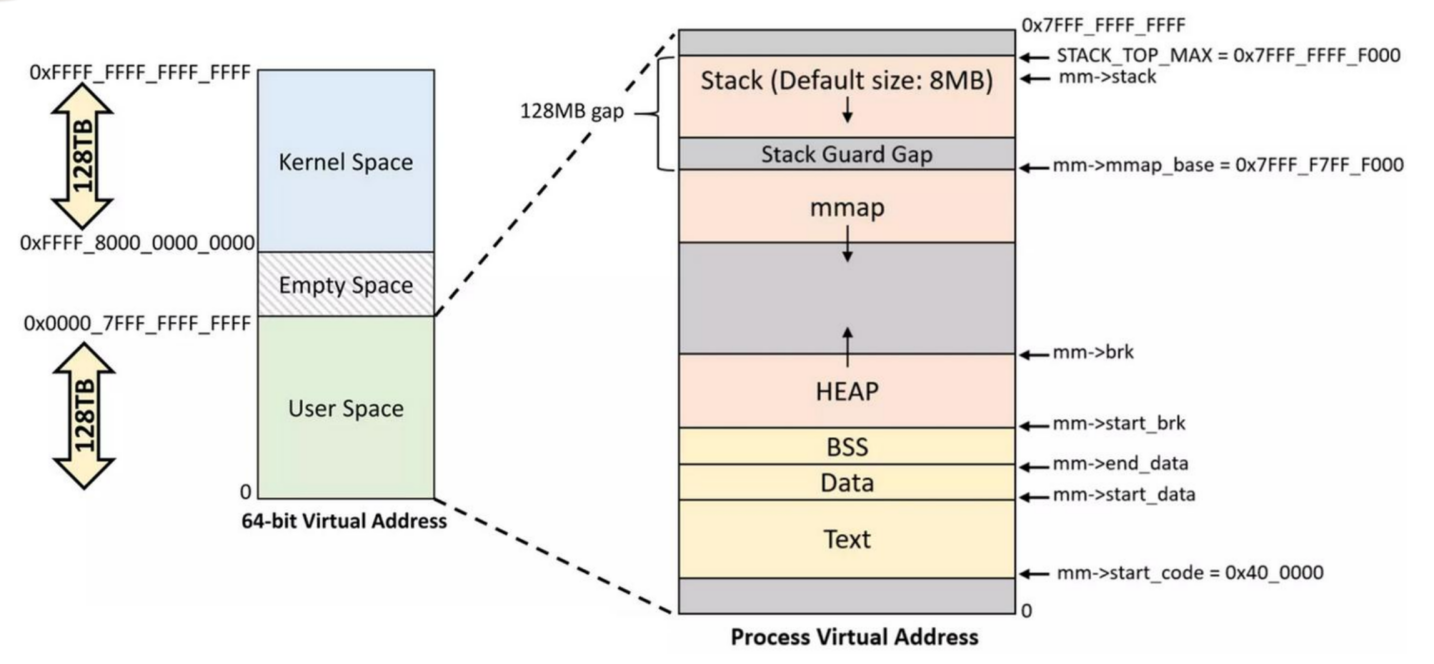
Let's break down the key user-space segments shown in the diagram:
- Text Segment (
.text): This is where the executable machine code of your program resides. It's mapped as read-only and executable. If multiple processes run the same program (e.g.,/bin/bash), they will all share the same physical pages for this segment. - Data Segments (
.data,.bss):- The
.datasegment holds initialized global and static variables. - The
.bsssegment holds uninitialized global and static variables. The kernel automatically initializes this area to zero, cleverly using a single physical page of zeros for all such pages until they are written to (a concept called a demand-zero page).
- The
- Heap: This is the area for dynamic memory allocation, managed by functions like
malloc(),calloc(), andfree(). In Linux, the heap is typically managed by growing a memory segment via thebrk()system call. It grows upwards from the end of the BSS segment. - Memory Mapping Segment (mmap region): This flexible area is used for various mappings, including shared libraries, memory-mapped files, and anonymous memory allocations requested via
mmap(). It typically starts at a high address and grows downwards. - Stack: This area stores local variables, function parameters, and return addresses for function calls. It has a fixed maximum size and grows downwards towards the mmap region.
Each of these segments, and indeed any memory region managed by the kernel for a process, is described internally by a vm_area_struct.
2. The vm_area_struct: The Kernel's Blueprint for Memory
The struct vm_area_struct, or VMA, is the fundamental kernel object for managing a process's address space. Each VMA represents a contiguous range of virtual addresses with a uniform set of properties, such as permissions (read, write, execute) and backing source (a file or anonymous memory).
The kernel documentation provides the most authoritative definition.
Process Addresses - The Linux Kernel documentation
The official kernel documentation, "Process Addresses", introduces VMAs and the mm_struct that contains them.
Read the introductory section titled "Process Addresses" down to the "Locking" section. This will formally define the VMA (struct vm_area_struct) and its relationship to the mm_struct.
A single process has many VMAs, one for its code, one for data, one for the stack, several for each shared library, and more for any memory allocated with mmap(). All VMAs for a process are managed within its mm_struct, which is the top-level descriptor for a process's memory. Historically, these were stored in a red-black tree, but modern kernels use a more cache-efficient data structure called a maple tree.
To truly understand VMAs, let's examine their fields.
Process Addresses - The Linux Kernel documentation
The kernel documentation also provides a detailed breakdown of the fields within struct vm_area_struct. Understanding these fields is key to understanding what a VMA actually describes.
In the same document, find the subsection "VMA fields" under "Locking" -> "Terminology". Study the four tables: "Virtual layout fields", "Core fields", "Config-specific fields", and "Reverse mapping fields". Pay close attention to the descriptions of vm_start, vm_end, vm_flags, vm_file, and vm_ops.
From your reading, here are the most critical fields to remember:
vm_start,vm_end: These define the start (inclusive) and end (exclusive) of the contiguous virtual address range covered by the VMA.vm_mm: A pointer back to the parentmm_struct, linking the VMA to the process's overall memory space.vm_flags: A bitmask defining the properties of this memory region. You'll see flags likeVM_READ,VM_WRITE,VM_EXEC, andVM_SHARED. These are checked during a page fault to determine if an access is legal (e.g., preventing a write to a read-only code segment).vm_file: If the VMA is backed by a file (e.g., an executable or a memory-mapped data file), this field points to the correspondingstruct file. For anonymous memory (like the heap or amallocviammap), this isNULL.vm_ops: A pointer to astruct vm_operations_structcontaining function pointers for operations on this VMA, such asfault()oropen(). This allows different types of memory (e.g., regular memory vs. device driver memory) to have custom behavior.
3. Creating Mappings with mmap()
While some VMAs are created implicitly when a program is loaded, the mmap() system call is the primary explicit tool for creating new ones. It is far more versatile than brk() and is the foundation for loading shared libraries, efficient file I/O, and inter-process communication.
mmap() can create two main types of mappings:
- File-backed Mappings: The virtual memory is associated with a file on disk. When a page is first accessed, the kernel reads the corresponding data from the file into physical memory (a major page fault). This is how executables and shared libraries are loaded.
- Anonymous Mappings: The virtual memory is not backed by a specific file. It is initialized to all zeros. This is a common way for
mallocimplementations to get large chunks of memory from the kernel.
Furthermore, mappings can be private or shared:
MAP_PRIVATE: Writes to the mapping are not visible to other processes and are not propagated to the underlying file. The kernel uses the Copy-on-Write (COW) mechanism we discussed in the last lesson. When a process first writes to a private page, the kernel transparently creates a private copy of that page for the writing process.MAP_SHARED: Writes are visible to all processes that have mapped the same object, and for file-backed mappings, the changes are carried through to the underlying file.
This next video provides an excellent conceptual overview of mmap and these different mapping types.
understanding mmap, the workhorse behind keeping memory access efficient in linux
The video "understanding mmap" from Chris Kanich gives a clear, high-level explanation of why mmap is so efficient and how its different flags (MAP_SHARED, MAP_PRIVATE) work.
Please watch the following segments: Demand Paging and Mapping Types (02:28 - 07:13): This explains how different parts of an executable (text, data, bss) are mapped as either file-backed or anonymous (demand-zero) pages. mmap vs. read/write (07:13 - 10:28): Understand why using mmap for file I/O can be more efficient by avoiding repeated system call overhead. Shared Mappings (10:28 - 12:42): See how MAP_SHARED allows processes to share memory directly. Copy-on-Write (12:42 - 20:09): This is a crucial section that details how MAP_PRIVATE and the fork() system call rely on the COW mechanism to delay memory duplication until it's absolutely necessary.
4. The mmap() Implementation: A Kernel Deep Dive
Now that you understand the concepts, let's trace the mmap() system call into the kernel to see how a VMA is actually created. Your experience with embedded C will be very helpful here, as we'll be looking at the function call sequence.
The journey from a user-space mmap() call to a new VMA in the process's maple tree involves several key kernel functions. The following article provides an excellent code-level walkthrough.
Linternals: Exploring The mm Subsystem via mmap [0x02] - sam4k
The article "Linternals: Exploring The mm Subsystem via mmap" is a fantastic deep dive that traces an anonymous mmap call step-by-step through the kernel source.
Read the article, focusing on these key sections and functions: Introduction & mm->mm_mt: Understand how /proc/[pid]/maps reflects the VMAs and how the mm_struct uses a maple tree (mm_mt) to manage them. do_mmap(): This is the first major kernel function. Note its responsibilities: sanitizing arguments, calculating vm_flags, and finding a suitable unmapped virtual address range. mmap_region(): This function does the real work. See how it first attempts to merge the new mapping with an adjacent, compatible VMA. If it can't, it proceeds to VMA allocation. VMA Allocation: Follow the steps for allocating a new struct vm_area_struct (vm_area_alloc), initializing its fields (vma_set_range, vm_flags_init, etc.), and finally inserting it into the mm->mm_mt maple tree (vma_iter_store).
To summarize the flow you just read:
- The
mmap()system call enters the kernel, and after some architecture-specific setup, calls the genericdo_mmap()function. do_mmap()is the primary validation and preparation layer. It checks permissions, validates flags, and callsget_unmapped_area()to find a sufficiently large gap in the process's virtual address space.- Once it has a valid address and flags,
do_mmap()callsmmap_region()to perform the mapping. mmap_region()is the core implementation. It tries to be efficient by first checking if the new mapping can be merged with an existing adjacent VMA. If not, it allocates a newvm_area_structfrom the SLUB allocator, meticulously initializes its fields (vm_start,vm_end,vm_flags,vm_file, etc.), and finally inserts this new VMA into the process'smm_struct->mm_mtmaple tree.
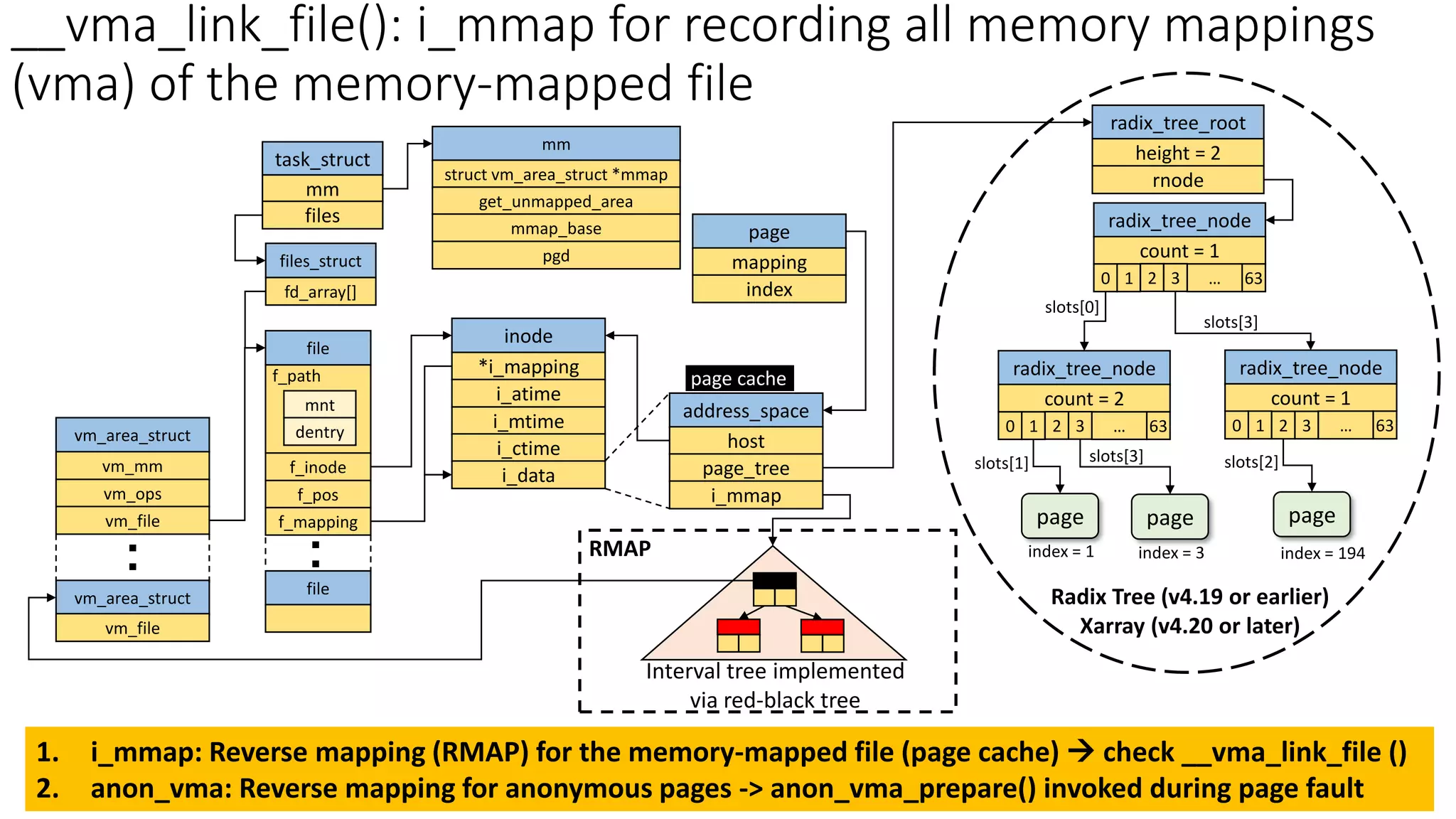
The following diagram shows the complex web of structures involved in memory management. You can now see how the mm_struct links to the list of vm_area_structs, which in turn can point to file and address_space objects for file-backed mappings.
5. Interview Scenario
Let's test this knowledge with a scenario-based question typical of a senior embedded role interview.
Question: "You run two separate instances of a data processing application. Both applications memory-map the same 2 GB data file using mmap() with MAP_PRIVATE and PROT_READ | PROT_WRITE. Process A reads the entire file. Process B then modifies a single byte at a 1GB offset within its mapping. Describe the state of the VMAs and physical memory (1) after Process A reads the file, and (2) after Process B performs its write."
Click to see the analysis
A strong answer would detail the following:
Initial State:
When both processes start, they each get a new VMA in their respective mm_struct. Both VMAs will have vm_flags including VM_READ, VM_WRITE, and VM_MAYWRITE. Both vm_file pointers will point to the same struct file representing the 2GB data file. At this point, no physical memory has been consumed for the file content itself, thanks to demand paging.
1. After Process A Reads the File:
- As Process A reads through the file, it will trigger a series of major page faults.
- For each fault, the kernel looks at Process A's VMA, sees it's a valid read from a file-backed region, and reads the corresponding 4KB page from disk into the system's page cache.
- The kernel then updates the Page Table Entry (PTE) in Process A's page table to map the virtual address to the physical page in the page cache. The PTE is marked as read-only, even though the VMA allows writing. This is the crucial first step for implementing Copy-on-Write.
- After the read is complete, the 2GB of file data now occupies 2GB in the shared page cache. Both Process A's and Process B's page tables are still empty for this region (since B hasn't touched it yet).
2. After Process B Writes a Single Byte:
- Process B attempts to write to an address corresponding to the 1GB offset. The virtual address falls within a 4KB page that has not been accessed by Process B before.
- First, a read fault occurs: Since B hasn't touched this page, its PTE is empty. The kernel sees the valid VMA and resolves the fault by mapping B's virtual page to the same physical page in the page cache that Process A is using. This PTE is also marked read-only. This is a minor fault as the data is already in RAM.
- Immediately, a write fault occurs: The CPU now retries the write instruction. The MMU finds the PTE, but it's marked read-only. This triggers another page fault—a Copy-on-Write (COW) fault.
- The kernel's COW fault handler sees that this is a write to a private mapping on a shared, clean page.
- It allocates a new physical page for Process B.
- It copies the content of the original page from the page cache into this new page.
- It updates Process B's PTE to point to this new private page and marks it as writable.
- The write instruction is then retried and succeeds on the private copy.
Final State: Physical memory usage has increased by one 4KB page. Process A's PTEs still point to the original pages in the page cache (marked read-only). Process B's PTEs point to the same pages, except for the one modified page, which now points to its own private, writable copy.
Conclusion
In this lesson, we have constructed a detailed model of a process's virtual address space. You now understand that this space is not arbitrary but is a well-organized collection of Virtual Memory Areas (VMAs), each defined by a struct vm_area_struct.
Key Takeaways:
- A process's virtual address space is segmented into text, data, BSS, heap, mmap region, and stack.
- The kernel uses
struct vm_area_struct(VMA) to manage each contiguous region, tracking its address range, permissions (vm_flags), and backing source (vm_file). - The
mmap()system call is the primary interface for creating new VMAs, offering flexible control over file-backed vs. anonymous and shared vs. private (COW) mappings. - The kernel implementation of
mmap()involvesdo_mmap()for validation andmmap_region()for VMA merging or allocation and insertion into the process's memory map.
So far, we have focused on how memory is promised and mapped. But what happens when the system is under pressure and physical RAM runs low? In our next lesson, we will investigate the page reclamation mechanism, including LRU lists, kswapd, direct reclaim, and the OOM killer, to see how the kernel decides which pages to discard to make room for new ones.