Introduction
In our last lesson, we saw how the Linux kernel uses demand paging to lazily allocate physical memory only when a virtual address is first accessed. This optimistic approach is highly efficient, but it leads to an important question: what happens when the demand for memory outstrips the physical supply? If processes keep faulting and requiring new physical pages, the system will eventually run out of RAM.
This lesson addresses that exact problem. Our learning outcome is to describe the page reclamation mechanism, including LRU lists, kswapd, direct reclaim, and the OOM killer. We will explore how the kernel proactively frees memory, how it decides which pages are the best candidates for eviction, and what drastic measures it takes when it's facing memory exhaustion. This is a critical process for system stability and performance.
1. Triggers for Page Reclamation: Watermarks and Zones
Before diving into how pages are reclaimed, we need to understand when. The kernel doesn't wait until the last byte of memory is used. Instead, it uses a system of thresholds called watermarks to maintain a healthy buffer of free pages.
As you may recall from your experience with NUMA-aware systems, physical memory is partitioned into nodes. Within each node, memory is further divided into zones based on its addressability by hardware devices. The most common zones on a 64-bit system are:
ZONE_DMA: The first 16MB of memory, for old ISA devices that can only address 24 bits.ZONE_DMA32: Memory up to 4GB, for 32-bit devices.ZONE_NORMAL: All remaining memory.
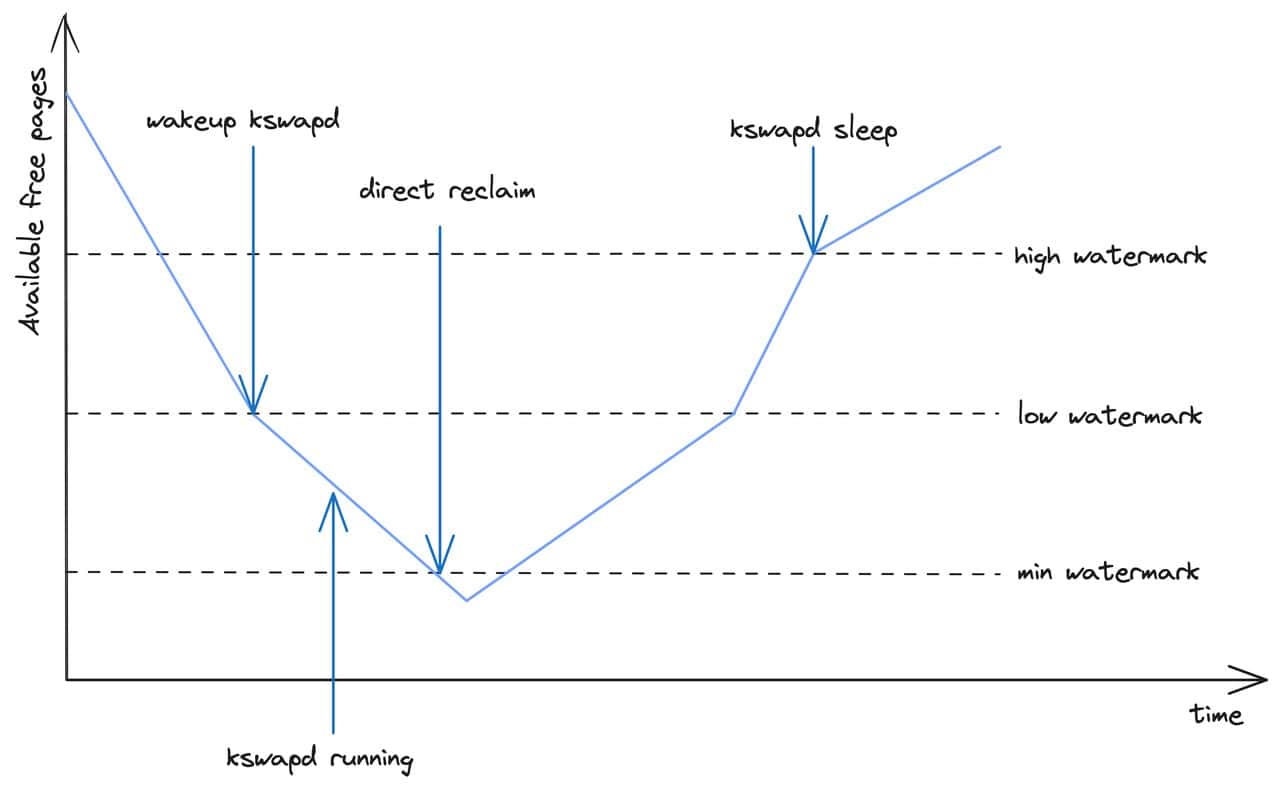
Each of these zones maintains its own set of watermarks and free page counts. The three key watermarks are:
high: When the kernel is freeing pages, it stops once the number of free pages in the zone reaches this mark.low: When the number of free pages dips below this mark, a background kernel thread is woken up to start freeing memory.min: This is a critical level. If a process requests memory and the number of free pages is below this mark, the allocation process must stop and free memory itself before it can proceed.
These watermarks control two distinct modes of page reclamation:
- Background Reclaim (
kswapd): When free pages in a zone drop below thelowwatermark, the kernel wakes up a dedicated thread for that node calledkswapd. This thread runs in the background, asynchronously reclaiming pages until thehighwatermark is reached. This is the preferred, non-disruptive method. - Direct Reclaim: If a process needs memory and finds its zone is below the
minwatermark, the system is under severe memory pressure. Thekswapdthread either can't keep up or is already running. The requesting process itself must synchronously reclaim pages. This is a "stop-the-world" event for that process, causing noticeable latency and performance degradation.
This image perfectly illustrates the relationship between the watermarks and the two reclaim mechanisms.
To get a more detailed explanation of this process, the following video segment is excellent.
Tutorial: Linux Memory Management and Containers - Gerlof Langeveld, AT Computing
The video "Tutorial: Linux Memory Management and Containers" by Gerlof Langeveld explains the concepts of zones and watermarks in detail, showing how they trigger the kswapd kernel thread.
Please watch the segment from 42:45 to 53:41. Focus on: How physical memory is divided into nodes and zones (DMA, DMA32, NORMAL). The meaning of the high, low, and min watermarks for each zone. How the kswapd process is activated when the low watermark is crossed and how it works to replenish free pages up to the high watermark.
2. The Heart of the Mechanism: LRU Lists
Once the kernel decides it needs to free memory, it faces a critical choice: which pages should it evict? The ideal candidates are pages that are not going to be used again soon. To approximate this, Linux uses a Least Recently Used (LRU) policy.
However, a single, perfect LRU list is too slow to maintain. Instead, the kernel uses a clever two-list approximation. Furthermore, it treats two types of pages differently because the cost of reclaiming them varies:
- Anonymous Pages: These belong to a process's heap or stack and are not backed by a file. To reclaim them, they must first be written to a swap device. This involves disk I/O.
- File-backed Pages: These are part of the page cache and correspond to a file on disk. If the page is "clean" (not modified), it can simply be dropped. If it's "dirty" (modified), it must be written back to the file first.
To manage this, the kernel maintains four main LRU lists for each memory zone, collectively part of a structure called an lruvec:
- Inactive Anonymous
- Active Anonymous
- Inactive File
- Active File
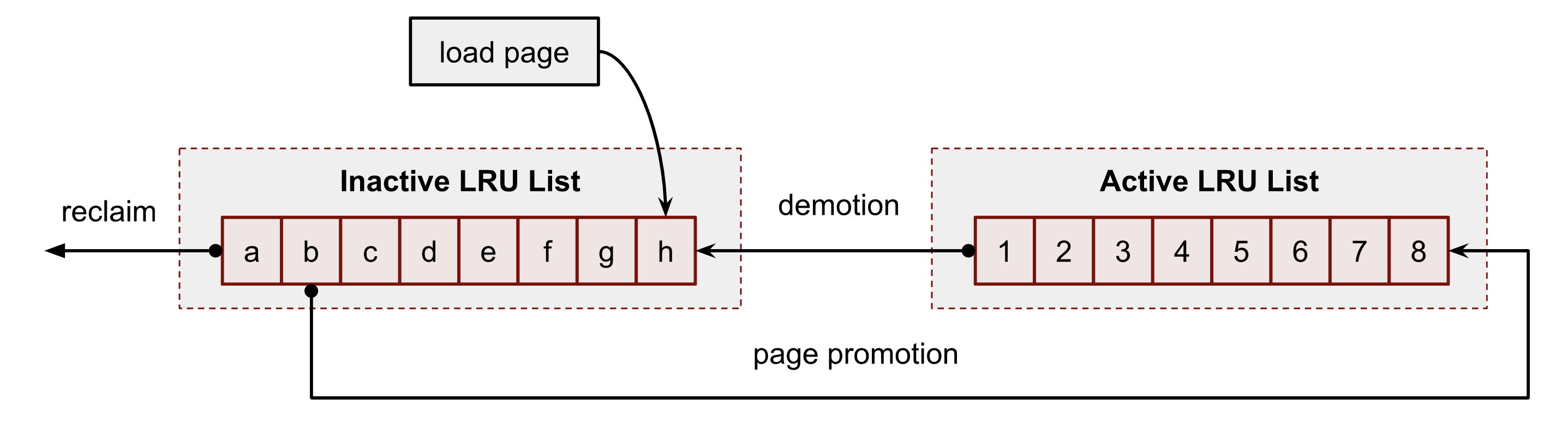
The general flow is as follows:
- When a page is first brought into memory, it is typically placed on an inactive list.
- If the page is accessed again while on the inactive list, the kernel sees this as a sign of use and promotes it to the head of an active list.
- Pages on the active list that are not accessed for some time are considered to be "cooling down" and are demoted to the inactive list.
- Page reclamation always starts by scanning from the tail (the "coldest" end) of the inactive lists. These are the pages that are considered the least recently used and are the best candidates for eviction.
This next video segment clearly explains these active and inactive lists for both anonymous and file-backed pages.
Tutorial: Linux Memory Management and Containers - Gerlof Langeveld, AT Computing
Continuing with the same video, this section explains the core LRU mechanism.
Watch the segment from 53:57 to 59:49. This covers the active and inactive LRU lists for both anonymous and file-backed pages, and explains how pages move between them.
To deepen your understanding, let's look at this from a more technical perspective. How does the kernel know a page has been "accessed"? It doesn't trap every memory access. Instead, it relies on an Accessed bit in the Page Table Entry (PTE), which is set by the MMU hardware.
The following article provides an excellent technical summary of this process.
The case of the vanishing CPU: A Linux kernel debugging story
The blog post "The case of the vanishing CPU" contains a fantastic section that explains the technical details behind page reclaiming, including the role of the hardware 'Accessed' bit.
Read the section titled "Understanding page reclaiming in Linux". This provides a more in-depth view of the concepts you just saw in the video, focusing on: The distinction between anonymous and file-backed memory. The role of the hardware Accessed bit in the Page Table Entry (PTE). How the kernel scans pages on the inactive and active lists, using the Accessed bit to decide whether to promote, demote, or reclaim a page.
3. Balancing Anonymous vs. File Pages: swappiness
The kernel has two pools of memory it can reclaim from: anonymous and file-backed pages. Reclaiming a clean file page is cheap (just drop it), while reclaiming an anonymous page is expensive (requires writing to swap). So, how does it balance this?
This trade-off is controlled by a tunable parameter: vm.swappiness. It's a value between 0 and 200 (defaulting to 60).
swappiness = 0: The kernel will strongly avoid swapping out anonymous pages and will aggressively reclaim file-backed pages from the page cache.swappiness = 60(Default): A balanced approach. The kernel considers reclaiming anonymous pages, but still prefers to shrink the page cache.swappiness = 100: The kernel treats the cost of reclaiming anonymous pages and file-backed pages as roughly equal.swappiness > 100: The kernel will favor swapping anonymous pages over dropping file-backed pages.
This setting allows system administrators to tune memory behavior based on the workload. For example, a database server might benefit from a low swappiness to keep its data hot in the page cache, while a desktop system might use the default.
4. The Last Resort: The Out-Of-Memory (OOM) Killer
What happens if kswapd and direct reclaim fail to free up enough memory? This can happen under extreme memory pressure where all pages are "hot" or when swapping is too slow. If the kernel cannot find any pages to reclaim, it has one last, brutal option to prevent a complete system freeze: the Out-Of-Memory (OOM) Killer.
The OOM killer's job is to select one "bad" process and kill it to free its memory and save the rest of the system.
How is the victim chosen?
The kernel calculates an oom_score for every process. The process with the highest score is the one that gets killed. The score is primarily based on the amount of memory the process is using as a percentage of total available memory. In simple terms, the most memory-hungry process is the most likely victim.
Can this be influenced?
Yes. You can adjust a process's likelihood of being killed by modifying its oom_score_adj value (found in /proc/[pid]/oom_score_adj).
- A large negative value (down to -1000) will make the process immune to the OOM killer. This is often done for critical system daemons like
sshd. - A large positive value will make the process a more attractive target for the OOM killer.
This video segment provides a clear walkthrough of the OOM killer's function and configuration.
Tutorial: Linux Memory Management and Containers - Gerlof Langeveld, AT Computing
The final segment of the video explains what happens when reclamation fails and the OOM killer is invoked.
Watch from 01:02:19 to 01:07:05. Pay attention to: When the OOM killer is triggered. How the oom_score is calculated to select a victim. How you can use oom_score_adj to protect important processes.
5. Interview Scenario: The Reclamation Livelock
Your deep experience in debugging complex systems is highly valued. Let's tackle a scenario that goes beyond the textbook explanation and into real-world pathologies—the kind of question you might face in a top-tier interview.
Question: "You're debugging a production server. You observe that a specific application is causing all CPUs to be stuck at 100% in kernel mode. perf top shows the shrink_lruvec function is the top consumer. The system is extremely sluggish, but it never OOM-kills the offending application. What could be happening?"
Click to see the analysis
This scenario points to a livelock within the page reclamation subsystem, a more subtle failure mode than a simple OOM condition. A strong answer would break it down like this:
-
Identify the Symptom: High CPU usage in
shrink_lruvecindicates the kernel is spending all its time in page reclamation. The fact that it's happening across all CPUs and the system is sluggish suggests this is direct reclaim happening continuously. Processes are trying to allocate memory, finding none, and getting stuck trying to free pages themselves. -
Formulate the Hypothesis: The OOM killer is not being triggered because the reclamation process is not failing. It's just pathologically inefficient. It manages to reclaim a tiny number of pages after scanning a massive number of them. Because it's making some progress, however small, it never gives up and triggers the OOM killer. The system is stuck in a loop: scan millions of pages, reclaim a few, allow a process to run for a moment, and then immediately get stuck in direct reclaim again.
-
Explain the Root Cause (based on the blog post): The blog post "The case of the vanishing CPU" (resource LINK) describes a real bug that caused this exact behavior.
- The Scenario: A process with thousands of threads memory-maps a large file, causing memory to reach its cgroup limit. All threads then try to access the memory, triggering direct reclaim.
- The Bug: In older kernels, the reclamation code (
shrink_lruvec) was called while holding the process'smmap_lock. This lock prevents the process's memory map from changing. - The Livelock: The thread attempting reclamation scans pages. If it finds a "hot" page (one that was recently accessed), it promotes it to the active list. In the scenario, other threads are constantly accessing pages, making them all appear "hot". The reclaiming thread scans the entire 4GB of memory, finds that almost every page has been recently accessed, promotes them, and manages to find only a handful of "cold" pages to evict. It has made progress, so no OOM. But it was incredibly inefficient, and the cycle repeats immediately, consuming 100% of the CPU.
-
Propose a Solution/Next Step: For this specific bug, the fix was to release the
mmap_lockbefore starting the expensive scan, or to switch to a newer reclamation algorithm like the Multi-Gen LRU (MGLRU) available in kernel 6.1+, which is designed to be more efficient in such high-contention scenarios.
This level of analysis shows an ability to connect system behavior to specific kernel mechanisms and diagnose subtle performance pathologies, a key skill for a senior kernel-aware developer.
Conclusion
In this lesson, we've unraveled the complex and critical process of page reclamation in Linux. You've seen how the kernel maintains system stability by proactively managing its finite physical memory.
Key Takeaways:
- Page reclamation is triggered by watermarks (
lowfor background,minfor direct reclaim) on a per-zone basis. kswapdis the background thread that handles asynchronous reclamation, while direct reclaim is a synchronous, performance-impacting fallback.- The kernel uses a set of active/inactive LRU lists for anonymous and file-backed pages to decide which "cold" pages to evict.
- The
vm.swappinessparameter tunes the kernel's preference for reclaiming anonymous (process) memory versus file-backed (page cache) memory. - The OOM Killer is the last resort, sacrificing the process with the highest
oom_scoreto prevent a total system lockup.
We've now covered how memory is allocated, mapped, and reclaimed. In our next module, we will shift our focus from memory to how the kernel interacts with the outside world, starting with hardware. Our next lesson will explain the interrupt handling flow in Linux, including top-half and bottom-half processing.