Introduction
Welcome to the next lesson in our journey through the kernel's memory management subsystem. In our last session, we investigated how the buddy allocator manages the supply of physical pages, organizing them into zones and using a clever splitting-and-coalescing algorithm to provide contiguous blocks of memory. We concluded by noting that while the buddy allocator is great for page-sized allocations, it's incredibly wasteful for the kernel's most common need: small, frequently used data structures.
This lesson directly addresses that inefficiency. We will explore the layer that sits on top of the buddy allocator, designed specifically for small allocations. Our learning outcome is to explain the SLAB/SLUB/SLOB allocators and how they manage small, frequently used kernel objects.
Understanding these allocators is vital. Not only do they have a significant impact on system performance and memory usage, but their debugging features are indispensable for finding tricky memory corruption bugs like buffer overflows and use-after-free errors—topics that are frequently probed in advanced embedded interviews.
1. The Need for a Specialized Allocator
Let's start with a simple question: why not just use the buddy allocator for everything? Imagine the kernel needs to allocate memory for a struct file, which is a few hundred bytes. The smallest unit the buddy allocator deals with is a single page, typically 4KB (4096 bytes).
Allocating a 4KB page for a 200-byte object results in over 95% of the memory being wasted. This is known as internal fragmentation. When this happens thousands of times for inodes, process descriptors, and network buffers, the waste becomes immense.
Furthermore, many kernel objects require complex initialization. Constantly allocating a new page, initializing the object from scratch, and then freeing it is computationally expensive. It's far more efficient to keep a "warm" cache of pre-initialized objects ready for immediate use.
To see a great summary of these motivations, let's watch a short video.
Kernel Exploitation - Slab Allocators
This segment from a pwn.college lecture on kernel exploitation clearly explains why the standard user-space malloc concepts and by extension, the page-level buddy allocator, are insufficient for the kernel's needs, focusing on performance, memory efficiency, and fragmentation.
Watch from 00:59 to 06:34. The video contrasts userland heap constraints with the kernel's unique requirements and introduces the problem of memory fragmentation that slab allocation is designed to solve.
This leads us to the solution: a specialized object-caching allocator. In Linux, this is generically known as the slab allocator.
2. Core Concepts: Caches, Slabs, and Objects
The slab allocator acts as a bridge between the page-oriented buddy allocator and the object-oriented needs of the rest of the kernel. The core idea is to create specialized pools of memory for specific object types.

The terminology is crucial:
- Cache: A manager for a single type or size of object. For example, there is a cache for
task_structobjects and another forinodeobjects. Each cache maintains a list of slabs. - Slab: A contiguous chunk of one or more physical pages, allocated from the buddy system. A slab is the container for objects.
- Object: The actual memory being used by the kernel code. An object is a single chunk of memory within a slab. When a slab is full of objects, it's called a "full" slab. When some objects are in use and some are free, it's a "partial" slab. When all objects are free, it's an "empty" slab.
The basic workflow is as follows:
- When a kernel subsystem needs an object (e.g., via
kmalloc()), it requests it from the appropriate cache. - The cache first tries to find a free object in a partial slab. This is the fast path.
- If no partial slabs are available, it will use an empty slab.
- If there are no empty slabs either, the cache requests new pages from the buddy allocator to create a new slab, which is then formatted to hold objects.
- When an object is freed, it is returned to its slab. If this makes the slab transition from full to partial, it's put on the partial list. If it makes the slab empty, the slab may eventually be returned to the buddy allocator to reclaim memory.
3. The Three Implementations: SLOB, SLAB, and SLUB
The term "slab allocator" is generic. The Linux kernel has had three distinct implementations, each with a different design philosophy. The original developer of SLUB, Christoph Lameter, gave an excellent talk explaining the history and technical differences. We'll use it as our guide through this section.
SL[AUO]B: Kernel memory allocator design and philosophy
This talk by Christoph Lameter, the author of the SLUB allocator, provides an authoritative and deep dive into the design and philosophy of all three Linux slab allocators. It is the best resource for understanding why they exist and how they differ.
First, watch from the beginning to 04:07. This section sets the stage, explaining the purpose of slab allocators and clarifying the sometimes confusing terminology.
As you just saw, we have to be careful with our terms: a "slab" is a chunk of memory, while "SLAB" is a specific implementation. Now let's dive into the details of each.
SL[AUO]B: Kernel memory allocator design and philosophy
Now, let's continue with the same video to understand the history and design philosophy behind SLOB, SLAB, and SLUB.
Watch from 05:14 to 12:54. This is the core of the talk, where Lameter compares the three allocators. Pay close attention to the design goals he mentions for each one: compactness for SLOB, cache-friendliness for SLAB, and simplicity/scalability/debugging for SLUB.
Let's summarize and compare the key characteristics based on the talk.
| Feature | SLOB (Simple List of Blocks) | SLAB | SLUB (The Unqueued Allocator) |
|---|---|---|---|
| Primary Goal | Compactness. Minimal memory overhead. | Performance & Cache-friendliness. Tries to keep hot objects in CPU cache. | Simplicity, Scalability, and Debuggability. |
| Best Use-Case | Small, memory-constrained embedded systems (e.g., < 32MB RAM). | Mid-sized systems, originally designed for NUMA-less supercomputers. | Default allocator for virtually all modern systems, from embedded to supercomputers. |
| Mechanism | A simple first-fit allocator over lists of free memory. | Maintains complex per-CPU, per-node queues to track objects. | Manages entire slabs on a per-CPU basis. No complex object queues. |
| Fragmentation | Highly susceptible to external fragmentation. | Manages internal fragmentation well but has memory overhead. | Manages internal fragmentation well with lower overhead than SLAB. |
| Scalability | Poor, especially on multi-core systems. | Suffers from exponential growth of queue structures on large systems. | Excellent. Simplistic design scales well to thousands of CPUs. |
| Debugging | Minimal. | Has debugging options, but they require a kernel recompile. | Best-in-class. Integrated, low-overhead debugging (poisoning, red-zoning) that can be enabled at boot time on production kernels. |
Given that SLUB is the default allocator, we will focus the rest of our lesson on its implementation.
4. A Closer Look at SLUB
SLUB's design achieves both high performance and simplicity by minimizing shared data structures. The key is its heavy reliance on per-CPU data.
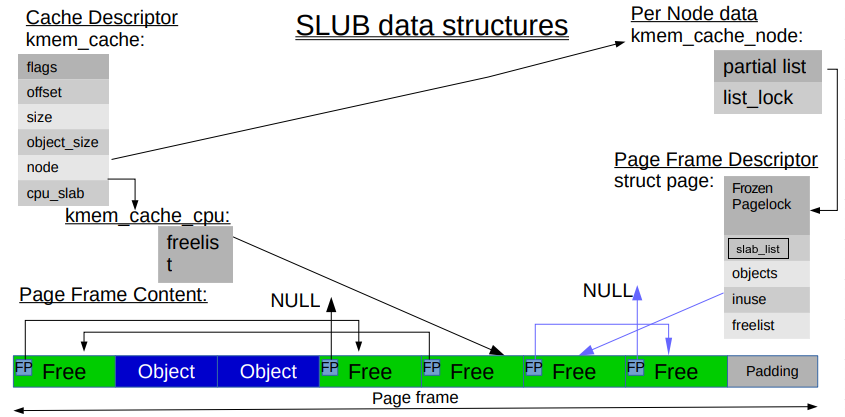
Let's break down the most important structures involved.
Linternals: The Slab Allocator
The article "Linternals: The Slab Allocator" provides an excellent, detailed breakdown of the modern SLUB implementation and its core data structures. We will use it to understand how SLUB is organized.
Read the 'Data Structures' section. It provides a clear explanation of struct kmem_cache, struct kmem_cache_cpu, struct kmem_cache_node, and struct slab and how they interrelate. Focus on understanding the roles of cpu_slab and the per-CPU freelist.
As the article explains, the most common allocation path is extremely fast and lock-free:
- The kernel requests an object on a specific CPU.
- SLUB looks at the
kmem_cache_cpustructure for that CPU. - This structure points to an "active" slab and a
freelistof available objects within that slab. - An object is taken from the head of the freelist, and the freelist pointer is updated.
- This all happens without taking any locks, as the
kmem_cache_cpudata is local to that CPU.
Locks are only required in the "slow path," such as when the per-CPU slab becomes full and needs to be exchanged for a partial slab from the shared kmem_cache_node list.
Allocation APIs
Kernel code can interact with the slab allocator in two main ways:
- General-Purpose Allocation: Using
kmalloc()andkfree(). The kernel pre-creates a set of general-purpose caches, namedkmalloc-8,kmalloc-16, ...,kmalloc-8k. When you callkmalloc(100), SLUB will find the smallest cache that can fit the request (in this case,kmalloc-128) and allocate an object from it. - Special-Purpose Allocation: If a subsystem allocates a specific object type very frequently (e.g.,
task_struct), it can create its own dedicated cache usingkmem_cache_create(). It then useskmem_cache_alloc()to allocate from this private cache. This improves performance and makes debugging easier by isolating objects.
For a great, step-by-step trace of how a kmalloc(128) call is handled by SLUB, you can refer to the article "Looking at kmalloc() and the SLUB Memory Allocator". It follows the code from the kmalloc inline function down into slab_alloc_node, showing how the correct cache is selected and the per-CPU freelist is updated using an atomic cmpxchg.
5. Practical Inspection and Interview Scenario
You can—and should—inspect the state of the slab allocator on a live system. This is a common activity when debugging performance issues or memory leaks.
Using /proc/slabinfo and slabtop
The /proc/slabinfo file provides a detailed snapshot of all active caches.
$ sudo cat /proc/slabinfo
slabinfo - version: 2.1


# name            <active_objs> <num_objs> <objsize> <objperslab> <pagesperslab> : tunables <limit> <batchcount> <shared> : slabdata <active_slabs> <num_slabs> <shared_avail>
...
task_struct       1480   1539   8384    3    8   : tunables    0    0    0 : slabdata    513    513      0
kmalloc-512       40878  43360    512   32    4   : tunables    0    0    0 : slabdata   1355   1355      0
kmalloc-256       21850  21856    256   32    2   : tunables    0    0    0 : slabdata    683    683      0
...
Here you can see:
name: The name of the cache.active_objs: Number of objects currently in use.num_objs: Total number of objects (active + free).objsize: Size of a single object in bytes.objperslab: How many objects fit in one slab.
A more user-friendly, real-time view is provided by the slabtop utility (you may need to install it with sudo apt-get install procps).
Interview Scenario
Your deep understanding of kernel internals is a key asset. An interviewer might ask a question like this to test your practical problem-solving skills:
Question: "You're debugging a driver on a production embedded device. You suspect a use-after-free error is causing random memory corruption, but the system doesn't crash immediately, making it hard to trace. You cannot recompile the kernel or attach a live debugger. How can you use the kernel's built-in memory management features to pinpoint the source of this corruption?"
Click to see the analysis
A top-tier answer would leverage the specific debugging capabilities of the SLUB allocator:
- Identify the Tool: The primary tool for this job is SLUB's built-in debugging framework, which can be enabled at boot time via kernel command-line parameters without recompiling.
- Enable Debugging: You would reboot the device and add
slub_debugto the kernel command line. This enables a suite of checks, including poisoning and red-zoning. - Explain the Mechanisms:
- Poisoning: When an object is freed, SLUB will overwrite it with a known pattern (e.g.,
0x6b6b6b6b). If the driver later tries to use its stale pointer to access the freed object, it will likely read or write this poison value. If the object is reallocated and the poison value is still present, the kernel knows there was a use-after-free and will panic. - Red Zoning: SLUB can add extra areas (red zones) before and after each object. A buffer overflow that writes past the end of an object will corrupt the red zone. When the object is freed, SLUB checks the integrity of the red zone and will panic if it has been modified, printing a report that points to the corrupted object's cache.
- Poisoning: When an object is freed, SLUB will overwrite it with a known pattern (e.g.,
- The Result: Instead of random, silent corruption, the
use-after-freeor overflow will now cause an immediate and loud kernel panic. The panic message will be highly informative, often including the cache name (kmalloc-128, for example), the address of the corrupted object, and stack traces of where the object was allocated and freed. This information is usually enough to quickly identify the misbehaving code path in the driver. - Bonus Points: Mention that this is precisely the motivation Christoph Lameter gave for building these features into SLUB—to make debugging easier on large, production systems where a debugger is not an option.
Conclusion
In this lesson, we bridged the gap between the page-level buddy allocator and the object-level needs of the kernel. By managing pools of small, frequently used objects, the slab allocator system is critical for both performance and memory efficiency.
Key Takeaways:
- Slab allocators solve the internal fragmentation and object initialization overhead issues of using the buddy allocator directly for small allocations.
- The kernel has three implementations: SLOB (for tiny systems), SLAB (the complex predecessor), and SLUB (the modern, scalable, and simple default).
- SLUB achieves high performance by using per-CPU active slabs and freelists, which minimizes locking in the common allocation/deallocation paths.
- SLUB includes powerful built-in debugging features like poisoning and red-zoning that can be enabled at runtime to catch memory corruption bugs.
- You can inspect the state of all slab caches using tools like
/proc/slabinfoandslabtop.
You now understand the two primary physical memory allocators in the kernel: the buddy system for pages and the SLUB allocator for small objects. But there's more to the story. What if the kernel needs a large block of memory that is virtually contiguous, but doesn't need to be physically contiguous?
Our next lesson will complete the picture by tackling the learning outcome: "Compare kmalloc, vmalloc, and direct page allocation, and select the appropriate allocator for a given scenario." We will create a clear decision framework for when to use each of the kernel's memory allocation tools.