Introduction
In our previous lesson, we explored the "demand" side of memory management—how the Linux kernel and the MMU work together to give each process its own private virtual address space. You learned how virtual addresses are translated to physical addresses using page tables and how mechanisms like page faults enable features like demand paging.
Now, we turn our attention to the "supply" side. Once the kernel decides it needs a physical page frame—to satisfy a page fault, for a kernel data structure, or for a disk buffer—how does it find one? This lesson addresses the learning outcome: Describe the kernel's physical memory management using zones and the buddy allocator.
We will investigate how the kernel keeps track of all available physical RAM, organizing it to meet diverse hardware requirements and allocating it efficiently to minimize waste. Mastering this is fundamental for understanding system performance, diagnosing memory-related issues, and appreciating the design of higher-level allocators.
1. Organizing Physical Memory: NUMA Nodes and Zones
Before the kernel can allocate memory, it first needs to build a map of what's available. On modern systems, physical RAM isn't treated as one single, uniform pool. It's organized hierarchically.
1.1. NUMA Nodes
On systems with multiple CPUs (sockets), you'll often encounter a Non-Uniform Memory Access (NUMA) architecture. In a NUMA system, memory is divided into banks, or nodes, where each node is "local" to a specific CPU or group of CPUs. A CPU can access its local memory faster than it can access memory on a remote node.
The kernel is NUMA-aware and tries to satisfy a memory request from the node local to the running CPU to maximize performance. Each node has its own independent memory management subsystem, described by a pg_list_data structure. For a typical single-socket embedded system or desktop, you'll just have one node, Node 0.
1.2. Memory Zones
Within each node, memory is further divided into zones. This division is not for performance but to handle hardware limitations, a concept highly relevant in embedded systems. Certain legacy devices can only perform Direct Memory Access (DMA) to specific, low-memory address ranges. Zones allow the kernel to manage these constraints.
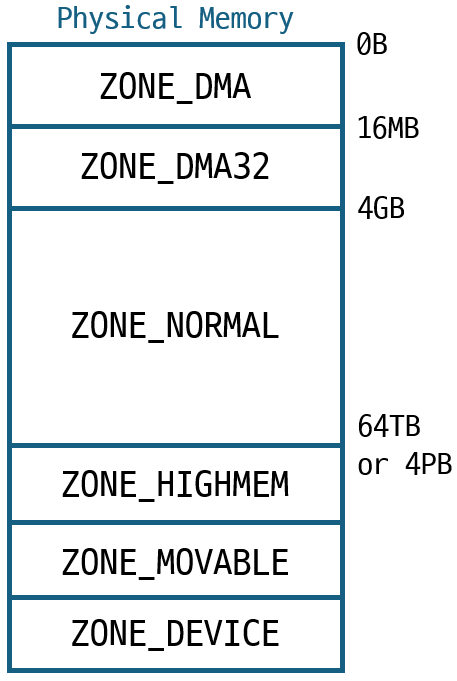
The primary zones on a 64-bit system are:
ZONE_DMA: The first 16MB of physical memory. This is reserved for old ISA devices that have a 24-bit address limitation and can only perform DMA in this small window.ZONE_DMA32: Memory in the first 4GB. This is for 32-bit devices that can't access memory beyond the 4GB boundary.ZONE_NORMAL: All physical memory above 4GB. This is the main zone for most allocations on a 64-bit system with sufficient RAM.
Additionally, you might encounter:
ZONE_HIGHMEM: On 32-bit systems, this is memory above ~896MB that the kernel cannot permanently map into its address space.ZONE_MOVABLE: A special zone used to group pages that can be easily moved, which helps prevent long-term memory fragmentation. We'll touch on this later.
To get a better understanding of how the kernel subdivides physical memory, let's watch an explanation.
Tutorial: Linux Memory Management and Containers - Gerlof Langeveld, AT Computing
This video segment explains the subdivision of physical memory into pages and then into the different zones, outlining the reasons for this organization.
Watch from 27:35 to 46:12. Focus on the concepts of pages as the basic unit, NUMA nodes, and the definitions and purposes of ZONE_DMA, ZONE_DMA32, and ZONE_NORMAL.
The key takeaway is that an allocation request specifies a preferred zone, but the kernel can fall back to other zones if the preferred one is empty. For instance, a ZONE_NORMAL request might be served from ZONE_DMA32 if necessary.
2. The Buddy Allocator: Managing Contiguous Pages
Now that we understand how memory is zoned, how does the kernel manage the free pages within each zone? The core algorithm Linux uses for this is the Binary Buddy Allocator.
Its primary goal is to efficiently allocate and free blocks of contiguous physical pages while fighting against external fragmentation. External fragmentation occurs when you have enough total free memory, but it's broken up into small, non-contiguous pieces, so you can't satisfy a request for a large, contiguous block.
2.1. The Core Concept: Powers of Two
The buddy system manages all free memory in blocks that are a power of two number of pages. The size of the block is referred to by its order.
- An order-0 block is 1 page (2⁰ pages).
- An order-1 block is 2 pages (2¹ pages).
- An order-2 block is 4 pages (2² pages).
- ...and so on, up to
MAX_ORDER - 1(typically 10), which corresponds to a block of 1024 pages (4MB).
The kernel maintains a separate free list for each order.
2.2. Allocation by Splitting
When the kernel needs a block of 2^N pages (order-N), it first checks the free list for order-N.
- If a block is available: It's removed from the list and allocated.
- If the list is empty: The allocator looks for a block on the next largest list, order-
N+1.- If an order-
N+1block is found, it's split in half into two order-Nblocks. These two blocks are called "buddies". - One buddy is allocated to satisfy the request.
- The other buddy is placed on the free list for order-
N. - If the order-
N+1list was also empty, this process continues recursively to higher orders until a free block is found to be split.
- If an order-
2.3. Deallocation by Coalescing
When a block of order-N is freed, the allocator checks the status of its buddy.
- If the buddy is also free: The two blocks are coalesced (merged) into a single order-
N+1block. This new, larger block is then returned to the order-N+1free list, and the coalescing process is repeated. Maybe its new buddy at orderN+1is also free. - If the buddy is in use: The newly freed block is simply placed on the order-
Nfree list.
This constant effort to coalesce free blocks is how the buddy system fights fragmentation and tries to re-create larger contiguous blocks over time.
To see this process explained with clear animations, let's watch the following video.
GWU OS: Memory Allocation - Slab and Buddy Allocators
This video from Gabriel Parmer provides a fantastic explanation of the buddy allocator's mechanics, including its power-of-two approach, recursive splitting, and the problem of fragmentation it seeks to solve.
Watch from the beginning to 11:00. Pay close attention to the visual demonstration of how a large memory region is broken down to satisfy requests and the example of how a request can fail due to fragmentation.

3. Linux Implementation Details
The abstract algorithm is elegant, but the real kernel implementation has more layers. Let's connect the concepts to the actual kernel data structures.
You can find a great overview of these structures in the article "A Quick Dive Into The Linux Kernel Page Allocator". I highly recommend reading it in full later, but for now, we'll focus on the key parts.
A Quick Dive Into The Linux Kernel Page Allocator
This article provides an excellent, up-to-date look at the Linux page allocator, connecting high-level concepts to the underlying data structures and code.
Please read the sections 'Overview' and 'Nodes, Zones and Free Lists'. These sections describe the buddy system, page orders, and how the zone structure contains the free_area array that implements the buddy free lists.
Based on that reading, we can summarize the key data structures:
struct pg_list_data: Represents a NUMA node.struct zone: Represents a memory zone (ZONE_DMA, etc.) within a node. This is the main container.struct free_area: Eachzonehas an array offree_areastructs, one for each order (zone->free_area[MAX_ORDER]). This is the core of the buddy system.struct list_head: Eachfree_areacontains a linked list (free_list) of the actual free page blocks.
Page Mobility and Fragmentation
The article also introduced another crucial concept: page mobility. To further reduce fragmentation, the kernel tries to avoid mixing pages that are easy to move (like user-space process pages) with pages that are hard or impossible to move (like kernel data structures with hardcoded pointers).
- Movable pages: Can have their physical location changed by the kernel. The kernel just needs to update the page table entry to point to the new location.
- Unmovable pages: Are pinned to their physical location.
The buddy allocator maintains separate free lists not just per-order, but also per-mobility type. This prevents a scenario where a single, unmovable page gets allocated in the middle of a large free block, "pinning" it and preventing it from ever being coalesced into a larger contiguous region.
The main free_area structure in the zone actually contains an array of lists indexed by migration type:zone->free_area[order].free_list[migratetype]
4. Inspecting the Buddy Allocator
You can directly observe the state of the buddy allocator on any running Linux system through the /proc filesystem. This is an invaluable tool for debugging and analysis.
/proc/buddyinfo
This file gives a quick, high-level summary of the free blocks.
$ cat /proc/buddyinfo
Node 0, zone      DMA      1      1      1      0      2      1      1      0      1      1      3
Node 0, zone    DMA32    267    158     88     54     38     19      6      3      3      0    531
Node 0, zone   Normal    186    113    113     79     60     36     22      4      0      0    468
How to read this:
Each line represents a zone within a node. The numbers that follow represent the number of free blocks for each order, starting from order-0 up to order-10.
- In the
Normalzone above, there are186free order-0 blocks (4KB each),113free order-1 blocks (8KB each), and so on, with468free order-10 blocks (4MB each).
A healthy, freshly-booted system will have most of its free memory in the highest-order blocks. A heavily fragmented system will have many blocks in the lower orders and very few in the higher ones.
/proc/pagetypeinfo
This provides a much more detailed view, breaking down the free pages by order and migration type. It's excellent for seeing how movable and unmovable pages are distributed.
$ cat /proc/pagetypeinfo
...
Page block order: 9
Pages per block: 512

Free pages count per migrate type at order       0      1      2      3      4      5      6      7      8      9     10
Node 0, zone   Normal, type    Unmovable     78     88     94     65     51     31     19      4      0      0      0
Node 0, zone   Normal, type    Reclaimable    8      9      6      3      2      1      0      0      0      0      0
Node 0, zone   Normal, type      Movable    100     16     13     11      7      4      3      0      0      0    468
...
This output confirms that the free lists are maintained separately for Unmovable, Movable, etc., pages to combat fragmentation.
5. Interview Scenario
Your embedded background means you're expected to understand resource management under constraints. An interviewer could pose a scenario like this:
Question: "Your driver needs to allocate a 64KB contiguous DMA buffer by calling alloc_pages(GFP_KERNEL, 4). The system has been running for a long time, and /proc/buddyinfo shows that the highest available free block in ZONE_DMA32 is order-3 (32KB). Describe what happens next and why the allocation might ultimately fail, even if free -m shows hundreds of megabytes of free RAM."
Click to see the analysis
A strong answer would follow these steps:
- Initial Request: The request is for an order-4 block (2⁴ * 4KB = 64KB). The allocator starts by checking the order-4 free list in the preferred zone (
ZONE_DMA32for this DMA buffer). - Splitting Attempt: The list is empty. It then looks at the order-5 list. Let's assume it's also empty, and this continues up to order-10. It finds no block of order-4 or higher to split.
- Failure within the Zone: The allocator cannot immediately satisfy the request within the preferred zone. At this point, it hasn't failed completely.
- Compaction and Reclamation: The kernel doesn't give up. It might trigger page reclamation, trying to free memory by writing dirty pages to disk or dropping clean caches. More importantly for this problem, it may initiate memory compaction. Compaction works by migrating movable pages from the end of a memory region to free holes at the beginning, effectively trying to create a large contiguous free block at the end.
- Retry: After attempting compaction, the allocator retries the allocation. If compaction successfully created a free block of order-4 or larger, the allocation now succeeds (potentially after splitting the newly formed large block).
- Why It Can Still Fail: The allocation fails if compaction is unable to create a large enough contiguous block. This happens if the memory region is heavily fragmented with unmovable pages (like other drivers' buffers, or core kernel data structures). Even though
free -mreports lots of free memory (the sum of all the small fragments), there is no contiguous 64KB block to be found, and none can be created. This is the classic definition of external fragmentation. - Final Outcome: If all attempts fail,
alloc_pages()returnsNULL, and the driver must handle the allocation failure gracefully.
Conclusion
In this lesson, we've dissected the kernel's strategy for managing its most precious resource: physical RAM. You now understand the fundamental "supply" side of the memory management equation.
Key Takeaways:
- Physical memory is organized hierarchically into NUMA nodes and zones (
ZONE_DMA,ZONE_NORMAL, etc.) to handle hardware-specific constraints. - The buddy allocator is the kernel's core algorithm for managing contiguous blocks of physical pages.
- It operates on power-of-two block sizes (orders) and uses splitting for allocation and coalescing for deallocation to minimize external fragmentation.
- To further combat fragmentation, free pages are also categorized by their mobility (
Movable,Unmovable), with separate free lists for each type. - You can inspect the state of the buddy system in real-time using
/proc/buddyinfoand/proc/pagetypeinfo.
The buddy allocator is powerful, but it's designed to work with page-sized chunks. What happens when the kernel needs to allocate an object that is much smaller than a page, like a 192-byte inode structure? Allocating a full 4KB page for such a small object would be incredibly wasteful (this is called internal fragmentation).
In our next lesson, we will answer that question by exploring the next layer up: "Explain the SLAB/SLUB/SLOB allocators and how they manage small, frequently used kernel objects." These allocators sit on top of the buddy system, carving up pages into smaller, object-sized chunks.