Welcome to the first lesson of Module 5: Budgeting, Planning, and Variance Analysis.
In the previous module, you accomplished the significant task of building a fully integrated three-statement financial model, culminating in mastering the complex challenge of circular references. You now possess the architectural skills to construct a dynamic model. This module shifts our focus from construction to application—using these models to perform core Financial Planning & Analysis (FP&A) functions that drive business decisions.
We begin with a cornerstone of modern financial discipline: Zero-Based Budgeting (ZBB). While traditional budgeting often involves making incremental adjustments to last year's numbers, ZBB forces a fundamental re-evaluation of every expense. This aligns perfectly with your engineering mindset, where a design isn't just tweaked but is built from first principles to meet specific, current objectives.
Today's lesson will equip you to meet the learning outcome: Build a zero-based budgeting (ZBB) template for departmental expense justification and review. We will explore the "why" behind ZBB and then dive into the practical "how," building a robust and user-friendly template in Excel.
1. What is Zero-Based Budgeting (ZBB)?
Zero-Based Budgeting is a method that requires all expenses to be justified for each new budget period. Instead of using the previous period's budget as a baseline (e.g., "last year's marketing spend plus 3%"), ZBB starts from a "zero base." Every department or manager must build their budget from the ground up and provide a rationale for every single dollar they request.
To get a formal introduction to the principles of ZBB and its relevance, please read the introductory section of the following guide.
Mastering Zero-Based Budgeting in Excel: A Comprehensive ...
The article 'Mastering Zero-Based Budgeting in Excel' from SparkCognition provides an excellent overview of the core concepts of ZBB and why it's such a powerful tool for financial planning.
Please read the 'Introduction to Zero-Based Budgeting' section. Focus on the core definition and how it differs from traditional budgeting.
As you read, the key distinction to grasp is the shift in mindset:
- Traditional Budgeting asks: "What incremental change do we need from last year?"
- Zero-Based Budgeting asks: "What resources do we need to achieve our strategic goals this year, and why?"
This approach drives cost efficiency, eliminates wasteful spending, and ensures that financial resources are directly allocated to activities that support the company's current strategic priorities.
2. Designing the ZBB Template in Excel
Now, let's translate the ZBB concept into a practical Excel template. The goal is to create a structured, standardized form that departments can use to submit their budget requests, and that FP&A can use to review and consolidate them.
A good ZBB template needs to capture several key pieces of information:
- Identification: Department, cost center, and the name of the person preparing the budget.
- Categorization: A standardized list of expense accounts (e.g., Salaries, Software, Travel).
- Justification: A clear description of the business purpose for each requested expense. This is the heart of ZBB.
- Quantification: The requested amount, typically broken down by month.
Building the Core Structure
Let's watch a short video that demonstrates how to set up a basic departmental budget template. While it doesn't explicitly label itself as "ZBB," its structure provides the perfect foundation for one.
Monthly Budgeting & Forecasting Model [Template Included]
This video from Eric Andrews, titled 'Monthly Budgeting & Forecasting Model', will walk you through creating the essential columns for a budget input sheet and using data validation to create drop-down menus. This is a crucial skill for ensuring consistency.
Please watch the video from the beginning until 05:11. Pay close attention to how he sets up the columns for 'Department,' 'Account,' and 'Description,' and then how he uses the Data Validation tool to create drop-down lists from a predefined source list. The 'Description' column is what we will use for our 'Justification'.
As demonstrated, using Data Validation (found under the Data tab in Excel) is critical. By forcing users to select departments and expense accounts from a predefined list, you prevent typos and inconsistencies (e.g., "Marketing" vs. "Mktg"), which makes aggregating and analyzing the data from multiple departments much easier.
Putting It All Together
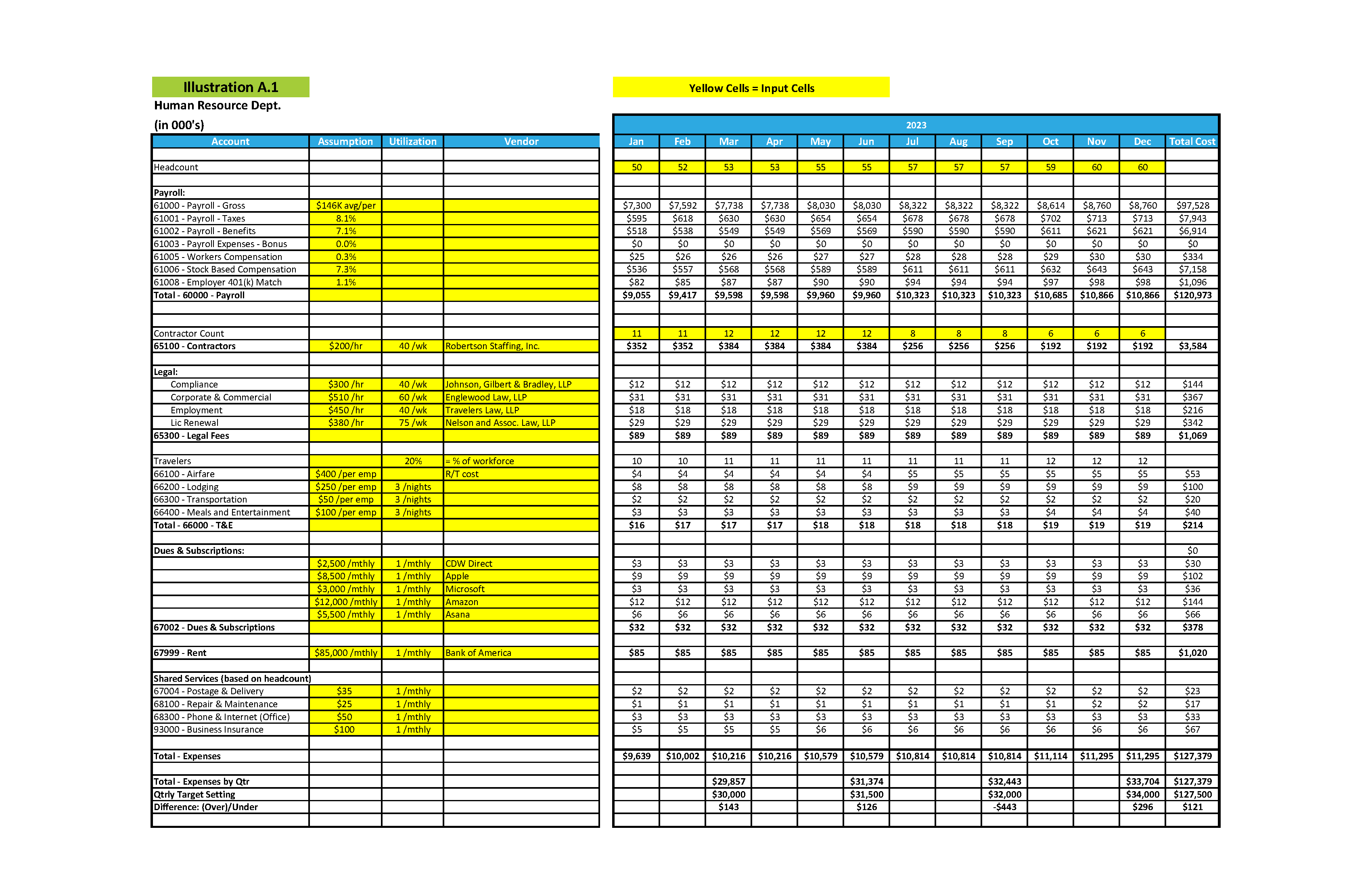
Based on the video and ZBB principles, a complete template would look something like this. Notice the prominent "Purpose" column, which serves as the justification field.

For more granular detail, especially for people-related or project costs, a template might include columns for the underlying assumptions or drivers.
Test your understanding!
You've designed and distributed your new ZBB template to all department heads. The Head of Sales submits their budget, but for the "Justification" column on a $50,000 request for "Travel," they have simply written "Same as last year." As the FP&A analyst, is this an acceptable submission? Why or why not, and what should be your next step?
Show answer
This is not an acceptable submission. It violates the core principle of Zero-Based Budgeting, which requires every expense to be justified from a "zero base" for the current period. "Same as last year" is the logic of traditional, incremental budgeting.
Your next step should be to go back to the Head of Sales and ask for a proper justification. You would ask probing questions like:
- "What specific trips are planned?"
- "Which clients or prospects will be visited?"
- "How does this travel support this year's sales targets?"
- "Could any of these meetings be done virtually to reduce cost?"
Your role is to ensure that the $50,000 is a necessary and efficient use of company resources to achieve current goals, not just a continuation of past habits.
3. ZBB Best Practices and the Review Process
Building the template is just the first step. The real value of ZBB comes from the strategic review process it enables. To learn more about the best practices for implementing this process, let's return to the guide from SparkCognition.
Mastering Zero-Based Budgeting in Excel: A Comprehensive ...
This guide also provides a step-by-step implementation walkthrough and outlines best practices for making your ZBB process successful.
Please read the sections 'Step-by-Step Guide to Zero-Based Budgeting in Excel' and 'Best Practices for Zero-Based Budgeting in Excel'. Focus on the principles of 'Build from Zero Each Period' and the importance of 'Data Validation & Audit Trails'.
The process generally works as follows:
- Distribution: The FP&A team distributes the blank ZBB template to all department heads.
- Justification: Each department head builds their budget from scratch, filling in the template with every desired line of spending and a clear business case in the justification column. This set of requests is often called a "decision package."
- Review and Challenge: The department head then meets with the FP&A team (and sometimes senior management) to review the decision package. The FP&A analyst's job is to act as a strategic partner, challenging assumptions and asking questions to ensure every dollar is aligned with company goals.
- Consolidation and Approval: Once all departmental budgets are reviewed and revised, FP&A consolidates them into a master company-wide budget for final approval by the CFO and CEO.
Your role as an FP&A analyst in this process is not just to check for accurate math, but to facilitate a strategic conversation about resource allocation across the entire organization.
Conclusion
In this lesson, we've moved from the abstract world of financial modeling theory to the practical application of budgeting. You've learned how to construct a Zero-Based Budgeting template, a powerful tool for enforcing financial discipline and strategic alignment.
Key Takeaways:
- ZBB Starts from Scratch: Unlike traditional budgeting, ZBB requires every expense to be justified each period, aligning spending with current strategic goals.
- The Template is Key: A well-designed Excel template standardizes the process. Critical components include fields for department, expense category, monthly amounts, and a detailed justification column.
- Excel Features Enhance Robustness: Using tools like Data Validation for drop-down lists is essential for maintaining data integrity and making consolidation easy.
- FP&A's Role is Strategic: The ZBB template is a tool to facilitate a rigorous review process. The analyst's job is to challenge assumptions and ensure resources are allocated effectively.
You now have a foundational tool for corporate budgeting. In our next lesson, we will build upon this by learning how to design and implement a rolling forecast model. This will allow us to dynamically track actual performance against our budget and continuously update our outlook for the future.