Welcome back! In our first lesson, you successfully set up your development environment and ran your first "Hello, World!" program. This was a crucial first step, confirming your tools are ready. Now, we move from simply printing a fixed message to actually working with data inside our program.
This lesson focuses on one of the most fundamental concepts in programming: variables. Variables are the named containers we use to store, reference, and manipulate data. Your background in Python means you're already familiar with the general idea of variables, but Go's approach is different in some key ways. We will explore how to declare and initialize variables using both the formal var keyword and the idiomatic short declaration := operator. Mastering this is essential for writing any Go program, from simple scripts to the complex backend services you aim to build.
1. Variables in a Statically Typed World
In programming, a variable is simply a name given to a storage location in memory. This location holds a value, which can be changed as the program runs.
A core difference between Go and Python is that Go is a statically typed language. This means that the type of a variable (e.g., whether it holds text, a whole number, or a decimal number) is known and checked by the compiler before you even run the program. In Python, types are dynamic and checked during execution. This static nature allows Go to catch many potential errors early and often leads to more performant and reliable code.
Every variable in Go has a specific type, and you can only assign values of that type to it. Let's explore the two primary ways you declare them.
2. The Formal Declaration: var
The var keyword is the most explicit way to declare a variable. It provides several ways to do so, giving you fine-grained control.
A. Declaration with Type and Value
The most verbose form specifies the variable name, its type, and its initial value.
// Format: var <name> <type> = <value>
var language string = "Go"
Here, we've declared a variable named language, specified that it must hold a string, and initialized it with the value "Go".
B. Declaration with Type Inference
Go's compiler is smart. If you provide an initial value, it can often figure out the type on its own. This is called type inference.
// Go infers that 'version' is a float64 because 1.18 has a decimal.
var version = 1.18
fmt.Println(version) // Prints 1.18
Even though we didn't write float64, the version variable is statically typed as such. Trying to assign a string to it later would cause a compiler error. This might feel a bit like Python, but remember the type is fixed at compile time.
C. Declaration with Zero Values
What if you declare a variable without giving it a value? Unlike some languages that might leave it with unpredictable "garbage" data, Go ensures safety by automatically initializing it to its zero value.
This W3Schools page provides a concise summary of Go variables. Focus on the concept of default initialization.
Please read the section titled "Variable Declaration Without Initial Value". The example demonstrates how variables are assigned default or "zero" values if not explicitly initialized.
The zero values for common types are:
0for numeric types (likeint,float64)falsefor thebooltype""(an empty string) for thestringtype
This feature prevents a whole class of bugs related to uninitialized variables.
3. The Idiomatic Shorthand: :=
Inside functions, you will most often use the := short variable declaration operator. It's a concise way to declare and initialize a variable at the same time. The compiler infers the type automatically.
// This is equivalent to: var name string = "Gopher"
name := "Gopher"

// You can declare multiple variables at once
port, status := 8080, "up"
The following video from Net Ninja provides a great visual walkthrough of declaring variables with both var and the := shorthand.
Go (Golang) Tutorial #3 - Variables, Strings & Numbers
This video covers the basics of declaring string and numeric variables in Go. Pay close attention to the distinction between the different declaration methods.
Watch the segment on string variables from the beginning. It covers the three forms of var declaration and the concept of reassigning values. Next, watch the explanation of the shorthand := syntax. The creator highlights a crucial rule about where it can be used.
4. var vs. :=: Key Differences and Usage
While they might seem interchangeable, var and := have distinct rules that determine when to use them.
var |
:= |
|---|---|
| Can be used inside and outside of functions. | Can only be used inside functions. |
| Declaration and value assignment can be done on separate lines. | Declaration and value assignment must be on the same line. |
Because := is limited to functions, the var keyword is required for declaring variables at the package level (outside of any function).
package main

import "fmt"

// 'var' is needed here, outside a function.
var isProduction = false

func main() {
    // ':=' is idiomatic inside a function.
    localHost := "127.0.0.1"

    fmt.Println("Production mode:", isProduction)
    fmt.Println("Connect to:", localHost)
}
A special rule for := is that it can be used on a line where some variables are being redeclared, as long as at least one new variable is also being declared. This is very common in Go, especially with error handling.
Unpacking Variables in Go | Definitions, Usage, and Examples
This video demonstrates various variable declaration syntaxes. The following clip explains the "at least one new variable" rule for the := operator.
Watch the short segment from this point where the presenter demonstrates how := can be used to reassign a value to an existing variable (year) while simultaneously declaring a new one (name).
5. Go's Strictness: The "Unused Variable" Rule
Go's compiler is very strict about clean code. If you declare a variable and don't use it anywhere, the compiler will refuse to build your program. This is not a warning; it is a compile-time error. This prevents you from leaving "dead code" in your program, which can be confusing and lead to bugs.
The image below shows exactly what this looks like in VS Code. The variable age was declared but never used, so the compiler flags it as an error.
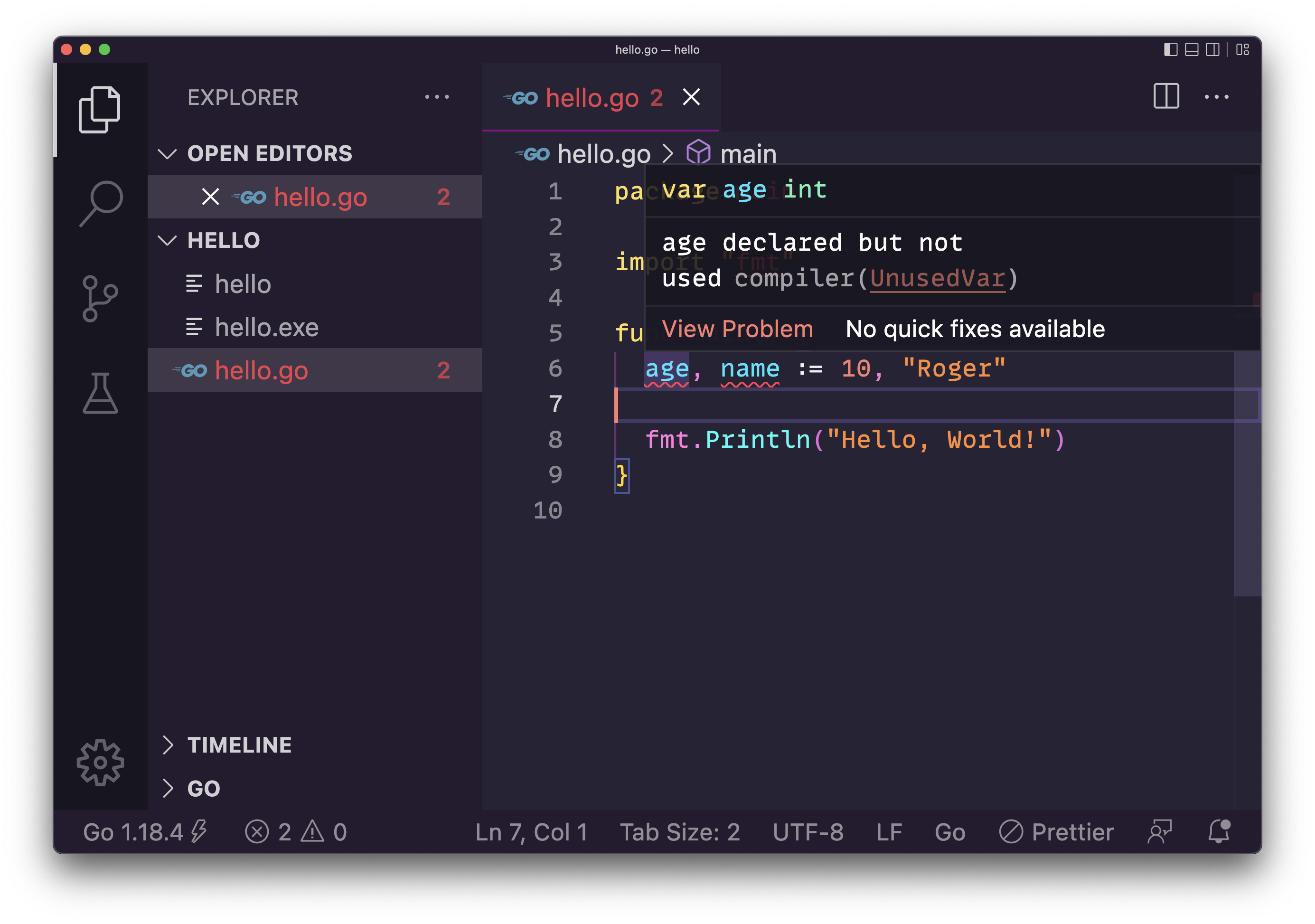
This is a common "gotcha" for programmers coming from languages like Python, which don't enforce this. If you encounter this error, the solution is simple: either use the variable or remove its declaration.
Practice
Now, let's put this into practice. Open the main.go file from our last lesson and replace its content with the following. Experiment by running the code, then uncommenting the lines as instructed.
package main

import "fmt"

func main() {
    // 1. Declare a variable `framework` of type string with the value "Gin".
    //    Use the explicit 'var' syntax.
    var framework string = "Gin"
    fmt.Println("Backend framework:", framework)

    // 2. Declare a variable `version` using type inference and the value 1.7.0.
    var version = "1.7.0"
    fmt.Println("Version:", version)

    // 3. Declare a variable `port` with the value 8080 using the ':=' shorthand.
    port := 8080
    fmt.Println("Running on port:", port)

    // 4. Declare a variable `isFun` but don't use it yet.
    //    Try to run the code with `go run main.go`. What happens?
    //    Now, uncomment the next line to fix the error and run it again.
    var isFun bool = true
    fmt.Println("Is Go fun?", isFun)

    // 5. Re-declare the port and declare a new variable `status`.
    //    This is a common pattern you will see in Go.
    port, status := 8081, "restarting"
    fmt.Println("New port:", port)
    fmt.Println("Status:", status)
}
Conclusion
In this lesson, you've learned the essential mechanics of declaring and initializing variables in Go. This is the foundation for storing and manipulating the data that will power your backend applications.
Key takeaways from this lesson:
- Static Typing: Go requires every variable to have a type that is known at compile time.
varKeyword: Used for formal declarations. It's required for package-level variables and allows separating declaration from initialization.:=Operator: A concise shorthand for declaring and initializing variables inside functions. It's the most common and idiomatic choice for local variables.- Zero Values: Variables declared without an initial value are safely initialized to a "zero value" like
0,false, or"". - Unused Variables: Go enforces clean code by treating unused variables as a compile-time error.
We've encountered types like string, int, and bool organically. In our next lesson, we will formally explore Go's basic data types in more detail and also look at how to declare constants.