Welcome to the final lesson of our Python Fundamentals module! In our previous session, we explored how to make your programs repeat actions using for and while loops. Now, we'll address a crucial aspect of writing real-world code: what happens when things don't go as planned? A program might try to divide by zero, access a file that doesn't exist, or receive invalid input from a user. Without a plan, these runtime errors, called exceptions, will crash your program.
This lesson is all about building robust, resilient code. You will learn to anticipate and handle exceptions gracefully using Python's try, except, else, and finally blocks. This allows your program to manage errors without halting execution, providing a much better experience for the user. Since you've worked with C++, the concept of exceptions will be familiar, but you'll find Python's approach to be particularly clear and structured.
1. The Anatomy of an Error: Syntax Errors vs. Exceptions
Before we start handling errors, it's important to distinguish between two main types.
- Syntax Errors: These are mistakes in the structure of your code that Python's parser detects before the program even starts running. For example, a missing parenthesis or incorrect indentation. The program won't run at all until these are fixed.
- Exceptions: These occur during the program's execution (at runtime). The code is syntactically correct, but an operation is impossible to perform. Dividing by zero is a classic example. An unhandled exception will cause your program to stop immediately and print a "traceback" message.
The Real Python article "Python Exceptions: An Introduction" provides a clear explanation of this distinction.
Python Exceptions: An Introduction
This article will help you solidify the difference between errors the interpreter catches before execution and errors that happen while the program is running.
Read the short section on this topic. Pay attention to the examples of a SyntaxError and a ZeroDivisionError to see how they differ.
An unhandled exception stops your program in its tracks. To prevent this, we need to "catch" the exception and decide how to proceed.
2. The try...except Block: Catching and Handling Exceptions
The fundamental tool for error handling in Python is the try...except block. The structure is simple:
- The
tryblock contains the code that you suspect might raise an exception. - The
exceptblock contains the code that will execute if and only if an exception occurs within thetryblock.
Let's watch a clear demonstration from Corey Schafer's tutorial. He shows a program that crashes from a FileNotFoundError and then uses a try...except block to handle it gracefully.
Python Tutorial: Using Try/Except Blocks for Error Handling
This video from Corey Schafer's highly-regarded Python series provides an excellent, practical introduction to error handling.
Watch the first part of the video, which demonstrates why we need error handling and the basic structure of a try...except block.
Best Practice: Be Specific with Your except Clauses
A common mistake for beginners is to use a "bare" except: block, which catches any and all exceptions. This is generally bad practice because it can hide unexpected errors or bugs, making your code difficult to debug. You might think you're handling a ValueError from user input, but you could accidentally be catching a TypeError from a mistake you made elsewhere in the try block.
The best practice is to always specify the type of exception you expect to catch. You can have multiple except blocks to handle different types of errors.
The next segment of Corey's video explains this crucial concept perfectly. He demonstrates how a generic except can mask a NameError and shows how to use multiple, specific except blocks to handle different errors appropriately.
Python Tutorial: Using Try/Except Blocks for Error Handling
This part of the video is key to writing robust error-handling code. It emphasizes the importance of anticipating specific errors.
Watch the segment on catching specific exceptions. Pay close attention to how he adds multiple except blocks and uses as e to get access to the actual exception object for logging or display.
The key takeaways from that segment are:
- Always specify the exception type (e.g.,
except ValueError:). - You can have multiple
exceptblocks, ordered from most specific to most general. - You can use
except ValueError as e:to capture the exception object, allowing you to print or log the specific error message (print(e)).
3. The Full Structure: else and finally
The try...except block can be extended with two more optional clauses: else and finally. This gives you fine-grained control over your program's flow in both success and error scenarios.
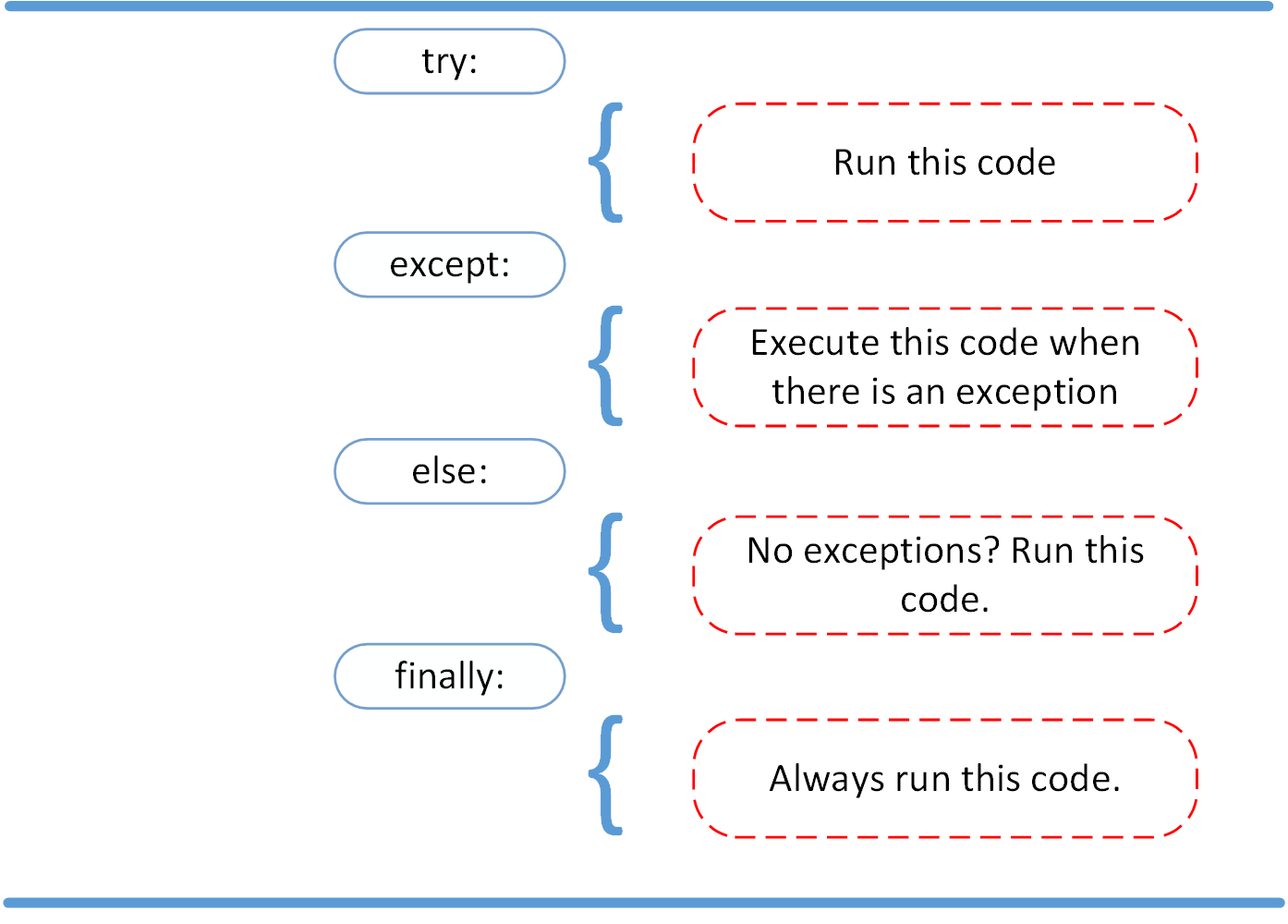
- The
elseBlock: This code runs only if thetryblock completes without raising any exceptions. It's useful for separating the code that should run on success from the code that is being monitored for errors. This keeps yourtryblock as small and focused as possible. - The
finallyBlock: This code runs no matter what. It executes whether thetryblock succeeded, an exception was raised and caught, or even if an uncaught exception occurred that will crash the program. It is essential for cleanup actions, like closing a file or a network connection, to ensure resources are properly released.
Let's return to the video for a walkthrough of these two clauses.
Python Tutorial: Using Try/Except Blocks for Error Handling
Corey Schafer clearly explains the distinct roles of the else and finally blocks using a file-handling example.
Watch the section that covers else and finally. Note when each block is executed in the success and failure cases he demonstrates.
4. Proactive Error Handling: The raise Statement
Sometimes, you need to signal an error based on your program's logic, even if Python wouldn't normally raise an exception. For example, a function might require a positive integer, and receiving a negative number is an invalid state. You can create your own error condition using the raise keyword.
def set_age(age):
    if age < 0:
        raise ValueError("Age cannot be negative.")
    print(f"Age is set to {age}")

try:
    set_age(-5)
except ValueError as e:
    print(f"Error: {e}")


# Output: Error: Age cannot be negative.
This allows you to enforce preconditions and business rules within your functions, making them more robust.
5. Time to Practice
Your preference is for hands-on learning, so let's apply these concepts. The following exercises will guide you through implementing each part of the try...except structure in common scenarios.
Python Error Handling Practice | try/except Examples
This resource from APX Machine Learning provides a set of focused, practical exercises that perfectly match the concepts we've just covered. Work through them sequentially, trying to solve each one before looking at the provided solution.
Complete the following four exercises on the page: Exercise 1: This is a classic use case—validating user input. It's a great warm-up for try...except ValueError. Exercise 2: This exercise introduces handling FileNotFoundError and demonstrates the practical use of the finally block for cleanup actions. Exercise 3: Here, you'll practice catching multiple, specific exceptions (ZeroDivisionError, TypeError) and using the else block for success-only code. Exercise 4: This final exercise will have you use the raise keyword to enforce a logical rule within a function and then catch the error in the calling code.
By completing these exercises, you will have built a solid, practical understanding of how to make your Python programs resilient to runtime errors.
Conclusion
You have now completed the Python Fundamentals module! By mastering error handling, you've added a critical layer of professionalism to your coding, enabling you to build applications that are robust and user-friendly.
Here are the key takeaways from this lesson:
- Exceptions are errors that occur at runtime. Unhandled, they crash your program.
- The
tryblock contains code that might fail. - The
except SpecificError:block is your error handler for a particular type of exception. Always be specific to avoid hiding bugs. - The
elseblock runs only if thetryblock succeeds, separating your success logic from your error-prone code. - The
finallyblock runs always, guaranteeing that cleanup code (like closing files) is executed. - The
raisekeyword allows you to trigger exceptions based on your own program's rules.
In our next lesson, we will begin Module 2, "Core Data Structures." We'll dive into lists, one of the most versatile and fundamental data structures in Python, which will be a cornerstone for tackling the more advanced data structures and algorithms you're aiming to master.