Hello! In our last lesson, we explored Python's fundamental data types, giving you the tools to store and organize information. Now that you can handle data, the next logical step is to write structured, reusable blocks of code that can process that data. This is where functions come in.
Today, we'll focus on writing and calling Python functions. Your background in JavaScript means you're already well-acquainted with the concept of functions as reusable code blocks. We'll build on that foundation, exploring Python's specific syntax and some of its powerful features, like keyword arguments, which make code remarkably readable. By the end of this lesson, you'll be able to encapsulate logic within functions that accept data and return processed results—a cornerstone of building any application, including our AI-powered study tool.
From JavaScript Functions to Python def
The core idea of a function is the same in both Python and JavaScript: a named block of code that performs a task. The most visible difference is the syntax. Python uses the def keyword and indentation, which promotes a clean and consistent style.
This article provides a direct comparison that will help you map your existing knowledge to Python's way of doing things.
How to Learn Python for JavaScript Developers [Full ...
This freeCodeCamp handbook is great for quickly translating concepts you already know. We'll look at the section on function definitions.
Please read the part that starts with the introduction to functions and then focus on the example under the heading Basic Function Definition. Notice the use of def and the colon : to start the function block.
The Anatomy of a Python Function
Let's dive deeper into the structure of defining and calling a function in Python. A great way to start is with a short video that walks through the essential syntax.
Python Functions || Python Tutorial || Learn Python Programming
The Socratica channel provides clear and concise tutorials. This video gives a quick but thorough introduction to defining and calling functions.
Watch the first part on defining and calling a simple function. Pay attention to the def keyword, the parentheses (), the colon :, and the role of indentation. Next, watch the section on returning values. This shows how a function can send a result back to the code that called it.
To solidify these concepts, the following comprehensive article from Real Python will be our main guide for this lesson. It breaks down every component in detail.
Defining Your Own Python Function
This article provides an in-depth look at Python functions. We'll start with the basic syntax.
Read the section Defining Functions in Python. It formally breaks down the def function_name(parameters): syntax and provides a clear first example with the greet() function.
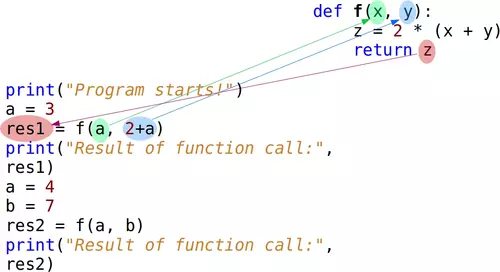
When you call a function, the program's execution flow transfers to the function, processes the code inside it, and then returns to where it was called. The following image provides a great visual for this process.
Passing Data to Functions: Arguments
Just like in JavaScript, you pass data into functions via arguments. However, Python offers more flexibility in how you can pass them, which can significantly improve code clarity.
Parameters vs. Arguments
It's useful to be precise with terminology:
- Parameters are the variable names listed in the function's definition (e.g.,
xandyindef my_func(x, y):). - Arguments are the actual values you pass to the function when you call it (e.g.,
5and10inmy_func(5, 10)).
Positional and Keyword Arguments
Python supports two main ways of passing arguments: by position and by keyword.
- Positional Arguments: The arguments are matched to parameters based on their order. This is the most common way and is identical to how arguments work in a standard JavaScript function call.
- Keyword Arguments: You explicitly name which parameter each argument corresponds to (e.g.,
my_func(x=5, y=10)). This makes the function call much more readable, and the order no longer matters.
Let's continue with the Real Python article to see these in action.
Defining Your Own Python Function
This section explains the two primary ways to pass arguments and the rules for combining them.
Read through these two subsections: Positional Arguments: This explains how arguments are matched by order and shows the potential for errors if the order is wrong. Keyword Arguments: This introduces the name=value syntax, highlighting the benefits of readability and order-flexibility. Pay close attention to the rule at the end: positional arguments must always come before keyword arguments in a function call.
Default Argument Values
You can make function parameters optional by providing a default value in the definition. If a value for that parameter isn't provided in the function call, Python will use the default.
Python Functions || Python Tutorial || Learn Python Programming
Let's return to the Socratica video, which has a great explanation of default (keyword) arguments.
Watch the segment on keyword arguments (which Python also calls default arguments). The cm function example is a practical demonstration. Then, watch the brief but important section on the rule for ordering required (non-default) and optional (default) arguments in a function definition.
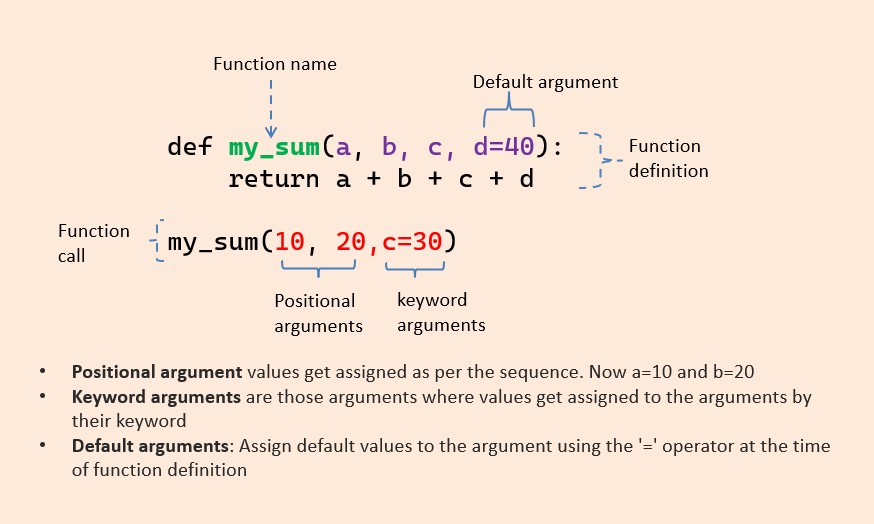
This image provides a helpful summary of the different argument types we've discussed.
A quick but important note: avoid using mutable objects like lists ([]) or dictionaries ({}) as default values. The default object is created only once when the function is defined, leading to unexpected behavior where modifications persist across calls. The standard practice is to use None as the default and then create a new list or dictionary inside the function if the argument is None.
Getting Data from Functions: The return Statement
So far, our functions have mostly printed things to the console—a "side effect." To build powerful, modular code, functions need to send results back to the caller. This is done with the return statement.
Defining Your Own Python Function
This part of the Real Python article covers the return statement and the crucial difference between functions that cause side effects and those that return values.
Please read the section Returning From Functions. Focus on the two key subsections: Producing Side Effects: This explains what a side effect is (like modifying a list in-place or printing to the screen). Returning Values: This details how the return statement works, how to return a single value, and how Python handily packs multiple returned values into a tuple.
Let's see a final, practical demonstration of creating functions that take arguments and return a useful result.
Functions in Python are easy 📞
This video from Bro Code offers a very direct, hands-on look at using the return statement.
Watch the segment from the beginning of the explanation on return. It shows clear examples of how a value is sent back from a function and can be assigned to a variable or used directly. The create_name example is a great demonstration of performing some logic (capitalizing strings) and returning the final result.
Key Takeaways
- Functions are defined with the
defkeyword, a name, parentheses for parameters, and an indented code block:def my_function(param1, param2):. - You call (or invoke) a function using its name followed by parentheses containing arguments:
my_function(arg1, arg2). - Positional arguments are matched to parameters by their order.
- Keyword arguments (
param1=arg1) are matched by name, making calls more readable and order-independent. Positional arguments must always come before keyword ones. - You can set default values for parameters (
def my_function(param="default"):) to make them optional. - The
returnstatement exits a function and sends a value back to the caller. A function without an explicitreturnstatement implicitly returnsNone.
In our next lesson, we will explore list comprehensions and lambda functions. Lambdas are a concise way to create small, anonymous functions, and they are frequently used in combination with list comprehensions to perform powerful data processing tasks in a single line of code.