Welcome to the next lesson in our "Advanced Python for Backend Systems" module. In the previous lesson, we focused on structuring code with inheritance and composition, learning how to build flexible and maintainable class relationships. Organizing code is half the battle; the other half is making it resilient. Real-world applications, especially backend systems like those at Infilect, must gracefully handle unexpected events like network failures, invalid user data, or missing files.
This lesson focuses on exactly that: writing robust code that doesn't crash at the first sign of trouble. You will learn to implement Python's primary mechanism for this, the try-except block. By the end of this lesson, you will be able to write robust functions that can anticipate, catch, and handle errors, a non-negotiable skill for any backend developer.
1. The Philosophy of Handling Errors: EAFP
In Python, there are two common approaches to dealing with potential errors:
- LBYL (Look Before You Leap): You check if an operation is safe before you perform it. For example, checking if a file exists before trying to open it.
- EAFP (Easier to Ask for Forgiveness than Permission): You go ahead and perform the operation, but wrap it in a mechanism that can handle any errors that occur.
While LBYL seems intuitive, the Python community strongly prefers EAFP. It leads to cleaner code and avoids a subtle bug known as a "race condition," where the state of the system (e.g., the file's existence) could change between your check and your action.
The following article by Miguel Grinberg, a well-respected Python developer, provides an excellent explanation of these two patterns and why EAFP is generally superior.
The Ultimate Guide to Error Handling in Python
This article introduces the core philosophies of error handling in Python.
Please read the first major section, from the beginning down to the end of the EAFP part. Focus on understanding the difference between the LBYL example of deleting a file and the more robust EAFP approach that uses a try...except block.
The EAFP principle is implemented in Python using exceptions and try...except blocks. An exception is an event that occurs during program execution that disrupts the normal flow. Instead of crashing, Python "raises" an exception object, and we can "catch" it to handle the problem.
2. The Anatomy of a try...except Block
The full structure for handling exceptions is try, except, else, and finally. Each part has a distinct role.
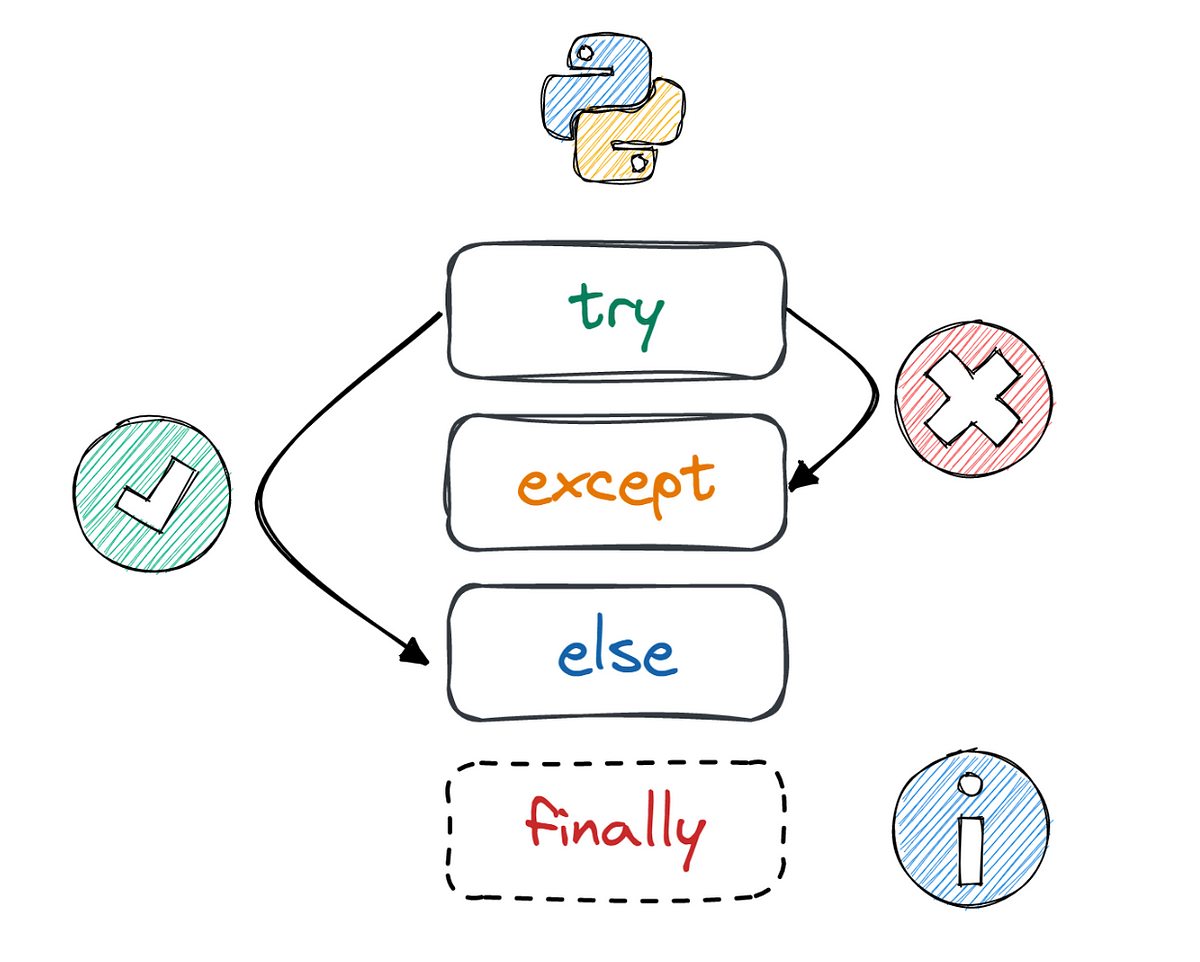
Corey Schafer’s tutorial provides a fantastic, clear walkthrough of how these pieces fit together.
Python Tutorial: Using Try/Except Blocks for Error Handling
This video is a comprehensive guide to the syntax and logic of try-except blocks.
Please watch these segments to understand each component: Basic try-except: Understand how wrapping code that might fail in a try block and providing an except block prevents the program from crashing. Catching Specific Exceptions: This is a critical section. Pay close attention to why catching a specific FileNotFoundError is much better than catching a generic Exception. This prevents you from accidentally hiding unrelated bugs. Accessing the Exception Object: Learn how to use as e to capture the exception object, which allows you to log or print the specific error message. The else and finally Clauses: Understand the purpose of else (runs only on success) and finally (always runs, for cleanup).
Let's summarize the structure with a code example:
try:


    # 1. Code that might raise an exception
    # Keep this block as small as possible
    file = open('data.txt', 'r')
    content = file.read()

except FileNotFoundError as e:


    # 2. Runs ONLY if a FileNotFoundError occurs in the try block
    print(f"Error: Could not find the file. Details: {e}")
    content = "" # Provide a default value

except Exception as e:


    # 3. A more general catch-all for other unexpected errors
    # Should be used sparingly and placed after specific exceptions
    print(f"An unexpected error occurred: {e}")
    content = ""

else:


    # 4. Runs ONLY if the try block succeeds without any exceptions
    print("File read successfully.")


    # Logic that depends on the success of the try block goes here

finally:


    # 5. Runs NO MATTER WHAT (success, exception caught, or uncaught exception)
    print("Closing resources...")
    if 'file' in locals() and not file.closed:
        file.close() # Essential cleanup
Best Practices:
- Be Specific: Always catch the most specific exceptions you expect first. A broad
except Exception:can mask bugs. - Keep
tryBlocks Tight: Only wrap the one or two lines of code that could actually cause the error you're trying to catch. - Use
finallyfor Cleanup: It's the guaranteed place to close files, database connections, or network sockets, preventing resource leaks.
3. Raising and Bubbling Exceptions
So far, we've only caught exceptions that Python or other libraries raised. But what if your own logic encounters a problem? You can, and should, raise your own exceptions. This is how a function signals to its caller that it couldn't complete its task.
When an exception is raised, it "bubbles up" the call stack. If the immediate calling function doesn't handle it, it passes up to the next one, and so on. If it reaches the top of the program without being caught, the program crashes.
This bubbling behavior is not a bug; it's a feature! It allows you to handle errors at the most appropriate level. For example, a low-level function that accesses a database might raise a ConnectionError, but it's the high-level API endpoint that catches it and returns a 503 Service Unavailable HTTP response to the client.
The video from ArjanCodes demonstrates this layered approach, which is fundamental to backend architecture.
Exception Handling Tips in Python ⚠ Write Better Python Code Part 7
This video shows the professional way to handle exceptions in a layered application, like a web backend.
Watch these key parts to see the pattern in action: Handling Low-Level Errors: Observe how a low-level database function catches a specific sqlite3.OperationalError. It uses a finally clause to ensure the database connection is always closed. Creating Custom Errors: The developer creates meaningful, application-specific exceptions like NotFoundError. Raising & Handling High-Level Errors: The low-level function raises the custom NotFoundError. A higher-level function (the API endpoint) then catches this NotFoundError and translates it into a user-facing HTTP 404 response.
This pattern is exactly how you build robust backend services. You let errors bubble up from the data layer to the service layer, where they are handled appropriately.
Hands-On Task: Write a Robust User Profile Processor
Let's put all these concepts together. You will write a function that processes a user dictionary.
Your task:
- Create a function
process_user_profile(user_data). - Inside this function, use a
try-except-else-finallyblock. - In the
tryblock:- Attempt to access the
namefromuser_data. If it's missing, Python will raise aKeyError. - Check if the user's
ageis less than 18. If it is, manuallyraiseaValueErrorwith the message "User is underage."
- Attempt to access the
- Write an
exceptblock to catch theKeyError. It should print: "Error: Missing 'name' in user data." - In the
elseblock (which runs on success), print a message like:Processing profile for {name}, age {age}. - In the
finallyblock, print: "Profile processing finished." - Outside the function, create a second, higher-level function
handle_request(user_data)that callsprocess_user_profile(user_data). This outer function should have its owntry-exceptblock that only catches theValueErrorthat might bubble up fromprocess_user_profile. If it catches it, it should print: "Validation failed: User is underage."
Test your handle_request function with three different dictionaries to see all paths execute:
- A valid user:
{'name': 'Alice', 'age': 30} - A user with a missing name:
{'age': 25} - An underage user:
{'name': 'Bob', 'age': 16}
Click here for a solution to check your work.
def process_user_profile(user_data):
    """Processes a single user profile, handling internal errors."""
    try:
        name = user_data['name']
        age = user_data['age']

        if age < 18:


            # Raise an exception that will bubble up
            raise ValueError("User is underage.")

    except KeyError as e:


        # Handle the error locally
        print(f"Error: Missing key in user data: {e}")

    else:


        # Runs only if try block succeeds
        print(f"Processing profile for {name}, age {age}.")

    finally:


        # Always runs
        print("--- Profile processing finished ---")

def handle_request(user_data):
    """Handles a request by calling the processor and catching validation errors."""
    print(f"\nHandling new request with data: {user_data}")
    try:
        process_user_profile(user_data)
    except ValueError as e:


        # Catch the error that bubbled up from the processor
        print(f"Validation failed: {e}")


# 1. Test with a valid user
valid_user = {'name': 'Alice', 'age': 30}
handle_request(valid_user)


# Expected Output:
# Handling new request with data: {'name': 'Alice', 'age': 30}
# Processing profile for Alice, age 30.
# --- Profile processing finished ---


# 2. Test with a user missing the 'name' key
missing_key_user = {'age': 25}
handle_request(missing_key_user)


# Expected Output:
# Handling new request with data: {'age': 25}
# Error: Missing key in user data: 'name'
# --- Profile processing finished ---


# 3. Test with an underage user
underage_user = {'name': 'Bob', 'age': 16}
handle_request(underage_user)


# Expected Output:
# Handling new request with data: {'name': 'Bob', 'age': 16}
# --- Profile processing finished ---
# Validation failed: User is underage.
Conclusion
You have now learned one of the most critical skills for writing professional, production-ready code. Building well-structured classes is important, but ensuring they can withstand and recover from failure is what makes a system reliable.
Key Takeaways:
- EAFP over LBYL: In Python, it's often better to try an operation and handle the failure than to check for all possible problems beforehand.
- The Full Toolkit:
tryruns risky code,excepthandles failures,elseruns on success, andfinallyis for cleanup that must always happen. - Be Specific: Catch specific exceptions to avoid hiding bugs.
- Handle Errors at the Right Level: Don't be afraid to let exceptions bubble up. Handle them at a layer in your application that has the right context, such as an API view that can return a meaningful HTTP error.
In our next lesson, we will explore logging. What do you do inside an except block after you catch an error? Often, you log it. Effective logging is the key to monitoring and debugging applications running in the cloud, and it builds directly on the error-handling skills you've just acquired.