Welcome to the next step in our journey! In the last lesson, we explored Python's essential collection types—lists, dictionaries, sets, and tuples—and learned how to manage groups of data. Now, we'll learn how to package our logic for processing that data into reusable, organized blocks called functions.
This lesson is all about the "Don't Repeat Yourself" (DRY) principle, a cornerstone of professional software development. By learning to write functions, you'll be able to create clean, modular, and testable code. This skill is absolutely fundamental for a backend engineer, as it forms the basis of every API endpoint, data processing task, and business logic you will ever build.
By the end of this lesson, you will be able to define your own functions, pass data into them using different types of arguments, and get processed results back using return values.
1. What Are Functions and Why Do We Need Them?
At its core, a function is a named, reusable block of code that performs a specific task. You've already used built-in functions like print() and len(). Now, you'll learn to create your own.
Imagine you have a set of steps you need to perform repeatedly, like the tag processing logic from our last lesson. Instead of copying and pasting that code every time, you can wrap it in a function. This approach has several key benefits that are crucial in a professional environment like Infilect's.
Writing Functions in Python— A Beginner's Guide
This article provides an excellent motivation for why functions are more than just a time-saver.
Read the section titled "First, why write functions?". As you read, pay close attention to the points about avoiding careless errors and freeing up "mental capacity."
In backend engineering, where systems can have hundreds of distinct operations, encapsulating logic into well-named functions makes the entire system understandable, maintainable, and less prone to bugs.
2. The Anatomy of a Python Function
Defining a function in Python has a clear and consistent syntax. Let's break down its essential parts.
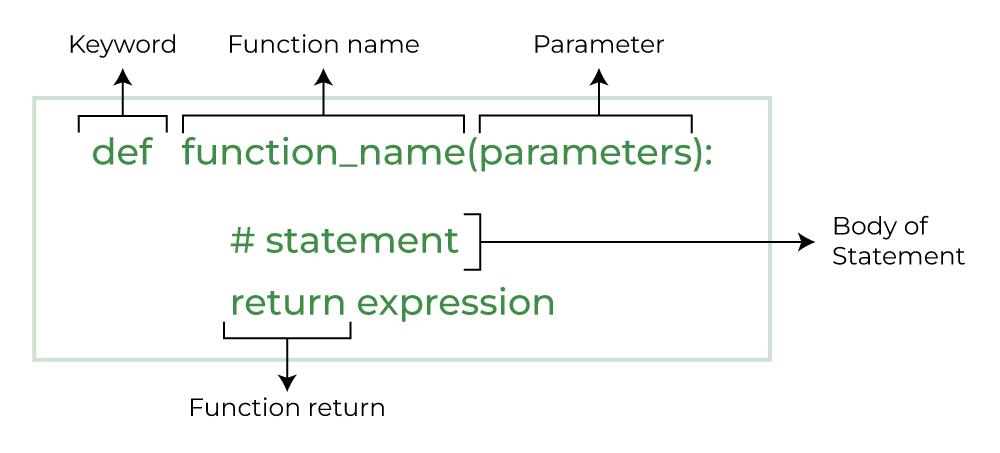
The key components are:
defkeyword: Signals the start of a function definition.- Function Name: A descriptive name that follows Python's standard naming conventions (lowercase with underscores, e.g.,
calculate_total_cost). - Parameters: Variables listed inside the parentheses
()that act as placeholders for the data the function will receive. These are the function's inputs. - Colon
:: Marks the end of the function header. - Function Body: An indented block of code that contains the logic the function will execute.
returnstatement: (Optional) Sends a result back to the code that called the function.
3. A Visual Guide to How Functions Work
The best way to understand functions is to see them in action. The following video provides a fantastic visual explanation of the entire process, from defining a function to calling it and understanding how Python handles variables.
Python Functions: Visually Explained
This video, "Python Functions - Visually Explained," is excellent for building a mental model of function execution.
Watch the first two main sections of the video: Syntax and Definition: This part covers the basic syntax of defining a function. Calling a Function: This segment visually traces how Python executes a function call, assigning the arguments (the actual values, like 14 and 10) to the parameters (the placeholders, length and width).
4. Single Responsibility and Returning Values
A critical best practice in programming is the Single Responsibility Principle. This means a function should do one thing and do it well. A function named calculate_area should only calculate the area; it shouldn't also print it or save it to a file.
But if the calculation happens inside the function, how do we get the result out? This is where the return statement becomes essential. It’s also where we must understand a fundamental concept in programming: scope.
Variables created inside a function are local—they exist only within that function's temporary workspace (its "local namespace") and are destroyed once the function finishes. To prevent the result from being lost, we use return to pass it back to the main program.
This next part of the video explains this concept perfectly.
Python Functions: Visually Explained
This is the most important part of the video. It explains the "why" behind the return statement.
Please continue watching from where you left off until the end: Single Responsibility: This section explains why mixing calculation and printing is a bad idea. Namespaces: This crucial segment illustrates the difference between the global namespace and a function's local namespace, explaining why local variables are temporary. Using return: Finally, watch from here to see how return solves the problem by sending a value out of the local namespace before it's destroyed.
To summarize:
- A function that performs a calculation should
returnthe result. - A function that performs an action (like printing to the console or modifying a file) is said to have a side effect.
- Good code design often separates functions that return values (pure calculations) from those that cause side effects.
If a function doesn't have an explicit return statement, it implicitly returns a special value called None. You can also return multiple values, and Python will automatically package them into a tuple.
5. Flexible Inputs: Positional, Keyword, and Default Arguments
Python offers a lot of flexibility in how you can pass arguments to a function. Understanding these methods is key to writing readable and easy-to-use functions, which is especially important when designing APIs later in this course.
Defining Your Own Python Function
This article from Real Python provides a detailed look at different ways to pass arguments.
Please read the following two sections: Start with the section on calling functions. This covers the difference between positional arguments, where order matters, and keyword arguments, which improve readability by using the parameter name. Next, read the section on default arguments. Pay very close attention to the "common gotcha" involving mutable objects like lists. Understanding this pitfall is a significant step in your Python journey.
To recap the key types of arguments:
- Positional:
calculate_cost("bananas", 6, 0.74)— Simple, but the caller must remember the correct order. - Keyword:
calculate_cost(item="bananas", quantity=6, price=0.74)— More verbose, but much more readable and order-independent. This is preferred for functions with many arguments. - Default:
def greet(name, verbose=False):— Allows you to make arguments optional. Callers can omit them, and the default value will be used.
6. Hands-On Practice: Building Reusable Tools
Let's apply these concepts by refactoring some code from our previous lesson and building a few new, simple tools. Create a new file named functions_practice.py.
Task 1: Functionalize the Tag Processor
In the last lesson, you wrote code to clean a list of user tags. Let's turn that into a reusable function.
def process_tags(tag_list):
    """Takes a list of tags and returns a sorted list of unique tags."""


    # 1. Use a set to get the unique tags.
    unique_tags_set = set(tag_list)


    # 2. Convert the set back to a list to be able to sort it.
    unique_tags_list = list(unique_tags_set)


    # 3. Sort the list alphabetically.
    unique_tags_list.sort()


    # 4. Return the cleaned list.
    return unique_tags_list


# --- Test your function ---
user_tags = ['python', 'backend', 'django', 'api', 'python', 'rest', 'api']
cleaned_tags = process_tags(user_tags)
print(f"Original tags: {user_tags}")
print(f"Cleaned tags: {cleaned_tags}")


# Expected output:
# Original tags: ['python', 'backend', 'django', 'api', 'python', 'rest', 'api']
# Cleaned tags: ['api', 'backend', 'django', 'python', 'rest']
Notice how this function has a single, clear responsibility and uses return to provide the result.
Task 2: A Versatile Data Processing Function
Now let's analyze a slightly more complex function. The image below shows a function designed to apply different operations to a list of data.
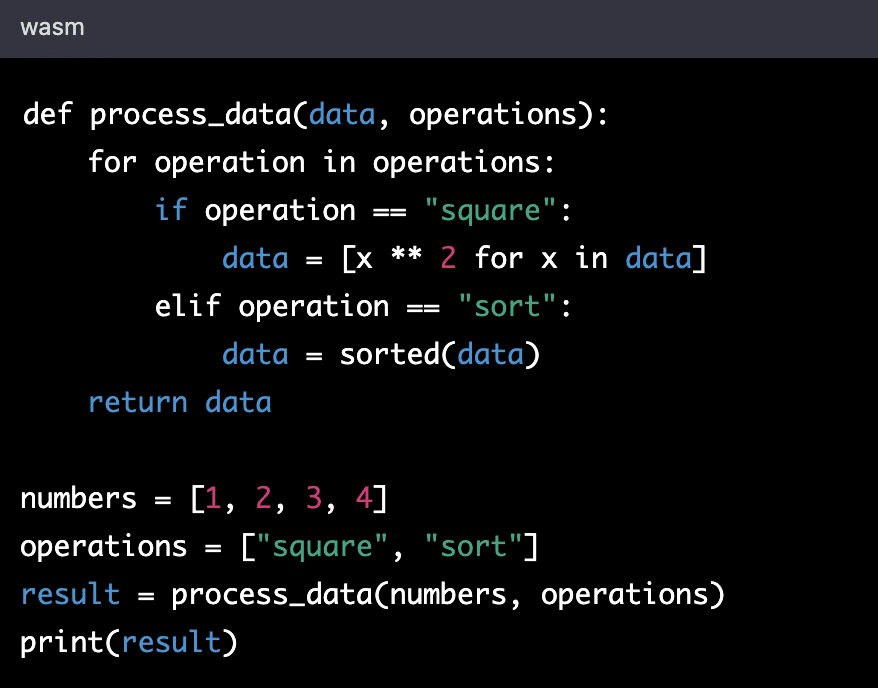
Look at this code and answer these questions for yourself:
- What are the names of the two parameters?
- In the example call, what are the two arguments being passed?
- What value does the function return?
- If the
operationslist was["sort", "square"], what would the output be? (Trace the logic!)
Task 3: Create a Report Generation Function
Let's write a function that takes structured data and returns a formatted string. This is a very common task in backend development (e.g., creating log messages or API responses).
def format_inventory_item(item, include_id=False):
    """
    Formats an inventory item dictionary into a human-readable string.

    Args:
        item (dict): A dictionary with 'name', 'quantity', and 'price'.
        include_id (bool): If True, includes the item_id in the output.

    Returns:
        str: A formatted string describing the item.
    """
    total_cost = item['quantity'] * item['price']


    # Start building the base report line
    report_line = f"{item['name'].capitalize()}: {item['quantity']} units available. Total value: ${total_cost:.2f}"


    # Optionally add the ID if the flag is set to True
    if include_id and 'item_id' in item:
        report_line += f" (ID: {item['item_id']})"

    return report_line


# --- Test your function ---
inventory = [
    {'item_id': 101, 'name': 'laptop', 'quantity': 12, 'price': 1200.00},
    {'item_id': 102, 'name': 'mouse', 'quantity': 55, 'price': 25.00},
]


# Generate a simple report
print("--- Simple Inventory Report ---")
for item_data in inventory:
    print(format_inventory_item(item_data))


# Generate a detailed report using the default argument
print("\n--- Detailed Inventory Report ---")
for item_data in inventory:
    print(format_inventory_item(item_data, include_id=True))
This format_inventory_item function demonstrates using both a positional argument (item) and an optional keyword argument (include_id) with a default value. This makes the function flexible for different reporting needs.
7. A Note on Professional Practice: Docstrings
A docstring is a string literal that appears as the first statement in a function's body. It explains the function's purpose, arguments, and return value. Writing good docstrings is a critical professional habit. It makes your code understandable to others and to your future self. In a collaborative environment like Infilect, clear documentation is non-negotiable.
Our format_inventory_item function includes a simple docstring explaining what it does (Args, Returns). This is the kind of documentation that helps teams work efficiently.
Conclusion
In this lesson, you've made a significant leap from writing simple scripts to structuring code like a professional programmer. Functions are the most important organizational tool in your arsenal.
Key Takeaways:
- Functions allow you to write reusable, modular, and testable code by encapsulating logic.
- Data is passed into functions via arguments, which are received by parameters.
- You can pass arguments by position or by keyword. Keyword arguments improve readability. Default arguments make parameters optional.
- Functions have a local scope; their variables are temporary.
- The
returnstatement is used to send a value out of a function before its scope is destroyed.
In our next lesson, we will explore how to make our programs persistent by reading from and writing to files. We will use the functions we've learned to write to process data that we read from a file and then write the results back out.