Introduction
In our recent lessons, we've deconstructed the craft of Principal-level design, moving from synthesizing new architectures to ensuring they can evolve gracefully and withstand critical risks like security breaches and large-scale disasters. We have assembled the conceptual building blocks. Now, we arrive at the final, crucial step: communicating that design. A brilliant design that exists only in your head has no impact. Its value is unlocked when it is documented, debated, and used to align an entire engineering organization.
This lesson focuses on how to produce a Principal-level technical design document, focusing on architecture, trade-offs, and a phased rollout plan. This artifact is the primary vehicle for technical leadership at companies like Google. It’s where your deep thinking on architecture, your analysis of trade-offs, and your strategic planning for implementation all come together. Mastering this is not just about becoming a better writer; it's about becoming a more effective technical leader.
The Design Document as a Strategic Tool
Before diving into the structure, it's essential to reframe the purpose of a design document. For a junior engineer, it might be a documentation exercise. For a Principal Engineer, it is a high-leverage strategic tool. As you know from your experience, senior engineers solve problems, and often the most effective tool for that, early on, is a document, not code.
Design Docs at Google - Industrial Empathy
This article, written by an ex-Googler, perfectly captures the role of design documents in Google's engineering culture. It moves beyond the idea of a doc as mere paperwork and presents it as a core engineering activity.
Please read the introduction, starting from the beginning and ending just before the "Anatomy of a design doc" section. Focus on the list of functions it fulfills, such as achieving consensus and scaling knowledge.
As the article highlights, a design doc's purpose is multifaceted: it de-risks projects, aligns stakeholders, and scales your expertise by creating an artifact that others can learn from. For a Staff+ engineer, time spent refining a design document is often more impactful than time spent in an IDE, because it steers the work of many others.
Anatomy of a Principal-Level Design Document
While the format is flexible, a strong design document at Google typically follows a logical narrative that guides the reader from the "why" to the "what" and "how." A good doc anticipates and answers the questions a critical reader—like another Principal Engineer—would ask.
Here's a synthesized structure based on common practices, which you should adapt to the specific problem:
-
Context and Goals: Set the stage. What is the problem we are solving, and why is it important now? What are the measurable goals (and explicit non-goals)? A weak goal is "improve latency." A strong goal is "Reduce p95 latency for the user profile page from 800ms to under 250ms for users in the EU region to meet the new UX guidelines and reduce user abandonment, which is projected to increase engagement by 3%." This section connects your technical work to business impact.
-
Proposed Architecture: This is the heart of the document. It should present your recommended design. Don't just provide a diagram; narrate how the system works. Explain the components, their responsibilities, and how they interact. Crucially, this is where you demonstrate you've considered the full picture.
-
Alternatives Considered: This section separates a senior-level doc from a Principal-level one. You must show that you've explored the design space. For each viable alternative, briefly describe it and explain the trade-offs that led you to discard it in favor of your proposed design. Always include "do nothing" as a baseline to justify the project's existence.
-
Detailed Design: Zoom in on the specifics. This includes API contracts, data schemas, and key algorithms. The goal is clarity, not exhaustiveness. Avoid copy-pasting code; link to a prototype if necessary.
-
Cross-Cutting Concerns: Explicitly address the topics from our last lesson. How does your design handle security, privacy, and observability? What is your disaster recovery plan (RTO/RPO)? At Google, security and privacy are so critical they often have their own dedicated reviews and documents, which you would reference here.
-
Phased Rollout & Migration Plan: A design is useless if it can't be implemented safely. This section outlines the step-by-step plan to get from the current state to the future state. This includes data migration, deployment strategy (e.g., canary, blue/green), feature flagging, and rollback plans.
Design Docs at Google: How to Write Effective Software ...
This blog post provides another excellent perspective on structuring a design doc, framing it as a narrative. It complements the previous resource by offering practical examples and a slightly different breakdown of the sections.
Please read from "From Concept to Structure" through section 6, "Results / Metrics." Then, read section 7, "Alternatives Considered". Pay close attention to the "Weak vs Strong" examples for goals and the emphasis on tying technical decisions to business metrics.
Deep Dive: Articulating Architecture and Trade-offs
The core of a design document is the justification of your chosen architecture through a clear analysis of trade-offs. This is where you synthesize principles from canonical systems (like Dynamo or Spanner) to solve a new problem.
A powerful technique is to invert a complex, synchronous system into a simpler, asynchronous one. Let's analyze a real-world example of this thinking, which would form the core of a "Proposed Architecture" and "Alternatives Considered" section in a design doc.
Large-Scale Architecture: The Unreasonable Effectiveness of Simplicity • Randy Shoup • YOW! 2022
Randy Shoup's talk on "The Unreasonable Effectiveness of Simplicity" provides brilliant case studies of exactly this kind of architectural trade-off. We'll focus on the general patterns and the Walmart case study.
Please watch these two key segments: First, watch the section on architectural tools for large-scale systems. This covers patterns for handling shared data, joins, and transactions (sagas) in a distributed environment. This is your toolkit. Next, watch the Walmart case study. This is a perfect example of a design proposal to re-architect a critical system. Notice the "before" state (complex, brittle) and the "after" state (simple, resilient).
Let's frame the Walmart case study as if you were writing the design doc:
- Context: The current item availability service is critical for e-commerce revenue.
- Problem: It relies on a synchronous graph of 23 service calls. This architecture is brittle (any single failure causes an outage), expensive to maintain (requires 5 nines SLO on all dependencies), and slow. The current design cannot meet our business goals for reliability and performance.
- Alternative 1 (Current System): Continue maintaining the synchronous call graph. Trade-offs: Unacceptably high operational cost and poor reliability. We will continue to miss our SLOs.
- Proposed Architecture (Alternative 2): Re-architect the system using an event-driven data flow. Invert the call graph: instead of pulling data synchronously, services push state changes as events. The final availability service consumes these events to maintain a materialized view.
- Trade-offs (Pros):
- Resilience: The synchronous hot path is reduced to just two services. The system can tolerate failures in upstream services without impacting availability.
- Cost/Simplicity: Asynchronous services can have relaxed SLOs, dramatically reducing operational cost.
- Scalability: Services are decoupled and can be scaled independently.
- Trade-offs (Cons):
- Consistency: The availability data becomes eventually consistent. We must analyze if the business can tolerate a few seconds of data staleness (it almost certainly can).
- Complexity: The data flow can be harder to debug than a simple RPC call trace. This requires investment in good observability (e.g., distributed tracing across event handlers).
- Trade-offs (Pros):
This is the essence of a Principal-level argument. You identify a core problem, propose a solution based on established architectural patterns, and rigorously defend it by analyzing the trade-offs against other options.
Deep Dive: Crafting the Phased Rollout Plan
A design that requires a "flag day" where everything changes at once is not a viable design for a large-scale system. Your rollout plan must be incremental, safe, and reversible.
The toolkit for this involves continuous delivery practices, which enable small, observable changes.
Large-Scale Architecture: The Unreasonable Effectiveness of Simplicity • Randy Shoup • YOW! 2022
Let's return to Randy Shoup's talk to review the development practices that enable safe, large-scale change.
Watch the segment on "simple changes." This covers the foundational techniques: decomposing large changes into small steps, continuous delivery, canary deployments, and feature flags. These are the building blocks of your rollout plan.
With these techniques in mind, your plan should be structured. The following diagrams illustrate common frameworks for migrations.

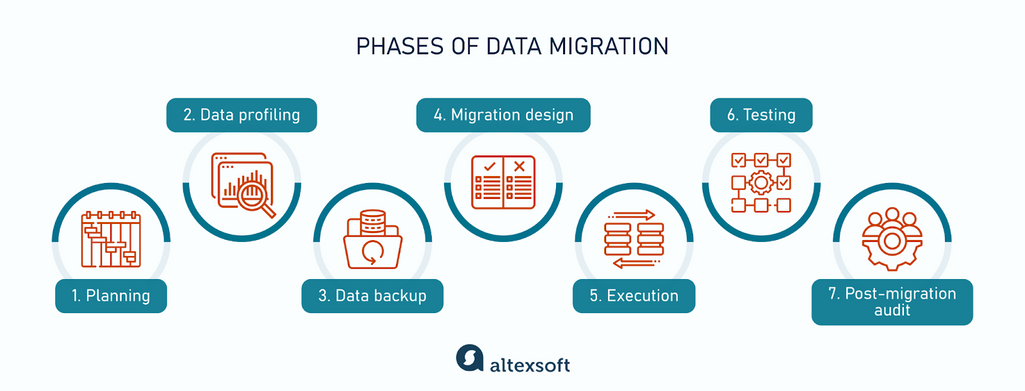
Let's synthesize these into a concrete plan for migrating a feature from a monolith to a new microservice, using the Strangler Fig pattern mentioned in the first diagram:
-
Phase 1: Analysis & Design (Step 1-3 from framework)
- Define the service boundaries and API contract for the new microservice.
- Design the data model. If migrating data, use the data migration framework (planning, profiling).
- This phase culminates in the approval of this design document.
-
Phase 2: Build & Integrate in Parallel (Step 4)
- Deploy the new service, but route no production traffic to it.
- Implement "dark writes": modify the monolith to write to both the old database and the new service's database/API. This ensures data stays in sync. Use feature flags to control this behavior.
- Backfill data from the old database to the new one (Execution & Testing from the data migration framework).
-
Phase 3: Divert Reads (Part of Step 4)
- Modify the monolith to read from the new service instead of its local code path.
- Use a canary deployment and feature flags to roll this out gradually. Start with 1% of traffic, monitor metrics (latency, errors), and slowly ramp up.
- This is the core of the Strangler Fig pattern: you are slowly redirecting the flow of traffic to the new system.
-
Phase 4: Validation & Decommission (Step 5)
- Once 100% of reads and writes are handled by the new service, run the systems in parallel for a period to gain confidence.
- Finally, remove the old code path and database tables from the monolith. Perform a post-migration audit.
This phased approach minimizes risk at every step. Each stage is small, reversible, and its impact is observable.
The Final Step: Review and Refinement
Your design doc is not a monologue; it's the start of a conversation. The review process is where the design is pressure-tested by the collective wisdom of your organization. As a Principal Engineer, you will be on both sides of this table. Understanding the reviewer's mindset is key to writing a great doc.
How to have a good principal design review
This video offers a Principal Engineer's perspective on what to look for when reviewing a design. By understanding their checklist, you get a checklist for what to include in your own document.
Watch from the overview of review areas. The speaker lists several critical aspects a Principal Engineer scrutinizes.
Here is the checklist from the video, which you should use to self-critique your own design doc before sharing it:
- Service Lifecycle: Have you thought through startup, shutdown (clean and dirty), maintenance (patching, schema migrations), and recovery? Most designs focus only on the "steady state."
- Data Flow & Lifecycle: Where does data come from? Where does it go? What are the freshness and ownership guarantees? Is there a plan to reap expired data?
- Security: Authentication, authorization, credential management, threat model, and compliance. Have you consulted with the security team?
- Diagnosability: How will you debug this system? What's the logging strategy? How do you assemble a trace for a single transaction? Is logging performant?
- Customer Focus: Does the design actually solve the customer's problem in a usable way? (e.g., for an API, have you tried to build a toy client against it?)
- Growth & Scalability: What happens if usage is 10x or 100x your forecast? What if the usage patterns change (e.g., users start storing videos instead of text)?
By proactively addressing these points in your document, you demonstrate foresight and make the review process smoother and more productive.
Conclusion
In this lesson, we've outlined the process of creating a Principal-level technical design document. This artifact is the culmination of the design process, translating architectural vision and rigorous analysis into a concrete plan that can align an organization.
Here are the key takeaways:
- Think Strategically: A design doc is not bureaucratic overhead; it's a high-leverage tool for problem-solving, risk mitigation, and scaling your technical influence.
- Tell a Coherent Story: Structure your document as a narrative that moves from the problem and goals to the proposed architecture, explicitly weighing it against considered alternatives.
- Justify with Trade-offs: The strength of your design lies in your analysis of its trade-offs. Use real-world patterns and data to defend your choices, as seen in the Walmart case study.
- Plan for Reality: A design must be implementable. A detailed, phased rollout plan using techniques like canary deployments and feature flags is non-negotiable for large-scale systems.
- Anticipate the Review: Use the perspective of a senior reviewer to critique your own work. Proactively address the full lifecycle of the system, from security and diagnosability to scalability.
With this lesson, we conclude our module on "The Craft of Principal-Level Design." You now have a framework for conceiving, evolving, securing, and documenting large-scale systems.
Our next lesson will begin the final module of the course, "Technical Strategy & Leadership." We will zoom out from the design of a single system to look at the bigger picture, starting with how to analyze business requirements and technology trends to inform a platform's technical vision. This is the process that generates the very problems that our design documents aim to solve.