Hello! Welcome to the final lesson in our module on Amazon Ads.
In our last session, you did the detective work of analyzing your automatic campaign's Search Term Report. You created a "winning" list of profitable customer search terms and a "losing" list of terms that were wasting your budget.
Today, you'll put that data into action. The goal of this lesson is to create a manual keyword targeting campaign using your list of profitable search terms. This is a pivotal step where you move from letting Amazon discover what works to taking control and telling Amazon exactly where to spend your money for maximum impact. We will also clean up your original automatic campaign to make it more efficient.
By the end of this lesson, you will have a powerful, two-part ad strategy:
- An optimized auto campaign that continues to discover new keywords.
- A profitable manual campaign that scales up what you already know works.
Let's begin.
1. From Discovery to Profitability: The "Winning" Campaign Strategy
Think of your advertising efforts as a funnel. Your automatic campaign sits at the top, casting a wide net to discover what customer search terms convert into sales. Your new manual campaign will sit below it, focusing your budget only on those proven, "winning" keywords.
The main benefit of a manual campaign is control. You choose the exact keywords, the match type, and the bid for each one. This precision is the key to improving your Advertising Cost of Sale (ACOS) and achieving consistent profitability.
The following article provides a great overview of this strategy. Pay attention to the diagram titled "The Amazon Ads Funnel," which visualizes how your research campaigns (like your auto campaign) feed into your scaling campaigns (the exact match campaign we're about to build).
Amazon Ads for Authors: A Comprehensive Step-by- ...
This section of the comprehensive guide from Jane Friedman's blog lays out the exact strategy we'll be implementing: creating an 'Exact Match Campaign' to scale up proven keywords.
Read the first part of 'Part 2: Set up your keyword targeting Amazon Ads campaigns,' down to the beginning of the 'Campaign 1: Exact Match Campaign' section. Focus on understanding the three-level campaign structure (Campaign, Ad Group, Ad) and the funnel diagram.
Now, let's build your "winning" campaign.
2. Step-by-Step: Creating Your Manual "Winning" Campaign
We'll walk through the process of setting up a new campaign in the Amazon Ads console. The video below provides a complete walkthrough, and we'll break down the key decisions you need to make at each step.
My ULTIMATE GUIDE to Keyword Ads on Amazon KDP
This video from Self Publishing Empire is an excellent practical guide to setting up a keyword ad campaign from start to finish. We will refer to specific parts of it as we go.
You can watch this video in its entirety (about 10 minutes, skipping the keyword research parts) to get a full overview, or you can refer to the specific timestamps we'll mention in the steps below.
Follow these steps in your Amazon Ads console:
Step 1: Initial Campaign Setup
- Navigate to your advertising console and click Create campaign.
- Choose Sponsored Products and then select Standard ad.
- Campaign Settings:
- Campaign name: Use a clear, descriptive name. This is crucial for staying organized. A good format is:
[Your Book Title] | Manual - Winning Keywords [EXACT]. - Daily budget: Start with a modest budget you are comfortable with. $10-$15 per day is a common starting point for a new manual campaign.
- Targeting: Select Manual targeting.
- Campaign name: Use a clear, descriptive name. This is crucial for staying organized. A good format is:
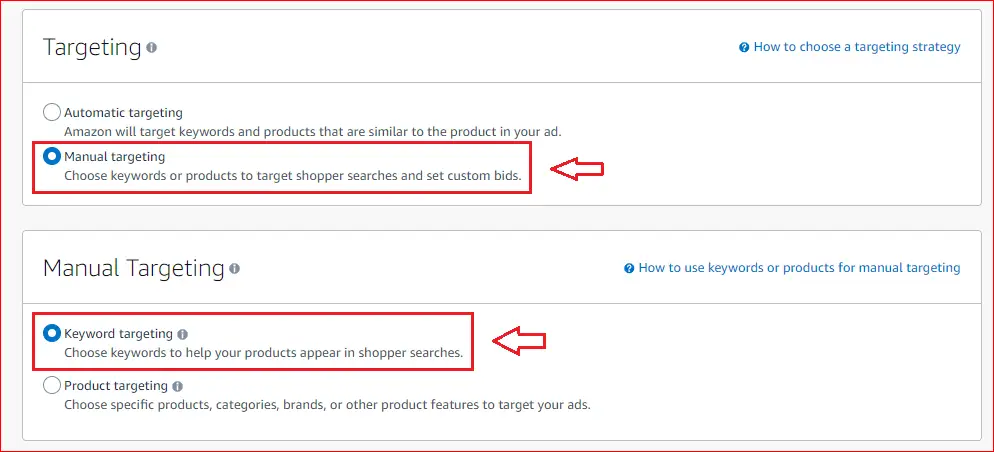
- Campaign bidding strategy: You have a few options. For this first manual campaign, I recommend starting with Dynamic bids - down only. This strategy will lower your bid in real-time if a click is less likely to convert to a sale, which helps protect your budget. The video from Self Publishing Empire explains this at timestamp
07:57.
Step 2: Keyword Targeting Setup
This is where you'll use your list of "winning" keywords.
- In the Ad group section, give it the same name as your campaign for consistency.
- In the Products section, add your coloring book.
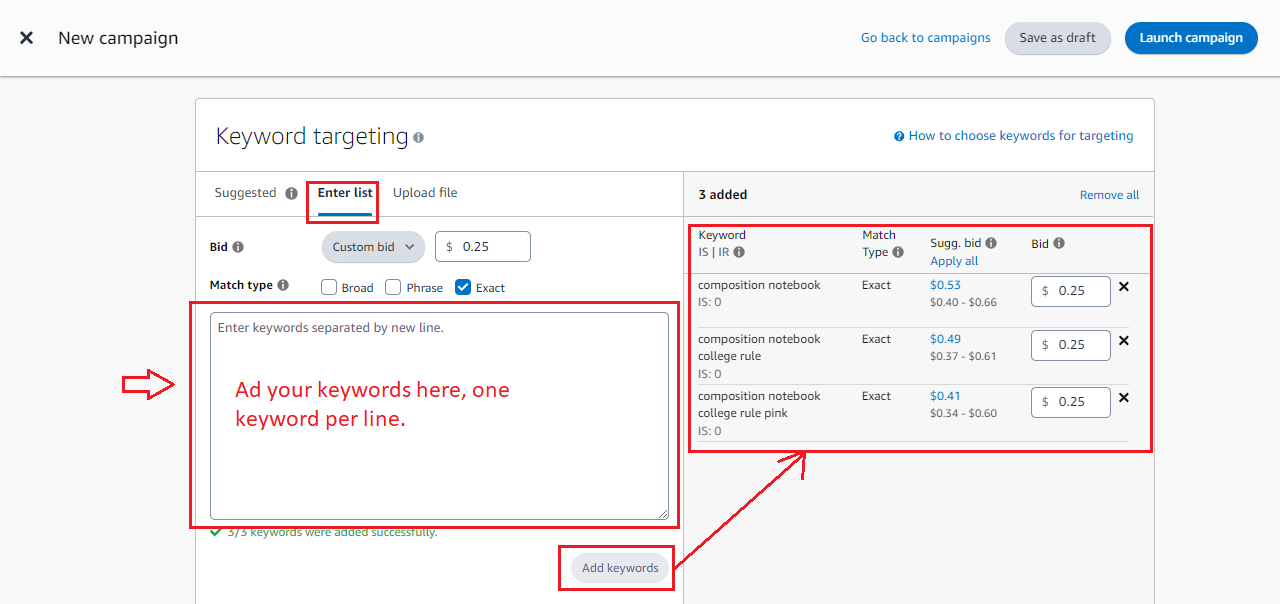
- Scroll down to the Targeting section and ensure Keyword targeting is selected.
- Click the Enter list tab. This is where you will add your keywords.
- Match types: Deselect Broad and Phrase. Leave only Exact selected.
- Why Exact Match? You want to tell Amazon to show your ad only when a customer types in the exact phrase you found to be profitable. This gives you maximum control and prevents your budget from being spent on similar, but unproven, variations.
- Enter your keywords: Copy the list of "winning" search terms you identified in the last lesson and paste them into the text box.
- Set your bids:
- Select Custom bid.
- Remember how you recorded the Cost Per Click (CPC) for each winning search term? This is your starting point. For each keyword, set a bid that is at or slightly above its profitable CPC. For example, if a winning term had a CPC of $0.35, you might bid $0.38. Bidding a few cents higher ensures you outbid competitors using standard increments.
This next video segment focuses specifically on creating a "winning campaign" and reinforces the logic of using Exact Match and your recorded CPC for bids.
My SIMPLE & Profitable Amazon Ads Strategy | Beginner Amazon Ads Tutorial for KDP Authors
In this clip, Ken Fornari demonstrates how to take a list of winning keywords and create a new campaign focused on them. This perfectly matches what you are doing now.
Watch from 15:58 to 16:56. Pay close attention to how he uses the 'Enter list' function, deselects Broad and Phrase match, and uses the previously recorded cost-per-click data to set the bids for his winning keywords.
Step 3: Launch
Leave the Negative keyword targeting section blank for this campaign. Since you are only using Exact Match with proven keywords, you don't need to block any terms within this specific campaign.
Scroll to the bottom and click Launch campaign.
Congratulations! Your focused, data-driven manual campaign is now created. It may take up to 72 hours for Amazon to approve and start running it.
3. Optimizing Your Auto Campaign with Negative Keywords
What about your "losing" keywords list? Now is the time to use it to make your original automatic campaign smarter and more efficient. By adding these non-converting search terms as negative keywords, you tell Amazon to stop showing your ad for those specific queries.
This is a critical optimization step that prevents wasted ad spend.
The following guide provides a detailed walkthrough on how to identify and add negative keywords to a campaign.
Amazon Ads for Authors: A Comprehensive Step-by- ...
This article from the Jane Friedman blog provides an excellent, detailed guide to 'trimming wasted ad spend' by using negative keywords.
Read the first half of 'Part 4: An introduction to Amazon Ads optimization', focusing on the subsections 'Trimming wasted ad spend' and the steps for negating keywords. Pay close attention to the difference between 'Negative Exact' and 'Negative Phrase'.
Here is your action plan:
- Go back to your original automatic campaign in the ad console.
- Click into the campaign, then the ad group.
- On the left-hand menu, select Negative targeting.
- Click Add negative keywords.
- Select the Negative Exact match type.
- Paste your list of "losing" search terms (the ones with many clicks but no sales) into the box.
- Click Add keywords, then Save.
By doing this, you've just plugged the biggest leaks in your discovery campaign, allowing it to use its budget more effectively to find new profitable search terms in the future.
Conclusion
You've made a significant leap forward in your advertising skills today. You've moved beyond simple automation and have built a sophisticated, data-driven campaign structure.
Key Takeaways:
- A Manual Exact Match campaign gives you precise control to focus your budget on keywords you know are profitable.
- Your bid for a proven keyword should be based on the Cost Per Click (CPC) that generated profitable sales in your auto campaign.
- Negative keywords are essential for optimizing your auto campaign by preventing it from wasting money on irrelevant search terms.
- Your advertising strategy now consists of two parallel campaigns: an auto campaign for discovery and a manual campaign for profitability.
Preview of the Next Lesson:
Your new manual campaign is live, and your auto campaign is optimized. What's next? Monitoring and refinement. In our next lesson, we will shift focus slightly to analyze post-launch data to decide whether to make further adjustments to your keywords and categories. This will equip you to manage and improve your book's overall performance in the Amazon store.