Introduction
In our last lesson, we focused on securing your digital presence at the account level by conducting a thorough privacy audit. We locked down settings to control who can see your information and how platforms track you. Now, we move a layer deeper, from the accounts you use to the content you create. The photos you publish—showcasing your lingerie designs or documenting your life—are more than just images; they are data packets that can carry invisible, and potentially compromising, information.
This lesson addresses a critical aspect of operational security for any public-facing creator, especially one whose content is as personal and visually driven as yours. We will define and explore EXIF data, the hidden metadata embedded in your photos. More importantly, you will learn to implement a systematic workflow to remove this data before you publish anything online. This practice is not just a technicality; it's a fundamental habit that helps sever the link between your digital content and your physical world, directly safeguarding you against doxing and stalking.
The Invisible Data in Your Photos
Every time you take a photo with a digital camera or smartphone, the device records not just the image but also a rich set of information about how, when, and where the photo was taken. This is called EXIF (Exchangeable Image File Format) data. While intended for organizing photos and improving photography, this metadata can become a significant privacy liability when shared unknowingly.
For you, as a designer posting photos of your work and lifestyle, this invisible data can reveal far more than you intend. To understand the scope of this data, let's break down what your phone or camera is recording.
EXIF Data: 6 Things Your Photos Tell Strangers - MetaClean
The MetaClean article "What is EXIF Data?" provides a comprehensive overview of what this metadata contains, where it comes from, and why it's a risk. It will form the foundation of our understanding.
Please read the first three sections of the article: "What EXIF Data Actually Is" explains the concept. "Where EXIF Data Comes From" details the hardware and software sources. "The Complete EXIF Field Catalog" lists the specific data points. As you read, pay close attention to the three most critical categories of data for your situation: GPS fields, timestamps, and device identification fields.
Let’s translate these technical fields into tangible risks for your specific context:
- GPS Coordinates: This is the most acute danger. Imagine you post a photo of a new bra design you've just finished, taken in your home studio. The embedded GPS data could pinpoint your home address with an accuracy of a few meters. For someone in an alternative lifestyle community who might attract obsessive followers or malicious actors, this is an unacceptable risk. A stalker could use a single photo to find your home, your favorite café, or the park where you do photoshoots.
- Timestamps: A single timestamp is revealing; a pattern is a liability. If you consistently post photos on certain days and times, an antagonist can use this metadata to build a profile of your daily and weekly routines. This information could be used to predict when you are home, when you are out, or to orchestrate online harassment campaigns when they know you are likely to be active.
- Device & Software Information: This is more subtle but powerful for doxing. This data includes the make and model of your phone (e.g., "Apple iPhone 15 Pro") and sometimes even the device's unique serial number in hidden "MakerNotes." If you use one phone for both your public designer brand and a more private personal account, an investigator could use this metadata to forensically link both personas to a single individual—you.
The infamous case of John McAfee's arrest in 2012 serves as a stark warning. His location was discovered by authorities after a journalist from Vice posted a photo with him, forgetting to scrub the GPS metadata from the image file.
Scrub your Metadata with THESE Tools
The YouTube channel Naomi Brockwell TV discusses this in the video "Scrub your Metadata with THESE Tools." It provides a compelling real-world example of why this matters.
Please watch the segment from the introduction. It defines metadata and vividly explains the risks, including the McAfee incident and the danger of revealing your home address through a simple photo of your pet.
The False Sense of Security: Social Media Platforms
A common belief is that social media platforms like Instagram or X (formerly Twitter) automatically solve this problem by stripping EXIF data upon upload. This is only partially true and creates a dangerous false sense of security.
While most platforms do remove metadata from the version of the image that is publicly displayed, their policies regarding the original uploaded file are often opaque. The original file, with all its pristine metadata, may be stored on their servers.
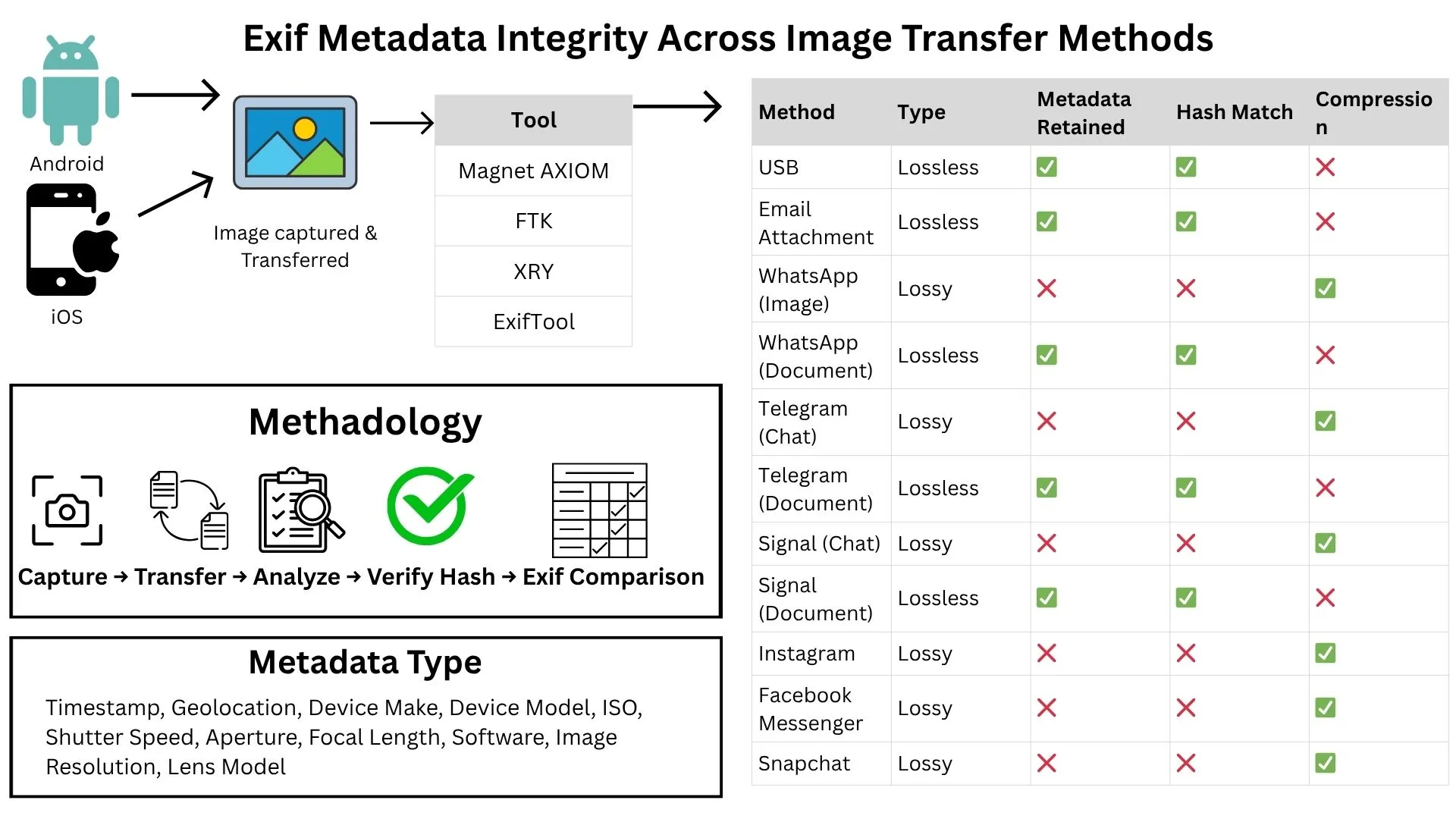
Furthermore, how you share an image matters. As the chart illustrates, sending a photo as a "Document" in apps like WhatsApp or Signal often preserves all metadata, while sending it as an "Image" strips it. This inconsistency means you cannot rely on the platform to protect you. The only reliable strategy is to ensure the data is gone before it ever leaves your device.
Your EXIF Removal Workflow: A 4-Step Process
Given your background in statistics and process optimization, you'll appreciate a systematic, repeatable workflow. We will build a four-step process that you can integrate into your content creation routine, making operational security a habit.
Step 1: Prevention at the Source (Disable Geotagging)
The first and simplest step is to stop your camera from recording GPS data in the first place. This is a one-time setting change on your smartphone.
EXIF data in shared photos may compromise your privacy - Proton
The Proton article on EXIF data provides clear, illustrated instructions for disabling this feature on both iOS and Android.
Find the section titled "How to protect your privacy before sharing photos" and follow the instructions under the subheading "Turn off location tagging on your camera" for your specific device.
While this prevents new photos from being geotagged, it doesn't affect photos already in your library, nor does it remove other metadata like timestamps and device info. Therefore, the next steps are still essential.
Step 2: Inspect the Data
Before removing the data, it's instructive to see it for yourself. This will reinforce your understanding of what's at stake. Most operating systems have a built-in way to view basic metadata.
The same Proton article you just read shows you how to do this. Re-open it and refer to the section titled "How to see your EXIF data" for instructions on Windows, Mac, iPhone, and Android. Take a recent photo from your phone and inspect its properties to see the information it contains.
Step 3: Remove the Metadata
This is the core action in your workflow. You need a reliable tool to "scrub" your photos clean. Here are a few options, from simple to advanced.
A. The Quick Method: The Screenshot Trick
One of the quickest ways to create a version of an image without most of its original EXIF data is to simply take a screenshot of it.
- How: Open the photo on your phone or computer and take a screenshot. The new screenshot file is a new image of the pixels on your screen and will not inherit the original file's detailed EXIF data (like GPS, camera settings, etc.).
- Pros: Fast, easy, requires no special software.
- Cons:
- It may slightly reduce image quality.
- The screenshot will have its own basic metadata (e.g., creation date/time, device type).
- You must be careful to crop out any identifying information on your screen, such as the time, battery level, or notification icons.
This method is good for casual sharing but for your professional brand, a more robust solution is better.
B. OS-Specific Tools
- On Windows: The operating system has a built-in metadata removal tool. This is a very effective and convenient option if you are working on a PC.
How to Remove Location Data From Photos on Windows to Protect Your Privacy
This short video, "How to Remove Location Data From Photos on Windows," provides a perfect screen-capture demonstration of the process.
Watch the core demonstration from this timestamp. The key action is right-clicking the file, going to Properties > Details, and selecting "Remove Properties and Personal Information." Notice the option to "Create a copy with all possible properties removed," which is the ideal non-destructive workflow.
- On iOS/macOS: Apple devices do not have an equivalent, easy-to-access built-in removal tool. However, you can use the "Shortcuts" app on an iPhone to create an automated workflow.
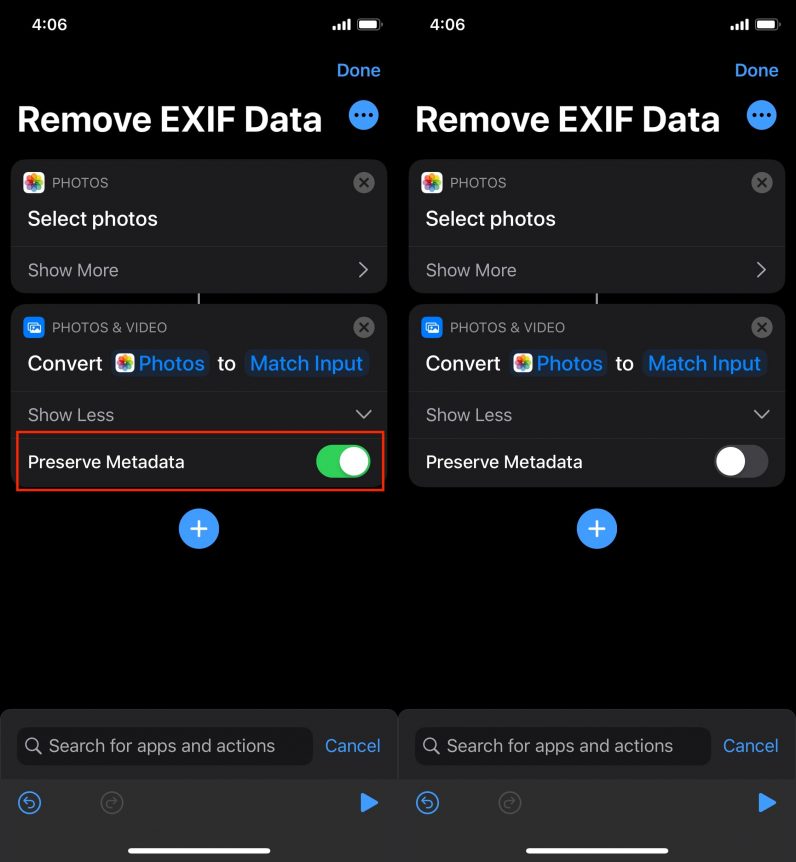
C. Dedicated Third-Party Tools (Recommended)
For the most thorough and reliable removal, especially of hidden MakerNotes, a dedicated tool is your best choice.
- Web-Based (Simple & Secure): Tools like MetaClean (mentioned in our first reading) allow you to drag and drop an image, see all its metadata, and download a scrubbed version. Crucially, these tools work in your browser, so your photos are never uploaded to a server, preserving your privacy.
- Desktop (The Gold Standard): For maximum control, the command-line tool ExifTool is what forensic professionals use. It is free and extremely powerful. Once installed, you can remove all metadata from a file with a single command in your terminal:
exiftool -all= your_image_name.jpg. This command overwrites the original file, so be sure to work on a copy. While more technical, this might appeal to your analytical nature as it offers absolute certainty.
Step 4: Verification
An essential part of any reliable process is verification. After you've "cleaned" an image, how do you know it worked?
The process is simple: take your newly saved, scrubbed image file and run it back through an inspection tool from Step 2. Open its properties on Windows, or drop it into a web-based viewer like MetaClean. The metadata fields should now be empty. This final check ensures your workflow is effective and protects you from any tool-specific quirks.
Conclusion
In this lesson, we have added a crucial layer to your digital security framework. You now understand that the photos you post are not just pictures but data carriers. By implementing a consistent workflow to remove EXIF metadata, you are taking a direct, proactive step to protect your physical location, daily routines, and personal identity from being exploited.
Your key takeaways from this lesson are:
- EXIF data is a hidden privacy risk: GPS coordinates, timestamps, and device information embedded in photos can be weaponized by stalkers and doxers.
- Platform protections are insufficient: You cannot rely on social media platforms to fully protect you. Scrubbing metadata before you upload is the only secure method.
- A systematic workflow is key: A four-step process—Prevent, Inspect, Remove, and Verify—turns a complex technical task into a simple, repeatable habit.
- Choose the right tool for the job: From simple screenshots to powerful command-line tools like ExifTool, you have a range of options to fit your needs. For your public-facing brand, using a dedicated removal tool is the recommended practice.
We have now fortified your accounts and the content you post. In our next lesson, we will address another core component of digital identity security: developing a personal data compartmentalization strategy. You will learn how to manage different online personas and create barriers between them to further reduce doxing risks and maintain control over your public and private lives.