Introduction
In our last lesson, we constructed a detailed analysis of cancel culture, identifying it as a strategic effort to ostracize a public figure by moving them into a "sphere of deviance." We saw how this builds on the dog-piling tactics we'd previously discussed and noted the particular risks of in-group cancellation within your niche communities. You now have a solid theoretical framework for what these mass harassment events are.
Today, we shift from theory to practice. This lesson is your digital self-defense class, where we move from analyzing the attack to building your fortifications. The goal is to master the specific tools provided by social media platforms themselves to mitigate attacks. We will cover the two primary functions of these tools—proactive filtering and reactive reporting—and focus on configuring them for your primary platform, Instagram, as well as others you may use. This is the first, most crucial step in seizing control when under fire.
The Two Pillars of Platform Defense: Filtering and Reporting
When you're facing a digital mob, your response can be categorized into two distinct activities, each serving a different purpose and timeline.
-
Filtering, Muting, and Blocking (Immediate Triage): This is your personal, immediate line of defense. These tools give you direct control over what you see and who can interact with you. Think of this as emotional and psychological triage. The goal is not to "win" the argument, but to manage the overwhelming volume of negative input, protect your mental state, and create the space needed to think strategically. Given your background in operations research, you can appreciate this as managing a sudden, high-volume, low-quality input queue to prevent system overload.
-
Reporting (Long-Term Accountability): This is the act of asking the platform to enforce its own rules. Reporting abuse creates a documented trail and can lead to consequences for harassers, such as content removal or account suspension. However, platform responses are often slow and inconsistent. Reporting is a necessary step and part of being a responsible digital citizen, but it is not a tool for immediate relief. It's a long-term play that contributes to the overall health of the ecosystem and can support a pressure campaign of your own, should you need to escalate.
Our focus today is on setting up the first pillar—the immediate triage tools—so they are ready before an attack, and knowing how to use the second pillar effectively when needed.
Your Primary Defense: Fortifying Instagram
Given that your work as a lingerie designer is highly visual, Instagram is likely your most important—and most vulnerable—platform. Its tools are quite robust, provided you configure them correctly.
Layer 1: The Automated Guard - Hidden Words & Advanced Filtering
Instagram's most powerful proactive feature is its ability to automatically filter comments and message requests. This is your first and most essential setup task.
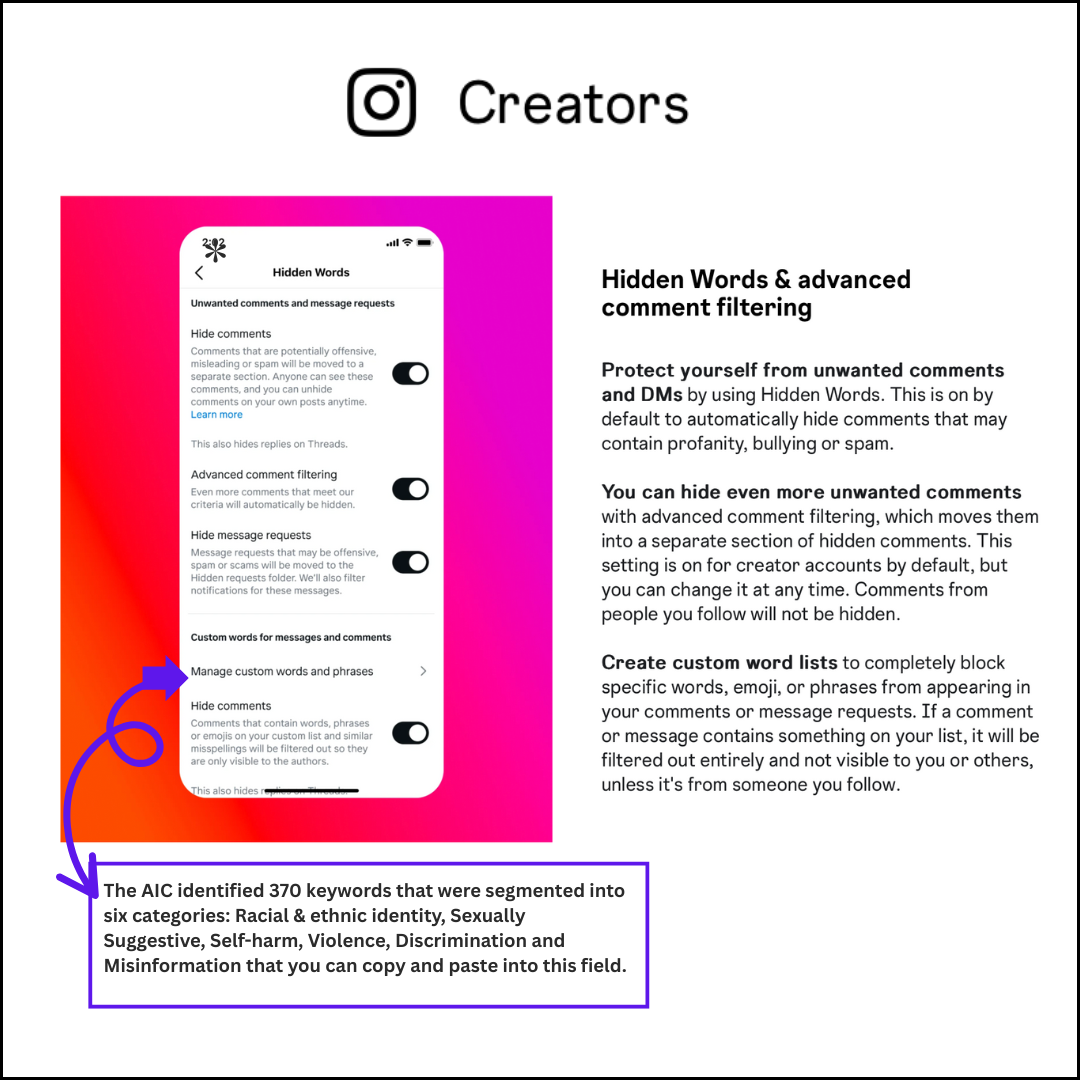
As the image shows, you have several options:
- Hide Comments: This is on by default for many accounts and uses Instagram's own list of offensive terms to hide comments that contain bullying, spam, or profanity.
- Advanced Comment Filtering: This is a more aggressive version of the above. You should absolutely have this turned on.
- Hide Message Requests: This filters DMs that may be offensive or from spammers into a separate "Hidden Requests" folder, so they don't appear in your main inbox.
The most critical feature for you, however, is the Custom words for messages and comments. Instagram's default list will not catch the specific, coded language used to attack someone in the alternative lifestyle or boudoir art space. You need to build your own list.
Your Personalized Filter List
Think about the comments you've seen or can anticipate. Your custom list should be a living document that you update as you encounter new attack vectors. Here are some categories to get you started:
- Slurs & Shaming Language: Common misogynistic slurs, but also terms used to shame your lifestyle choices or work (e.g., "degenerate," "homewrecker," "attention whore").
- "Concern-Trolling" Keywords: Words used to frame an attack as helpful advice (e.g., "you should cover up," "this is not empowering," "think of the children").
- Weaponized Niche Terminology: Words from polyamory or feminist discourse that are often twisted into accusations (e.g., "patriarchy," "problematic," "unsafe," "toxic"). Filtering these doesn't mean you can't discuss them, but it stops them from being used as low-effort weapons in your comments.
- Body & Appearance Negging: Any specific words related to negative body image or appearance critiques that you find particularly triggering or unhelpful.
Creating and maintaining this list is the single most effective action you can take to control the climate of your comments section.
Layer 2: The Emergency Lockdown - The "Limits" Feature
The "Limits" feature is your panic button for a dog-pile. It is designed specifically for situations where you experience a sudden spike in unwanted comments and messages.

As you can see in the settings flow, this feature allows you to temporarily limit interactions from two key groups that are characteristic of a mob attack:
- Accounts that aren't following you.
- Recent followers (those who followed you in the last week).
When you post a new lingerie design or a blog post on hotwifing that attracts controversy, and you suddenly see a flood of comments from profiles you don't recognize, this is the tool to use. You can activate it for a set period (e.g., one week), which gives you breathing room to assess the situation without being constantly bombarded.
Practical Steps for Proactive Defense
Let's now turn to the excellent guide from Consumer Reports, which provides clear, step-by-step instructions for these features and more. Your task is to go through these settings on your own accounts.
How to Shield Yourself From Social Media Abuse - Consumer Reports
This article provides concise, actionable instructions for configuring the protective filters on major social media platforms. We'll use it as our technical manual.
First, focus on the section for Instagram. Follow these steps on your phone to turn on "Advanced comment filtering" and explore the "Manage custom words and phrases" menu. Start building your personal list now with at least 10-15 terms based on our discussion above. Then, walk through the steps to activate the "Limits" feature so you know exactly where it is in an emergency. Next, review the instructions for TikTok. Pay attention to the "creator care mode" and the options to filter who can comment. If you use TikTok to market your designs, these settings are directly applicable. Finally, read the section for X (formerly Twitter). The key takeaways here are the "quality filter" and the ability to mute notifications from specific groups (like new accounts or those without a profile photo), which are often hallmarks of "burner" accounts used for harassment.
By completing this exercise, you will have pre-emptively established a baseline of digital defense across your most likely platforms of engagement.
The Reporting Process: A Strategic Reference
Once your immediate defenses are up and the digital noise is reduced, you can move to the second pillar: reporting. Reporting every single negative comment is inefficient and draining. Instead, you should prioritize reporting content that most clearly violates a platform's terms of service. This includes:
- Direct threats of violence.
- Hate speech targeting a protected characteristic.
- Doxing (sharing your private information).
- Targeted harassment (repeatedly singling you out).
- Impersonation.
The PEN America "Online Harassment Field Manual" is the best resource for this. It's a comprehensive guide to the reporting mechanisms of nearly every major platform.
Reporting to Platforms - Online Harassment Field Manual
This manual is your go-to reference for how to report abuse on different platforms. You don't need to memorize it, but you should know what's in it and where to find it.
First, read the brief introductory section, "What to Know Before Reporting." The advice here is critical: be specific and, if possible, name the exact community standard that has been violated. Your background in statistics will tell you that a well-classified data point is more likely to be processed correctly. Next, skim the sections for the platforms you use most, particularly Instagram, TikTok, and YouTube. Notice that they provide direct links to the community guidelines and specific reporting forms for different types of abuse (e.g., impersonation vs. harassment). Bookmark this page. It will be invaluable during an incident.
Using this guide, your reporting strategy becomes more precise. Instead of just clicking "report," you can identify the specific policy violation, take a clear screenshot as evidence, and use the correct form. This significantly increases the probability of a successful report and action from the platform.
Conclusion
Today, we have translated the theoretical understanding of online attacks into a concrete, practical set of defensive actions. You are now equipped with the knowledge to fortify your digital spaces.
Key Takeaways:
- Platform tools serve two functions: filtering/blocking for immediate triage and personal control, and reporting for long-term platform-level accountability.
- Custom word filters on Instagram are your most powerful, personalized defense. You must proactively build and maintain a list tailored to the specific language used in your niche.
- The "Limits" feature on Instagram is an essential "panic button" to deploy at the first sign of a dog-pile, giving you immediate relief from the onslaught.
- A strategic approach to reporting, focusing on clear violations and using resources like the PEN America field manual, is more effective than attempting to report every negative interaction.
You've now configured your digital armor. However, managing an attack involves more than just technical tools. It requires a clear head and a plan of action. In our next lesson, we will build on today's work to draft an immediate triage checklist for the first hour of a targeted online attack, combining these technical defenses with psychological and communication strategies.