Hello! Welcome to your next lesson on the mathematical foundations for computer vision.
In our last few lessons, we've explored the core concepts of linear algebra, culminating in understanding how to perform eigendecomposition using NumPy. We treated functions like np.linalg.eig and np.linalg.inv as powerful tools that give us the right answer. Today, we're going to open up those "black boxes."
Our goal is to implement fundamental vector and matrix operations from scratch in Python. This will solidify your understanding of how these operations truly work, which is essential for deriving and implementing machine learning algorithms later on. Since you have a background in software engineering, we will not only write functions but also think about how to structure them logically. We will rely only on basic Python lists, loops, and functions.
1. Representing Vectors and Matrices in Python
Before we can operate on vectors and matrices, we need a way to store them. The most straightforward approach in Python, without using any special libraries, is to use lists.
- A vector can be represented as a simple list of numbers. For example, the vector can be stored as
v = [1, 2, 3]. - A matrix can be represented as a list of lists, where each inner list corresponds to a row. For example, the matrix can be stored as
A = [[1, 2], [3, 4]].
This simple convention is the foundation for everything we'll build in this lesson.
The following article from GeeksForGeeks provides a good overview of how to create and manipulate matrices using Python's built-in lists. It will serve as a practical reference for our implementations.
Please read the sections 'Creating a simple matrix using Python', 'Assigning Value in a matrix', and 'Accessing Value in a matrix'. These sections show how to represent a matrix with a list of lists and how to access its elements using indices like matrix[row][col], which is the core mechanism we'll be using.
2. Implementing Vector Operations: The Dot Product
The dot product is arguably one of the most important operations in all of machine learning. It measures the similarity or projection of one vector onto another.
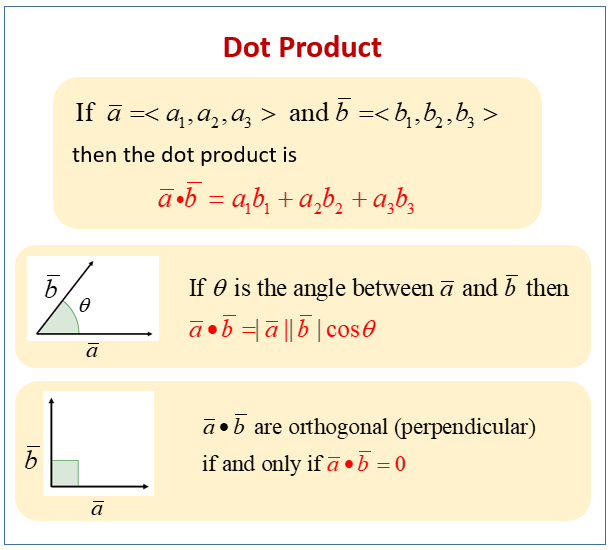
To implement this, we need to iterate through two vectors of the same length, multiply their corresponding elements, and sum the results.
Here is a function that accomplishes this using a simple for loop:
def dot_product(v1, v2):
    """Computes the dot product of two vectors."""
    # Ensure vectors have the same length
    if len(v1) != len(v2):
        raise ValueError("Vectors must have the same length")

    result = 0
    for i in range(len(v1)):
        result += v1[i] * v2[i]
    return result

# Example usage:
a = [1, 2, 3]
b = [4, 5, 6]
print(f"The dot product of {a} and {b} is {dot_product(a, b)}") # Output: 32
A more "Pythonic" way to achieve the same result is by using the zip function combined with a generator expression, which can be more concise and efficient.

3. Implementing Basic Matrix Operations from Scratch
Now let's extend this "from scratch" approach to matrices. We'll implement addition, scalar multiplication, and transposition.
Let's return to the GeeksForGeeks article. This time, we'll focus on the sections that implement mathematical operations using loops and list comprehensions.
Please read the sections 'Mathematical Operations with Matrix in Python' and 'Transpose of a Matrix'. Pay close attention to how nested loops are used to iterate through rows and columns for addition and subtraction, and how indices are swapped for transposition. Note the alternative implementations using list comprehensions.
Let's summarize and write our own functions based on what you just read.
Matrix Addition
Two matrices can be added only if they have the same dimensions. The addition is element-wise.
def matrix_add(A, B):
    """Adds two matrices A and B."""
    # Get dimensions
    rows_A, cols_A = len(A), len(A[0])
    rows_B, cols_B = len(B), len(B[0])

    if rows_A != rows_B or cols_A != cols_B:
        raise ValueError("Matrices must have the same dimensions for addition")

    # Create a result matrix filled with zeros
    result = [[0 for _ in range(cols_A)] for _ in range(rows_A)]

    for i in range(rows_A):
        for j in range(cols_A):
            result[i][j] = A[i][j] + B[i][j]

    return result

# Example:
X = [[1, 2], [3, 4]]
Y = [[5, 6], [7, 8]]
print("Matrix Addition Result:\n", matrix_add(X, Y)) # Output: [[6, 8], [10, 12]]
Matrix Transposition
The transpose of a matrix , denoted , is formed by swapping the rows and columns. The element at in becomes the element at in .
def transpose(A):
    """Computes the transpose of matrix A."""
    rows = len(A)
    cols = len(A[0])

    # The result matrix will have dimensions (cols, rows)
    result = [[0 for _ in range(rows)] for _ in range(cols)]

    for i in range(rows):
        for j in range(cols):
            result[j][i] = A[i][j]

    return result

# Example:
X = [[1, 2, 3], [4, 5, 6]]
print("Transpose Result:\n", transpose(X)) # Output: [[1, 4], [2, 5], [3, 6]]
Test your understanding!
Write a function scalar_multiply(matrix, scalar) that takes a matrix (as a list of lists) and a number (scalar), and returns a new matrix where each element is multiplied by the scalar. Try implementing it using a list comprehension for a more compact solution.
Show answer
Here's one way to implement it using a nested list comprehension:
def scalar_multiply(matrix, scalar):
    """Multiplies a matrix by a scalar."""
    return [[element * scalar for element in row] for row in matrix]

# Example usage:
X = [[1, 2], [3, 4]]
scalar = 10
print(scalar_multiply(X, scalar)) # Output: [[10, 20], [30, 40]]
4. The Big One: Matrix-Matrix Multiplication
Matrix multiplication is more complex than element-wise operations. The element at row i and column j of the result matrix is the dot product of the i-th row of the first matrix and the j-th column of the second matrix.
For a multiplication to be valid, the number of columns in must equal the number of rows in .
Python Program to Multiply Two Matrices
This final resource focuses specifically on implementing matrix multiplication from scratch.
Please read the section 'Using Nested Loops'. This section shows the classic three-loop approach, which directly follows the mathematical definition of matrix multiplication. Notice how the innermost loop computes the dot product for a single element of the result matrix.
Let's adapt the code from the resource into a reusable function. To do this, we'll need to get the j-th column from matrix B. A helper function can make this cleaner.
def get_column(matrix, col_index):
    """Extracts a column from a matrix as a vector."""
    return [row[col_index] for row in matrix]

def matrix_multiply(A, B):
    """Multiplies matrix A by matrix B."""
    rows_A, cols_A = len(A), len(A[0])
    rows_B, cols_B = len(B), len(B[0])

    if cols_A != rows_B:
        raise ValueError("Number of columns in A must equal number of rows in B")

    # The result matrix will have dimensions (rows_A, cols_B)
    result = [[0 for _ in range(cols_B)] for _ in range(rows_A)]

    for i in range(rows_A):
        for j in range(cols_B):
            row_A = A[i]
            col_B = get_column(B, j)
            # The element (i, j) is the dot product of row i of A and column j of B
            result[i][j] = dot_product(row_A, col_B)

    return result

# Example:
A = [[1, 2, 3],
     [4, 5, 6]] # 2x3 matrix

B = [[7, 8],
     [9, 10],
     [11, 12]] # 3x2 matrix

# Result will be a 2x2 matrix
C = matrix_multiply(A, B)
print("Matrix Multiplication Result:\n", C)
# Output: [[58, 64], [139, 154]]
# 1*7 + 2*9 + 3*11 = 58
# 1*8 + 2*10 + 3*12 = 64
# etc.
Conclusion
In this lesson, we peeled back the layers of abstraction provided by libraries like NumPy and implemented core linear algebra operations from first principles.
Key Takeaways:
- Vectors and matrices can be effectively represented in Python using lists and lists of lists.
- Operations like addition and scalar multiplication are element-wise and relatively straightforward to implement with nested loops or list comprehensions.
- The transpose operation involves swapping the row and column indices.
- Matrix multiplication is the most involved operation. It requires that the inner dimensions of the matrices match, and its result is computed by taking a series of dot products between the rows of the first matrix and the columns of the second.
Preview of the Next Lesson:
While building these functions from scratch provides an invaluable depth of understanding, it's also clear that the implementations can be complex and computationally slow for large matrices. Python's native lists and loops are not optimized for numerical computation.
In the next lesson, we will complete our foundational module on linear algebra by systematically learning how to perform these same operations efficiently using NumPy. You will see how NumPy leverages highly optimized, pre-compiled code (often written in C or Fortran) to perform these calculations dramatically faster, with much simpler syntax. This will bridge our "first-principles" knowledge with the practical tools used in all modern machine learning.