Welcome to your second lesson! In our first session, we explored the "behind-the-scenes" process of how a computer understands and runs a Python program. We learned that the Python interpreter reads our code line-by-line, translating it into instructions the computer can execute.
Today, we're moving from theory to practice. We'll get our hands on the keyboard and start communicating directly with Python using its interactive interpreter. You'll learn how to use this powerful tool as a simple calculator to evaluate mathematical expressions, which is the first fundamental skill in writing any program.
The Interactive Shell: Your Direct Line to Python
The Python interpreter has a special mode called the interactive shell. Think of it as a live conversation with Python. You type a command, press Enter, and Python immediately shows you the result. This is also known as a REPL, which stands for Read-Eval-Print Loop: it Reads your input, Evaluates it, Prints the result, and Loops back to wait for your next command.
This interactive environment is perfect for beginners to experiment with code snippets and see instant results without the complexity of writing a full program file. Python comes with a simple built-in editor and shell called IDLE (Integrated Development and Learning Environment) that we'll be using.
The following video provides a quick introduction to what IDLE is and the concept of the interactive shell.
What is Python IDLE and How to Use the IDLE Shell
This video from Real Python explains why IDLE is a great starting point and what the interactive shell (or REPL) is for.
Please watch the segments that explain what Python IDLE is and how the interactive interpreter works as a REPL.
Expressions, Values, and Operators
Now that you know what the shell is, let's start using it. The most basic thing you can do is ask Python to evaluate an expression.
Chapter 1 - Python Basics, Automate the Boring Stuff with Python, 3rd Ed
This first chapter from the book "Automate the Boring Stuff with Python" will introduce you to the core components of a Python expression.
First, read the instructions for opening the interactive shell. Then, focus on the section "Entering Expressions into the Interactive Shell". Pay close attention to the definition of an expression, which consists of values (like numbers) and operators (like + or -).
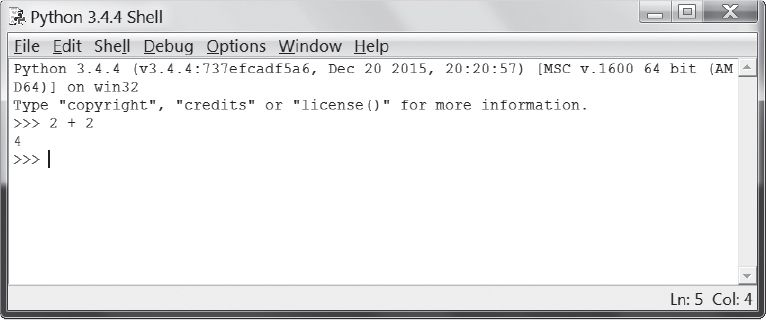
As you've just read, an expression is a combination of values and operators that Python can calculate to produce a single new value. For example, when you type 2 + 2 and press Enter, Python evaluates this expression and gives you back the value 4.
Here is what this looks like in a Python shell. The >>> is the prompt, where you type your code.
Python's Mathematical Toolkit
Python can handle much more than simple addition. It includes a full set of mathematical operators that you can use to build more complex expressions.
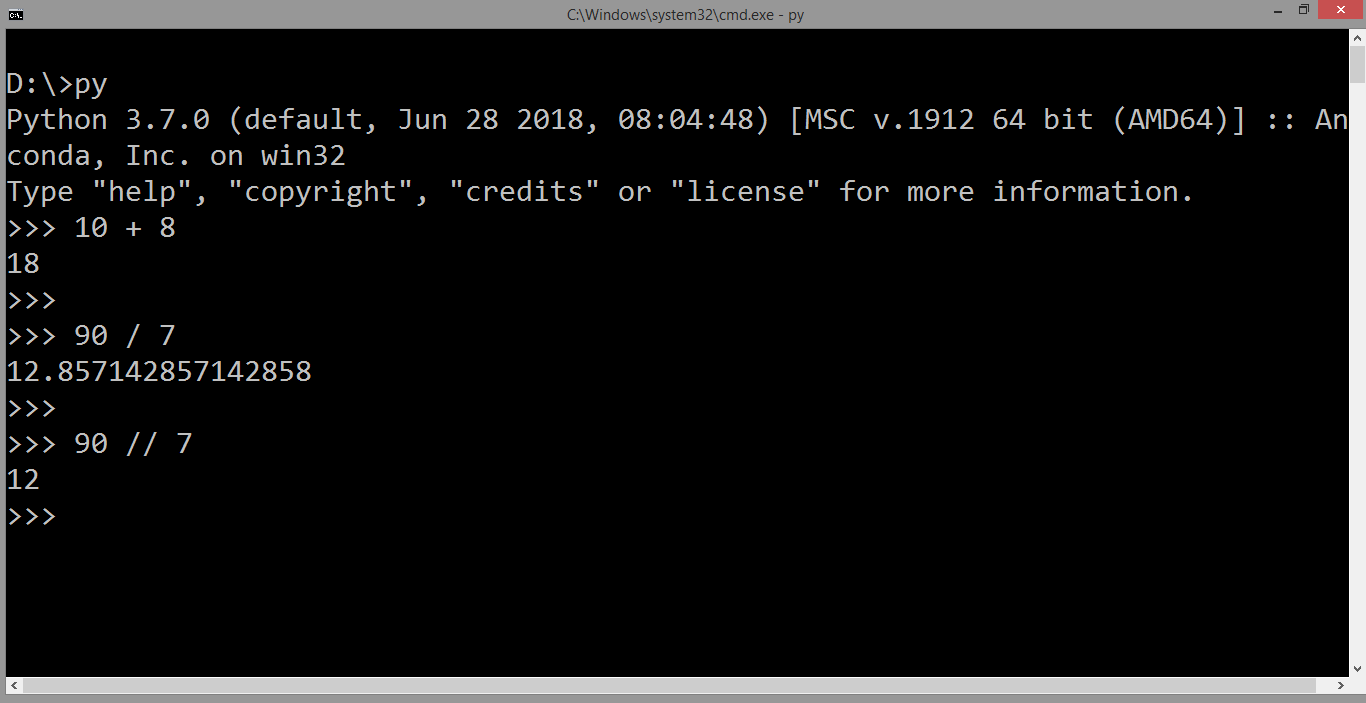
The following reading explains the different operators and, crucially, the order in which Python evaluates them.
Chapter 1 - Python Basics, Automate the Boring Stuff with Python, 3rd Ed
This section details the different math operators available in Python and the rules of precedence it follows when evaluating them.
In the "Automate the Boring Stuff with Python" chapter, look at the list of math operators. Then, carefully read about the order of operations, which is the same set of rules (PEMDAS/BODMAS) you learned in math class. Finally, look at the examples provided to see how Python evaluates different expressions.
Here's a quick summary of the order of operations:
- Parentheses
( ... ) - Exponents
** - Multiplication
*, Division/, Integer Division//, Remainder%(from left to right) - Addition
+, Subtraction-(from left to right)
So, 2 + 3 * 6 evaluates to 20 because multiplication is done first. To force the addition to happen first, you would use parentheses: (2 + 3) * 6 evaluates to 30.
This next video demonstrates these concepts in action. Seeing someone type them into the shell can help solidify your understanding.
PYTHON BASICS 4 :- Entering Expressions into the Interactive Shell
This video provides a practical walkthrough of entering expressions, using different operators, and understanding the order of operations in the interactive shell.
Watch the following segments: Defining an expression Exploring Python's math operators The order of operations
Different Types of Data
So far, we've mostly worked with numbers. But in programming, we work with many different kinds of data. An integer (like 5) is different from a floating-point number (like 5.0) or a piece of text, which we call a string (like 'Hello').
The operators we've used can behave differently depending on the data types they're working with. For example, the + operator adds numbers, but it "concatenates" (joins) strings.
Chapter 1 - Python Basics, Automate the Boring Stuff with Python, 3rd Ed
This reading introduces the fundamental data types and shows how operators behave differently with strings.
Please read the sections introducing integers, floats, and strings. Then, see how the + and * operators work with strings in the section on concatenation and replication.
As you can see, 'Alice' + 'Bob' results in 'AliceBob', and 'Alice' * 5 results in 'AliceAliceAliceAliceAlice'. This is a core concept in programming: the operation depends on the data.
When Things Go Wrong: Syntax Errors
What happens if you type something Python doesn't understand? You get an error. One of the most common is a SyntaxError, which means your instruction doesn't follow Python's grammar rules. For example, 5 + is incomplete because the + operator needs a value after it.
Getting errors is a normal part of programming. Don't be afraid of them! They are Python's way of telling you that it couldn't understand your instruction.
Your Turn to Practice
Now it's time to open Python's IDLE on your computer and try it yourself. Try typing these expressions into the interactive shell and see if the results match what you expect.
100 - 15 * 3(100 - 15) * 32 ** 4'Hello' + ' ' + 'World''Go! ' * 325 / 425 // 425 % 4
Experiment with your own expressions! This is the best way to get comfortable with the syntax.
Conclusion
Great work today! You've taken your first active steps in programming by interacting directly with Python. You now have a practical tool for testing code and a solid understanding of how Python evaluates simple instructions.
Here are the key takeaways from this lesson:
- The Python interactive shell (or REPL) lets you run code one line at a time and get immediate feedback.
- An expression is a combination of values and operators that evaluates to a single value.
- Python supports various operators for arithmetic (
+,*,/,**, etc.) and string manipulation. - Python evaluates expressions following the standard mathematical order of operations.
- Operators can behave differently based on the data type of the values (e.g.,
+adds numbers but joins strings).
In our next lesson, we will transition from using the interactive shell to writing and running your first complete Python program file. You will learn how to use the print() function to display output, which will allow you to build more structured and useful programs.