Hello! Welcome to the final lesson of our first module, "React Fundamentals and JSX."
Introduction
In our previous lessons, we've explored the building blocks of React's rendering layer. We've written JSX, embedded JavaScript expressions, handled conditional logic, and most recently, dived deep into how React efficiently updates lists using the key prop and its reconciliation algorithm. Throughout this, we've been implicitly creating the structures that make up a React application.
Today, we will formalize this by focusing on the learning outcome: Define and type React functional components using TypeScript. We'll bring together everything we've learned to define these reusable pieces of UI and, critically, leverage your TypeScript expertise to make them robust, predictable, and self-documenting. This lesson serves as the capstone for this foundational module.
What is a React Functional Component?
At its core, a React component is a self-contained, reusable piece of code that controls a part of the UI. In modern React, the standard way to create components is with JavaScript functions.
A functional component is, quite simply, a JavaScript function that:
- Accepts a single object argument called
props(properties). - Returns a React element (usually written in JSX) that describes what should be rendered.
- Has a name that starts with a capital letter (e.g.,
WelcomeMessageinstead ofwelcomeMessage). This convention is crucial because it's how React's JSX transformer distinguishes between a user-defined component and a standard HTML tag like<div>or<span>.
Here is a basic example of a typed functional component, which is what we'll be learning to build today.
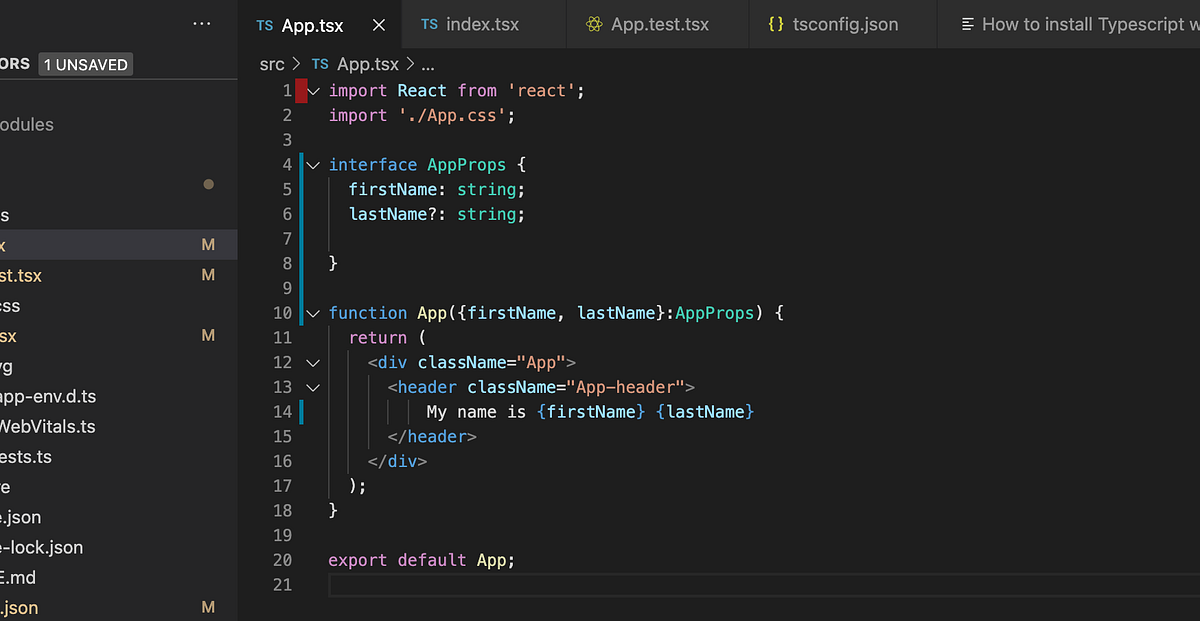
Typing Component Props
Props are the way we pass data from a parent component down to a child component, making our components dynamic and reusable. Think of them as the arguments to your component function. Your background in TypeScript makes you well-equipped to enforce contracts for these props, preventing bugs and improving developer experience.
Let's explore the common patterns for typing props.
1. Inline Typing
The most direct way to type props is to define their shape directly in the function's signature.
// A simple component with inline prop types
function Greeting({ name }: { name: string }) {
  return <h1>Hello, {name}!</h1>;
}

// Usage
<Greeting name="Satoshi" />
This works for simple components, but as the number of props grows, it becomes cluttered and hard to read.
2. Using a type Alias or interface
A much cleaner and more scalable approach is to define the shape of your props object using a TypeScript type alias or interface. The consensus in the modern TypeScript/React community leans towards using type aliases for their flexibility, but both work for defining prop objects.
// Define the shape of the props using a type alias
type GreetingProps = {
  name: string;
  messageCount?: number; // The '?' makes this prop optional
};

function Greeting({ name, messageCount }: GreetingProps) {
  return (
    <div>
      <h1>Hello, {name}!</h1>
      {messageCount && <p>You have {messageCount} new messages.</p>}
    </div>
  );
}
This approach is more organized, reusable, and easier to read. The official React documentation demonstrates this pattern as well.
Using TypeScript - Typing React Components
The official React documentation provides a clear, concise guide on this topic. Let's start by reading their initial examples on typing components.
Read the section under the heading 'TypeScript with React Components'. It covers both the inline syntax and the more common interface/type pattern.
type vs. interface
You've likely used both type and interface in your TypeScript work. While they are often interchangeable for describing object shapes, there are key differences that make type a more versatile choice in many scenarios.
- Flexibility:
typecan define not just objects, but also union types (string | number), intersection types, tuples, and primitive aliases. - Extensibility:
interfacecan be extended usingextends, which is familiar from class-based inheritance.typeachieves the same with intersection types (&).
For a deeper dive into this and a recap of the fundamentals of prop typing, the following video is excellent.
TypeScript in React - COMPLETE Tutorial (Crash Course)
This video from ByteGrad provides a comprehensive tutorial on using TypeScript with React. We'll watch a few key segments. First, let's focus on the basics of prop typing and the type vs. interface discussion.
Please watch the following two segments: 02:55 - 08:23: This covers the evolution of prop typing from inline to using a separate type alias, including destructuring and optional props. It provides a solid practical foundation. 21:28 - 24:05: This section clearly explains the differences between type and interface and makes a strong case for standardizing on type, which is a valuable modern perspective.
The children Prop: Creating Wrapper Components
One special prop that you don't pass explicitly is children. This prop represents any content nested between a component's opening and closing tags. It's the key to creating flexible, reusable "wrapper" components like cards, modals, or page layouts.
<Card>
  {/* This h1 and p are the 'children' of the Card component */}
  <h1>Photo of the Day</h1>
  <p>A beautiful sunset over the mountains.</p>
</Card>
To type the children prop, React provides a few utility types. The most common is React.ReactNode.
React.ReactNode: A very broad type that includes anything React can render: JSX elements, strings, numbers, booleans,null,undefined, and arrays of other nodes. This is what you'll use most of the time.React.JSX.Element: A more restrictive type that only allows for valid JSX elements. You would use this if your component should not accept primitive values like text nodes as direct children.
The following diagram provides a great mental model for the relationship between these types.

Let's watch a short video that demonstrates how to type the children prop in practice.
Typescript for React Components From Beginners to Masters
This segment from Jack Herrington's video on TypeScript components focuses specifically on how to handle content passed as children.
Watch from 05:25 to 07:42. Pay attention to how using React.ReactNode allows the component to accept both simple text and more complex JSX elements as children.
The React.FC Pattern: A Note on Legacy Code
As you browse older React codebases or tutorials, you will inevitably encounter components defined with React.FC or React.FunctionComponent.
// The React.FC pattern
import React from 'react';

type GreetingProps = { name: string };

const Greeting: React.FC<GreetingProps> = ({ name }) => {
  return <h1>Hello, {name}!</h1>;
};
While this works, it is no longer the recommended approach. The main reasons are:
- Implicit Children: In older versions of React's types,
React.FCautomatically includedchildrenin the component's props, even if you didn't want it. This was confusing and has since been fixed, but the historical baggage remains. - Verbosity: The plain function syntax is more concise.
- Composition: Plain functions compose more naturally with other TypeScript features, especially generics.
It's important to recognize this pattern, but for your own code, you should prefer the plain function syntax we've been using. The "React TypeScript Cheatsheets" resource offers a good summary of this. It notes that with the latest updates, the choice is mostly stylistic, but the general consensus is to avoid React.FC.
Advanced Typing: Generics
Given your computer science background, you'll appreciate how you can use generics to create highly reusable, type-safe components. This is a powerful pattern that combines React's component model with one of TypeScript's best features.
Let's imagine a List component. We want it to be able to render a list of any kind of data—strings, numbers, or complex objects—while ensuring the render function receives the correctly typed item.
Typescript for React Components From Beginners to Masters
Let's watch one more clip from Jack Herrington that perfectly demonstrates how to build a generic List component. This is a fantastic real-world application of generics in a React context.
Watch from 18:02 to 21:48. Notice how the type parameter <ListItem> is defined on the component function and then used to type both the items array and the item argument in the render function prop. This creates a strong link between the data and how it's rendered.
Test your understanding!
You are building a generic Select component. It should accept an array of items of any type and a renderOption function. This function receives an item and should return a JSX element for the <option>.
How would you define the type for this component's props using generics?
// Fill in the blanks
type SelectProps<T> = {
  items: ???;
  renderOption: (item: ???) => React.JSX.Element;
};

function Select<T>({ items, renderOption }: SelectProps<T>) {
  // ... implementation ...
}
Show answer
Here is the correct way to type the props:
type SelectProps<T> = {
  items: T[]; // An array of the generic type T
  renderOption: (item: T) => React.JSX.Element; // A function that receives an item of type T
};
By defining the generic T on SelectProps and using it for both items and the renderOption function's argument, you ensure type safety. If you pass an array of User objects to items, TypeScript will enforce that the item passed to renderOption is also a User object, giving you full autocomplete and type checking.
Conclusion
This lesson marks the end of our first module. You now have a comprehensive understanding of React's foundational concepts, from the syntax of JSX to the formal definition of a component.
Key Takeaways:
- Functional Components are the modern standard in React. They are JavaScript functions that accept
propsand return JSX. - Props are typed using TypeScript
typealiases orinterfacesto create clear, enforceable contracts for your components.typeis often preferred for its flexibility. - The
childrenprop is a powerful feature for creating composable wrapper components and is typically typed withReact.ReactNode. - The
React.FCtype is a legacy pattern. While you should recognize it, prefer the simpler and more powerful plain function syntax for new components. - Advanced TypeScript patterns like generics can be used to build extremely flexible and reusable components, a perfect intersection of your programming skills and React's declarative model.
In our next module, "Components, Props, and Composition," we will begin by exploring why functional components became the standard over their class-based predecessors. We will then build on today's lesson to master the flow of data and events throughout a complex component hierarchy.