Hello! Welcome to the second module of our course, "Components, Props, and Composition."
Introduction
In our last lesson, we concluded the fundamentals module by learning how to formally define and type a React functional component using TypeScript. We covered the syntax, how to type props with type aliases, and even touched on advanced patterns like generics. This gave you the "how-to" for writing the basic building blocks of a React application.
Today, we'll address the learning outcome: Create functional components and explain why they are the standard in modern React. We will explore the "why" behind this standard. To do this, we'll look back at their predecessor—class components—and understand the evolution that led the React community and its creators to favor the functional approach. This contextual understanding is crucial for writing idiomatic, modern React code.
What is a Functional Component? A Quick Review
As we've established, a functional component is fundamentally a JavaScript function that accepts an object of properties (props) and returns a React element (typically JSX) describing the UI.
Let's start with a foundational reading to solidify this definition.
The article 'React Function Components' by Robin Wieruch provides a clear and concise starting point. It defines what a functional component is and shows its basic syntax.
Please read the first two sections: 'React Function Component Example' and 'React Arrow Function Component'. This will reinforce the basic structure and introduce the common ES6 arrow function syntax for defining components.
As you saw, a component can be a standard function declaration or a const assigned an arrow function. Both are common, but the arrow function syntax is prevalent in modern codebases.
// Standard function syntax
function Greeting({ name }: { name: string }) {
  return <h1>Hello, {name}!</h1>;
}

// Arrow function syntax (often more concise)
const Greeting = ({ name }: { name: string }) => {
  return <h1>Hello, {name}!</h1>;
};
This seems simple enough, so why do we need a whole lesson on it? Because for many years, this wasn't the primary way to build powerful, interactive components.
The Historical Context: Class Components
To understand why functional components are the standard now, we must first look at what they replaced: class components. Before 2019, if your component needed to hold its own data (state) or perform actions when it was added to or removed from the screen (lifecycle events), you had to use a JavaScript class.
A class component is an ES6 class that extends React.Component. It has a more complex structure, requiring:
- A
constructorto initialize state (this.state). - A
render()method that returns the JSX. - The
thiskeyword to access props (this.props) and state (this.state).
The following video provides a clear, side-by-side visual comparison of the syntax.
React Basics Crash Course (2020): Functional Components vs Class Components
This video from CodingWithChandler gives a great visual breakdown of a functional component versus its class-based equivalent. Pay close attention to the structural differences.
Watch the segment from 01:30 to 02:42. Note the class ... extends React.Component syntax, the constructor, and how the JSX is returned from a render() method, unlike in a functional component.
Here is a typical class component structure:
import React from 'react';

type CounterProps = {
  initialCount: number;
};

type CounterState = {
  count: number;
};

class Counter extends React.Component<CounterProps, CounterState> {
  // 1. Constructor to initialize state
  constructor(props: CounterProps) {
    super(props);
    this.state = {
      count: props.initialCount,
    };
  }

  // 2. A render method is required
  render() {
    return (
      <div>
        <p>Count: {this.state.count}</p>
        {/* 3. State is updated with this.setState */}
        <button onClick={() => this.setState({ count: this.state.count + 1 })}>
          Increment
        </button>
      </div>
    );
  }
}
This is significantly more verbose than its functional equivalent. Given your CS background, you can see the boilerplate involved: the constructor, super(props), and the management of the this context, which has historically been a common source of bugs in JavaScript.
The Revolution: React Hooks
For a long time, functional components were known as "stateless functional components." They were great for simple presentation, but couldn't manage their own state or lifecycle. This created a division: simple UI was functional, complex UI was a class.
This all changed with the introduction of React Hooks in React 16.8.
Hooks are functions that let you "hook into" React state and lifecycle features from functional components.
With Hooks, functional components gained the ability to do everything class components could, but with a much simpler and more direct API.
Let's see how Hooks bridged this gap.
React Basics Crash Course (2020): Functional Components vs Class Components
Let's return to the CodingWithChandler video, which perfectly explains how Hooks brought state and lifecycle features to functional components.
Watch from 04:01 to 05:41. This section introduces useState for managing state and useEffect for handling side effects (the equivalent of lifecycle methods), which were the two key features missing from functional components.
The introduction of useState is a perfect example of this simplification.
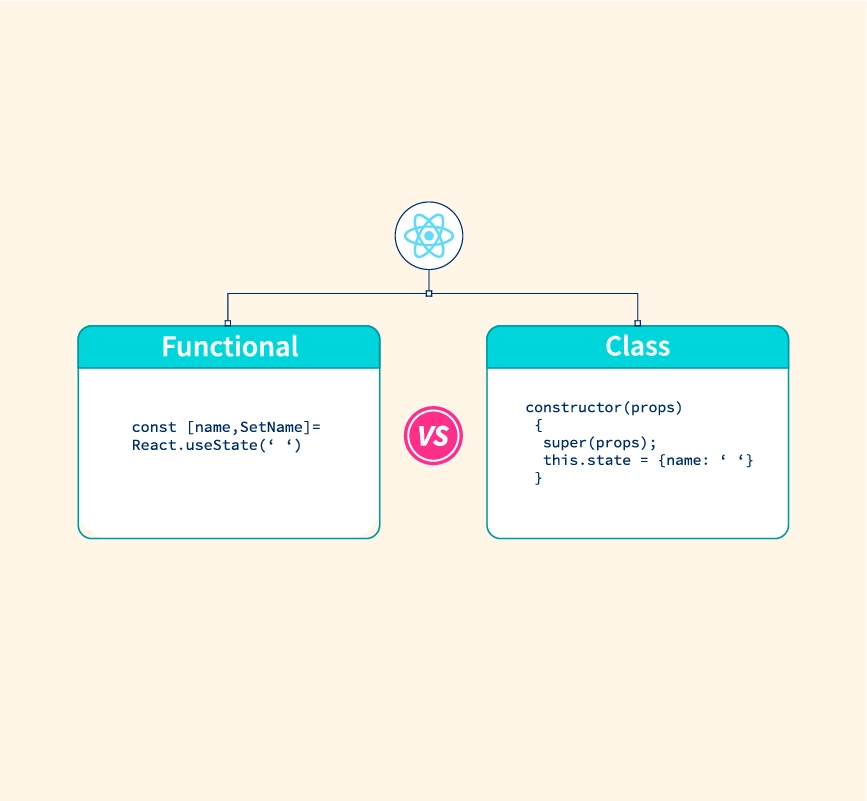
Key Advantages of Functional Components
With Hooks, functional components not only reached parity with class components but surpassed them in several ways, leading to their adoption as the modern standard.
The article "Functional vs. Class Components in React" provides an excellent summary of these benefits.
Functional vs. Class Components in React
Let's read a section from this article on devchallenges.io. It neatly organizes the advantages of using functional components.
Read the section titled 'Benefits of Using Functional Components'. It outlines several key advantages, including simplified syntax, performance, and easier testing.
Let's summarize the key points from that reading and others:
-
Simplified Syntax & Less Boilerplate: As we've seen, functional components are just functions. They are more concise and easier to read. You avoid the
classkeyword, theconstructor, and the complexities of thethiskeyword. -
Easier to Read and Reason About: A functional component is a clear transformation of props into UI. This input -> output model is predictable and aligns well with the principles of functional programming.
-
State and Logic Reusability (Custom Hooks): With class components, reusing stateful logic was cumbersome (involving patterns like Higher-Order Components or Render Props). Hooks introduced a much cleaner way to extract and share logic between components through custom hooks, which we'll cover in a future module.
-
Easier Testing: Since they are just JavaScript functions, testing a functional component is often as simple as calling it with some props and asserting on its output. You don't need to worry about class instances or complex lifecycle interactions.
-
Performance Optimizations: While the performance difference is often negligible for simple apps, the functional component model is generally more amenable to optimizations by the React team. The reduced bundle size and lack of class instance overhead can be beneficial.
The React team themselves now recommend using functional components with Hooks for all new development.
React Basics Crash Course (2020): Functional Components vs Class Components
Let's watch a final clip that summarizes the official recommendation and reinforces the key takeaways.
Watch from 05:41 to 06:39. This conclusion emphasizes that functional components are simpler, easier to test, and are the recommended approach by the creators of React.
Test your understanding!
A colleague is reviewing a very old part of your company's codebase and finds a class component. They ask you why the team now exclusively writes functional components. What are two key reasons you would give them, based on what you've learned?
Show answer
You could provide several valid reasons, but here are two of the most important ones:
- Simpler and More Readable Code: Functional components have less boilerplate. You don't need a
constructor,rendermethod, or thethiskeyword, which makes the code more concise and easier to understand at a glance. - The Power of Hooks: You could explain that React Hooks (like
useStateanduseEffect) allow functional components to handle their own state and side effects. This gives them all the power of class components but with a much cleaner and more composable API, especially for reusing logic with custom hooks.
Conclusion
Today, we've placed functional components in their historical context and established a clear understanding of why they are the cornerstone of modern React development. While you may still encounter class components in legacy code, all your new work in React will be with functional components.
Key Takeaways:
- React development historically relied on class components to manage state and lifecycle events.
- Class components are more verbose, requiring a
constructor,render()method, and careful management of thethiskeyword. - The introduction of React Hooks in 2019 empowered functional components with the ability to manage state (
useState) and side effects (useEffect). - Functional components are now the standard because they are simpler, more readable, easier to test, and promote better code reuse through custom hooks.
Next Steps
Now that we have firmly established what a component is and why we use the functional form, we are ready to build on this foundation. In the next lesson, we will dive deep into the primary mechanism for passing information to components: props. We'll learn how to pass data from parent to child components using robust TypeScript definitions, which is the first step in creating a dynamic and interactive application.