Hello! Welcome to the first lesson in our module on Advanced State Management.
In previous modules, we've built a solid foundation. We've created UIs with components, managed local state with useState, handled asynchronous operations with useEffect, and even built a complete navigation system with React Router. You've essentially constructed the "skeleton" and "pathways" of a web application.
Now, we're going to focus on the "central nervous system": the state that powers your application's logic and interactivity. As applications grow, sharing state between distant components becomes a significant challenge. This lesson addresses a fundamental question every React developer faces: when are React's built-in tools enough, and when should you reach for a dedicated state management library?
Our learning outcome is to compare the trade-offs between React's built-in state management and external libraries. We'll dissect the problems they solve, their performance characteristics, and the developer experience they offer, equipping you to make informed architectural decisions.
The Original Sin: Prop Drilling
Let's start by revisiting a problem we've touched on before: prop drilling. This occurs when you need to pass data from a component high up in the tree to one that's deeply nested. To do this, you have to pass the data as props through all the intermediate components, even those that don't use the data themselves.
Given your background in software engineering, you can likely see the parallels to passing arguments through multiple function calls or layers in a system just to get it to its final destination. It creates tight coupling and makes refactoring a headache.
The following video provides an excellent visual explanation of this core problem.
State Managers Are Making Your Code Worse In React
This video from Web Dev Simplified clearly illustrates the concept of prop drilling, showing how state needs to be passed down through multiple component layers.
Watch from 01:09 to 02:40. Focus on understanding the visual representation of how state is 'drilled' down through the component tree.
React's Native Solution: The Context API
React provides a built-in solution to prop drilling: the Context API. As we saw in Module 6, Context allows a "provider" component to make a value available to all components within its subtree, without passing props down manually. Any component in the tree can then "consume" this value using the useContext hook.
This is a form of dependency injection, a pattern you might be familiar with from other programming frameworks. Let's watch a practical demonstration of Context solving the prop drilling problem.
Mastering React Context: Do you NEED a state manager?
In this video, Jack Herrington refactors a component that uses prop drilling to use the Context API instead. This is a perfect demonstration of Context's primary use case.
Watch from 04:13 to 09:10. Observe how creating a CounterContext and a CounterContextProvider eliminates the need to pass setCounter through the intermediate Container component.
The Trade-offs of Context
Context is an excellent, dependency-free tool, but it has significant trade-offs, especially concerning performance.
-
Pros:
- Built-in: No third-party libraries to install or maintain.
- Simplicity: The API (
createContext,useContext) is straightforward for solving prop drilling. - Ideal for "slow" state: Perfect for data that doesn't change often, like theme information (light/dark mode), user authentication status, or language settings.
-
Cons:
- Performance: This is the most critical drawback. When a context's value changes, every component that consumes that context re-renders, regardless of whether the specific part of the value it cares about has changed.
Let's see this performance issue in action.
Mastering React Context: Do you NEED a state manager?
Jack Herrington continues his example, demonstrating how updating a single value in the context causes the entire component tree that consumes it to re-render.
Watch from 25:33 to 30:01. Pay close attention to the highlighted updates in the React DevTools. You'll see that when the cart count is updated, the login section also re-renders, because they both consume the same context value.
This re-render behavior is why you often hear the advice: "Don't put frequently updated state in Context." While there are advanced patterns to mitigate this (like splitting contexts or using the use-context-selector library, which the same video explores later), it requires manual optimization. This leads us to the world of external libraries.
The Role of External State Management Libraries
Long before the Context API and hooks were mature, libraries like Redux emerged to solve React's state management challenges on a large scale. They provided a centralized "store" for global application state, with strict rules for how that state could be read and updated.
A dedicated state manager is more than just a way to avoid prop drilling.
Mastering React Context: Do you NEED a state manager?
Let's get a clear definition of what separates a generic tool like Context from a purpose-built state manager.
Watch from 14:59 to 16:07. The key takeaway is that a state manager is highly opinionated and provides out-of-the-box solutions for performance (like granular updates), state structure, and mutation logic.
Modern libraries like Zustand, Jotai, and the modernized Redux Toolkit are designed to provide the benefits of a global store with a much better developer experience and superior performance compared to a naive Context implementation.
A Look at a Modern Library: Zustand
Zustand is a popular, minimalist state management library. Its philosophy is to provide a simple, unopinionated global store using a familiar hook-based API.
Let's see how the same e-commerce example from before is implemented with Zustand and, more importantly, how it performs.
Mastering React Context: Do you NEED a state manager?
This segment demonstrates how to create and consume a global store with Zustand. Notice how little boilerplate is required compared to setting up a Context.
First, watch from 16:07 to 22:22. This section shows how to create a useStore hook with Zustand and use it to get both state and action functions in different components without any providers. Then, watch from 24:27 to 25:33 to see the performance benefits. Notice how updating the cart count only re-renders the CartCount component. This is because Zustand uses selectors to ensure components only subscribe to the specific pieces of state they need.
Zustand's ability to facilitate granular re-renders is its key performance advantage over a basic Context setup. Components automatically subscribe only to the state slices they select, preventing unnecessary updates.
Head-to-Head Comparison: The Key Trade-offs
Now that we've seen both approaches in action, let's formalize the comparison. Choosing the right tool involves balancing several factors.
The article below provides an excellent breakdown and a feature matrix comparing multiple solutions.
Do You Need State Management in 2025? React Context ...
This article, 'Do You Need State Management in 2025?', offers a comprehensive evaluation of the modern state management landscape. We'll focus on its direct comparisons.
First, read the section 'The Contenders' to get a quick overview of the key strengths and weaknesses of Context, Zustand, Jotai, and Redux Toolkit. Then, carefully study the 'Quick Feature Matrix' table in the 'Head-to-Head Comparison' section. This table is a concise summary of the trade-offs.
To give you an even quicker visual summary, here is a fantastic comparison table:
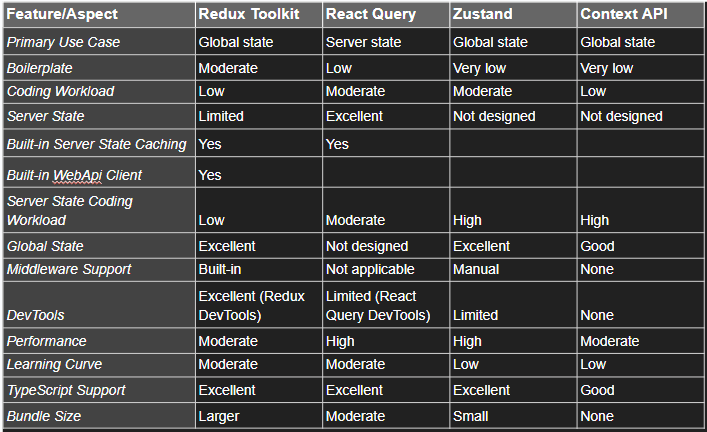
Let's synthesize this into our own list of trade-offs.
| Criteria | React Context (useContext) |
External Libraries (e.g., Zustand) |
|---|---|---|
| Primary Use Case | Dependency injection, avoiding prop drilling for low-frequency state (theme, user auth). | Managing complex, frequently updated global client state. |
| Performance | By default, re-renders all consumers on any change. Requires manual optimization (splitting contexts, memoization). | Optimized for performance. Granular updates via selectors prevent unnecessary re-renders. |
| Bundle Size | 0 KB (built-in). | Minimal (Zustand is ~1KB). Can be larger for more feature-rich libraries like Redux Toolkit (~8KB+). |
| Boilerplate | Moderate. Requires creating a context and a provider component for each piece of state. Can lead to "provider hell". | Minimal. Create a store with a simple function and use the hook directly anywhere, no providers needed. |
| Developer Tools | None built-in. Debugging is done via React DevTools, but without features like "time travel". | Excellent. Most libraries integrate with Redux DevTools, offering state inspection, action logging, and time-travel debugging. |
| Learning Curve | Low. The concepts are native to React. | Low for minimalist libraries like Zustand. Higher for more structured ones like Redux Toolkit. |
Test your understanding!
You are building a settings panel for a large application. This panel has a "Theme" toggle (light/dark) and a "Notifications" toggle (on/off). Both settings need to be accessible by many components throughout the app. The "Theme" is set once and rarely changes, while the "Notifications" setting could be toggled frequently by the user.
Based on the trade-offs, how might you architect the state management for these two settings?
Show answer
A good approach would be to use separate tools for each concern:
-
Theme: Use React's
Context API. The theme is a classic example of "slow-moving" global state. Creating aThemeContextis perfect for this. It has zero bundle size impact, and since it rarely changes, the performance drawback of re-rendering all consumers is not a concern. -
Notifications: Use a library like
Zustand. Since this state can change frequently, you want to avoid the unnecessary re-renders that a shared Context might cause. Zustand's selector-based model ensures that only components that actually display the notification status will re-render when the toggle is flipped, making it more performant for this use case.
This hybrid approach demonstrates the key principle: use the right tool for the job.
The Modern Landscape: It's Not a Binary Choice
The most important takeaway is that modern state management isn't about choosing one tool for everything. It's about categorizing your state and using the best tool for each category.
This article from developerway.com provides a brilliant mental model for this.
React State Management in 2025: What You Actually Need
This article, 'React State Management in 2025', argues that most state concerns don't even require a traditional 'state management library'. It breaks down state into distinct categories.
Read the sections 'State Concerns That Don't Need a State Management Library', 'Shared State', 'Shared State and External Libraries', and the final 'TL;DR'. Focus on understanding the different categories of state: Remote, URL, Local, and Shared. This reframes the entire debate from 'which library is best?' to 'what kind of state am I managing?'
The key categories of state are:
- Local State: Managed within a single component.
useStateanduseReducerare the perfect tools. - Shared UI State: State needed by multiple components. This is where the Context vs. Zustand/Redux debate lies. Start with Context; if performance becomes an issue or you feel the pain of "provider hell," graduate to a library like Zustand.
- URL State: State stored in the URL, like search filters or tab selections.
useSearchParamsfrom React Router is the native tool here. - Server State (or Server Cache): Data fetched from an API. This is a completely different problem. It involves caching, refetching, and synchronization. Don't use a client state manager for this! This is the job for a dedicated library like TanStack Query (React Query) or SWR.
Conclusion
You now have a framework for thinking about state management in a modern React application. We've moved beyond a simple one-size-fits-all approach to a more nuanced, problem-driven methodology.
Key Takeaways:
- The primary problem that both Context and external libraries solve is prop drilling.
- React Context is a built-in solution, ideal for low-frequency global state (like theming), but can cause performance issues due to its re-render behavior.
- External libraries like Zustand offer better performance for frequently updated state through selective subscriptions, along with a better developer experience (e.g., less boilerplate, powerful dev tools).
- The choice is a trade-off between bundle size, performance, complexity, and developer experience.
- Modern state management is about categorizing your state (Local, Shared, URL, Server) and using the best tool for each category.
Preview of the Next Lesson:
We've briefly touched upon the most important categorization: client state vs. server state. In our next lesson, we will dive deep into this distinction, explaining what "server cache" means and why specialized libraries like TanStack Query are a game-changer for data-driven applications. This will be a crucial step in completing your modern React toolkit.