Hello! Welcome to the next lesson in our module on Advanced State Management.
In our last session, we drew a critical line in the sand between Client State and Server Cache. We concluded that server data, with its asynchronous nature and external ownership, is best managed by a specialized library like TanStack Query. This leaves a much smaller, more manageable set of global client state—things like UI settings, theme preferences, or session information.
Today, we'll explore an elegant solution for managing precisely that kind of state. Our learning outcome is to introduce the core principles of a minimal state management library like Zustand. We'll uncover why it's become so popular, how its API is designed for simplicity and performance, and the core ideas that make it a powerful tool in a modern React developer's toolkit.
Why Do We Need Another State Manager?
After our last lesson, you might be wondering: if we've moved our complex server data to a dedicated cache, is the remaining global client state really that hard to manage? Can't we just use React's built-in useState and useContext?
While you certainly can, the Context API has some well-known limitations, especially as an application scales:
- The Provider Problem: You need to wrap your component tree in a
Provider, which can become cumbersome. - The Re-render Problem: Any component consuming a context will re-render whenever any value in that context changes, even if the specific piece of data it cares about remains the same. This can lead to performance bottlenecks.
Zustand was created to solve these exact problems, offering a way to share state across your app without providers and with surgical precision for re-renders.
To start, let's watch this excellent introduction from the 'Zustand - Complete Tutorial' by Cosden Solutions. It clearly articulates the problems with local state and the Context API, setting the stage for why Zustand is a compelling alternative.
Watch from 00:24 to 02:24. Pay attention to the explanation of why prop drilling and the Context API can fall short in more complex applications.
As the video explains, Zustand provides global state that is not tied to your component hierarchy. It achieves this with a design philosophy centered on simplicity and minimal boilerplate.
The Core Principles of Zustand
Before we dive into code, let's establish Zustand's guiding principles. These are what make it different from other state managers you may have heard of, like Redux.
Zustand: A Guide to Scalable State Management
This article, 'Zustand: A Guide to Scalable State Management', provides a fantastic look under the hood. We'll read a small section that outlines its fundamental architecture.
Read the section titled 'Zustand Architecture: Under the Hood'. It introduces the core components: the Store, Subscribers, and Selectors, and highlights the crucial point that it does not require a provider.
From that reading, we can extract a few key principles:
- Minimal API & No Boilerplate: Zustand's API is tiny. You primarily use one function,
create, to get started. There are no complex concepts like reducers, action types, or dispatchers required for basic usage. - Hooks-Based, But Not React-Exclusive: It generates a custom hook for you to use in your components, making it feel very natural in a modern React codebase. However, the underlying store is plain JavaScript, meaning you can interact with it from anywhere, even outside of your React components.
- No Context Provider: This is a major differentiator. You don't need to wrap your app in
<MyStoreProvider>. Any component can import and use the store directly. - Performance Through Subscriptions: Components subscribe to state changes. By using selectors, you can ensure a component only re-renders when the exact slice of state it cares about has changed.
This last point is arguably the most important one for performance. Let's see how this works in practice.
Creating and Using a Store
The fundamental unit in Zustand is a store. A store is a single JavaScript object that holds your state values and any actions that can modify them. You create a store using the create function from the zustand library.
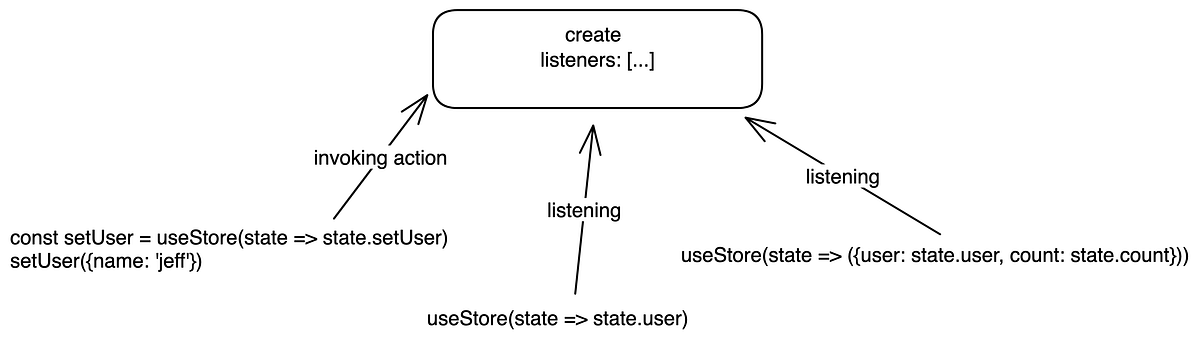
Let's see how to define a store, complete with TypeScript typings.
This next clip from the Cosden Solutions tutorial demonstrates how to set up your first store. It covers defining the store's type and creating the store itself with an initial state.
Watch from 02:24 to 04:09. Note the two main steps: first, defining the type for the store's shape, and second, using create to implement it.
As you saw, the process is straightforward. Here’s a breakdown of the code structure:
import { create } from 'zustand';

// 1. Define the interface for your store's state and actions
interface CounterState {
  count: number;
  increment: () => void;
  decrement: () => void;
}

// 2. Create the store using the `create` function
// The function returns a custom hook, conventionally prefixed with `use`
export const useCounterStore = create<CounterState>((set) => ({
  // Initial state
  count: 0,

  // Actions that modify the state
  increment: () => set((state) => ({ count: state.count + 1 })),
  decrement: () => set((state) => ({ count: state.count - 1 })),
}));
The create function takes a callback that receives a set function.
set: This is the only way to update the state. You can either pass it an object to merge (set({ count: 10 })) or, more commonly, a function that receives the current state and returns the new state (set(state => ({...}))). Using the function form is essential when your new state depends on the old state.
Accessing State in Components
The useCounterStore we just created is a hook. You can use it in any component to access the store. The key to performance is using a selector function.
Let's continue with the video to see how to connect a component to the store and read state from it.
Watch from 04:09 to 05:29. The most important part here is the selector function: state => state.count. Understand that this tells Zustand that this component only cares about the count property.
Here is how you would use it in a component:
import { useCounterStore } from './store';

function CounterDisplay() {
  // The selector function extracts only the `count` property.
  // This component will only re-render if `count` changes.
  const count = useCounterStore((state) => state.count);

  return <h1>Count: {count}</h1>;
}

function Controls() {
  // You can also select actions from the store.
  const increment = useCounterStore((state) => state.increment);
  const decrement = useCounterStore((state) => state.decrement);

  return (
    <>
      <button onClick={increment}>Increment</button>
      <button onClick={decrement}>Decrement</button>
    </>
  );
}
If you need multiple values, you can select an object. However, be aware that this can cause extra re-renders unless you use a special equality function like shallow, which we'll cover later. For now, the best practice is to use multiple useStore calls with atomic selectors.
Handling Actions: Sync and Async
Actions are just functions in your store that call set. They can be simple synchronous updates or complex asynchronous flows, like making an API call (though remember our discussion on server cache!). Zustand handles async actions out of the box without any extra middleware.
This final clip demonstrates implementing both synchronous and asynchronous actions, and how to access the store from outside a React component.
Watch from 05:29 to 16:00. This is a longer segment, so focus on these key ideas: How actions use the set function to update state (05:29). How easily an async function can be added to the store (10:06). How to use useCounterStore.getState() and .setState() to interact with the store outside of a React component's lifecycle (12:43).
The ability to use getState and setState outside of React is a powerful feature. Because the store is not tied to the React component tree, you can integrate it with other parts of your application, like utility functions, WebSocket handlers, or logging services.
Test your understanding!
You need to create a simple store to manage an application's theme. The store should have:
- A
themeproperty that can be either'light'or'dark'. - An initial theme of
'light'. - A
toggleThemeaction that switches the theme from'light'to'dark'and vice-versa.
Based on what you've learned, how would you define the TypeScript interface and the create function for this useThemeStore?
Show answer
First, you'd define the interface for the state and actions:
interface ThemeState {
  theme: 'light' | 'dark';
  toggleTheme: () => void;
}
Then, you'd implement the store using create:
import { create } from 'zustand';

// Assuming ThemeState is defined as above

export const useThemeStore = create<ThemeState>((set) => ({
  theme: 'light', // Initial state

  toggleTheme: () =>
    set((state) => ({
      theme: state.theme === 'light' ? 'dark' : 'light'
    })),
}));
This implementation correctly defines the shape of the store with TypeScript, sets the initial state, and provides a toggleTheme action that uses the functional form of set to update the theme based on its previous value.
Conclusion
Today we've introduced Zustand as a modern solution for global client state management in React. We've seen that its power lies in its simplicity and a few well-designed principles that avoid the common pitfalls of older solutions.
Key Takeaways:
- Zustand solves the "provider" and "re-render" problems associated with React's Context API for global state.
- Its core principles are simplicity, performance via selectors, and flexibility (working outside React).
- You create a store with the
createfunction, which returns a custom hook. - The store holds both state and the actions that modify it.
- State is updated immutably using the
setfunction. - In components, you use selectors to subscribe to specific slices of state, preventing unnecessary re-renders.
Preview of the Next Lesson:
We've covered the theory and core API. In the next lesson, we'll put this knowledge into practice. We will manage global client state in a sample application using Zustand, building out a real feature and seeing how these principles translate into clean, scalable code.