Hello! Welcome to the final lesson in our module on Advanced State Management.
In our last session, we mastered optimistic updates with TanStack Query, a powerful technique for creating highly responsive user interfaces that feel instantaneous. We've now explored a full spectrum of state management tools: useState for local state, useReducer and Context for more complex or shared state, Zustand for global client state, and TanStack Query for server state.
The goal of this lesson is not to learn a new tool, but to synthesize what you've learned. We will differentiate the use cases for useState, useReducer/Context, Zustand, and TanStack Query. By the end, you'll have a clear mental model and a decision-making framework to confidently choose the right tool for any state management challenge you face. This is about moving from knowing how to use these tools to knowing when and why.
1. It’s All About Categories: Four Types of State
A common mistake is to think of "state" as one monolithic problem to be solved by a single library. In reality, modern React applications have several distinct categories of state. Recognizing the category is the first and most important step in choosing the right tool.
Drawing from best practices, we can classify most application state into four main types:
- Local Component State: Data that is owned and used by a single component. Think of the
isOpenstatus of a dropdown menu or the value of an uncontrolled form input. - Shared Client State: Data that lives entirely on the client but needs to be accessed by multiple, often disconnected, components. A theme toggle (light/dark mode) or the contents of a shopping cart are classic examples.
- Server Cache State: Data that originates from your backend. It's not truly client state, but rather a client-side cache of remote data. User profiles, product lists, and blog posts fall into this category.
- URL State: Data that is stored in the URL's query parameters, like search filters or pagination info (
?page=2&sort=asc). This makes the UI shareable and bookmarkable. While important, today we'll focus on the first three, which are handled by the tools in our learning outcome.
Let's now map our tools to these categories.
2. Local State: useState vs. useReducer
This is the simplest category and should always be your starting point.
useState: This is your default, go-to hook for local state. Use it for simple, independent state variables like booleans, strings, or numbers.useReducer: Reach foruseReducerwhen you have more complex state logic. It shines when:- The next state value depends on the previous one.
- You have a complex state object with multiple fields that often change together.
- You want to co-locate the state update logic for better predictability and testability.
The useReducer hook provides a more structured way to handle state transitions, as illustrated below.

Guideline: Start with useState. If you find yourself writing complex update logic inside event handlers or passing multiple state setters around, it's a good sign to refactor to useReducer.
3. The Most Important Distinction: Client State vs. Server State
Perhaps the biggest leap in modern React state management is understanding the difference between client state and server state. Confusing the two leads to complex, hard-to-maintain code.
- Client State: Data that your frontend owns and has complete control over. It's typically synchronous and ephemeral. Zustand is a master of this domain.
- Server State: Data that lives on a remote server. Your frontend merely holds a cache of it. It is asynchronous, shared among users, and can become stale. TanStack Query is the specialized tool for this.
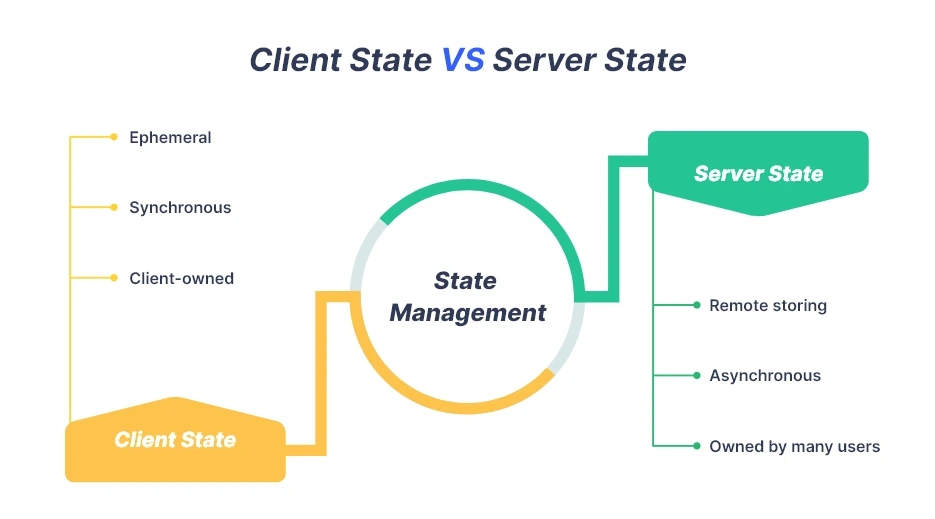
Trying to manage server state with a client state library is a common anti-pattern. You'd have to manually handle loading states, error states, caching, deduplication, and background updates—all things TanStack Query does for you out of the box.
The following video brilliantly demonstrates this distinction by showing the wrong and right ways to combine a client state manager (Zustand) and a server state manager (TanStack Query).
Combining Zustand with React Query
This video from Cosden Solutions is essential for understanding the separation of concerns between client and server state. It will clarify exactly why you shouldn't put server data into a client state store like Zustand.
Watch from 00:10:36 to 00:17:36. Pay close attention to the definition of 'server state' vs. 'client state' and how the example is refactored. Notice how Zustand is used to manage client-side filters, which then drive the TanStack Query hook that manages the actual server data.
Key Takeaway from the video:
Use TanStack Query for your server data. Use client state tools like useState or Zustand to manage UI state (like filters, sorting, or pagination) that might be used as input to your TanStack Query hooks.
4. Shared Client State: Context vs. Zustand
When state is client-side but needs to be shared across many components, we enter the realm of global state management.
The Prop Drilling Problem and the Context Solution
Your first instinct might be to lift state up to a common ancestor and pass it down. This leads to "prop drilling," where components in the middle have to pass props they don't use.
React's Context API was created to solve this. It allows you to "broadcast" a value to all components in a tree without passing props down manually.
The Problem with Context
While Context is built-in and useful, it has two significant drawbacks in large applications:
- Provider Hell: Each piece of state requires its own
Provider, leading to deeply nestedProvidertrees at the root of your app, which can become difficult to manage. - Performance Issues: Any component consuming a
Contextwill re-render whenever any part of theContext's value changes, even if the component doesn't use that specific part. This can lead to excessive, unnecessary re-renders.
Zustand: The Graduation Path
Zustand solves both of these problems elegantly:
- No Providers: You create a "store" and can use its hook in any component without wrapping your app in providers.
- Optimized Re-renders: Components subscribe to specific slices of the state. They will only re-render if the data they subscribe to actually changes.
The next video provides a fantastic demonstration of this progression, starting with prop drilling, moving to Context, and finally showing why a dedicated state manager like Zustand is often a better choice.
Mastering React Context: Do you NEED a state manager?
Watch this video by Jack Herrington to see a practical comparison between using Context and a state manager like Zustand. He clearly demonstrates the performance benefits.
Watch the following sections: Prop Drilling with useState (00:01:03 - 00:05:11): Understand the initial problem. Refactoring to Context (00:05:11 - 00:08:45): See how Context solves prop drilling. Introducing Zustand (00:16:07 - 00:22:07): Observe how Zustand simplifies the setup and improves the developer experience. Performance Comparison (00:24:17 - 00:25:54): This is crucial. See how Zustand's selective subscriptions prevent unnecessary re-renders using the React DevTools.
Guideline: Use Context for low-frequency, simple global state like a theme or user authentication status. If your global state is complex, updates frequently, or you find yourself fighting with performance, it's time to reach for Zustand.
5. A Decision Framework for State Management
Now, let's put it all together into a simple decision tree. When faced with a new piece of state, ask yourself these questions in order:
Do You Need State Management in 2025?
The following article provides an excellent summary of the modern state management landscape and includes a clear, actionable decision framework. We'll use this as our guide.
Read the section titled "My Decision Framework". This provides a step-by-step questionnaire that perfectly summarizes the thought process for choosing a state management tool.
Here is a summary of that framework:
-
Is it server data?
- Yes: Use TanStack Query. End of story for this piece of state.
-
No, it's client data. Is it local to one component?
- Yes: Use
useState. If the logic becomes complex, refactor touseReducer.
- Yes: Use
-
No, it needs to be shared. How widely?
- Shared between a few nearby components (parent/child/sibling)?
- Lift state up and pass props (prop drilling). This is perfectly fine for 2-3 levels.
- Shared across many distant components?
- Start with
ContextAPI. It's built-in and ideal for simple, low-frequency updates (e.g., theme). Remember to split contexts to avoid performance issues. - Does
Contextfeel messy ("Provider Hell"), or are you seeing performance issues from frequent updates (e.g., a complex shopping cart)? Use Zustand.
- Start with
- Shared between a few nearby components (parent/child/sibling)?
Test your understanding!
You are building a social media dashboard. For each of the following features, which state management tool would you choose and why?
- The list of posts fetched from the API for the main feed.
- The
isOpenstate for a "Create Post" modal dialog. - The user's notification settings (e.g.,
enableDesktopNotifications: true), which are used by multiple components across the app to decide whether to show a browser notification. - The state of the "Create Post" form, which has multiple fields (title, content, tags, visibility) and complex validation logic.
Show answer
- List of posts: TanStack Query. This is classic server cache state. TanStack Query will handle fetching, caching, re-fetching on window focus, and invalidation automatically.
- Modal
isOpenstate:useState. This is simple, local component state. Aconst [isOpen, setIsOpen] = useState(false)is all you need. - Notification settings: This could be
Contextor Zustand. Since it's simple, app-wide configuration that likely doesn't change often,Contextis a great starting point. If the app had many such global settings and you wanted to avoid Provider Hell, Zustand would also be an excellent choice for its simplicity. - Complex form state:
useReducer. The form has multiple interdependent fields and complex logic.useReducerwould allow you to centralize all update logic (e.g.,UPDATE_FIELD,VALIDATE_FORM,RESET_FORM) into a single reducer function, making it much more predictable and manageable than multipleuseStatecalls.
Conclusion
You have now completed your journey through React's state management landscape, from the fundamental useState hook to the advanced capabilities of TanStack Query. You've not only learned the how but, more importantly, the when and why.
Key Takeaways:
- Categorize Your State: Before choosing a tool, identify if your state is local, shared client state, or server cache state.
- Client vs. Server is Key: The most crucial distinction is between data your client owns (managed by
useState/useReducer,Context, Zustand) and data it's just caching from a server (managed by TanStack Query). - Start Simple: Always default to the simplest solution. Use local state (
useState) whenever possible. - Graduate as Needed: Don't add libraries prematurely. Move from prop drilling to
Context, and fromContextto Zustand only when you face the specific problems those tools are designed to solve.
Preview of the Next Lesson:
We are now moving into a new module: Advanced Component and TypeScript Patterns. Having mastered how to manage state, our next focus will be on how to design more powerful, reusable, and flexible components. In the next lesson, we will implement the compound component pattern, a sophisticated technique for creating component APIs that are both expressive and flexible for the consumer.