Hello! Welcome to our next lesson on advanced state management with TanStack Query.
In our last session, we took a big step forward by learning how to keep our UI in sync with the server using invalidateQueries and how to improve perceived performance by manually updating the cache on success with setQueryData. This pattern is excellent, but it still requires the user to wait for the server to confirm the change.
Today, we will learn how to create the fastest possible user experience by implementing optimistic updates. We'll explore how to update the UI before the server responds, making your application feel instantaneous. Given your background in software engineering, you're well aware of network latency; this lesson provides a powerful front-end pattern to effectively hide it from the user.
Our goal is to implement optimistic updates for a smoother user experience using TanStack Query, covering the logic for both the "happy path" and the crucial error-handling rollback.
1. What Are Optimistic Updates?
An optimistic update is a pattern where we assume a mutation will succeed and update the UI immediately, without waiting for the server's confirmation.
- User Action: A user clicks "Add Comment".
- Optimistic UI: The new comment appears in the list instantly.
- Background: The request is sent to the server.
- If Success: Nothing changes in the UI. The data is eventually re-fetched in the background to get the final server-generated data (like an ID or timestamp), but the user perceives no delay.
- If Failure: The optimistically added comment is removed from the list, and an error message is shown.
This approach creates a snappy, responsive feel, but it requires us to carefully manage the application state to handle potential failures gracefully.

TanStack Query provides a robust set of callbacks within the useMutation hook to manage this complex flow elegantly.
2. The Anatomy of an Optimistic Mutation
To implement an optimistic update, we will primarily work with three callbacks in our useMutation configuration: onMutate, onError, and onSettled.
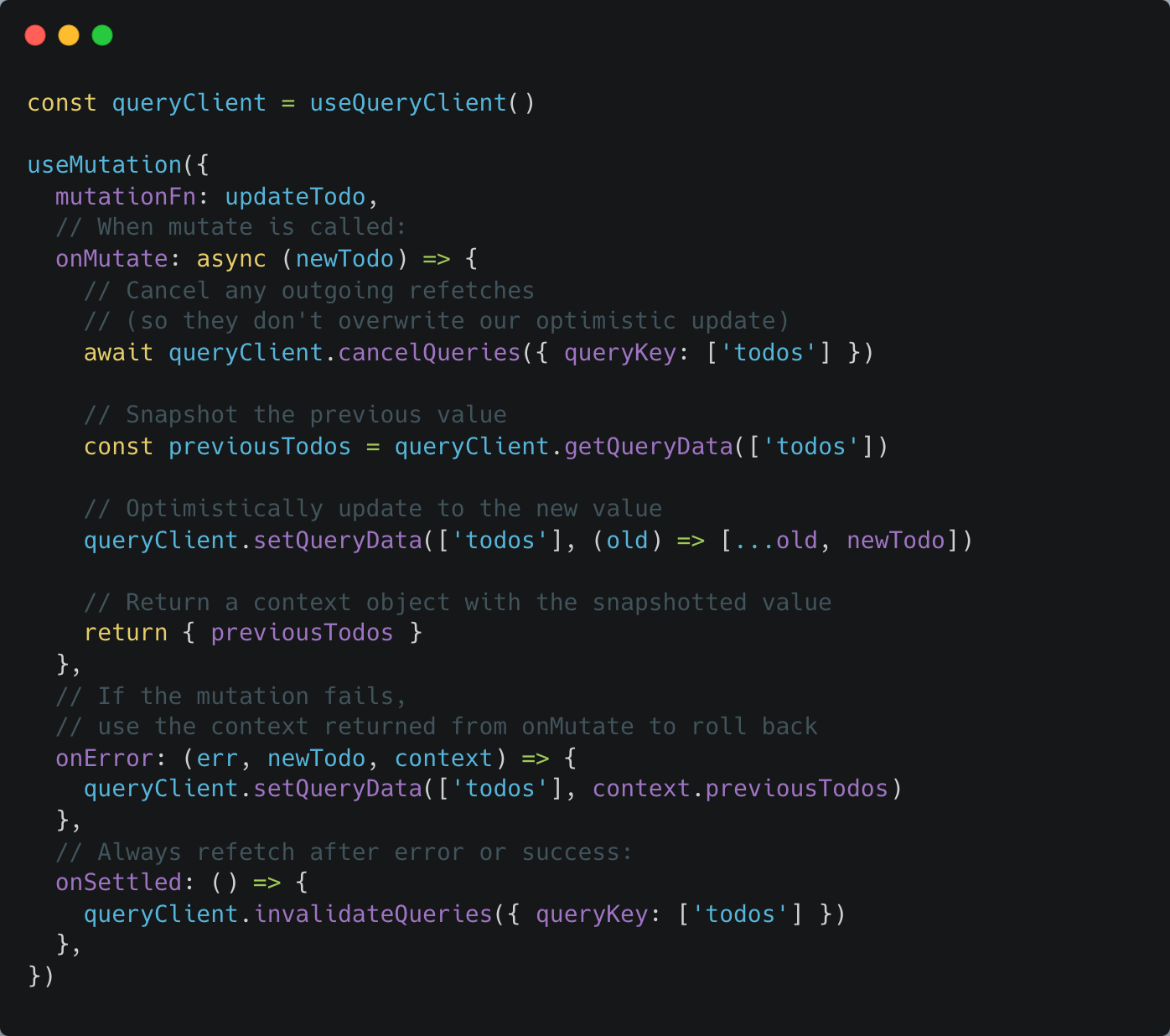
Here is the step-by-step process:
-
onMutate: This function runs before themutationFnis fired. It's our chance to update the UI preemptively.- Cancel Queries: We cancel any outgoing refetches for the data we're about to update. This prevents server data from overwriting our optimistic update.
- Snapshot Previous Data: We get the current data from the cache. We'll need this snapshot to roll back the state if the mutation fails.
- Optimistically Set Data: We manually update the cache with the new, optimistic data.
- Return Context: We return an object containing the snapshotted data. This context is passed to the
onErrorandonSettledcallbacks.
-
onError: This function runs only if the mutation fails.- It receives the
error, the originalvariables, and thecontextreturned fromonMutate. - We use the snapshotted data from the context to restore the cache to its pre-mutation state, effectively "rolling back" the optimistic change.
- It receives the
-
onSettled: This function runs after the mutation is complete, whether it succeeded or failed.- Its primary job here is cleanup. We invalidate the query to ensure our cache eventually syncs up with the definitive state from the server.
3. Implementing an Optimistic Update
Let's walk through a practical example: adding a new comment to a list. We'll build on the custom hook pattern we've used before.
The following video provides an excellent, detailed walkthrough of this exact process. It demonstrates how to create a "dummy" comment to insert into the cache and how to handle the full lifecycle of the optimistic mutation.
TanStack React Query v5 - Full Guide (Setup, Mutations, Infinite Loading, Optimistic Updates)
Watch this section from 'Coding in Flow' to see a complete, step-by-step implementation of optimistic updates for adding a comment to a list.
Watch from 01:19:08 to 01:29:12. Pay close attention to how onMutate is used to immediately update the UI, onError is used to roll back the change if the API call fails, and how a 'fake' comment object is created on the client-side for the immediate update.
Let's break down the code from the video into a clear, typed example. Assume we have a query for comments with the key ['comments'].
import { useMutation, useQueryClient } from '@tanstack/react-query';
import { createComment } from './api'; // Your API function
import { Comment, User } from './types'; // Your data types

// A type for the context object passed between mutation callbacks
interface CommentMutationContext {
  previousComments: Comment[] | undefined;
}

export const useCreateCommentOptimistic = () => {
  const queryClient = useQueryClient();

  return useMutation({
    mutationFn: createComment, // e.g., (newComment: { text: string }) => Promise<Comment>

    // 1. Fired before the mutation function
    onMutate: async (newComment: { text: string }): Promise<CommentMutationContext> => {
      // Cancel any outgoing refetches so they don't overwrite our optimistic update
      await queryClient.cancelQueries({ queryKey: ['comments'] });

      // Snapshot the previous value
      const previousComments = queryClient.getQueryData<Comment[]>(['comments']);

      // Optimistically update to the new value
      const currentUser: User = { name: "Current User", id: "user-1" }; // In a real app, this comes from auth
      const optimisticComment: Comment = {
          id: `temp-${Date.now()}`, // A temporary, unique ID
          text: newComment.text,
          createdAt: new Date().toISOString(),
          user: currentUser,
      };

      queryClient.setQueryData<Comment[]>(['comments'], (oldData = []) => [
        optimisticComment,
        ...oldData,
      ]);

      // Return a context object with the snapshotted value
      return { previousComments };
    },

    // 2. If the mutation fails, use the context returned from onMutate to roll back
    onError: (err, newComment, context) => {
      console.error("Failed to create comment:", err);
      if (context?.previousComments) {
        queryClient.setQueryData(['comments'], context.previousComments);
      }
    },

    // 3. Always refetch after error or success to sync with server
    onSettled: () => {
      queryClient.invalidateQueries({ queryKey: ['comments'] });
    },
  });
};
By structuring your mutation this way, you provide an instant UI update while ensuring data consistency and robust error handling.
Test your understanding!
A user likes a post. You implement an optimistic update that immediately increments the like count in the UI. The server request then fails due to a temporary network issue. Describe the sequence of events that should happen from the moment the server returns the error.
Show answer
- The
onErrorcallback of youruseMutationhook is triggered. - Inside
onError, you access thecontextobject that was returned from youronMutatefunction. This context contains thepreviousPostData(the post with the original like count) that you snapshotted before the optimistic update. - You call
queryClient.setQueryData(['posts', postId], context.previousPostData)to revert the cache to its original state. The UI automatically re-renders, showing the original like count. - Finally, the
onSettledcallback runs. It callsqueryClient.invalidateQueries({ queryKey: ['posts', postId] }). Although the mutation failed, this invalidation is still useful. If the network issue is resolved, the user can try the action again, and TanStack Query will know to refetch the data.
4. Alternative: UI-Level Optimistic Updates
The cache manipulation approach is powerful because it updates the central data source, ensuring any component subscribed to that query key will see the update. However, there is a simpler alternative for localized updates.
You can use the variables and isPending state returned from useMutation to render a temporary UI element.
Optimistic Updates | TanStack Query React Docs
The official TanStack Query documentation outlines this simpler, UI-based approach and explains its trade-offs.
Read the sections "Via the UI" and "When to use what". This will show you how to render an optimistic item based on mutation state and help you understand when this simpler method is appropriate versus the more robust cache-update method.
Here's a brief example:
function Todos() {
  const { data: todos = [] } = useQuery({ queryKey: ['todos'], queryFn: fetchTodos });

  const { mutate, isPending, variables } = useMutation({
    mutationFn: createTodo,
    onSuccess: () => {
      queryClient.invalidateQueries({ queryKey: ['todos'] });
    },
  });

  // ... form handling to call mutate({ text: 'New Todo' })

  return (
    <ul>
      {todos.map(todo => <li key={todo.id}>{todo.text}</li>)}
      {isPending && (
        <li style={{ opacity: 0.5 }}>
          {/* `variables` contains the object passed to `mutate` */}
          {variables.text}
        </li>
      )}
    </ul>
  );
}
This is easier to implement and doesn't require rollbacks (the pending item just disappears on error). However, the optimistic update is only visible within this component. If another component elsewhere also displays the list of todos, it won't see the pending item.
The rule of thumb is:
- Use the UI-level approach for simple, localized updates where you only have one place to show the result.
- Use the cache-update approach when the data is shared across multiple components or when you need a globally consistent optimistic state.
Conclusion
Today, we've unlocked one of the most powerful patterns for creating modern, high-performance web applications. By mastering optimistic updates, you can make your app feel as responsive as a native desktop application, even when dealing with network latency.
Key Takeaways:
- Optimistic updates assume a mutation will succeed and update the UI immediately for a superior user experience.
- The core implementation in TanStack Query relies on the
onMutate,onError, andonSettledcallbacks. - The flow involves canceling queries, snapshotting previous state, updating the cache optimistically, and rolling back on error.
- There are two main strategies: updating the cache (robust, global) and updating the UI directly (simpler, local). Choosing the right one depends on your application's needs.
Preview of the Next Lesson:
We have now explored useState for local state, useReducer/Context for complex local or simple global state, Zustand for client-side global state, and TanStack Query for server state. In our final lesson for this module, we will bring it all together. We will compare these tools and establish a mental model for deciding which state management solution is the right fit for different scenarios you'll encounter as a React developer.