Welcome to your first lesson in the Ethical Hacking course! We're kicking off our journey with the absolute cornerstone of computer networking: the TCP/IP model. To hack a network, you first need to understand how it's built and how its components communicate. This lesson will provide you with that foundational blueprint.
Our goal is to explain the TCP/IP model and the functions of its key layers. Think of it as learning the anatomy of the internet. Just as a doctor must know human anatomy to diagnose and treat ailments, an ethical hacker must understand network anatomy to identify and exploit vulnerabilities. We'll explore not just what each layer does, but also how its design can be turned into an attack surface, setting the stage for the practical skills you'll develop throughout this course.
What is a Network Model?
Before we dive into the layers, let's establish what we're talking about. When two computers communicate over a network, they can't just send random signals to each other. They need a shared set of rules to govern the conversation. These rules are called protocols.
The TCP/IP suite is the collection of protocols that powers the internet. To manage the immense complexity of this communication, these protocols are organized into a conceptual framework, or model, consisting of distinct layers. Each layer has a specific job and provides a service to the layer directly above it.
Imagine sending a company-wide announcement.
- You write the memo (the data).
- You put it in an envelope and address it to the specific department (end-to-end delivery).
- The mailroom figures out which building and floor to send it to (routing).
- A courier physically carries it to the destination (physical transmission).
The TCP/IP model works in a similar, layered fashion.
To get a clear overview of this concept, let's watch a short segment from an introductory video.
TCP IP Model Explained | TCP IP Model Animation | TCP IP Protocol Suite | TCP IP Layers | TechTerms
The video "TCP IP Model Explained" from TechTerms provides a great animated introduction. Please watch the following part.
Focus on the explanation of protocols as "ground rules" and how messages are broken into smaller data units for transmission from the introduction. Pay close attention to the roles of TCP and IP and the mention of UDP as an alternative.
The Layers of the TCP/IP Model
The TCP/IP model is typically described as having four layers. As data is prepared for sending, it travels down these layers, and at each step, it gets wrapped in an additional layer of information called a header. This process is called encapsulation. The receiving computer reverses the process, unwrapping the data as it moves up the stack.
Here are the four layers and some of the protocols that operate within them:
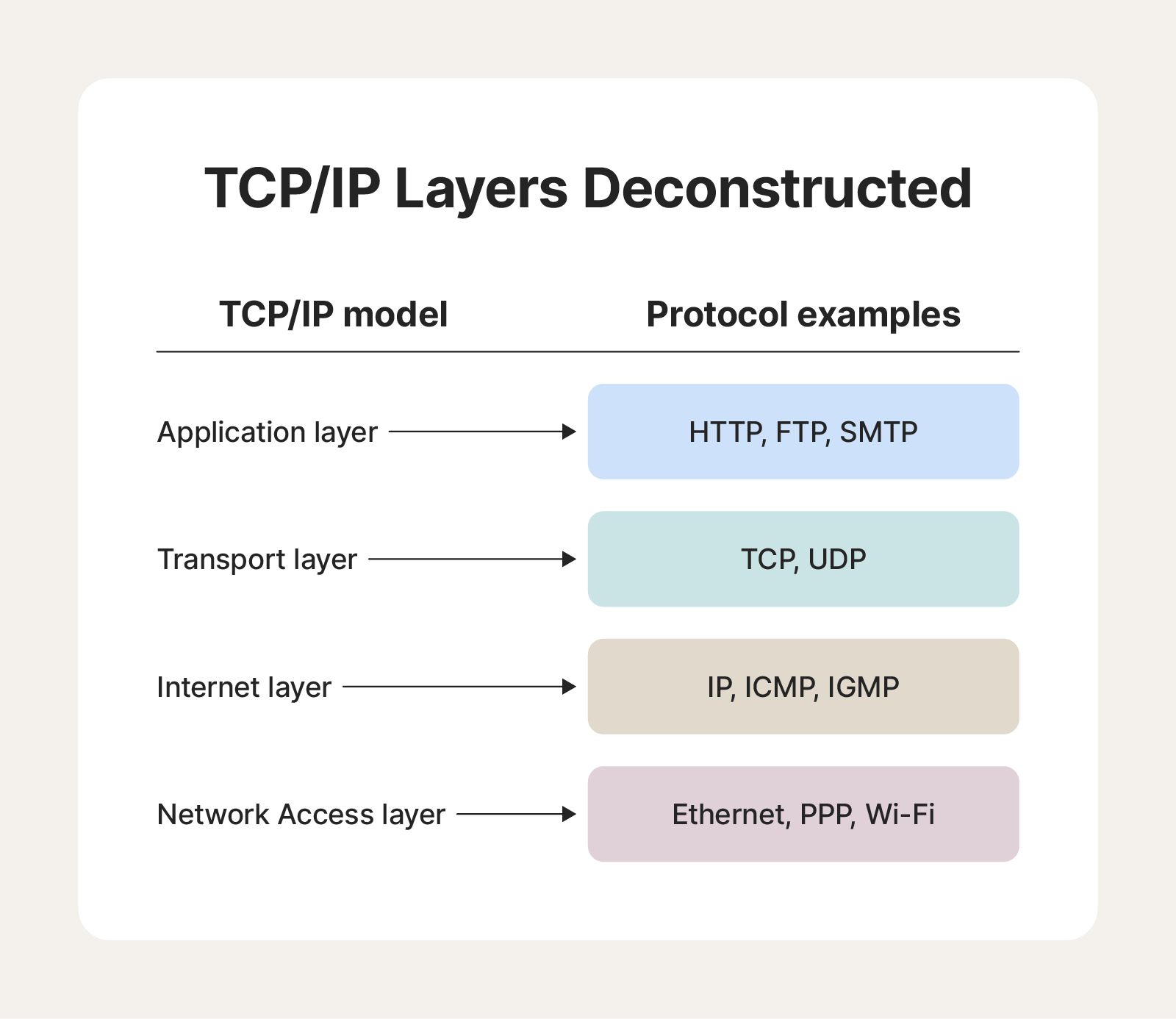
The journey of data from a sending to a receiving computer, with encapsulation and de-encapsulation at each layer, looks like this:
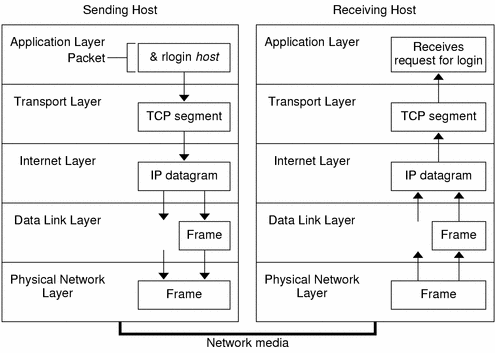
Now, let's explore what each layer does, and more importantly for us, how it can be exploited.
A Layer-by-Layer Breakdown
For each layer, we'll first look at its official function and then examine it from a hacker's point of view. A common point of confusion is the difference between the 7-layer OSI model taught in many computer science courses and the 4-layer TCP/IP model used in practice. The TCP/IP model is a more practical, condensed version. We'll map the layers as we go.
The following video from Hacker Joe frames this topic perfectly for our goals. While it refers to the 7-layer OSI model, its insights apply directly to the corresponding TCP/IP layers.
1. Application Layer
(Corresponds to OSI Layers 5, 6, and 7: Session, Presentation, Application)
This is the top layer, the one that user-facing applications like your web browser, email client, or a video game interact with. It's responsible for providing network services directly to the end-user.
TCP IP Model Explained | TCP IP Model Animation | TCP IP Protocol Suite | TCP IP Layers | TechTerms
First, let's understand the standard function of this layer.
Watch this segment on the Application Layer. It lists several protocols you'll encounter frequently, such as HTTP, DNS, and SMTP.
The Hacker's Perspective:
Because this layer deals with software logic and user interaction, it's where the vast majority of modern attacks occur. The underlying network can be perfectly secure, but a flaw in the application's code or a moment of human error can lead to a complete compromise.
TCP/IP and the OSI Model Explained! (Advanced Hacking Course)
Now, let's see how this layer is viewed as an attack surface.
Watch the segments on the Session Layer (session hijacking), the Presentation Layer (stripping encryption), and the Application Layer (SQL injection, XSS, phishing). These concepts map to the TCP/IP Application Layer.
2. Transport Layer
(Corresponds to OSI Layer 4: Transport)
This layer is the heart of end-to-end communication. Its main job is to manage the connection between two applications on different hosts. It provides two primary protocols:
- TCP (Transmission Control Protocol): Reliable, connection-oriented, and ordered. It ensures all data arrives correctly. This is used for web browsing, email, and file transfers where data integrity is critical.
- UDP (User Datagram Protocol): Unreliable, connectionless, and fast. It's used for services like video streaming or online gaming where speed is more important than ensuring every single packet arrives.
TCP IP Model Explained | TCP IP Model Animation | TCP IP Protocol Suite | TCP IP Layers | TechTerms
Let's get a detailed look at the function of the Transport Layer.
This segment explains the difference between TCP and UDP, and details TCP's features like segmentation and reliability. Pay attention to the "three-way handshake" used to establish a connection.
The Hacker's Perspective:
The Transport Layer is where we find ports, which are like numbered doors on a server, each leading to a different service. Firewalls operate here, deciding which doors are open and which are closed. An attacker's first step is often to knock on all these doors to see what services are running—a process called port scanning.
TCP/IP and the OSI Model Explained! (Advanced Hacking Course)
Let's see how attackers target this layer.
Watch this segment on the Transport Layer. It explains how port scanning works and introduces fragmentation attacks, a clever way to bypass firewalls.
3. Internet Layer
(Corresponds to OSI Layer 3: Network)
This layer is responsible for logical addressing and routing. It takes the segments from the Transport Layer, adds IP addresses (the logical address of the source and destination), and creates packets (or datagrams). Its job is to figure out the best path to send these packets across the internet from one network to another using routers.
- IP (Internet Protocol): The main protocol here. It's responsible for addressing and routing packets.
TCP IP Model Explained | TCP IP Model Animation | TCP IP Protocol Suite | TCP IP Layers | TechTerms
This part covers the core functions of the Internet Layer.
Focus on the explanation of Logical Addressing (IP addresses) and Routing. The example of how a packet moves between two networks via a router is particularly important.
The Hacker's Perspective:
The Internet Layer is built on a certain amount of trust. It assumes the "return address" (source IP) on a packet is legitimate. Attackers can exploit this by "spoofing" or faking the source IP address to hide their identity or to redirect responses to a victim, causing a denial-of-service attack.
TCP/IP and the OSI Model Explained! (Advanced Hacking Course)
Here's how this trust can be exploited.
Watch this explanation of the Network Layer to understand IP spoofing and reflected denial-of-service attacks.
4. Network Access Layer
(Corresponds to OSI Layers 1 and 2: Physical and Data Link)
This layer is a combination of two concepts. The Data Link part handles communication between devices on the same local network using physical addresses called MAC addresses. The Physical part is responsible for converting the digital data into physical signals (electrical pulses, radio waves, light) and transmitting them over the medium (cables, air).
TCP IP Model Explained | TCP IP Model Animation | TCP IP Protocol Suite | TCP IP Layers | TechTerms
Finally, let's look at how data gets physically transmitted.
This video covers these concepts in two parts. First, watch the segment on the Physical Layer, then the one on the Data Link Layer. Note the difference between a MAC address (for local delivery) and an IP address (for global delivery).
The Hacker's Perspective:
At this lowest level, attacks can be physical or local. If you can physically access a device or network cable, the game is often over. On a local network (like a public Wi-Fi), attackers can trick devices into sending their traffic through the attacker's machine, a "Man-in-the-Middle" attack.
TCP/IP and the OSI Model Explained! (Advanced Hacking Course)
Let's look at the security implications at this level.
Watch the clips on the Physical Layer (USB attacks, rogue Wi-Fi access points) and the Data Link Layer (ARP spoofing).
For a concise review of these four layers, you can refer to this article.
TCP/IP Stack: Network Layers and Protocols
This article from 101 Computing provides a clear, text-based summary of the 4-layer TCP/IP model.
Read the sections from Application Layer down to Link Layer to reinforce your understanding of each layer's primary function.
Conclusion
In this lesson, we've unpacked the TCP/IP model, the fundamental framework that governs all communication on the internet. You now have a mental map of the network, not just as a tool for communication, but as a landscape of potential vulnerabilities.
Key Takeaways:
- The TCP/IP model organizes network protocols into four layers: Application, Transport, Internet, and Network Access.
- Data is encapsulated with headers as it travels down the stack from sender and de-encapsulated as it travels up at the receiver.
- The Application Layer provides user-facing services and is a primary target for software logic and human-level attacks.
- The Transport Layer manages end-to-end connections and flow control, making it a focal point for port scanning and firewall evasion.
- The Internet Layer handles addressing and routing, which can be subverted through IP spoofing and traffic redirection.
- The Network Access Layer deals with physical transmission and local network communication, opening doors for physical attacks and Man-in-the-Middle exploits.
In our next lesson, we will zoom in on the protocols themselves. We'll identify common protocols like HTTP, DNS, and DHCP, learn what they do, and discover the standard ports they use. This is the next logical step in learning to identify the services running on a target system.