Introduction
In our last lesson, we explored the mechanics of subnetting, learning how to divide a large network into smaller, manageable pieces using subnet masks and CIDR notation. The networks we designed—like a /24 or /26—are typical of what you'd find in a home or office environment. Today, we'll address a crucial question: how do these local networks connect to the vast, global internet?
This lesson focuses on the fundamental distinction between public and private IP addresses. You will learn what defines each type, why this separation exists, and how devices on a private network can communicate with the outside world. For an ethical hacker, understanding this boundary is paramount. It's the difference between seeing a target on the open internet versus one hidden inside a corporate network, which dictates the entire approach of an attack.
Public vs. Private IPs: Two Sides of the Same Coin
Every device that communicates on a network needs an IP address. However, not all IP addresses are created equal. They exist in two distinct realms:
-
Private IP Addresses: These are used for devices within a local network (like your home Wi-Fi or a company's internal network). These addresses are not unique globally; the same private IP address, like
192.168.1.100, can be used in millions of homes and offices around the world simultaneously. They are not routable on the public internet. -
Public IP Addresses: This is the single address that your entire local network uses to identify itself to the rest of the world. It's assigned by your Internet Service Provider (ISP) and is globally unique. Think of it as your home's mailing address for the internet.
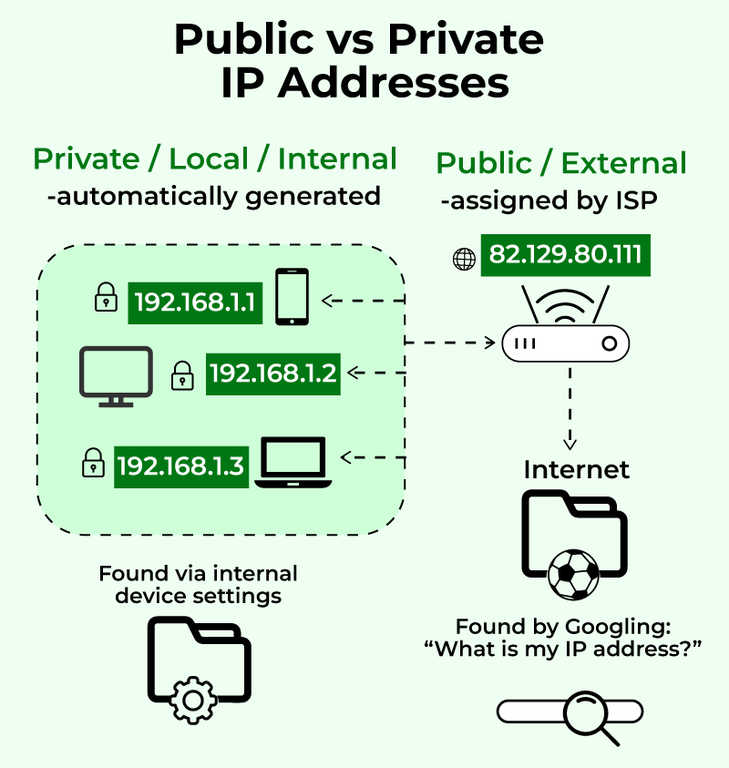
The diagram below illustrates this relationship perfectly. Multiple devices on the local network (a computer, phone, and laptop) each have their own unique private IP address. They all connect to the internet through a router, which has a single public IP address.
But why was this system created? And how does it technically work? The following video provides an excellent explanation.
This animated video from PowerCert clearly explains the origin and function of public and private IP addresses.
Please watch these two key sections: Start with the explanation of public IPs to understand their role and uniqueness. Continue with the section on private IPs and NAT. This part is crucial as it explains that private IPs were developed to solve the shortage of IPv4 addresses and introduces the concept of Network Address Translation (NAT).
The Role of NAT (Network Address Translation)
As you saw in the video, the magic that allows multiple devices with private IPs to share one public IP is Network Address Translation (NAT). This service, typically running on your router, acts as a traffic coordinator.
When your computer (with a private IP) wants to visit a website, the request goes to the router. The router modifies the request, replacing your computer's private source IP with its own public IP before sending it to the internet. When the website replies, the response comes back to the router's public IP. The router then checks its records to see which internal device made the original request and forwards the reply to your computer's private IP. This process is seamless and allows all your devices to share one public internet connection.
The Reserved Private IP Ranges
To prevent chaos and ensure private IP addresses don't accidentally conflict with public ones, the Internet Assigned Numbers Authority (IANA) has reserved specific address blocks exclusively for private use. Routers are configured not to forward traffic from these addresses onto the public internet.
As an ethical hacker, you must memorize these ranges. When you see an IP address from one of these blocks during a scan, you immediately know you are looking at a device on an internal, private network.
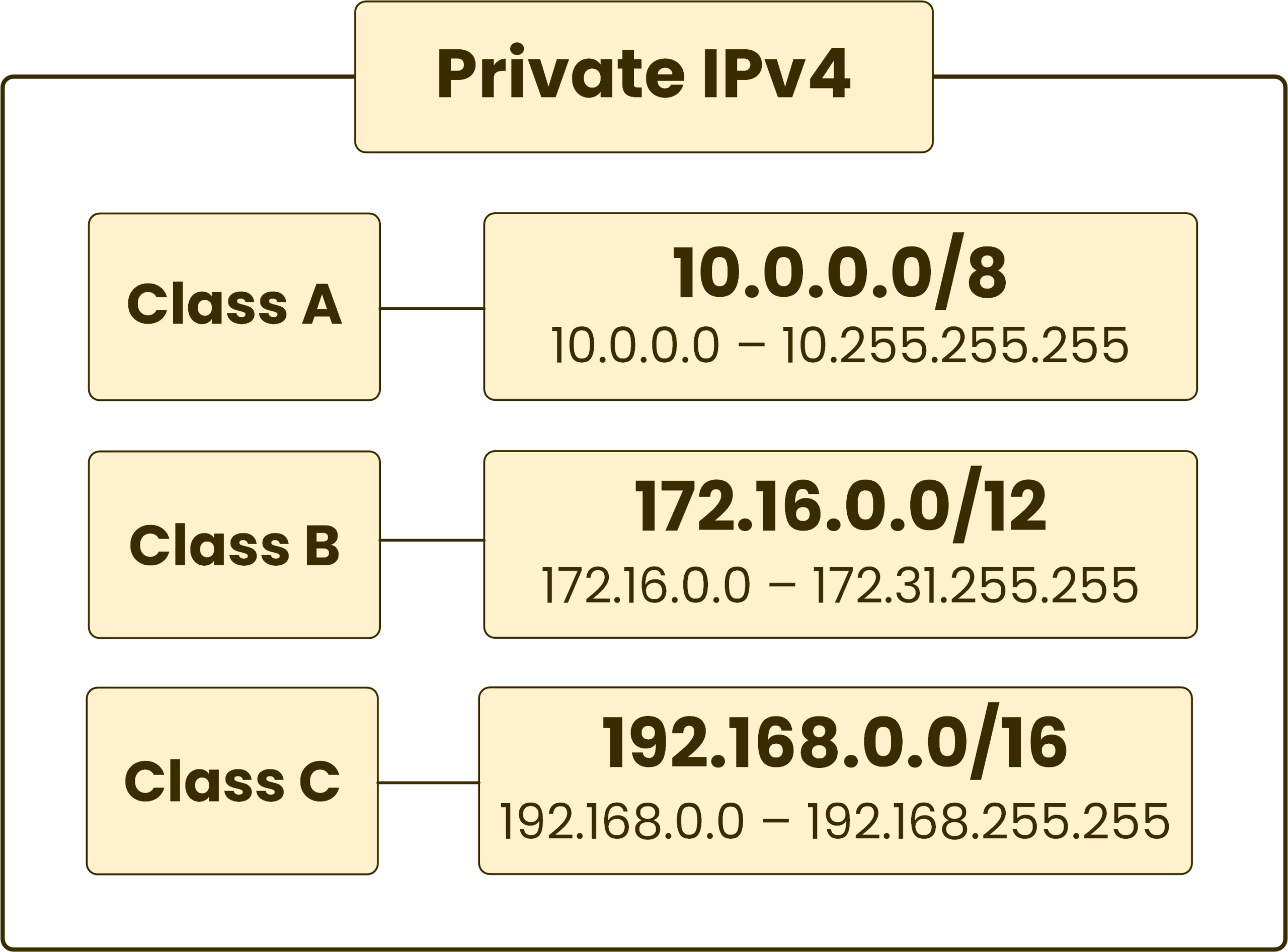
The three reserved ranges are:
- Class A:
10.0.0.0to10.255.255.255(A single/8network). Used by very large corporations. - Class B:
172.16.0.0to172.31.255.255(A block of 16/12networks). Typically used by medium to large organizations. - Class C:
192.168.0.0to192.168.255.255(A block of 256/16networks). Most commonly used in small offices and home networks (SOHO). Your home Wi-Fi router almost certainly assigns addresses from this range.
The following resource provides a clear, textual summary of these ranges and the key differences between public and private IPs.
Private vs. Public IP Addresses: A Beginner Guide
This guide from IPXO offers a concise breakdown of the concepts we've discussed. It's a great reference to have.
Focus on these two parts: Read the section defining private and public IPs. Pay special attention to the list of IANA-reserved ranges. Review the summary of Key Differences, which compares the two types based on accessibility, traceability, and security.
An Analogy: Nicknames vs. Official Names
To solidify the concept, let's use an analogy. Think of your private IP as a nickname that only your family and close friends use at home. Within the house (the local network), everyone knows who "Buddy" is. But if someone from another country tries to send a letter addressed to "Buddy," the postal service won't know where to deliver it.
Your public IP is like your official, government-registered name. It's unique and can be used to find you from anywhere in the world.
This leads to a fundamental rule of network communication:
- Private IPs can communicate directly with other private IPs on the same local network.
- Public IPs can communicate directly with other public IPs across the internet.
- A private IP can never communicate directly with a public IP, and vice versa. The communication must always pass through a device performing NAT, like a router.
Practical Exercise: Find Your IPs
Let's apply this knowledge. You have both a private IP (on your computer) and a public IP (from your ISP). Here’s how you can find them.
Finding Your Private IP
Since you are currently using Windows, you can find your private IP address through the Command Prompt.
- Press the Windows Key, type
cmd, and press Enter. - In the black window that appears, type the following command and press Enter:
ipconfig - Look for the network adapter you are using (e.g., "Wireless LAN adapter Wi-Fi" or "Ethernet adapter"). You will see a line labeled "IPv4 Address." That is your computer's private IP address. It will likely start with
192.168.or10.or172..
Finding Your Public IP
You cannot find your public IP using a command on your local machine, because your computer is only aware of its private IP. The easiest way to find it is to ask an external server.
- Open any web browser.
- Go to a website like
https://www.whatismyip.comor simply search Google for "what is my IP address". - The address displayed is your network's public IP address. Notice it is completely different from the private IP you found earlier.
Preview for Your Hacking Lab
In the next module, you will set up a Kali Linux virtual machine, which will be your primary tool for ethical hacking. In a Linux environment, you use different commands to find the same information.
- To find your private IP in Linux, you would use the command
ip addr. - To find your public IP from the Linux terminal, a common trick is to use the command
curl ifconfig.me.
You don't need to run these now, but keep them in mind. You will use them constantly once your lab is set up.
Conclusion
You have now learned to distinguish between the two fundamental types of IP addresses. This is a critical piece of the networking puzzle, bridging the gap between the local networks we sub-netted in the last lesson and the global internet.
Key Takeaways:
- Public IP addresses are globally unique, assigned by ISPs, and are used for communication over the internet.
- Private IP addresses are for use within a local network, are not globally unique, and belong to specific reserved ranges (
10.0.0.0/8,172.16.0.0/12,192.168.0.0/16). - Network Address Translation (NAT) is the mechanism on a router that translates between a single public IP and multiple private IPs, allowing an entire local network to access the internet.
- As a rule, private networks can't talk directly to public networks. The communication must go through a NAT device.
In our next lesson, we will start using this knowledge practically. You will learn to use basic network diagnostic tools like ping, traceroute, and nslookup to gather information about both private and public IP addresses on a network.