Hello! Welcome to the fifth lesson in our module on Essential Concurrency Patterns.
In our last lesson on the select statement, we saw how a single goroutine can manage multiple incoming events. We ended by posing a different kind of coordination problem: how can a parent goroutine launch multiple worker goroutines and then wait for all of them to complete their tasks before it proceeds?
This lesson introduces sync.WaitGroup, Go's straightforward and efficient solution for this exact scenario. You will learn how to use a WaitGroup to orchestrate the completion of multiple concurrent tasks—a fundamental pattern for building parallel automation tools, such as a utility that performs health checks on multiple servers simultaneously.
1. The Problem: Uncoordinated Goroutines
When you launch goroutines, they run independently of the function that started them. This means the main function, or any parent goroutine, will not automatically wait for them to finish. This often leads to a common bug where the main program exits before the goroutines have had a chance to complete their work.
Let's see this problem in action.
Go sync.WaitGroup Basics - tutorial
The video "Go sync.WaitGroup Basics - tutorial" from TutorialEdge clearly demonstrates why a synchronization mechanism is necessary.
Watch the segment from 00:41 to 02:59. It shows a simple program where the main function terminates before a goroutine can finish its simulated work, highlighting the core problem that WaitGroup solves.
As you saw, the message from the goroutine was never printed because the main function didn't wait. In a real-world DevOps tool, this could mean your script reports success while all its background jobs failed to even run.
2. The Solution: sync.WaitGroup
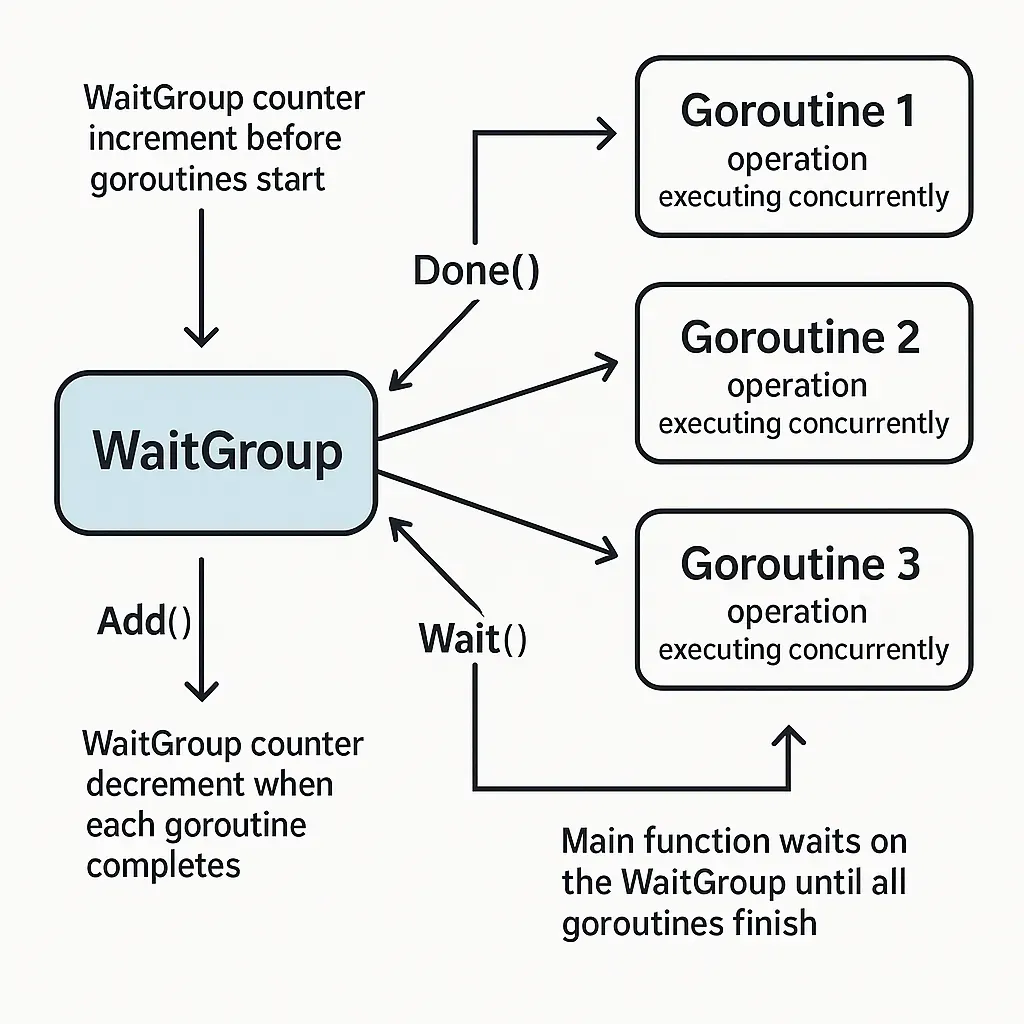
A sync.WaitGroup is essentially a counter that blocks a goroutine's execution until the counter's value is zero. It provides a simple way to wait for a collection of goroutines to finish.
It has three core methods:
Add(delta int): Increments the counter bydelta. You call this to specify how many goroutines you are about to launch and need to wait for.Done(): Decrements the counter by one. Each goroutine calls this method when it finishes its work. It's just a shorthand forAdd(-1).Wait(): Blocks the execution of the goroutine that calls it until the counter becomes zero. This is typically called in the main (or parent) goroutine.
The following diagram illustrates this flow:
Now, let's see how these methods are used to fix the problem from the first video.
Go sync.WaitGroup Basics - tutorial
The same TutorialEdge video now demonstrates the basic application of WaitGroup.
Continue watching from 02:59 to 05:10. Observe how wg.Add(1), defer wg.Done(), and wg.Wait() are used to ensure the program waits for the goroutine to complete.
Notice the use of defer wg.Done(). This is a crucial best practice that ensures the WaitGroup counter is decremented even if the function encounters an error or panics. We'll discuss this and other best practices more later.
3. Practical Use Case: Parallel Health Checks
Now for a more practical example that's highly relevant in a DevOps context. Imagine you need to build a tool that checks the status of several websites or API endpoints concurrently. Doing this sequentially would be slow, as you'd wait for each request to complete before starting the next. With goroutines and a WaitGroup, you can perform all checks in parallel and wait for all results.
This next video segment builds a small REST API that does exactly that.
Go sync.WaitGroup Basics - tutorial
This part of the TutorialEdge video builds a real-world example of parallel task execution.
Watch from 05:10 to 10:56. Focus on how the program iterates over a slice of URLs, calling wg.Add(1) for each URL and launching a goroutine to check its status. The wg.Wait() at the end ensures the HTTP handler doesn't send a response until all checks are complete.
4. Another Perspective: Aggregating Data for Performance
Another common use case is aggregating data from multiple sources to serve a single request. For example, fetching user profile details from one service and their activity from another. A WaitGroup allows you to parallelize these data-fetching operations, significantly reducing response time.
The following video does an excellent job of demonstrating the performance benefit. It starts with a slow, synchronous implementation and refactors it to use goroutines and a WaitGroup.
How To Use Goroutines For Aggregating Data In Golang?!
Anthony GG's video, "How To Use Goroutines For Aggregating Data In Golang?!", provides a compelling demonstration of the performance gains from parallelization.
First, watch from 00:52 to 04:50 to understand the synchronous version of the code and its performance benchmark. Then, skip to 12:19 and watch until 16:13 to see how sync.WaitGroup is introduced to coordinate the concurrent goroutines, leading to a significant speedup. Notice how the total time taken is now determined by the longest-running task, not the sum of all tasks.
This before-and-after comparison clearly shows why concurrent execution coordinated by a WaitGroup is such a powerful pattern.
5. Best Practices and Common Pitfalls
While WaitGroup is simple, there are a few common mistakes that can lead to bugs like race conditions or deadlocks. Understanding these best practices is essential for using it correctly.
Deep Dive into WaitGroup: Mastering Concurrent Task ...
The article "Deep Dive into WaitGroup" from dev.to offers a practical, experience-driven guide to using WaitGroup effectively.
Read the sections "2. Core Principles of WaitGroup" and "5.1 Best Practices for WaitGroup". Pay close attention to the explanations of these critical rules: Add Before You Go: Why wg.Add() must be called outside the goroutine. Defer Done Like a Reflex: The importance of using defer to prevent goroutine leaks. Passing WaitGroup: Why a WaitGroup must not be copied and should be passed as a pointer (*sync.WaitGroup).
To reinforce these concepts, especially the danger of deadlocks, another resource provides clear examples of what can go wrong.
Golang sync.WaitGroup: Powerful, but tricky
The article "Golang sync.WaitGroup: Powerful, but tricky" from Wundergraph explains common pitfalls with clear code snippets.
Read the section titled "Pitfalls of using the sync.WaitGroup in Golang", focusing on the subsection "Deadlock due to improper counter management". This will solidify your understanding of why defer wg.Done() is not just good practice, but essential for robust code.
Test your understanding!
You are writing a script to process a list of configuration files in parallel. The following code is your first attempt, but it contains a subtle bug that could cause the program to exit prematurely. Can you spot and fix it?
package main

import (
	"fmt"
	"sync"
	"time"
)

func processFile(filename string, wg *sync.WaitGroup) {
	defer wg.Done()
	fmt.Println("Processing", filename)
	time.Sleep(100 * time.Millisecond) // Simulate work
}

func main() {
	var wg sync.WaitGroup
	files := []string{"config1.yml", "config2.yml", "config3.yml"}

	for _, file := range files {
		go func(f string) {
			wg.Add(1) // Where is the problem?
			processFile(f, &wg)
		}(file)
	}

	wg.Wait()
	fmt.Println("All files processed.")
}
Show answer
The problem is that wg.Add(1) is called inside the goroutine. This creates a race condition. The main goroutine might execute wg.Wait() before any of the child goroutines have had a chance to run and call wg.Add(1). If the counter is still zero when wg.Wait() is called, the program will exit immediately.
The fix is to move wg.Add(1) outside the goroutine, into the for loop in the main function.
Here is the corrected code:
package main

import (
	"fmt"
	"sync"
	"time"
)

func processFile(filename string, wg *sync.WaitGroup) {
	defer wg.Done()
	fmt.Println("Processing", filename)
	time.Sleep(100 * time.Millisecond) // Simulate work
}

func main() {
	var wg sync.WaitGroup
	files := []string{"config1.yml", "config2.yml", "config3.yml"}

	for _, file := range files {
		wg.Add(1) // Correct: Increment the counter before starting the goroutine
		go func(f string) {
			processFile(f, &wg)
		}(file)
	}

	wg.Wait()
	fmt.Println("All files processed.")
}
Alternatively, you could increment the counter all at once before the loop: wg.Add(len(files)).
Conclusion
In this lesson, you've learned how to use sync.WaitGroup to coordinate the completion of multiple goroutines. This is a fundamental pattern for parallelizing tasks, improving performance, and building efficient DevOps tools in Go.
Key Takeaways:
sync.WaitGroupis a simple counter used to wait for a group of goroutines to finish.- The main pattern involves
Add()to set the number of tasks, launching goroutines that each callDone()upon completion, and usingWait()to block until all tasks are finished. - Always call
Add()before launching the associated goroutine to prevent a race condition. - Always use
defer wg.Done()at the beginning of your goroutine's work function to ensure the counter is decremented, even in case of panics. WaitGroupis ideal when you need to "fire and forget" a batch of tasks and just wait for them all to complete, without needing to pass data back from them.
Next Up
WaitGroup is excellent for synchronizing the completion of tasks. However, what happens when those concurrent tasks need to access and modify the same shared data, like a map or a slice? If multiple goroutines write to the same memory location at the same time, you can get data corruption known as a "race condition". WaitGroup does not prevent this.
In our next lesson, we will explore sync.Mutex, a tool designed to protect shared data by ensuring that only one goroutine can access it at a time.