Hello! Welcome back to our module on Essential Concurrency Patterns.
In our last lesson, you learned how to launch concurrent tasks using goroutines. We saw how lightweight and efficient they are, but we also encountered a significant problem: the main program doesn't wait for goroutines to finish. We used time.Sleep() as a temporary hack, but for building reliable tools, we need a proper mechanism for synchronization.
This lesson introduces that mechanism: channels. Channels are the heart of Go's concurrency model and the key to building robust, concurrent applications. You'll learn how to use them to enable safe communication and synchronization between your goroutines, moving from firing off tasks into the void to orchestrating them with precision. This is guided by Go's core philosophy: "Don't communicate by sharing memory; share memory by communicating."
1. What Are Channels?
At its core, a channel is a typed conduit through which you can send and receive values between goroutines. Think of it as a pipeline connecting concurrent parts of your application. Given your background with Bash, you can draw a parallel to the pipe (|) operator, which directs the output of one command to the input of another. Channels serve a similar purpose for goroutines.
Let's start with a short conceptual introduction from a Medium article by Abu Bakar.
Channels in Go: A Comprehensive Guide
This brief text introduces the concept of channels using a helpful analogy.
Read the first two sections of the article: "What Are Channels?" and the code block below it. Pay attention to the restaurant service window analogy and the basic syntax for creating, sending to, and receiving from a channel.
The basic operations for a channel of type T are:
- Create:
ch := make(chan T) - Send:
ch <- value(wherevalueis of typeT) - Receive:
receivedValue := <-ch
The arrow <- indicates the direction of data flow.
2. Synchronization with Unbuffered Channels
By default, when you create a channel with make(chan T), you get an unbuffered channel. This is a critical point. Unbuffered channels have no capacity to hold any values. This means:
- A send operation (
ch <- data) will block until another goroutine is ready to receive from that same channel. - A receive operation (
data := <-ch) will block until another goroutine performs a send on that same channel.
This blocking behavior is not a bug; it's the feature that allows us to synchronize goroutines. It's a "rendezvous" point where the sender and receiver meet to exchange data.
Let's see how this solves our problem from the previous lesson. Instead of time.Sleep(), we can use a channel to make the main goroutine wait until our worker goroutine is finished.
package main

import (
    "fmt"
    "time"
)

func checkService(service string, doneChan chan bool) {
    fmt.Printf("Checking status of %s...\n", service)
    time.Sleep(200 * time.Millisecond) // Simulate work
    fmt.Printf("...%s is OK.\n", service)

    // Signal that we are done by sending a value on the channel
    doneChan <- true
}

func main() {
    // Create a channel to signal completion
    done := make(chan bool)

    go checkService("Database", done)

    // Block and wait for a value from the channel
    <-done

    fmt.Println("Check complete. Main function finished.")
}
In this example, the main function's execution pauses at <-done and only resumes after the checkService goroutine sends the value true on the done channel. We have successfully synchronized the two goroutines. The type of data sent (bool) doesn't matter here; it's the act of sending and receiving that creates the synchronization.
The following diagram visualizes this flow of messages and synchronization. While it shows multiple messages, pay attention to the "done channels" which are used to signal completion back to the main goroutine.

3. Communicating Data and Closing Channels
Channels are not just for signaling; their primary purpose is to pass data. Let's build a simple producer-consumer pattern. One goroutine will produce data, and another will consume it.
When the producer has no more data to send, it should close() the channel. This is a crucial step that signals to any receivers that the stream of data is finished. A receiver can check if a channel has been closed using a special two-value assignment:
value, ok := <-ch
// 'ok' will be false if the channel is closed and empty.
However, a more common and idiomatic way for a receiver to read all values from a channel is to use a for...range loop. The loop will automatically terminate when the channel is closed.
Golden Rule: Never close a channel from the receiver side. Only the goroutine that sends data should be responsible for closing it. Sending on a closed channel will cause a panic.
Now, let's watch a detailed video that puts all these concepts together: creating channels, sending and receiving data, using for...range, and the importance of closing.
Golang Concurrency - All the Basics you have to know!
This segment from a video by Flo Woelki provides a complete, hands-on demonstration of using an unbuffered channel to communicate between a producer and a consumer goroutine.
Watch from 00:23:36 to 00:32:13. Focus on these key steps: The introduction to channels as 'communication conduits'. Creating the channel with make. The producer goroutine sending orders into the channel (orderChan <- order). The consumer goroutine receiving orders with a for...range loop. The explanation of deadlock and how close(orderChan) solves it.
Deadlock Explained
As mentioned in the video, a deadlock is a common issue in concurrent programming. In Go, it occurs when a group of goroutines are all waiting for each other, and none can proceed. A simple example is a program where the main goroutine tries to receive from a channel, but no other goroutine will ever send to it. The Go runtime is smart enough to detect this situation and will panic with the message: fatal error: all goroutines are asleep - deadlock!. This is why correctly closing channels is so important when using for...range loops on them.
4. Channel Direction
To make programs safer and more self-documenting, Go allows you to specify a channel's direction in function signatures.
chan<- T: A send-only channel. You can only send to it.<-chan T: A receive-only channel. You can only receive from it.
This is a compile-time check that prevents you from, for example, accidentally sending data to a channel in a function that is only supposed to be a consumer.
Let's refine our producer-consumer functions:
// producer can only send to the channel it creates.
// It returns a receive-only channel to the caller.
func producer() <-chan string {
    out := make(chan string)
    go func() {
        defer close(out) // Close the channel when the goroutine exits
        out <- "Task 1"
        out <- "Task 2"
        out <- "Task 3"
    }()
    return out
}

// consumer can only receive from the provided channel.
func consumer(in <-chan string) {
    for task := range in {
        fmt.Println("Processing:", task)
    }
}

func main() {
    tasks := producer()
    consumer(tasks)
    fmt.Println("All tasks processed.")
}
This pattern, where a producer goroutine owns and writes to a channel and returns it as a receive-only <-chan T, is known as confinement. It ensures by its design that only one goroutine is writing to the channel, which prevents a whole class of concurrency bugs.
5. A Practical Summary
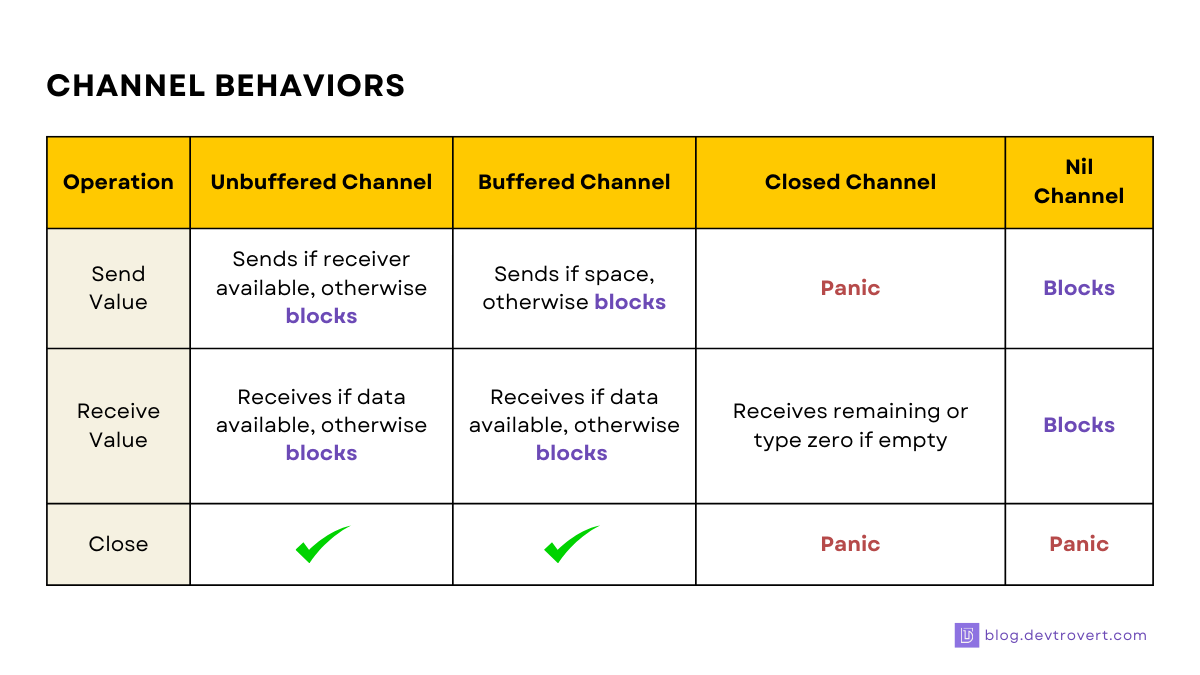
The behavior of channels can seem complex at first. This table provides a clear summary of what happens when you send, receive, or close channels in different states.
Test your understanding!
Imagine you are writing a script to concurrently check the health of three different services. One goroutine checks service-A, another service-B, and a third service-C. Each check can take a variable amount of time. How would you use a single channel to collect a "Done" message from each service check in the main goroutine and ensure the program only exits after all three are confirmed?
Show answer
You would create a single channel, say done := make(chan string). You would pass this same channel to all three goroutines. Inside each goroutine, after the health check is complete, it would send a message (e.g., the service name) to the channel: done <- "service-A".
In the main goroutine, you would then need to receive from the channel three times. A simple for loop would work well:
for i := 0; i < 3; i++ {
    serviceName := <-done
    fmt.Printf("%s check is complete.\n", serviceName)
}
fmt.Println("All services checked.")
This works because each receive (<-done) blocks until one of the goroutines sends a value. By looping three times, main guarantees that it waits for all three goroutines to finish their work before it can proceed and exit.
Conclusion
You've now learned the fundamental mechanism for managing concurrency in Go. Channels are a powerful concept that, once mastered, allow you to write clean, safe, and highly performant concurrent code.
Key Takeaways:
- Channels are typed conduits for safe communication and synchronization between goroutines.
- Unbuffered channels are synchronous; they block on both send and receive until the other party is ready, which is how they enforce synchronization.
- The
for...rangeloop is the idiomatic way to read all values from a channel until it is closed. - A channel should only be closed by the sender. Forgetting to close a channel that a receiver is ranging over will lead to a deadlock.
- Directional channels (
chan<-and<-chan) improve the safety and readability of your concurrent code.
Next Up
Unbuffered channels are excellent when you need tight synchronization. However, sometimes the producer of data works at a different rate than the consumer. Forcing them to rendezvous for every single piece of data can be inefficient. In the next lesson, we will explore buffered channels, which act as a queue to decouple the producer and consumer, allowing for more flexible and high-throughput data pipelines.