Hello! Welcome back to our series on building HTTP services in Go.
In our last lesson, you mastered a crucial pattern for creating robust APIs: implementing a centralized error handling middleware. This allows your handlers to remain clean and focused while ensuring all API responses are consistent and secure.
Today, we'll extend our web service to handle two fundamental features of web applications: serving static files and processing file uploads. As a DevOps engineer, you'll find this essential for building tools with simple web interfaces, creating endpoints for uploading configuration files (like YAML or JSON), or receiving build artifacts.
By the end of this lesson, you will be able to:
- Serve static content like HTML, CSS, and JavaScript files using Go's standard library.
- Build an HTTP handler to securely accept and save files uploaded from a web client.
- Integrate these features into the error-handling and routing structure we've built in previous lessons.
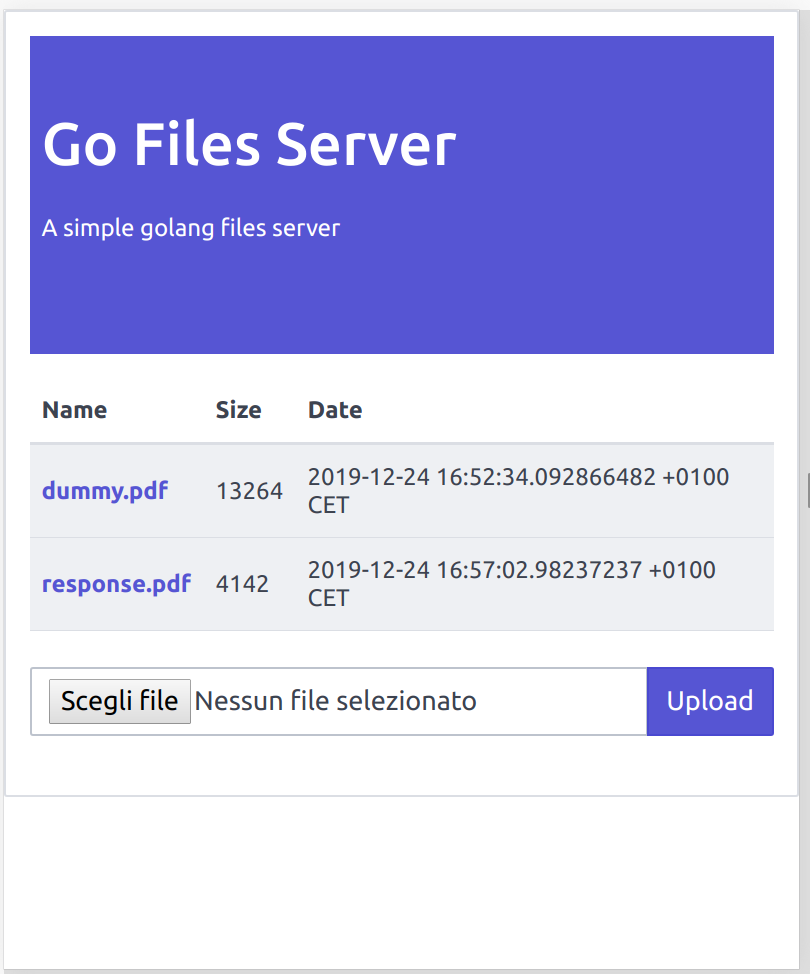
We'll work towards building a simple web page that looks something like this, allowing users to both see existing files and upload new ones.
1. Serving Static Files for a Web UI
Most web applications need to serve static assets—HTML pages, CSS stylesheets, and JavaScript files—that make up the user interface. Go's net/http package makes this incredibly straightforward.
Let's imagine our project has a public directory containing our web content:
.
├── go.mod
├── main.go
└── public/
    └── index.html
The Basic File Server
The simplest way to serve files from a directory is with http.FileServer.
Serving static files and web apps in Go
The article 'Serving static files and web apps in Go' by Eli Bendersky provides excellent, concise examples for this. First, let's look at the most basic implementation.
Read the short section '#1: Basic file server'. It shows how to serve a directory's contents with just a few lines of code.
As you saw, http.FileServer(http.Dir("public")) creates a handler that serves files from the public directory. If you mount this at the root (/), a request to http://localhost:8080/index.html will serve the public/index.html file.
However, in our applications, we often want to reserve the root path for our API and serve static files from a specific prefix, like /static/.
Serving Files on a Specific Route
If we simply register the file server at /static/, a request to /static/index.html would cause the file server to look for public/static/index.html, which isn't what we want.
To solve this, we use http.StripPrefix, a middleware that modifies the request path before passing it to the http.FileServer.
Serving static files and web apps in Go
Let's continue with the same article to see how to solve this pathing issue.
Read sections '#2: Serving files on a different route' and '#3: Static and dynamic content'. Pay close attention to how http.StripPrefix works and how you can register both static and dynamic handlers in the same main function.
Let's integrate this into the main function from our previous lesson:
func main() {
	mux := http.NewServeMux()

	// --- Dynamic API Handlers from previous lesson ---
	mux.Handle("GET /health", AppHandler(healthCheckHandler))
	mux.Handle("GET /users", AppHandler(getUserHandler))
	mux.Handle("GET /internal", AppHandler(internalErrorHandler))

	// --- New Static File Handler ---
	// Create a handler for serving files from the 'public' directory
	fileServer := http.FileServer(http.Dir("./public"))

	// Register the handler at the "/static/" path.
	// http.StripPrefix removes "/static/" from the request path before
	// the file server tries to find the file.
	mux.Handle("/static/", http.StripPrefix("/static/", fileServer))

	log.Println("Starting server on :8080")
	// ... rest of main ...
}
With this setup, a request to http://localhost:8080/static/index.html will correctly serve the file at ./public/index.html.
2. Handling File Uploads
Now for the main event: accepting files from a client. The standard method for this is using a multipart/form-data request, which is what browsers use when you submit a form containing <input type="file">.
The Client-Side: An HTML Form
First, let's create a simple HTML form in public/index.html. This form will send a POST request to our /upload endpoint with the enctype set to multipart/form-data.
<!-- public/index.html -->
<!DOCTYPE html>
<html lang="en">
<head>
    <meta charset="UTF-8">
    <title>Go File Upload</title>
</head>
<body>
    <h1>Upload a File</h1>
    <form action="/upload" method="post" enctype="multipart/form-data">
        <input type="file" name="myFile">
        <input type="submit" value="Upload">
    </form>
</body>
</html>
The name="myFile" attribute is the key our Go server will use to find the uploaded file.
The Server-Side: An Upload Handler
Now, let's build the Go handler to process this form. The process involves three main steps:
- Parse the multipart form from the request body.
- Retrieve the file from the form data using its name.
- Save the file to a location on the server's disk.
Go Simple HTTP File Upload Tutorial
The video 'Go Simple HTTP File Upload Tutorial' by TutorialEdge provides a great visual walkthrough of this entire process, from setting up the handler to creating the temporary file.
Watch the section from 04:02 to 10:23. This segment covers the core logic of an upload handler. Focus on these key function calls: r.ParseMultipartForm(): To parse the incoming data. r.FormFile(): To access the file itself. io.Copy() (via ioutil.ReadAll and tempFile.Write in the video): To write the file bytes to a destination.
Let's write our own uploadFileHandler and integrate it with the AppHandler error pattern we already have.
First, a crucial security measure: always limit the size of an incoming request body to prevent denial-of-service attacks from huge uploads. We do this by wrapping r.Body with http.MaxBytesReader.
func uploadFileHandler(w http.ResponseWriter, r *http.Request) error {
	// 1. Set a max upload size (e.g., 10 MB)
	r.Body = http.MaxBytesReader(w, r.Body, 10 * 1024 * 1024)

	// 2. Parse the multipart form
	// The 10 << 20 specifies a max memory allocation of 10 MB for the form.
	// Files larger than this will be temporarily stored on disk.
	if err := r.ParseMultipartForm(10 << 20); err != nil {
		return &APIError{Status: http.StatusBadRequest, Message: "File is too large.", err: err}
	}

	// 3. Retrieve the file from form data
	file, header, err := r.FormFile("myFile") // "myFile" is the name from our HTML form
	if err != nil {
		return &APIError{Status: http.StatusBadRequest, Message: "Error retrieving the file.", err: err}
	}
	defer file.Close()

	log.Printf("Uploaded File: %+v, File Size: %+v, MIME Header: %+v\n",
		header.Filename, header.Size, header.Header)

	// 4. Create a destination file
	// It's a good practice to create a dedicated directory for uploads.
	// We'll also sanitize the filename to prevent path traversal attacks.
	uploadDir := "./uploads"
	// Ensure the directory exists
	os.MkdirAll(uploadDir, os.ModePerm)

	// Create the destination file
	dst, err := os.Create(filepath.Join(uploadDir, filepath.Base(header.Filename)))
	if err != nil {
		// Return a generic error, which our middleware will handle as a 500
		return fmt.Errorf("could not create destination file: %w", err)
	}
	defer dst.Close()

	// 5. Copy the uploaded file's content to the destination file
	if _, err := io.Copy(dst, file); err != nil {
		return fmt.Errorf("could not save file: %w", err)
	}

	fmt.Fprintf(w, "Successfully Uploaded File\n")
	return nil
}
Test your understanding!
In the code above, we use filepath.Base(header.Filename). What kind of attack does this help prevent, and how? For example, what could happen if a malicious user provided ../../etc/passwd as the filename and we didn't sanitize it?
Show answer
This helps prevent a Directory Traversal (or Path Traversal) attack.
If a user supplied ../../etc/passwd as the filename, and we naively did os.Create("./uploads/" + header.Filename), the resulting path would be ./uploads/../../etc/passwd. The ../ sequences would "traverse" up the directory tree from our application's working directory, potentially allowing the user to overwrite a critical system file like /etc/passwd.
filepath.Base() mitigates this by returning only the last element of the path. For ../../etc/passwd, it would simply return passwd, and the file would be safely created as ./uploads/passwd.
A Note on Large Files and Memory
The r.ParseMultipartForm() method is convenient but has a drawback: for files smaller than the maxMemory limit, it buffers the entire file in memory. For a server handling many concurrent uploads, this can consume significant RAM.
A more scalable approach is to process the upload as a stream, which maintains constant memory usage regardless of file size.
How to Handle File Uploads in Go at Scale
For your work in DevOps, dealing with large files like container images or build artifacts is common. The article 'How to Handle File Uploads in Go at Scale' explains a more advanced, memory-efficient streaming approach.
Read the section 'Streaming Uploads to Avoid Memory Issues'. You don't need to implement it now, but understand the core idea: using r.MultipartReader() directly gives you a stream for each part of the form, which you can then copy piece-by-piece to its destination using io.CopyBuffer. This avoids loading the whole file into memory.
3. Putting It All Together: A Complete Example
Let's update our main.go to include the static file server and the new upload handler.
Project Structure:
.
├── go.mod
├── main.go
├── public/
│   └── index.html
└── uploads/
    └── (this directory will be created to store uploads)
main.go:
package main

import (
	"encoding/json"
	"errors"
	"fmt"
	"io"
	"log"
	"net/http"
	"os"
	"path/filepath"
)

// APIError and AppHandler from the previous lesson
type APIError struct {
	Status  int
	Message string
	err     error
}

func (e *APIError) Error() string { /* ... same as before ... */ }
type AppHandler func(http.ResponseWriter, *http.Request) error

func (h AppHandler) ServeHTTP(w http.ResponseWriter, r *http.Request) {
	if err := h(w, r); err != nil {
		var apiErr *APIError
		if errors.As(err, &apiErr) {
			log.Printf("API Error: Status %d, Msg: %s, Err: %v", apiErr.Status, apiErr.Message, apiErr.err)
			w.Header().Set("Content-Type", "application/json")
			w.WriteHeader(apiErr.Status)
			json.NewEncoder(w).Encode(map[string]string{"error": apiErr.Message})
			return
		}
		log.Printf("Internal Server Error: %v", err)
		w.Header().Set("Content-Type", "application/json")
		w.WriteHeader(http.StatusInternalServerError)
		json.NewEncoder(w).Encode(map[string]string{"error": "an unexpected error occurred"})
	}
}

// Our new upload handler
func uploadFileHandler(w http.ResponseWriter, r *http.Request) error {
	if r.Method != "POST" {
		return &APIError{Status: http.StatusMethodNotAllowed, Message: "Method not allowed"}
	}
	r.Body = http.MaxBytesReader(w, r.Body, 10*1024*1024) // 10 MB limit
	if err := r.ParseMultipartForm(10 << 20); err != nil {
		return &APIError{Status: http.StatusBadRequest, Message: "File too large.", err: err}
	}
	file, header, err := r.FormFile("myFile")
	if err != nil {
		return &APIError{Status: http.StatusBadRequest, Message: "Error retrieving file.", err: err}
	}
	defer file.Close()
	log.Printf("Uploaded File: %s, Size: %d\n", header.Filename, header.Size)

	uploadDir := "./uploads"
	os.MkdirAll(uploadDir, os.ModePerm)
	dst, err := os.Create(filepath.Join(uploadDir, filepath.Base(header.Filename)))
	if err != nil {
		return fmt.Errorf("could not create destination file: %w", err)
	}
	defer dst.Close()

	if _, err := io.Copy(dst, file); err != nil {
		return fmt.Errorf("could not save file: %w", err)
	}

	w.WriteHeader(http.StatusCreated)
	fmt.Fprintf(w, "Successfully Uploaded File: %s", header.Filename)
	return nil
}

func main() {
	mux := http.NewServeMux()

	// Handler for our upload form and other static assets
	mux.Handle("/", http.FileServer(http.Dir("./public")))

	// Handler for receiving file uploads
	mux.Handle("/upload", AppHandler(uploadFileHandler))

	log.Println("Starting server on :8080...")
	log.Println("Visit http://localhost:8080 to upload a file.")
	if err := http.ListenAndServe(":8080", mux); err != nil {
		log.Fatalf("Could not start server: %s\n", err)
	}
}
To run this:
- Create the
publicdirectory and theindex.htmlfile inside it. - Save the Go code as
main.go. - Run
go mod init uploader && go mod tidy. - Run
go run .. - Open your browser to
http://localhost:8080, select a file, and click "Upload". The file will appear in theuploadsdirectory.
Conclusion
Excellent work! You've now added two powerful capabilities to your Go web service. You can create simple web frontends for your tools and build API endpoints that accept file-based inputs.
Key Takeaways:
- Serving Static Files: Use
http.FileServercombined withhttp.Dirto serve a directory. Usehttp.StripPrefixto correctly map URL paths when serving from a non-root route. - Handling File Uploads: Use a
multipart/form-dataHTML form on the client. On the server, user.ParseMultipartFormandr.FormFileto access the uploaded file. - Saving Files: Use
os.Createto make a destination file andio.Copyto write the uploaded content to it. - Security is Paramount: Always enforce a maximum request size with
http.MaxBytesReaderand sanitize filenames withfilepath.Baseto prevent common vulnerabilities. - Scalability: For large files, consider a streaming approach with
r.MultipartReaderto keep memory usage low and constant.
Next Up
Our server is becoming quite capable, but what happens if we need to restart it while it's handling requests? Connections might be dropped, and uploads could be cut off midway. In our next lesson, we will address this by learning how to implement graceful shutdown for an HTTP server, a critical feature for any production-grade service.