Hello! Welcome to the third and final lesson of our foundational module.
In our last session, we broke down the three core languages of the web: HTML for structure (the skeleton), CSS for style (the clothes), and JavaScript for interactivity (the brain). You learned that keeping these separate is a key principle for clean, manageable code.
1. What We Are Learning
Today, we're building on that foundation. Our goal is to distinguish between static websites (like a brochure) and dynamic websites (like a web app).
We'll explore what makes a site "static" versus "dynamic," using analogies that connect directly to your work as a designer.
2. Why This Matters
This distinction is crucial because it defines the scope and complexity of a web project. As we've chosen to build a landing page, understanding this concept will clarify exactly what that means from a technical standpoint.
- A static site is like a high-fidelity mockup in Figma. It's self-contained, its content is fixed, and what you see is what you get. Our landing page project falls into this category.
- A dynamic site is like Figma itself. It's a full-blown application where the content is constantly changing based on user input (you drawing a rectangle, your teammate leaving a comment).
Knowing the difference helps you understand why we need certain tools (and, more importantly, why we don't need others, like databases or complex back-end servers) for our project. This keeps us focused and avoids unnecessary complexity.
3. Step-by-Step Instructions
Let's dive in.
Step 1: Understanding the Core Concepts with Analogies
At its heart, the difference is about whether the content is fixed or changes based on data or user interaction. One of the best ways to grasp this is through analogy.
Static vs. Dynamic Websites: Key Differences - Figma
This article from Figma's own resource library is perfect for us. It uses clear, simple language and analogies to introduce the topic.
Please read the first few paragraphs of the article, down to the heading 'What is a static website?'. Focus on the analogy of a static site being a 'snapshot in time'.
To add another great analogy:
- A static website is like a printed brochure. The information is prepared once, printed, and handed out. Everyone who gets a brochure sees the exact same content.
- A dynamic website is like a shared Google Doc. Multiple people can interact with it, the content can be updated in real-time, and everyone with access sees the latest version instantly.
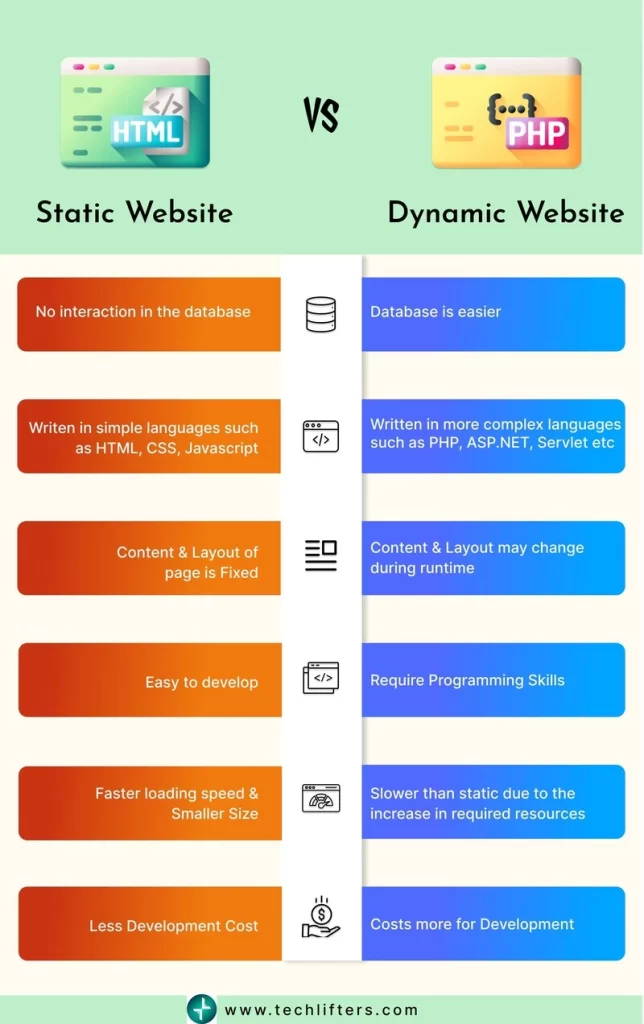
Step 2: How They Work "Under the Hood"
Now let's look at the technical difference. In our first lesson, we talked about the client (your browser) requesting files from a server. The static vs. dynamic distinction changes how the server responds.
- Static: The server has the complete HTML, CSS, and JS files already prepared. When you request the page, it simply finds those files and sends them to you. It's like grabbing a finished, pre-packaged meal off a shelf.
- Dynamic: The server doesn't have a finished HTML file waiting. Instead, it has templates (like master components in Figma), a database of content, and server-side code. When you request the page, the server runs code to fetch the right content from the database, assemble it using the templates, and then generates a custom HTML page just for you. It's like a chef cooking a meal to order based on your specific request.
This video gives a fantastic explanation of this process, using the concept of "template files" and "common elements" that will feel very familiar to you as a designer.
Difference Between a Static & a Dynamic Website ( Tutorial with visual Aids)
This video provides a great visual breakdown of how dynamic sites use templates to assemble pages, which is a very powerful concept.
Please watch from 01:25 to 06:40. Pay close attention to these parts: Static (01:25 - 03:52): Notice how he explains that every page is a separate, complete file. Dynamic (03:52 - 06:40): Focus on the idea of identifying 'common elements' (header, footer) that are stored separately and combined with page-specific content from a database. This is the key takeaway.
Step 3: Examples in the Wild
Let's ground this in reality.
Typical Static Websites:
- A Landing Page: Its purpose is to showcase a single product or message. The content is the same for every visitor. (This is what we are building!)
- An Online Portfolio: A designer or photographer's site showing their work. The projects are fixed until the creator decides to manually update the files.
- A Restaurant's "Menu" Page: Displays the menu. The content only changes when the restaurant updates its offerings.
Typical Dynamic Websites:
- Social Media (Facebook, Instagram, X): Your feed is personalized for you. The content is generated based on who you follow, your past interactions, and real-time posts from others.
- E-commerce (Amazon, Shopify): Product pages show real-time stock levels, prices can change, and you see personalized recommendations. Your shopping cart is unique to your session.
- Web Apps (Figma, Google Docs, Asana): The entire experience is interactive and based on data that you and your team create and manipulate in real-time.
4. What Could Go Wrong?
There are a couple of common points of confusion to clarify:
- "Dynamic" does not mean "animated." A static site can have rich, beautiful animations and interactive elements using CSS and JavaScript. The "static" part refers to the site's content, which is fixed in the code. "Dynamic" means the content itself is data-driven and generated by the server.
- The line can be blurry. Some sites use a hybrid approach. For example, a blog might be a static site, but it uses a third-party service like Disqus (which is dynamic) to handle comments. For our purposes, if the main content isn't coming from a database, we'll consider it static.
For our project, we are firmly in the static camp. We'll write the HTML and CSS for our content, and it will be delivered to every user in the exact same way.
5. Mini Exercise
Time to test your understanding. For each of the websites/pages below, decide if it's more likely to be static or dynamic, and briefly state why.
- A "Terms of Service" legal page.
- Your Netflix browsing page.
- A simple "Linktree" style page with a list of social media links.
- A weather forecast website showing your local temperature.
- The marketing homepage for a new app you've never visited before.
Take a moment to think about your answers before reading the solutions below.
Solutions:
- Static: The legal text is fixed and the same for everyone. It's only updated occasionally and manually.
- Dynamic: The "Top Picks for You" and "Continue Watching" sections are completely personalized based on your viewing history and preferences.
- Static: The list of links is pre-defined and the same for anyone who visits the page.
- Dynamic: The site needs to fetch real-time data from a weather service and may use your location to generate a forecast specific to you.
- Static: As a first-time visitor, you're seeing the general marketing content. It's the same for all new visitors. (Though it might have dynamic elements like a sign-up form.)
6. Checklist Before Moving Ahead
Let's make sure these concepts are locked in.
- I can explain the difference between a static site and a dynamic site using an analogy (e.g., brochure vs. Google Doc).
- I understand that a static site's files are pre-built, while a dynamic site's pages are assembled on-demand by the server.
- I can name an example of both a static and a dynamic website.
- I understand that our landing page project is a static site, and I know why.
Fantastic work. This lesson concludes our "Foundations" module. You now have the essential theoretical knowledge of how a website gets from a server to your screen, what it's made of, and the different types of sites that exist.
A Look Ahead: In our next lesson, we move from theory to practice. We'll start setting up your computer with the essential tools of a web developer: a code editor (VS Code) and the command line. It's time to roll up our sleeves and prepare your workspace for building