Hello again! We're at the final lesson of our "Foundations" module.
In our last session, we established that hosting is like renting a house for your website's files, and deployment is the act of moving those files into the house. We ended with a crucial distinction: a house is useless without a street address.
1. What We Are Learning
Today, we're going to explore that "street address." Our goal is to explain what a domain name is and how it connects to your server's IP address.
This is the last piece of the puzzle you need to understand how a person on the internet finds and views the website you will build.
2. Why This Matters
As a designer, you know that a good name is memorable and easy to share. A domain name (your-brand.com) is the digital equivalent. It's the user-friendly entry point to your creation.
Understanding the connection between this simple name and the complex systems behind it demystifies how the internet works. It connects the "address" (the domain) to the "house" (the hosting server), completing our high-level picture of a live website. Once we grasp this, we can move on from theory and start setting up your tools.
3. Step-by-Step Instructions
Let's break down how your browser finds a website.
Step 1: The Problem – Names vs. Numbers
The fundamental challenge is simple: humans remember names, but computers communicate using numbers.
Every device connected to the internet, including the server that hosts your website, has a unique numerical label called an IP (Internet Protocol) address. It looks something like 172.67.142.23.
Imagine having to remember a unique string of numbers for every website you visit—Google, Figma, YouTube. It would be impossible. This is the core problem that domain names solve.
How a DNS Server (Domain Name System) works.
To start, let's watch a short clip from this PowerCert video. It does an excellent job of explaining this fundamental 'names vs. numbers' problem.
Please watch from the beginning until 01:49. Focus on the core idea of why we need a system to bridge the gap between how humans and computers identify things on a network.
Step 2: The Solution – A Memorable Address
A domain name is a human-friendly alias for a website's numerical IP address.
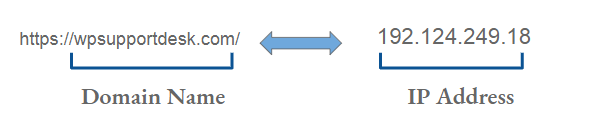
This is exactly like the contacts app on your phone. You don't dial your friend's 10-digit phone number; you tap on their name. The phone looks up the name to find the number and makes the call. A domain name works the same way for websites.
What is a Domain Name? - A Beginners Guide to How Domain Names Work!
This next video provides a great, simple explanation using a house address analogy, which connects perfectly to our previous lesson on hosting.
Watch from 00:24 to 01:29. Notice how it defines a domain name as an easy-to-remember name for an IP address, just like saving 'Home' in your phone for your home address.
Step 3: The Connection – The DNS "Phonebook"
So, if you type google.com into your browser, how does it find the correct IP address? It uses a global system called the DNS (Domain Name System).
You can think of the DNS as the internet's giant, public phonebook.
When you enter a domain name:
- Your browser sends a request to a DNS server, asking, "What's the IP address for
google.com?" - The DNS server looks it up in its records.
- It sends the IP address back to your browser.
- Your browser then knows the exact numerical address of the server it needs to contact to get the website files.
This entire lookup process happens in milliseconds.
The Full Picture: A Restaurant Analogy
Let's tie this lesson together with the last one using a final, powerful analogy.
Domain vs URL - A summary analogy
This article provides a fantastic summary using a pizza restaurant analogy. It's a perfect way to visualize how hosting, domain names, and IP addresses all fit together.
Please read just the 'Conclusion' section. It compares a website to a pizza restaurant and clearly defines the role of the domain, hosting, and IP address.
To recap that analogy:
- Domain Name: The name of the restaurant (
Domainos Pizza). It's what people remember and ask for. - Hosting: The physical restaurant building where the food is made. It's the space where your website's content lives.
- IP Address: The precise GPS coordinates of that building. It's the server's exact location on the internet.
4. What Could Go Wrong
The most common point of confusion is thinking that buying a domain name is the same as getting hosting. They are two different services that you need to connect.
- You register a domain name with a "domain registrar" (like Google Domains, Namecheap). This is like claiming the name "Domainos Pizza." You now own that name for a set period.
- You buy hosting from a "hosting provider" (like Vercel, which we'll use). This is like renting the building.
A domain name without hosting is just a reserved name that doesn't point to anything. A hosting server without a domain name has an IP address, but no one will find it. You need to configure your domain's DNS settings to "point" it to your hosting provider's server.
5. Mini Exercise
Imagine this scenario:
You've just registered the perfect domain name for your new portfolio: janedoe.design. You have a folder on your computer with your finished landing page files (index.html, styles.css). A colleague asks for the link to your new site.
- Can you send them the link
http://janedoe.designyet? Why or why not? - What two services do you still need to get and connect to make the site live at that address?
Take a moment to think it through based on the restaurant analogy.
Solutions:
- No, you can't send the link yet. You only own the "name" of the restaurant. You haven't rented the "building" (hosting) or moved your "kitchen equipment" (website files) into it yet. The address
janedoe.designdoesn't point anywhere. - You still need hosting to get a server space for your files. Then, you need to deploy your files to that server. Finally, you must configure your domain's DNS settings to point
janedoe.designto the server's IP address.
6. Checklist Before Moving Ahead
This concludes our first module! Before we move on, let's make sure these foundational concepts are clear.
- I can explain that a domain name is a human-friendly address for a website.
- I can explain that an IP address is the numerical, computer-friendly address of a server.
- I can describe the role of DNS as the "translator" or "phonebook" that connects a domain name to an IP address.
- I can use the restaurant analogy to explain the difference between a domain name, hosting, and an IP address.
Conclusion
Congratulations on completing the "Foundations" module! You now have a solid conceptual understanding of how a website works—from the roles of HTML and CSS, to the difference between static and dynamic sites, to how websites are stored (hosting), made public (deployment), and found (domains and DNS).
A Look Ahead: With the theory covered, it's time to get our hands dirty. In the next module, "The Developer's Toolkit," we will start setting up your local environment. Our very first step will be to install and get familiar with VS Code, the code editor that will be your primary workspace.