Welcome to the first lesson in your customized CCNA course. Given your goal of expanding your knowledge into more advanced networking topics, we will begin with a deep dive into IPv6. This protocol is no longer a "future" technology but a present-day reality, and mastering it is essential for any network engineer.
Today's lesson focuses on the fundamentals of the IPv6 address itself. We will explore its structure, the hexadecimal notation it uses, and the rules for writing these long addresses in a more manageable, shortened format. We'll then categorize IPv6 addresses, focusing on the three primary unicast types you'll encounter and configure: Global Unicast, Link-Local, and Unique-Local.
The Need for a New Protocol
Before diving into the address format, it's crucial to understand why IPv6 was developed. Your experience with IPv4 addressing and subnetting gives you a solid foundation for appreciating the primary driver: IPv4 address exhaustion. While techniques like NAT have extended the life of IPv4, they were only temporary fixes. IPv6 is the long-term solution.
The video below from Jeremy's IT Lab provides a great overview of the hexadecimal numbering system used in IPv6 and explains the critical problem of IPv4 address exhaustion.
Free CCNA | IPv6 Part 1 | Day 31 | CCNA 200-301 Complete Course
This video provides essential background for our work with IPv6.
First, watch the section covering the hexadecimal system. As an IT student, you are likely familiar with hexadecimal, but this is an excellent, networking-focused review. Pay close attention to how four binary bits map to a single hexadecimal digit. Next, watch the segment on Why IPv6? to understand the scale of the IPv4 address exhaustion problem and the immense address space that IPv6 provides.
The IPv6 Address Format
An IPv6 address is 128 bits long, a four-fold increase from IPv4's 32 bits. This doesn't just mean four times the addresses; it's an exponential increase, resulting in a staggering number: , or roughly 340 undecillion addresses.
To make these addresses readable, they are written in hexadecimal and broken into eight 16-bit segments, often called "hextets" or "quartets," separated by colons.
A full, uncompressed IPv6 address looks like this:2001:0db8:85a3:0000:0000:8a2e:0370:7334
Each x in the x:x:x:x:x:x:x:x format represents four hexadecimal digits. Since each hex digit represents 4 bits, a 4-digit hextet represents 16 bits (4 digits * 4 bits/digit). Eight of these hextets give us the full 128 bits (8 hextets * 16 bits/hextet).
Making IPv6 Manageable: Address Compression
Typing out a full 128-bit address is cumbersome and prone to error. To simplify this, IPv6 includes two rules for shortening, or compressing, addresses. Mastering these is a fundamental skill.
Rule 1: Omit Leading Zeros
Within any 16-bit hextet, you can omit the leading zeros.
0db8can be written asdb800a0can be written asa00007can be written as7
Applying this rule to our example address:2001:0db8:85a3:0000:0000:8a2e:0370:7334
becomes:2001:db8:85a3:0:0:8a2e:370:7334
Note that 0000 becomes a single 0. You must have at least one digit in every hextet.
Rule 2: Compress Consecutive Zeros with a Double Colon
A single, contiguous block of all-zero hextets can be replaced with a double colon (::).
ff02:0:0:0:0:0:0:2becomesff02::22001:db8:0:0:1234:0:0:0becomes2001:db8:0:0:1234::
Crucially, this can only be done once per address. If it were used more than once, there would be no way to know how many zero-hextets each :: represents. If you have multiple blocks of zeros, you can only compress one of them (the longest one, by convention).
Let's apply both rules to our original example:2001:0db8:85a3:0000:0000:8a2e:0370:7334
- Applying Rule 1 (omit leading zeros):
2001:db8:85a3:0:0:8a2e:370:7334 - Applying Rule 2 (compress zeros): The block
:0:0:becomes::.
2001:db8:85a3::8a2e:370:7334
The video from Jeremy's IT Lab provides excellent walkthroughs and practice exercises for these rules. Working through them will solidify your understanding.
Free CCNA | IPv6 Part 1 | Day 31 | CCNA 200-301 Complete Course
This part of the video is dedicated to the IPv6 address format and its compression rules.
Watch the segment from the beginning. The instructor clearly explains the address structure, the two shortening rules, and then provides practice questions for both shortening and expanding addresses. Pause the video and try the exercises yourself before he reveals the answers.
IPv6 Address Types
Just like IPv4, IPv6 uses different types of addresses for different purposes. The main categories are Unicast, Multicast, and Anycast. For this lesson, we'll focus on the key unicast types you need to know for the CCNA.
The following video gives a concise overview of the main address types and, importantly, how to identify them by their prefix.
IPv6 Addresses Explained | Cisco CCNA 200-301
This video from CertBros summarizes the different IPv6 address types.
Watch this segment on address types. It introduces Global Unicast, Unique Local, Link-Local, and Multicast addresses and provides the prefixes used to identify each one.
Now let's examine the three most important unicast address types in more detail.
This article provides clear, written definitions for each unicast address type, drawing helpful comparisons to their IPv4 counterparts.
Read the following sections: The introduction to IPv6 Unicast Addresses. The section on Global Addresses, which are the public, internet-routable addresses. The description of Unique Local Addresses, which function like IPv4 private addresses. The explanation of Link-Local Addresses, which are automatically configured and used for communication on a single network segment.
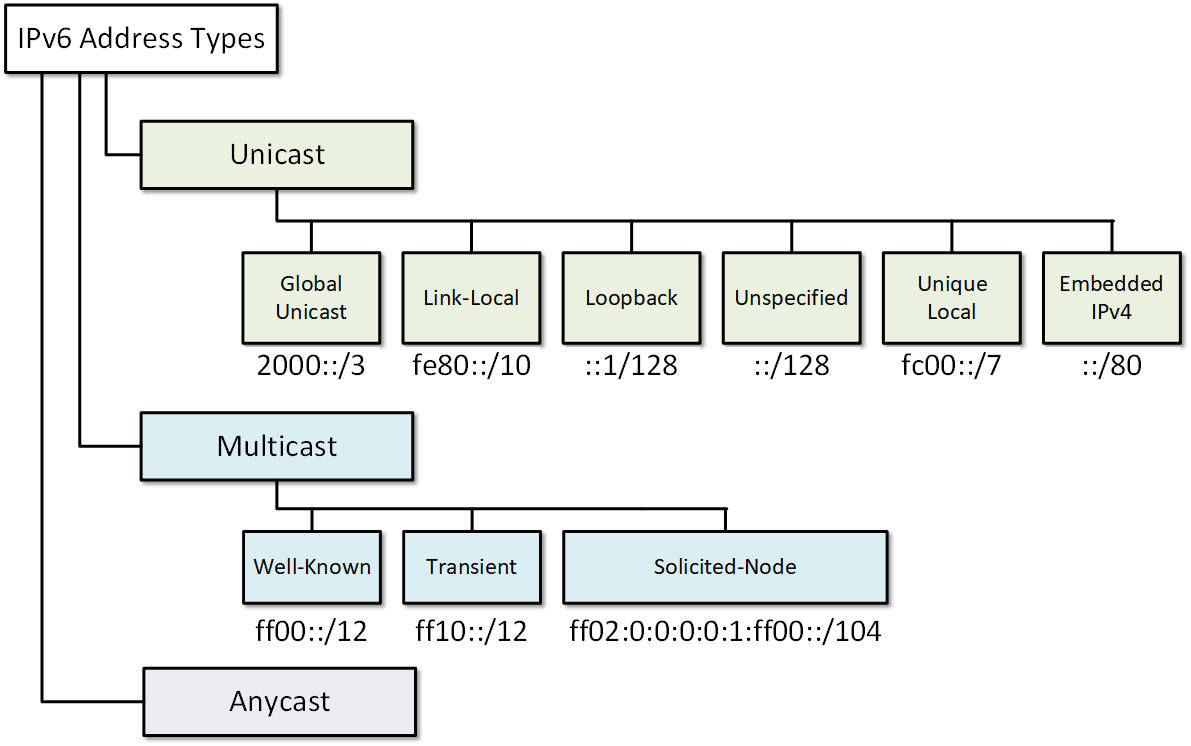
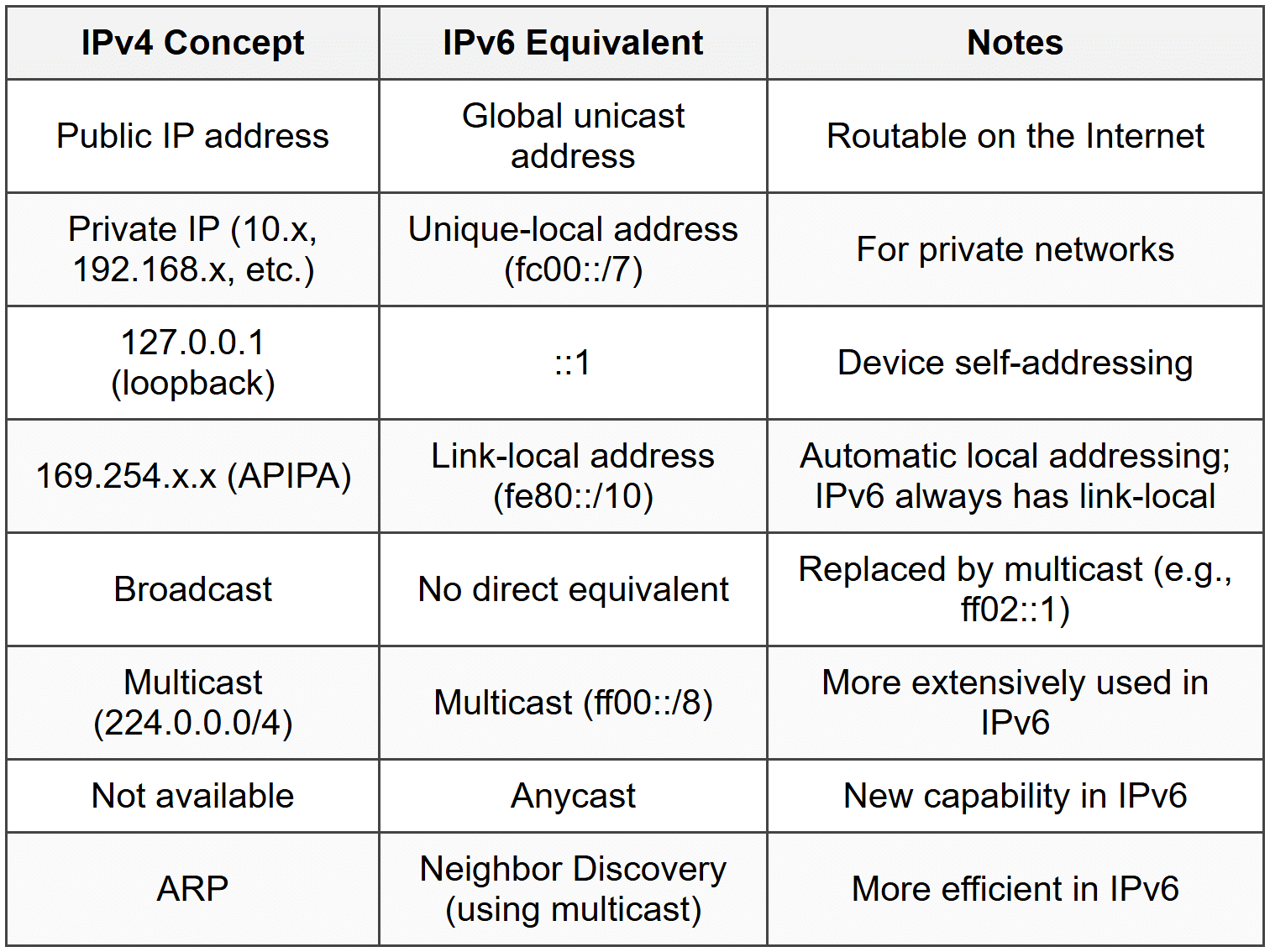
To summarize and bring these concepts together, these two diagrams are extremely helpful.
The first shows the hierarchy of IPv6 address types. You can see how the types we've discussed—Global Unicast, Link-Local, and Unique Local—fit under the main Unicast category.
The second diagram provides a direct comparison between familiar IPv4 concepts and their new IPv6 equivalents. This is a great way to map your existing knowledge to this new protocol.
Key Takeaways
- IPv6 was created to solve the problem of IPv4 address exhaustion, offering a massive 128-bit address space.
- IPv6 addresses are written as eight 16-bit hextets in hexadecimal, separated by colons.
- They can be shortened by omitting leading zeros in any hextet and by using a double colon (
::) to represent one contiguous block of all-zero hextets. - Global Unicast Addresses (GUA) start with
2000::/3and are the public, internet-routable addresses equivalent to IPv4 public IPs. - Unique Local Addresses (ULA) start with
FC00::/7(commonlyFD00::/8) and are used for private networking, equivalent to IPv4's RFC 1918 addresses. They are not routed on the public internet. - Link-Local Addresses (LLA) start with
FE80::/10and are automatically configured on every IPv6-enabled interface. They are used for communication only on the local link and are not routable.
Next Steps
In our next lesson, we will move from theory to practice. You will learn how to apply this knowledge by configuring and verifying these different IPv6 unicast addresses on a Cisco router interface.