Welcome back. In our previous lesson, we established the importance of the QoS trust boundary, learning how to strategically decide where to trust the priority markings on network traffic. This wrapped up our conceptual exploration of Quality of Service. Now, it's time to move from theory to practice and begin implementing QoS policies on Cisco devices.
This lesson marks our first step into the command line for QoS configuration. We will focus on the foundational task of traffic classification. You will learn how to use the Modular QoS CLI (MQC) framework to identify specific types of traffic, with a direct focus on using Access Control Lists (ACLs) as your classification tool. By the end of this session, you'll be able to create the basic building blocks required for any QoS policy.
The Modular QoS CLI (MQC) Framework
Before we dive into commands, it's important to understand the framework that structures QoS configuration on modern Cisco routers and switches: the Modular QoS CLI (MQC). In the past, configuring different QoS features involved a wide variety of unrelated commands, which made managing policies complex and inconsistent across different hardware platforms. MQC was developed to standardize this process into a logical, three-step model.
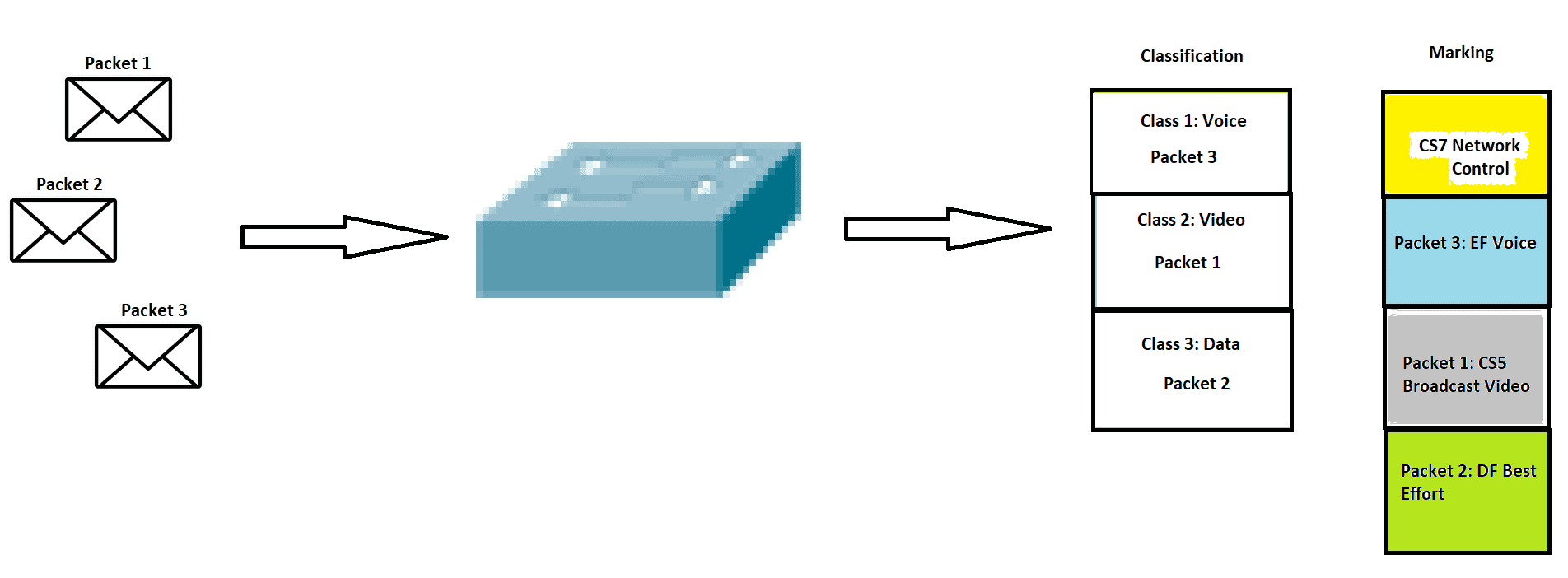
The three steps of MQC are:
- Classify Traffic (
class-map): Identify and categorize traffic into different classes. This is our focus today. - Define a Policy (
policy-map): Specify the QoS actions (like marking or queuing) to be applied to each class of traffic. - Apply the Policy (
service-policy): Attach the policy to an interface or a virtual circuit to make it active.
The following reading provides a concise overview of this powerful framework.
This article from NetworkAcademy.IO introduces the MQC framework and its three core components.
Please read the introductory section, The Modular QoS CLI (MQC). Pay close attention to the diagram illustrating the three steps, as this is the fundamental workflow we will use throughout this module.
Step 1: Classifying Traffic with class-map
As you just read, the first step is to classify traffic. Before we can give special treatment to voice calls or deprioritize bulk data transfers, we must first be able to accurately identify them. In MQC, we do this by defining one or more matching criteria inside a class-map.
While there are several ways to match traffic (which we will touch on later), our focus for this learning outcome is on using Access Control Lists (ACLs). You have likely encountered ACLs before in the context of security for filtering traffic. When used for QoS, their purpose shifts from "permit or deny" to "identify."
A key point to remember is that within a QoS context, the permit statement in an ACL means "this is the interesting traffic to match." The router is not filtering the traffic, but rather using the ACL as a pattern to identify packets that belong to a specific category.
CCNA Introduction to QoS - Network Direction
This section from Network Direction's "CCNA Introduction to QoS" clearly explains how an ACL is used for classification.
In the article, find "Chapter 5 – Cisco’s MQC". Read the portion starting from this section. The explanation of the permit keyword's role is particularly important.
Creating and Applying an ACL-Based Class Map
Now that you understand the role of the ACL, let's see how to tie it into a class-map. The process involves two main configuration blocks:
- Define the ACL: Create a standard or extended ACL that
permitsthe traffic you want to classify. For example, to identify HTTP traffic, you would create an ACL that matches TCP traffic destined for port 80. - Create the
class-map: Create a named class-map and use thematch access-groupcommand to reference the ACL you just created.
A critical component of a class-map is its matching logic: match-all or match-any.
match-all(default): A packet must match all of thematchstatements within the class-map. This is logical "AND".match-any: A packet must match at least one of thematchstatements. This is logical "OR".
The choice between them is vital. For example, if you wanted to classify all web traffic, which includes both HTTP (port 80) and HTTPS (port 443), you would need two separate match statements (one for each protocol). Since a single packet cannot be both HTTP and HTTPS simultaneously, you must use match-any.
The following reading provides detailed examples and explains this logic clearly.
This article continues its explanation of MQC by diving into the class-map command, its syntax, and provides excellent examples of using ACLs for classification.
Please read the sections The class-map command and the subsequent CLI examples. Focus on understanding the syntax and the practical difference between match-all and match-any.
An Alternative Method: Network Based Application Recognition (NBAR)
While ACLs are a fundamental and powerful tool for classification, it is worth knowing that MQC offers other, more advanced methods. One of the most powerful is Network Based Application Recognition (NBAR). NBAR performs deep packet inspection to recognize applications not just by port number, but by their traffic signatures and behaviors.
This allows you to classify traffic that uses dynamic port numbers or tries to hide its identity, such as peer-to-peer file sharing or streaming services. The configuration is done inside a class-map using the match protocol command.
Let's watch a brief demonstration of NBAR in action. This will broaden your understanding of classification possibilities, though our immediate focus remains on ACLs.
Configuring Quality of Service (QoS) with MQC
This video by Kevin Wallace demonstrates the creation of several class maps using NBAR's match protocol command.
Watch the segment from this demonstration. Notice how he uses class-map match-any to classify various email protocols together, which is analogous to how you would use it with multiple ACLs for web traffic.
As you saw, match protocol provides a very intuitive way to identify well-known applications. For your CCNA studies and real-world configurations, you will often use a combination of ACLs (for custom or specific IP/port-based rules) and NBAR (for complex application recognition).
Conclusion
In this lesson, we transitioned from QoS theory to hands-on configuration. You learned the structure of the Modular QoS CLI and mastered its first and most critical step: traffic classification.
Key Takeaways:
- QoS configuration on Cisco devices follows the Modular QoS CLI (MQC) framework, a three-step process:
class-map,policy-map, andservice-policy. - Classification is the first step, where you identify interesting traffic using a
class-map. - Access Control Lists (ACLs) are a primary tool for classification. In this context, the
permitstatement is used to match traffic, not to filter it. - A
class-mapusesmatch access-groupto reference an ACL. - The logic within a
class-mapis controlled bymatch-all(AND) andmatch-any(OR), which is a critical choice when using multiple matching criteria. - More advanced methods like NBAR (
match protocol) exist for application-layer classification.
You are now prepared for the next stage. Having successfully classified our traffic, our next lesson will focus on the second step of MQC: creating a policy-map. We will take the traffic classes defined today and assign specific actions to them, starting with marking the traffic with appropriate DSCP values.