Welcome to the second lesson in our "Dart Fundamentals" module!
In the last lesson, we built a solid bridge from your TypeScript knowledge to Dart, focusing on the core differences like null safety and constructor syntax. You should now be comfortable with the basic structure of Dart code.
Today, we'll move on to a topic that will feel very familiar and powerful: manipulating collections. The goal of this lesson is to get you fluent in using common methods like map and where on Dart's List and Map types. Your experience with JavaScript's array methods like .map() and .filter() will give you a significant head start. We'll focus on how these concepts translate to Dart and explore the "declarative" style that is a best practice in modern Flutter development.
The "Why": A Declarative Approach to Data
Before we jump into the code, let's address the "why." As an experienced developer, you know there are many ways to loop over data. Dart, like modern JavaScript, strongly encourages a declarative style over an imperative one.
- Imperative: You write a
forloop and manually manage state, telling the computer how to do something step-by-step. - Declarative: You use methods like
mapandwhereto describe what you want the result to be, abstracting away the "how."
This declarative approach leads to more readable, less error-prone code and is fundamental to how Flutter builds UIs. To get a solid grasp of this principle, the following article is an excellent starting point.
Map, Where(Filter) and Reduce in Dart | by Darsshan Nair
This article by Darsshan Nair, 'Map, Where(Filter) and Reduce in Dart', provides a great conceptual overview of these methods. It explains the benefits of this declarative style, such as immutability, which is a key concept in robust application architecture.
Please read the sections 'Preface', 'Conceptual Understanding', and 'Motivations'. Focus on the distinction between these methods and traditional forEach loops, and why immutability is an important goal.
As the article highlighted, using methods like map and where allows us to create new collections without changing (mutating) the original data, which is a safer and more predictable way to manage application state.
Manipulating Lists
Lists in Dart are the equivalent of JavaScript arrays. They are ordered collections of items. Given your background, the syntax for creating and accessing them is straightforward.
Using map and where on Lists
Let's see these declarative methods in action. The video below provides a fantastic, practical comparison between the old imperative style and the new functional, declarative style.
Practical Functional Programming in Dart & Flutter
In this clip from 'Practical Functional Programming in Dart & Flutter' by Reso Coder, you'll see a side-by-side comparison of using a for loop versus chaining where and map to achieve the same result. This perfectly illustrates the readability and composability benefits we just discussed.
Watch from 06:00 to 12:47. Pay close attention to how a for loop with an if statement is refactored into a clean chain of where and then map.
Let's break down the key takeaways and add a crucial detail:
-
where(Filter):- Takes a function that returns a
bool. - Returns a new
Iterablecontaining only the elements for which the function returnedtrue. - This is identical in purpose to JavaScript's
Array.prototype.filter.
final numbers = [1, 2, 3, 4, 5, 6]; final evenNumbers = numbers.where((number) => number % 2 == 0); // evenNumbers is now an Iterable containing [2, 4, 6] - Takes a function that returns a
-
map(Transform):- Takes a function that transforms an element into something new.
- Returns a new
Iterablewhere each element is the result of the transformation. - This is identical in purpose to JavaScript's
Array.prototype.map.
final numbers = [1, 2, 3];
final squaredNumbers = numbers.map((number) => number * number);
// squaredNumbers is now an Iterable containing [1, 4, 9]
The Iterable and .toList()
A critical point to note is that both map and where return an Iterable, not a List. An Iterable is a "lazy" collection; it doesn't compute its values until they are actually needed. To convert this back into a concrete List, you must call .toList() at the end of your chain. This is a common pattern you'll see everywhere in Dart.
final numbers = [1, 2, 3, 4, 5, 6];

// Chain 'where' and 'map' together, then convert to a List.
final squaresOfEvens = numbers
    .where((n) => n % 2 == 0)      // Filters to (2, 4, 6)
    .map((n) => n * n)             // Transforms to (4, 16, 36)
    .toList();                     // Converts the Iterable to a List.

print(squaresOfEvens); // Output: [4, 16, 36]
Test your understanding!
You have a list of user objects, each represented as a Map. Create a list of strings containing the names of all active users, formatted in uppercase.
final users = [
  {'name': 'Alice', 'isActive': true},
  {'name': 'Bob', 'isActive': false},
  {'name': 'Charlie', 'isActive': true},
];

// Your code here to produce a List<String> of active user names in uppercase.
// Expected output: ['ALICE', 'CHARLIE']
Show answer
You would chain where to filter for active users, then map to extract and transform the name, and finally toList to create the final list.
final activeUserNames = users
    .where((user) => user['isActive'] == true)
    .map((user) => (user['name'] as String).toUpperCase())
    .toList();

print(activeUserNames); // [ALICE, CHARLIE]
Note the as String cast inside the map function. This is necessary because Dart's type inference sees user['name'] as Object?, and we need to tell the compiler that we know it's a String before calling .toUpperCase() on it.
Manipulating Maps
A Dart Map is a collection of key-value pairs, similar to JavaScript objects or the Map object in JS. Keys must be unique. Your experience with JSON objects makes this concept very familiar.
To start, let's get a quick but thorough foundation on how Map works in Dart.
Map in Dart | What is Map in Dart & Flutter | Dart Tutorial #16
The video 'Map in Dart' from Flutter Teacher covers the essentials. We'll watch a few key sections to understand what a Map is, how to create one with proper types, and how to access its values.
Please watch from 00:42 to 02:22 to understand the key-value concept. Then, watch from 04:58 to 09:00 to see how to create maps, especially with explicit type annotations (e.g., Map<String, int>), which is a best practice. Finally, watch from 13:36 to 15:25 to see how to access and update values.
Here's a handy cheatsheet that summarizes map operations and also notes a key performance characteristic that you, as a data engineer, will appreciate: maps provide O(1) (constant time) access to elements by key, which is much faster than searching a list.
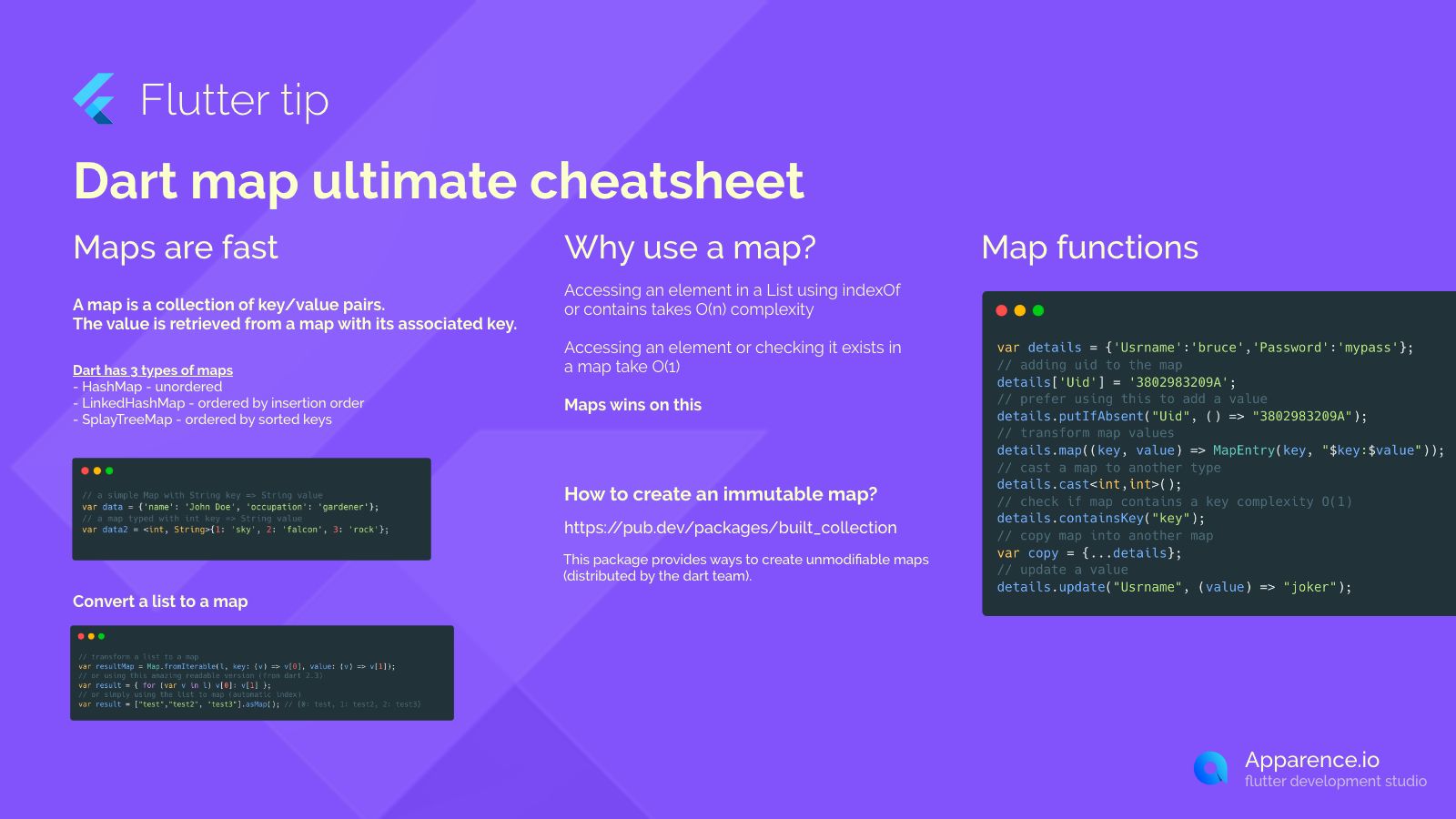
Filtering and Transforming Maps
Applying where and map to a Map is a little different than with a List.
Filtering a Map (where on entries)
The most common way to filter a map is to access its entries (which is an Iterable of MapEntry objects), apply where to the entries, and then build a new Map from the filtered entries.
final productPrices = {
  'Laptop': 1200.00,
  'Mouse': 25.00,
  'Keyboard': 75.00,
  'Webcam': 15.00,
};

// Find all products that cost more than $50
final expensiveProducts = Map.fromEntries(
  productPrices.entries.where((entry) => entry.value > 50.00)
);

print(expensiveProducts); // {Laptop: 1200.0, Keyboard: 75.0}
Transforming a Map (map method)
A Map has its own .map() method. Instead of taking a function with one argument (the element), it takes a function with two arguments: (key, value). This function must return a new MapEntry to be included in the new map.
Let's see this in practice by transforming the keys and values of a map.
Map in Dart | What is Map in Dart & Flutter | Dart Tutorial #16
Let's return to the 'Map in Dart' video to see a specific example of the map's .map() method in action.
Watch from 26:38 to 28:31. This section demonstrates how to use the .map() method to create a new map by transforming the values of an existing one (in this case, converting them to uppercase).
Here is another example, where we transform the values from dollars to cents:
final productPrices = {
  'Laptop': 1200.00,
  'Mouse': 25.00,
};

// Create a new map with prices in cents
final pricesInCents = productPrices.map((key, value) {
  return MapEntry(key, (value * 100).toInt());
});

print(pricesInCents); // {Laptop: 120000, Mouse: 2500}
Test your understanding!
You have a map of student names to their test scores. Your task is to create a new map containing only the students who passed (score >= 60), with a 5-point bonus added to their score.
final scores = {
  'Alice': 85,
  'Bob': 55,
  'Charlie': 92,
  'David': 48,
};

// Your code here
// Expected output: {'Alice': 90, 'Charlie': 97}
Show answer
You can achieve this by chaining where on the entries to filter for passing scores, and then using map to create the new entries with the bonus points.
final passingScoresWithBonus = Map.fromEntries(
  scores.entries
    .where((entry) => entry.value >= 60)
    .map((entry) => MapEntry(entry.key, entry.value + 5))
);

print(passingScoresWithBonus); // {Alice: 90, Charlie: 97}
This elegantly combines filtering and transformation for a Map in a single, declarative expression.
Conclusion
Great job! You've now mastered one of the most common and powerful tasks in Dart: manipulating collections declaratively. Your prior experience with JavaScript makes this a natural transition, and focusing on these functional methods will set you up for writing clean and maintainable Flutter code.
Here are the key takeaways from today's lesson:
- Declarative Style: Using methods like
mapandwhereleads to more readable and less error-prone code by describing what you want, not how to get it. - Immutability: These methods return new collections, leaving the original data untouched. This is a crucial principle for predictable state management.
ListManipulation: Use.where()to filter and.map()to transform. Remember to call.toList()at the end of the chain to convert the resultingIterableback into aList.MapManipulation: Filter a map by applying.where()to its.entriesand reconstructing withMap.fromEntries(). Transform a map using its own.map()method, which operates on(key, value)pairs and requires you to return a newMapEntry.- Chaining: You can chain these operations together to perform complex data manipulations in a single, elegant expression.
This lesson completes our "Dart Fundamentals" module. You now have a solid foundation in Dart's syntax, type system, object orientation, and data manipulation.
In our next lesson, we will finally dive into Flutter itself! We'll start building our first user interfaces and explore the structure of a Flutter app, the widget tree, and the fundamental role of the build method.