Hello! In our last module, we established a complete framework for web accessibility, ensuring your site is usable by everyone. This focus on user experience is a perfect bridge to our next major topic: performance. A site that is accessible but slow still offers a poor experience.
Welcome to the module on Performance and Optimization. In this first lesson, we'll explore the foundational metrics that define a high-performance website. We are going to address the learning outcome: Explain Core Web Vitals (LCP, INP, CLS) and their importance for user experience and SEO.
You'll learn what these three critical metrics are, what they measure, and why they are non-negotiable for achieving your goal of a modern, production-ready, and SEO-optimized accounting website. This lesson will provide the "why" behind the practical optimization techniques we'll implement in the rest of this module.
1. What are Core Web Vitals?
In the past, measuring website performance was complex, with dozens of different metrics. To simplify this, Google introduced the Web Vitals initiative, designed to provide unified guidance on the signals essential for a great user experience.
The most important of these are the Core Web Vitals (CWV). These are a specific subset of metrics that Google considers critical to all web pages. They focus on three key aspects of the user experience: loading, interactivity, and visual stability.
Crucially, since 2021, Core Web Vitals have been an official Google ranking factor. A slow, clunky site doesn't just frustrate users; it can also directly harm your search engine ranking and business goals.
To understand this connection between performance, user experience, and SEO, let's start with a resource that explains their practical importance.
Core Web Vitals Optimization: The Complete Guide 2025
This article from the GoldenWing agency blog provides an excellent, business-focused overview of Core Web Vitals. It cuts straight to why these metrics are so important for SEO and user retention.
Please read the sections 'Core Web Vitals: Why They Decide Your SEO Success in 2025' and 'Core Web Vitals and SEO: The Direct Connection'. Pay close attention to the link between loading speed, user behavior (like bounce rates), and search rankings.
As the article highlights, good performance isn't a luxury; it's a feature. For a professional accounting website that needs to build trust, a fast and seamless experience is paramount.
2. The Three Pillars of User Experience
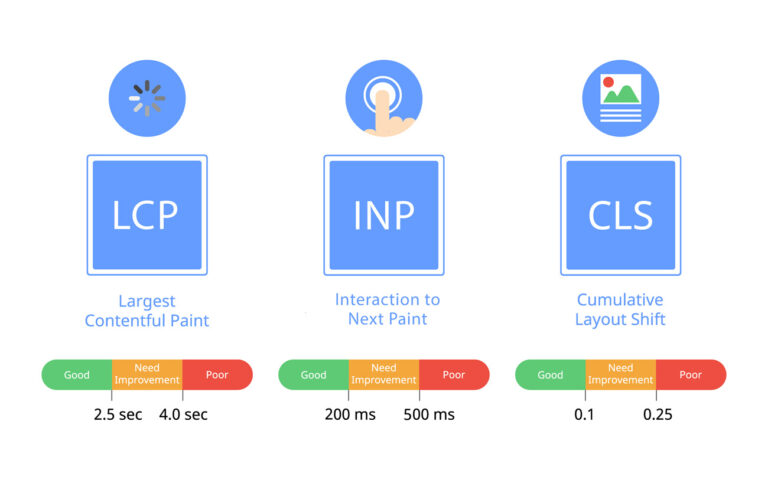
Now, let's break down each of the three Core Web Vitals. For each metric, Google has defined specific thresholds to classify the experience as 'Good', 'Needs Improvement', or 'Poor'. The goal is for at least 75% of your users to have an experience in the 'Good' range.
To get the official definitions, let's turn to Google's own documentation.
The official web.dev article on Web Vitals provides the canonical definitions for each of the Core Web Vitals. It's the ultimate source of truth for these metrics.
Read the section titled 'Core Web Vitals'. Focus on the definition and the specific time or score threshold for LCP, INP, and CLS to be considered 'Good'.
Let's digest those definitions with some practical examples.
1. Largest Contentful Paint (LCP) – Loading Performance
- What it measures: The time it takes for the largest single element (typically a large image or a block of text) to become visible within the viewport.
- Thresholds:
- Good: < 2.5 seconds
- Needs Improvement: 2.5s – 4.0s
- Poor: > 4.0 seconds
- Why it matters: LCP is a user-centric measure of perceived loading speed. It marks the point in the page load timeline when the user feels that the main content has arrived. A slow LCP can lead users to believe the page is broken and cause them to leave. For your accounting site, the LCP element on the homepage will likely be the main hero image or the primary headline.
2. Interaction to Next Paint (INP) – Interactivity
- What it measures: The responsiveness of a page to user input. It measures the latency of all interactions a user makes with the page (clicks, taps, key presses) and reports one of the longest interactions.
- Thresholds:
- Good: < 200 milliseconds
- Needs Improvement: 200ms – 500ms
- Poor: > 500ms
- Why it matters: INP measures whether the page feels "laggy" or "unresponsive". A high INP means that when a user clicks a button, opens a navigation menu, or fills out a form, there is a noticeable delay before they see a visual response. This can be extremely frustrating. Since you have experience building interactive UIs with JavaScript, you know how heavy event handlers or complex component re-renders can block the main thread and lead to poor responsiveness. INP is the metric that captures this pain point.
Note: INP officially replaced an older metric, First Input Delay (FID), in March 2024 because it provides a more comprehensive measure of a page's overall responsiveness.
3. Cumulative Layout Shift (CLS) – Visual Stability
- What it measures: The sum total of all unexpected layout shifts that occur during the entire lifespan of the page. A layout shift happens when a visible element changes its position from one rendered frame to the next.
- Thresholds (score-based, not time):
- Good: < 0.1
- Needs Improvement: 0.1 – 0.25
- Poor: > 0.25
- Why it matters: Have you ever tried to click a link, only for an ad or an image to load suddenly, pushing the content down and causing you to click the wrong thing? That's a layout shift, and it’s a major source of user frustration. Common causes include images without defined dimensions, dynamically injected content, or web fonts loading and causing a flash of unstyled or restyled text. A low CLS score is essential for a professional and trustworthy feel.
Test your understanding!
Imagine you're reviewing a performance report for your new accounting website. The report shows these scores for the homepage:
- LCP: 3.8s
- INP: 150ms
- CLS: 0.28
Based on what you've learned, which of the three Core Web Vitals are failing the 'Good' threshold? For each failing metric, describe the likely user experience problem.
Show answer
-
LCP (Largest Contentful Paint) is failing. A score of 3.8s is in the 'Needs Improvement' range. This means users are likely waiting almost 4 seconds for the main content (e.g., the hero banner) to appear, making the page feel slow to load.
-
INP (Interaction to Next Paint) is passing. A score of 150ms is well within the 'Good' threshold of < 200ms. This indicates that the page feels responsive when users interact with it.
-
CLS (Cumulative Layout Shift) is failing. A score of 0.28 is in the 'Poor' range. This indicates that users are experiencing significant and frustrating visual instability. Elements are likely shifting around as the page loads, which could cause them to lose their place or click on the wrong items.
3. Practical Considerations for Developers
Understanding the definitions is the first step. As a developer, you also need to be aware of some practical nuances.
Core Web Vitals Optimization: The Complete Guide 2025
Let's revisit the GoldenWing blog post to explore its FAQ section. This provides clear answers to common questions you'll face when you start measuring and optimizing these metrics.
Read the 'Frequently Asked Questions' section. Pay special attention to the difference between Lab and Field data, and why mobile often scores worse than desktop.
Here are two key takeaways from that reading:
- Lab Data vs. Field Data: You will encounter two types of data. Lab data is measured in a controlled environment (like using Lighthouse in your browser's DevTools). It's great for debugging during development. Field data is collected from real users (via the Chrome User Experience Report) and reflects real-world performance across various devices and network conditions. Field data is what Google uses for ranking, so it's your ultimate source of truth.
- Mobile-First Prioritization: Google evaluates and ranks the mobile and desktop versions of your site separately. Because mobile devices typically have less processing power and slower network connections, performance scores are often worse. Your optimization efforts should prioritize the mobile experience.
Conclusion
You now have a solid theoretical understanding of Core Web Vitals, the metrics at the heart of web performance. They are not just abstract numbers but direct measures of user delight or frustration.
Key Takeaways:
- Core Web Vitals (CWV) are Google's standardized metrics for measuring user experience, focusing on loading (LCP), interactivity (INP), and visual stability (CLS).
- They are a confirmed Google ranking factor, making them critical for the SEO success of your accounting website.
- LCP measures how quickly the main content appears.
- INP measures how responsive the page is to user interactions.
- CLS measures how much the layout shifts unexpectedly during loading.
- Your goal is to have at least 75% of users experience 'Good' scores for all three metrics, with a strong focus on the mobile experience.
Up Next:
Now that you understand what to measure and why it's important, the following lessons will focus on the how. We will start by tackling one of the most common causes of a poor LCP score: large, unoptimized images. In the next lesson, you'll learn how to leverage Astro's powerful, built-in Image component to automatically optimize images for incredible performance gains.