Hello! Welcome back.
In our last lesson, we built the blueprint for our content by defining type-safe schemas with Zod. We established the rules for what makes a valid blog post, service page, or testimonial. This was a crucial step in ensuring the long-term maintainability and quality of your accounting website.
Today, we put those blueprints to use. The learning outcome for this lesson is to author content in MDX files using frontmatter metadata. We'll move from defining the rules to creating the actual content that follows them. This is the core workflow you'll use to add and manage all the dynamic information on your site, from blog articles to service descriptions.
What is Frontmatter?
At the top of every Markdown or MDX file in Astro, you can include a section for metadata. This section is called frontmatter. It's where you store data about the content, such as its title, publication date, author, or a brief description.
Frontmatter is written in YAML, a simple key-value format, and is fenced off from the main content using triple dashes (---).
---
key: 'value'
another_key: 123
a_list:
  - item 1
  - item 2
---

This is the main content of the file, written in Markdown.
The magic happens when this frontmatter is validated against the Zod schemas we created in src/content/config.ts. The keys and the data types of the values you write in the frontmatter must match the schema you defined for that collection.
Creating Your First MDX Content
Let's see this in action by creating our first blog post. The process involves creating a new .mdx file in the correct directory and filling in both the frontmatter metadata and the main body content.
The following article from the LogRocket blog provides a clear, practical walkthrough of this exact process. It demonstrates how to create a post layout and then write the MDX file with its frontmatter.
Build a blog with Astro, Vite, and MDX
Please read the following sections from the article "Build a blog with Astro, Vite, and MDX". This will guide you through the practical steps of creating an MDX file and defining its metadata.
Please start at the section "Creating the blog post layout" and read until the end of "Creating a Markdown blog post". Focus on two key parts: 1) How Astro.props.frontmatter is used in the layout file to access metadata. 2) The syntax used inside first-post.mdx, specifically how the frontmatter block is structured with key-value pairs between the triple-dashes.
Deconstructing the MDX File
As you saw in the article, an MDX file for a content collection consists of two parts:
- Frontmatter: The YAML block at the top containing the metadata.
- Content: The Markdown (and soon, JSX) body of the page below the frontmatter.
Let's apply this to the blog schema we created in the last lesson. First, we need to locate the correct directory. All our blog posts will live inside src/content/blog/.
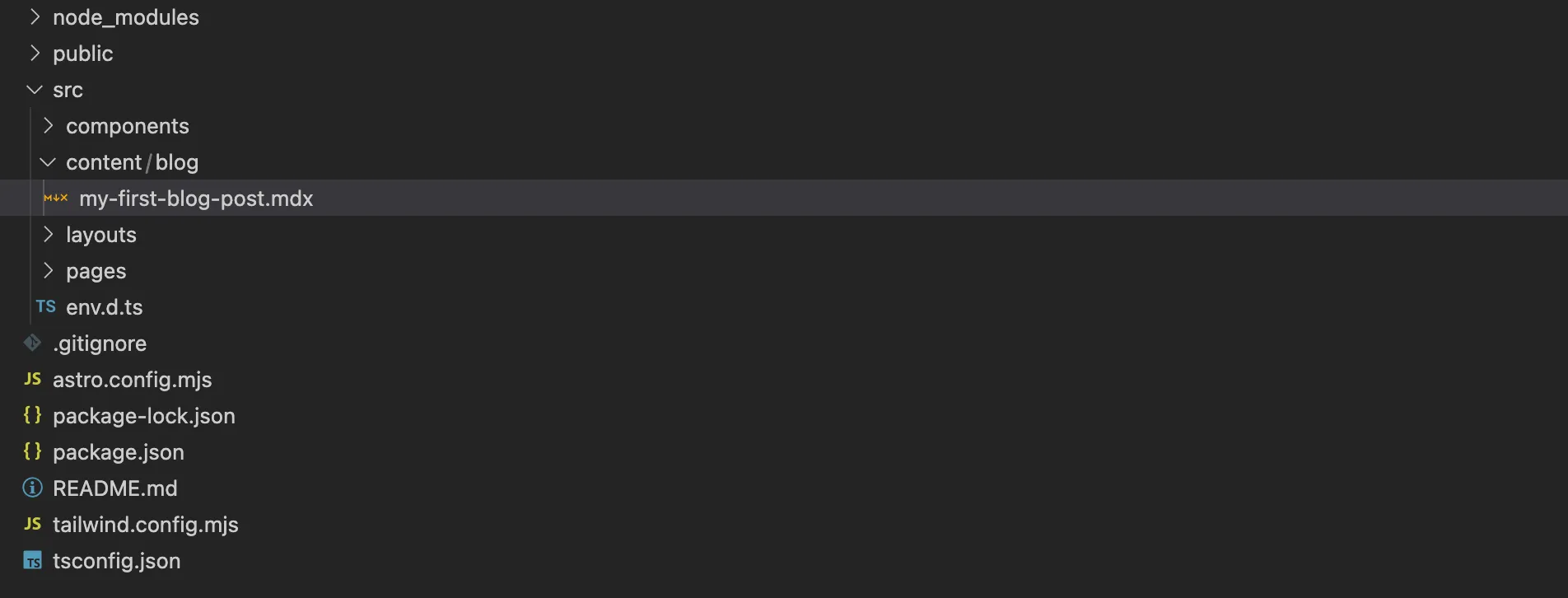
Now, let's create a new file: src/content/blog/understanding-tax-deductions.mdx.
Based on our schema from the previous lesson, the frontmatter for this file would look something like this:
---
title: "A Beginner's Guide to Tax Deductions"
description: "Learn the basics of tax deductions for small businesses and individuals to maximize your savings."
pubDate: "2024-08-15"
category: "Tax"
tags: ["small business", "tax tips", "individuals"]
isDraft: false
heroImage: "/images/blog/tax-deductions-hero.jpg"
---

# A Beginner's Guide to Tax Deductions

Welcome to our guide on understanding tax deductions! For many small business owners and individuals, navigating the world of taxes can be daunting. But understanding what you can deduct is one of the most powerful ways to lower your taxable income.

## What is a Tax Deduction?

A tax deduction is an expense that you can subtract from your adjusted gross income (AGI) to lower the amount of income that is subject to tax.

### Common Deductions for Small Businesses

*   **Office Supplies:** Pens, paper, software, etc.
*   **Business Travel:** Flights and hotels for business trips.
*   **Home Office:** If you have a dedicated space in your home for business.
Notice how each key-value pair corresponds directly to our Zod schema:
titleanddescriptionare strings that meet our length requirements.pubDateis a string in a format thatz.coerce.date()can understand.categoryis one of the values from ourz.enum(["Tax", "Audit", "Consulting", "News"]).tagsis an array of strings.isDraftis a boolean.
The Payoff: Automatic Validation
This is where the work we did in the last lesson pays off. What happens if you make a mistake?
- What if you forget the
descriptionfield? - What if you misspell a category as
"Taxes"instead of"Tax"?
Astro's development server will immediately stop and show you a clear error message, telling you exactly what's wrong and in which file.
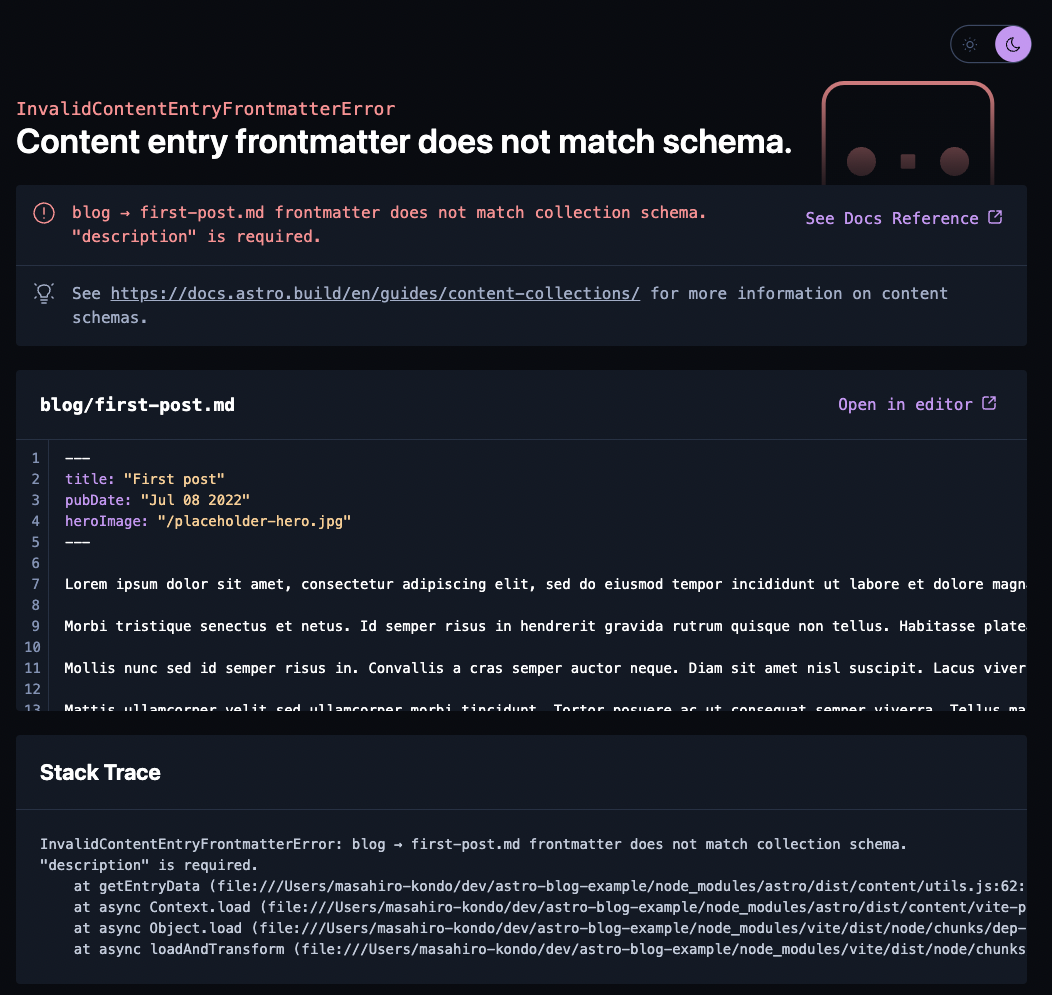
This tight feedback loop is invaluable. It turns potential runtime bugs or visual glitches on your live site into simple, easy-to-fix errors during development.
The official Astro documentation provides more detail on how frontmatter variables are made available to your project.
Markdown & MDX 🚀 Astro Documentation
To solidify your understanding, let's look at the official Astro documentation. It explicitly covers how frontmatter is supported in MDX files.
Please read the section titled "Using Frontmatter Variables in MDX". It's a short section that reinforces how frontmatter works and how you can even access its values within the MDX file itself using {frontmatter.title}.
Test your understanding!
Let's practice by authoring a new piece of content. In the previous lesson, we designed a servicesCollection schema. Now, create the frontmatter for a new service page.
The schema was:
z.object({
    title: z.string(),
    tagline: z.string(),
    icon: z.string(),
    isFeatured: z.boolean().default(false)
})
In a new file, src/content/services/audit-and-assurance.mdx, write the frontmatter for a service with the title "Audit & Assurance". Give it a compelling tagline, an icon file name of icon-audit.svg, and mark it as a featured service.
Show answer
Your frontmatter in src/content/services/audit-and-assurance.mdx would look like this:
---
title: "Audit & Assurance"
tagline: "Building trust and confidence in your financial reporting."
icon: "icon-audit.svg"
isFeatured: true
---

(The main content for the service page would go here...)
This frontmatter perfectly adheres to the servicesCollection schema. It provides all the required fields with the correct data types, ensuring it can be reliably used to build your service pages later.
Conclusion
You have now mastered the fundamental workflow for creating content in an Astro project. By combining the structure of Zod schemas with the simplicity of MDX frontmatter, you've built a scalable and error-resistant system for managing your website's information.
Here are the key takeaways from this lesson:
- Content is authored in
.mdxfiles within thesrc/content/directory. - Frontmatter is YAML metadata at the top of an MDX file, enclosed by
---. - The keys and values in your frontmatter must match the Zod schema defined for that content collection.
- Astro provides automatic validation and clear error messages during development, ensuring data integrity.
You are now fully equipped to populate your accounting website with blog posts, service descriptions, testimonials, and more.
Up Next: We've focused on the "meta" part of our content. But the real power of MDX comes from its name: Markdown + JSX. In the next lesson, we will embed interactive React components directly within MDX content. This is where you'll bridge your existing React skills with Astro's content-driven architecture to bring your pages to life.