Hello! We’ll begin with the execution model behind PySpark DataFrames. This first module builds from that model toward writing transformations and reasoning about their performance. For an Azure data engineer interview, the key is not just to name Spark components, but to explain what actually happens when a line of PySpark requests a result.
By the end of this lesson, you should be able to trace a DataFrame action from the driver’s plan through jobs, stages, and tasks on executors—and explain why the preceding transformations may not have processed any rows yet.
The application has a coordinator and distributed workers
A Spark application has a driver: the process that runs your application code, builds and coordinates computations, and tracks their progress. It obtains resources through a cluster manager, which arranges for executors to run on worker nodes. Executors are processes that carry out tasks, hold data partitions, and report progress and results to the driver.
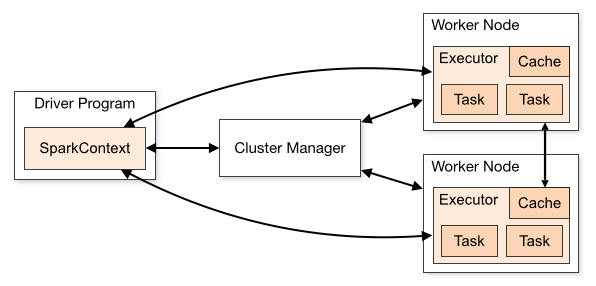
Notice the distinction between acquiring resources and scheduling work. The cluster manager supplies executor resources; the driver schedules the application’s tasks onto those executors. The driver does not normally read and process every input row itself. Conversely, an executor does not decide the overall query plan.
Spark’s official RDD guide describes the underlying application model. Although you will work mainly with DataFrames, this account of the driver and lazy execution provides useful foundations for understanding them.
RDD Programming Guide - Spark 4.1.0 Documentation
Read these two short passages in the Apache Spark documentation to establish what the driver does and why transformations wait for an action.
In “Overview,” read the opening paragraph, stopping before the paragraph on shared variables. Then, in “RDD Operations,” read the first two paragraphs, stopping after the explanation of lazy transformations. The examples use RDDs; focus on the execution principle, which also matters for DataFrames.
One qualification matters when transferring that explanation to DataFrames: an action does not always return data to the driver. A write action, for example, can produce files from distributed executor work. The driver still coordinates the operation.
A DataFrame transformation describes work; an action demands a result
Consider a report of qualifying orders by region:
from pyspark.sql import functions as F

orders = spark.read.parquet("/data/orders")

summary = (
    orders
    .filter(F.col("amount") > 100)
    .groupBy("region")
    .count()
)

summary.explain()
rows = summary.collect()
Constructing summary describes a computation. The filter says which rows are eligible; groupBy(...).count() says what result is needed. Spark can analyze and optimize that description before running the full data-processing work. For example, it can arrange to read only needed columns where the data source permits it. summary.explain() displays a plan; it is not a request to compute and return the report.
collect() is the action here. It asks Spark to execute the plan and send the resulting rows to the driver. This is reasonable only if the number of regions—and therefore the result—is known to be small. Collecting a large DataFrame can overwhelm driver memory.
“Lazy” does not mean that every line before collect() has absolutely no activity: Spark may inspect schema or file metadata while constructing or analyzing a DataFrame. It means the DataFrame transformations have not yet performed the requested full computation over the rows. That distinction is more accurate than saying “nothing happens until an action.”
Watch this demonstration before following the example into the cluster. It connects the code-level distinction to what appears in Spark’s UI.
Understanding Spark UI in Depth | Jobs, Stages, Tasks Explained in PySpark and Databricks
Watch “Understanding Spark UI in Depth | Jobs, Stages, Tasks Explained in PySpark and Databricks” from DataBeli for its DataFrame demonstration and explanation of execution units.
Watch lazy DataFrames as the session and DataFrames are created, then the action to see what changes when show() runs. Finish with execution units, focusing on how an application contains jobs, stages, and tasks. The video uses show(); our example uses collect(). Both request a result, though their execution details can differ.
What the action causes Spark to run
When summary.collect() runs, the driver coordinates execution of the DataFrame’s physical plan. Three nested units help describe the work:
- A job is an execution submitted to satisfy an action or part of one.
- A stage is a set of tasks Spark can execute without first obtaining the output of another stage across a shuffle boundary.
- A task is one unit of a stage’s work on one partition. Executors run these tasks.
A common interview shortcut is “one action creates one job.” Treat it as an introductory approximation, not a guarantee: a single DataFrame action can involve multiple Spark jobs, depending on the operation and execution details. Likewise, one line of code is not necessarily one task or one stage.
To see why our report needs stages, imagine that input partitions contain orders from several regions. A task can filter its own partition and calculate partial counts. But the final count for a region requires contributions from all partitions containing that region. Spark therefore shuffles intermediate data so the relevant contributions can be combined. In a physical plan, an Exchange operator is a useful sign that Spark will redistribute data.
For a simple execution of this query, you can trace the work in four parts:
- The driver plans the action. It decides how the scan, filter, aggregation, and result retrieval will execute, then schedules the required stages.
- Executors run tasks on input partitions. Each task reads its partition, applies the filter, and can compute partial counts. It produces intermediate data for the shuffle.
- Executors run tasks on shuffled partitions. These tasks obtain the relevant intermediate data and finish the regional counts. The shuffle dependency separates this work from the preceding stage.
- The small result reaches the driver. The driver receives the rows requested by
collect()and returns them to the PySpark program.
Tasks in the first stage need not all finish simultaneously; available executor task slots limit how many run at once. Suppose, purely for illustration, that the scan has eight input partitions and the available executors can run four tasks concurrently. The input stage has eight partition-level tasks, so they require at least two waves. If the shuffled result has four partitions, its stage has four partition-level tasks. Actual partition counts and stage shapes depend on the data, plan, and Spark’s runtime decisions.
The crucial separation is partition versus task versus executor. A partition is a chunk of data; a task processes one partition for a particular stage; an executor is the long-lived process that can run many tasks over the application’s lifetime. If an executor runs several tasks, that does not make those tasks one partition.
The video’s Spark UI walkthrough makes these units visible rather than merely conceptual:
Understanding Spark UI in Depth | Jobs, Stages, Tasks Explained in PySpark and Databricks
Continue DataBeli’s Spark UI demonstration to connect the execution model to the screens you may encounter while explaining a job.
Watch the UI walkthrough. Follow the SQL view of the DataFrame computation, then the job and stage views down to individual tasks. Look for where the displayed execution has a boundary between stages; do not expect every action to produce the same number of jobs or stages as the demonstration.
In an interview, you can use the UI as evidence: the SQL view helps connect a DataFrame query to its execution plan; the Jobs and Stages views show scheduled execution units; and stage details show the tasks that ran. This is a stronger explanation than inferring the number of tasks solely from the number of PySpark lines.
A concise interview explanation
If asked, “What happens when a DataFrame action runs?”, a sound answer is:
The transformations have described a computation without materializing the full result. When the action requests a result, the driver plans and coordinates its execution. Spark submits job work, divides it into stages at shuffle dependencies, and schedules partition-level tasks on executors. Executors process the data and exchange intermediate data when required; the driver tracks completion and receives the requested result or coordinates the output.
You can then make the explanation concrete with filter and groupBy: filtering can be done independently within input partitions, while counting by region requires contributions from different partitions to be brought together. That need for redistribution—not the presence of a particular PySpark line by itself—is the reason to expect a shuffle and a stage boundary.
Conclusion
The driver coordinates; executors process partitions through tasks. DataFrame transformations build a plan, while an action asks Spark to execute it. Jobs organize the action’s execution, stages reflect dependencies such as shuffles, and tasks are the partition-level work within each stage.
Next, we’ll sharpen the distinction behind that stage boundary: which DataFrame transformations can work within existing partitions, and which create wider dependencies and shuffles.