Introduction
In our last lesson, you learned about JavaScript's primitive data types—the fundamental building blocks of information like strings, numbers, and booleans. Now that you know how to store data, it's time to learn how to operate on it. This is where the real work of programming begins: performing calculations, making decisions, and constructing logical conditions.
This lesson will introduce you to JavaScript's operators. We will cover three essential categories: arithmetic, comparison, and logical operators. By the end, you'll be able to combine these to form complex expressions—the core of any program's logic. For your goal of test automation, mastering operators is non-negotiable; they are what you will use to write assertions that check if an application is behaving as expected.
Arithmetic Operators: The Tools for Calculation
Arithmetic operators do exactly what their name suggests: they perform mathematical calculations on numbers. You'll use them for everything from calculating a total price in a shopping cart to checking the number of items on a page.
While the basic operators for addition (+), subtraction (-), multiplication (*), and division (/) are straightforward, JavaScript includes a few others that are extremely useful.
The video below from the Bro Code channel provides a fast-paced but thorough overview of all the arithmetic operators you'll need.
JavaScript ARITHMETIC OPERATORS in 8 minutes! ➕
Watch this video to get a complete tour of JavaScript's arithmetic operators.
For the standard operators, watch from the beginning to the end of the division example. Pay close attention to the modulus (%) and exponentiation (**) operators, explained from this timestamp. The modulus operator is particularly handy for determining if a number is even or odd, a common task in programming. The video then introduces augmented assignment operators like += and -=, which are convenient shortcuts you will see often in existing code. Finally, learn about the increment and decrement operators (++ and --), which are used to add or subtract 1 from a variable.
Operator Precedence and Grouping
What happens when you combine multiple operators in one line, like let result = 10 + 5 * 2;? JavaScript doesn't simply execute from left to right. It follows a specific order of operations, often remembered by the acronym PEMDAS (Parentheses, Exponents, Multiplication/Division, Addition/Subtraction).
In the example above, multiplication (*) has higher precedence than addition (+), so 5 * 2 is calculated first, resulting in 10. Then, 10 + 10 is calculated, making result equal to 20, not 30.
You can explicitly control the order of operations using the grouping operator: parentheses ( ). Any expression inside parentheses is evaluated first.
let result = (10 + 5) * 2; // result is 30
The last part of the Bro Code video explains this critical concept.
JavaScript ARITHMETIC OPERATORS in 8 minutes! ➕
Watch this final segment to understand operator precedence.
Watch from the start of the precedence section to the end. The video walks through how complex expressions are resolved step-by-step.
Comparison Operators: Asking Questions
Comparison operators are used to compare two values. The result of a comparison is always a boolean value: true or false. This is the foundation of decision-making in code and is central to your work in QA. Every automated test you write will end with one or more comparisons (assertions) to determine if the test passes or fails. For example: "Is the actual text on the page equal to the expected text?"
A crucial distinction in JavaScript is between loose equality (==) and strict equality (===).
- Strict Equality (
===): Compares both the value and the data type. This is the operator you should use by default. It is predictable and avoids subtle bugs.5 === 5; // true (same value, same type) 5 === '5'; // false (same value, but different types: number vs. string) - Loose Equality (
==): Compares only the value, after attempting to convert the operands to the same type (a process called type coercion). This can lead to unexpected results and is generally discouraged.5 == 5; // true 5 == '5'; // true (JavaScript converts the string '5' to a number before comparing)
The following video from Future Fullstack provides an excellent, detailed explanation of all comparison operators, with a strong focus on the vital difference between loose and strict comparisons.
JavaScript Comparison Operators Explained
This video will guide you through relational and equality operators.
Start with the introduction to comparison operators. Watch the section on relational operators (>, <, >=, <=). These are generally intuitive. Pay very close attention to the sections on loose vs. strict equality (== vs. ===) and loose vs. strict inequality (!= vs. !==). This is one of the most important concepts for writing reliable code and tests.
As a QA Engineer, your goal is to be precise and leave no room for ambiguity. Always prefer the strict equality (===) and strict inequality (!==) operators to ensure your tests are checking exactly what you intend them to check.
Logical Operators: Combining Conditions
Logical operators are used to combine or modify boolean values. They allow you to create complex conditions for your tests. For example, "the 'Login' button should be visible AND clickable" or "an error message should appear if the username is empty OR the password is empty."
There are three logical operators in JavaScript:
&&(Logical AND): Returnstrueonly if both operands aretrue.||(Logical OR): Returnstrueif at least one operand istrue.!(Logical NOT): Inverts a boolean value. It turnstrueintofalse, andfalseintotrue.
The image below provides a simple "truth table" that visualizes how these operators work.
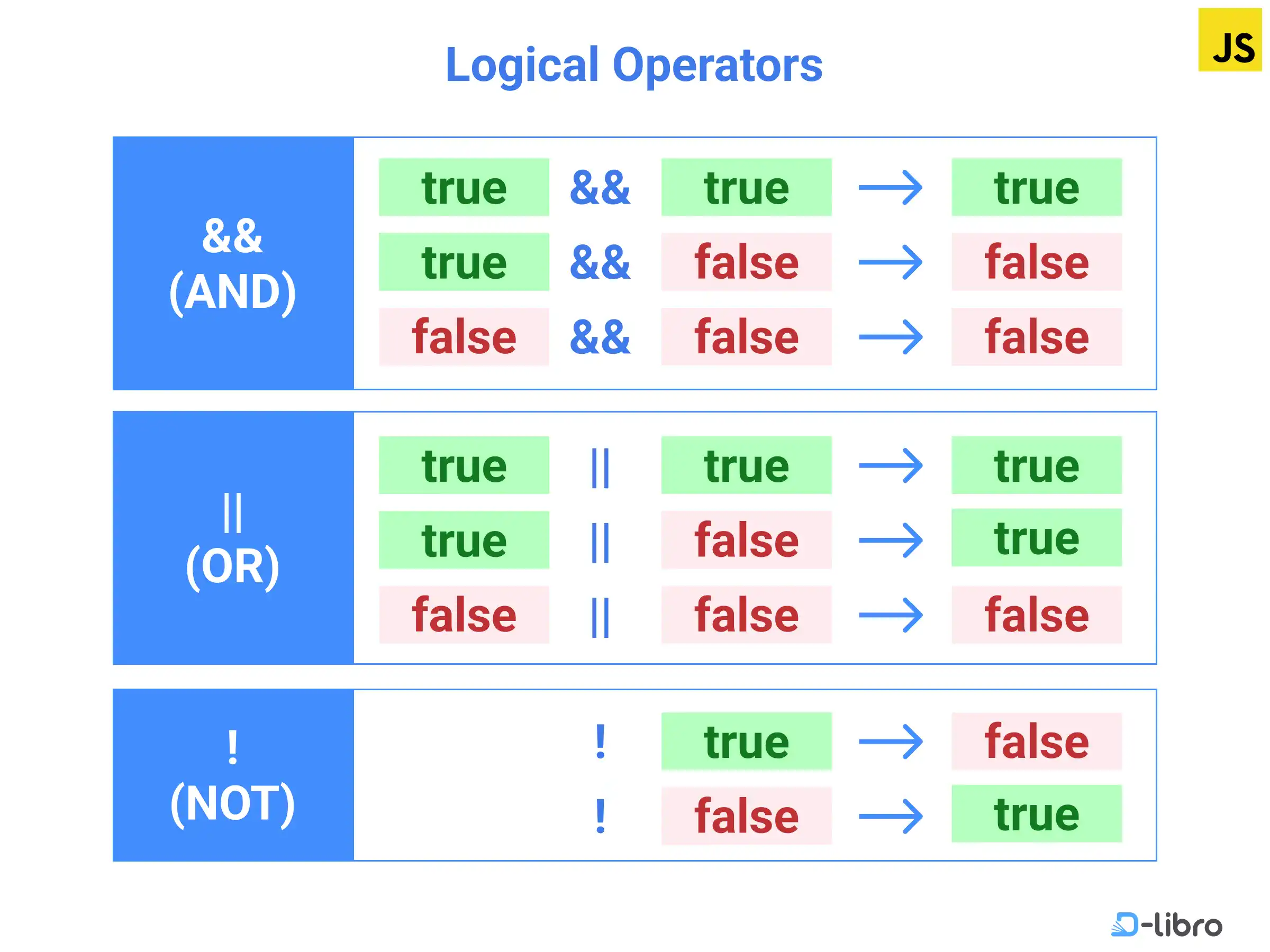
Here's how you can combine them to form a complex expression:
let isLoggedIn = true;
let userRole = 'admin';
let hasItemsInCart = false;

// Example 1: Check if the admin is logged in
let canAccessDashboard = isLoggedIn && userRole === 'admin'; // true && true -> true

// Example 2: Check if a user should see a "continue shopping" prompt
let showPrompt = isLoggedIn && !hasItemsInCart; // true && !false -> true && true -> true

// Example 3: Check if a checkout button should be disabled
let isCheckoutDisabled = !isLoggedIn || !hasItemsInCart; // !true || !false -> false || true -> true
Short-Circuit Evaluation
A key feature of && and || is short-circuiting. JavaScript evaluates these expressions from left to right and stops as soon as it knows the final result.
- For
expr1 && expr2: Ifexpr1isfalse, the whole expression must befalse, soexpr2is never evaluated. - For
expr1 || expr2: Ifexpr1istrue, the whole expression must betrue, soexpr2is never evaluated.
This is not just a performance optimization; it's a common pattern used to prevent errors, like trying to access a property on a null or undefined value.
For a more detailed reference on all the operators discussed, the MDN Web Docs is an authoritative source.
Expressions and operators - JavaScript - MDN Web Docs
This guide from Mozilla provides a technical breakdown of JavaScript's operators. You can use it as a reference to solidify your understanding.
Skim the Comparison operators section for a tabular summary. Review the Arithmetic operators section to see all the operators in one place. Read the Logical operators section, paying attention to the description of short-circuit evaluation.
Conclusion
You've now learned how to use operators to manipulate data and create expressions that form the logical core of a program. This is a massive step forward from simply storing data in variables.
Key Takeaways:
- Arithmetic operators (
+,-,*,/,%,**) perform mathematical calculations. - Comparison operators (
===,!==,>,<, etc.) compare values and always produce a boolean (trueorfalse). - Logical operators (
&&,||,!) combine or invert boolean values to create complex conditions. - Operator precedence determines the order of operations, which can be controlled with parentheses
(). - Always prefer strict equality (
===) over loose equality (==) to avoid bugs from automatic type conversion.
In our next lesson, we will formally explore the concept of type coercion. You've already seen a glimpse of it with the loose equality operator (==), but we'll dive deeper into how and why JavaScript sometimes converts data types automatically. Understanding this behavior is critical for debugging and writing robust code.