Introduction
In our last lesson, you saw how JavaScript's comparison operators work, particularly the important difference between loose equality (==) and strict equality (===). We noted that 5 == '5' evaluates to true due to an automatic conversion process. Today, we're going to pull back the curtain on that process, known as type coercion.
This lesson will explain how JavaScript handles operations between different data types. We'll explore how to check a value's type using the typeof operator, and then dive into both the intentional (explicit) and automatic (implicit) ways JavaScript converts types. Understanding this is crucial for a QA engineer, as type-related issues are a common source of subtle and hard-to-find bugs.
JavaScript's Dynamic Nature and the typeof Operator
Before we can talk about types changing, we need a reliable way to see what type a value is in the first place. This is where the typeof operator comes in.
To understand why typeof is so important, we first need to appreciate that JavaScript is a dynamically typed language. This means you don't have to declare the type of a variable when you create it, and the type of data a variable holds can change over time. This offers flexibility, but it also places the responsibility on you, the programmer, to keep track of types.
The following video provides an excellent explanation of this concept and introduces the typeof operator.
JavaScript Typeof Operator Explained
Watch this video from Future Fullstack to understand the difference between statically and dynamically typed languages and see how the typeof operator works.
First, watch the explanation of why a tool like typeof is necessary in a dynamically typed language like JavaScript. Then, see the operator in action with various primitive values. Pay close attention to the result for null.
A Strange Quirk: typeof null
As you saw in the video, typeof null returns the string 'object', not 'null'. This is one of the most infamous quirks in JavaScript. It is a bug that has existed since the very first version of the language. While there was a proposal to fix it, it was rejected because changing this behavior would break countless existing websites and applications.
For a brief, clear explanation of this historical bug, please read the following short article.
JavaScript Data Types - DEV Community
This article from DEV Community discusses JavaScript's data types and the typeof operator.
Focus on the sections "Typeof operator" and "Null". Pay particular attention to the paragraph that explains why typeof null behaves the way it does. You can find it by looking for the text here.
As a QA engineer, knowing about oddities like this is part of developing a sharp eye for potential problems. If you see code that relies on typeof to check for null, you know it's a bug. The correct way to check for null is using strict equality: myVariable === null.
What is Type Coercion?
Type coercion is the process of converting a value from one data type to another. JavaScript does this in two ways:
- Explicit Coercion (Type Conversion): This is when you intentionally convert a value's type. You are explicitly telling JavaScript what you want to do.
- Implicit Coercion: This happens automatically when operators are used with values of different types. This is what you saw with
5 == '5'.
The following video from Telusko introduces both concepts.
#8 Type Conversion & Coercion in JavaScript
This video provides a great overview of both explicit conversion and implicit coercion.
Watch the introduction to the concepts here. See how to perform explicit conversion using String() and Number() in this segment.
Let's look at these two forms of coercion in more detail.
Explicit Coercion: You're in Control
When you want to be clear and precise, you can explicitly convert types using built-in functions like String(), Number(), and Boolean().
let num = 123;
let strFromNum = String(num); // "123"
console.log(typeof strFromNum); // "string"

let str = "45.6";
let numFromStr = Number(str); // 45.6
console.log(typeof numFromStr); // "number"

// What happens with non-numeric strings?
let notANumber = Number("hello");
console.log(notANumber); // NaN (Not a Number)
NaN is a special numeric value that represents an invalid number. It's important to know that typeof NaN is 'number', which can be confusing!
Implicit Coercion: When JavaScript Guesses
Implicit coercion is where things get interesting and potentially buggy. It's the primary reason why using the strict equality operator (===) is a best practice.
Let's see how different operators trigger implicit coercion.
-
The
+Operator (Addition/Concatenation): If either operand is a string, the+operator converts the other operand to a string and concatenates them. -
Other Arithmetic Operators (
-,*,/,%): These operators always try to convert non-numeric operands into numbers.
The Telusko video demonstrates this behavior perfectly.
#8 Type Conversion & Coercion in JavaScript
Watch these short clips to see how different operators trigger different coercion rules.
First, watch how the + operator behaves when a string is involved here. Then, see how the - operator forces values to become numbers in this clip.
This behavior is why '10' - 5 equals 5, but '10' + 5 equals '105'. This inconsistency is a classic source of errors. The following table provides a dramatic visual summary of how loose equality (==) can lead to confusing results due to implicit coercion.
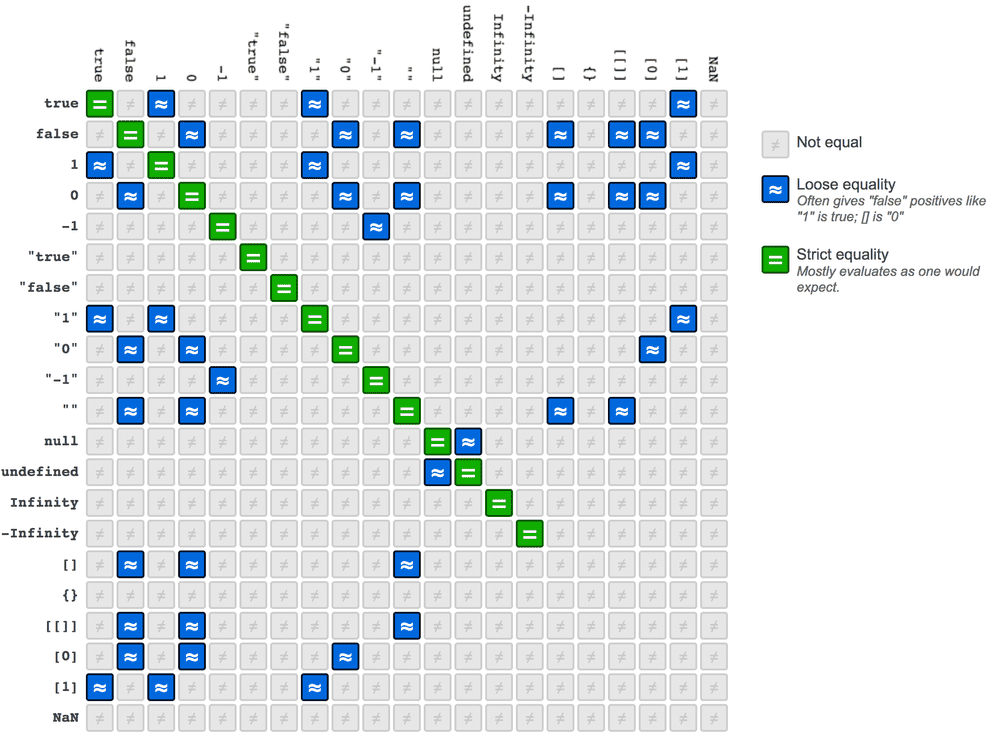
Truthy and Falsy Values
One of the most important forms of implicit coercion happens in contexts where a boolean is expected, such as in an if statement. When you place a non-boolean value in a conditional, JavaScript coerces it into either true (a "truthy" value) or false (a "falsy" value).
The list of falsy values is short and essential to memorize. Everything not on this list is truthy.
false0""(an empty string)nullundefinedNaN
That's it! Any other value, including an empty object {} or an empty array [], will be coerced to true.
JavaScript Data Types - DEV Community
The "Falsy and truthy values" section of this article provides a perfect, concise reference.
Read the definition and list to solidify your understanding of which values are considered falsy.
This is incredibly useful for writing concise checks in your code, a pattern you will see constantly in both application and test code.
let itemsInCart = 0;

if (itemsInCart) { // 0 is falsy, so this block is skipped
  console.log("Proceed to checkout.");
} else {
  console.log("Your cart is empty."); // This line runs
}

let errorMessage = getErrorMessage(); // Let's pretend this function returns "" if there's no error

if (errorMessage) { // An empty string "" is falsy. This block only runs if there is an error message.
  console.log("Displaying error: " + errorMessage);
}
Conclusion
You've now explored one of JavaScript's most distinctive and sometimes tricky features. Understanding types and coercion is a mark of a careful and effective programmer.
Key Takeaways:
- JavaScript is a dynamically typed language, so a variable's type can change.
- Use the
typeofoperator to check a value's current data type. Remember thattypeof nullis'object'. - Type Coercion is the conversion of a value from one type to another.
- Explicit coercion is intentional and clear (e.g.,
Number('123')). - Implicit coercion is automatic and can cause bugs. Prefer strict equality (
===) to avoid it in comparisons. - In a boolean context, all values are either truthy or falsy. Memorize the short list of falsy values (
false,0,"",null,undefined,NaN).
In our next lesson, we will look at template literals. You've seen how the + operator can be used to join strings, but template literals provide a much more powerful and readable way to construct strings with embedded variables and expressions—an essential tool for creating dynamic log messages and assertions in your tests.