Hello! Let's get started on our next lesson.
In our last session, you did a great job learning how to make your forms user-friendly by displaying validation errors and repopulating data directly in the template. This gave you fine-grained control over the front-end presentation of your forms.
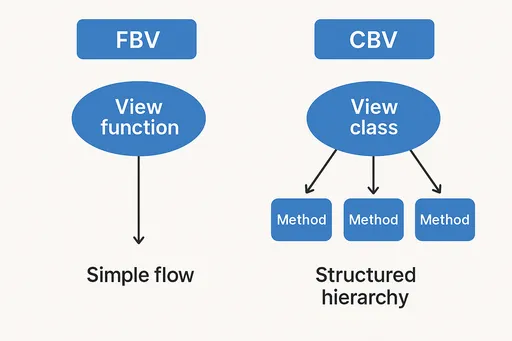
Today, we're shifting our focus back to the "brains" of the operation: the views. So far, you've written all your views as Python functions (Function-Based Views or FBVs). This is a clear and explicit way to handle requests, but you may have noticed that some patterns—like fetching a list of items or a single item from the database—are very common.
In this lesson, you'll learn how to refactor function-based views into generic Class-Based Views (CBVs) like ListView and DetailView. By leveraging these pre-built views, you can write cleaner, more organized, and more reusable code, which is a crucial skill for building your task management portfolio project efficiently.
Why Bother with Class-Based Views?
Before we dive into the code, let's understand the "why." Why switch from functions, which work perfectly fine, to classes?
In short, Class-Based Views help you follow the Don't Repeat Yourself (DRY) principle. Many web application tasks are repetitive:
- Show a list of items from the database.
- Show the details of one specific item.
- Show a form to create a new item.
- Show a form to update an existing item.
- Show a confirmation page to delete an item.
Django's generic CBVs provide ready-made solutions for these common patterns. By using them, you inherit a lot of functionality and only need to specify the parts that are unique to your application. This makes your code more concise and easier to maintain.
To get a solid conceptual overview of CBVs and their benefits, let's watch a video from Dennis Ivy.
What are Django class based views & should you use them?
This video provides an excellent introduction to what Class-Based Views are, why they were introduced in Django, and the main advantages they offer over Function-Based Views.
Please watch from the beginning to 13:41. Focus on understanding: The benefits of CBVs (reusability, inheritance, DRY principle). The direct code comparison between an FBV and a ListView. How CBVs automatically handle different HTTP methods (like GET and POST) in separate class methods.
Refactoring a List View: From FBV to ListView
Let's start with a very common scenario: displaying a list of all tasks.
A Function-Based View for this would look something like this:
# views.py (Function-Based View)
from django.shortcuts import render
from .models import Task

def task_list(request):
    tasks = Task.objects.all().order_by('-created_at')
    context = {'tasks': tasks}
    return render(request, 'tasks/task_list.html', context)
Now, let's refactor this into a Class-Based View using Django's generic ListView. This process involves two main steps: updating your views.py and your urls.py.
The video below gives a practical, step-by-step walkthrough of this refactoring process.
Django - Generic & Class-Based Views! (an alternative to functions)
The video "Django - Generic & Class-Based Views!" by BugBytes clearly demonstrates how to convert a function-based view into a ListView.
Watch from the beginning to 06:28. Pay close attention to: How the urls.py is changed to use ClassName.as_view(). How the view is defined as a class inheriting from generic.ListView. The use of class attributes like template_name and context_object_name. How to provide a custom query by overriding the get_queryset() method.
Summary of the ListView Refactor
Based on the video, here is the new approach:
1. Update views.py:
Instead of a function, you create a class that inherits from ListView.
# views.py (Class-Based View)
from django.views.generic import ListView
from .models import Task

class TaskListView(ListView):
    model = Task  # Which model to query?
    template_name = 'tasks/task_list.html'  # Which template to render?
    context_object_name = 'tasks'  # What to call the list of objects in the template?

    # For custom logic, like ordering
    def get_queryset(self):
        return Task.objects.all().order_by('-created_at')
model = Task: TellsListViewto get all objects from theTaskmodel.template_name: Specifies which template to use. If you omit this, Django looks for a default template at<app_name>/<model_name>_list.html(e.g.,tasks/task_list.html).context_object_name: Sets the name of the variable that will contain the list of tasks in your template. If you omit this, the default name isobject_list.get_queryset(): This method gives you full control over the database query. You can override it to add filtering, ordering, or other logic. If you defineget_queryset(), you don't strictly need to definemodel, as the model is inferred from the queryset.
2. Update urls.py:
You need to change the URL pattern to point to the new class. Since the URL resolver expects a function, you call the .as_view() method on your class.
# urls.py
from django.urls import path
from .views import TaskListView # Import the class

urlpatterns = [
    # The new path for the CBV
    path('tasks/', TaskListView.as_view(), name='task-list'),
]
And that's it! With just a few lines of declarative code, you've replicated the functionality of the FBV in a more structured and reusable way.
Refactoring a Detail View: From FBV to DetailView
Next, let's tackle displaying a single object.
A Function-Based View for this might be:
# views.py (Function-Based View)
from django.shortcuts import render, get_object_or_404
from .models import Task

def task_detail(request, pk):
    task = get_object_or_404(Task, pk=pk)
    context = {'task': task}
    return render(request, 'tasks/task_detail.html', context)
The process for refactoring this to a DetailView is very similar. Let's continue with the same video.
Django - Generic & Class-Based Views! (an alternative to functions)
The second half of the BugBytes video covers refactoring a function into a DetailView.
Watch from 06:28 to 11:25. Focus on: How DetailView automatically uses the primary key (pk) from the URL to fetch the object. The default context object name (usually the lowercase model name, e.g., task). What happens if your URL uses a parameter name other than pk, and how to fix it using pk_url_kwarg.
Summary of the DetailView Refactor
1. Update views.py:
# views.py (Class-Based View)
from django.views.generic import DetailView
from .models import Task

class TaskDetailView(DetailView):
    model = Task
    template_name = 'tasks/task_detail.html'
    context_object_name = 'task'
DetailView automatically knows to look for a URL parameter named pk and fetches the corresponding object for you. It's that simple!
2. Update urls.py:
# urls.py
from django.urls import path
from .views import TaskDetailView

urlpatterns = [
    # ... other paths
    path('tasks/<int:pk>/', TaskDetailView.as_view(), name='task-detail'),
]
Just like with ListView, you use .as_view(). The key part is <int:pk>, which captures the primary key from the URL and passes it to the view.
For a clear, text-based reference that shows the FBV and CBV code side-by-side, this article is an excellent resource.
Function based views and their class ... equivalents in django
The article "Function based views and their class based view equivalents" provides concise code examples that directly compare the old and new ways of writing these views.
Read the first two sections, "List" and "Detail". Compare the code for toy_list vs. ToyListView and toy_detail vs. ToyDetailView. Notice how the attributes set in the CBV replace the logic written inside the FBV.
Test your understanding!
Imagine you have a Project model in your app. Your task is to display a list of all projects and a detail page for a single project.
- Write a Function-Based View called
project_detailthat takes a primary keypkand displays a single project using the template'projects/project_detail.html'. - Now, write a Class-Based View called
ProjectDetailViewthat accomplishes the exact same thing. - Finally, write the
urls.pypattern needed to route a URL like/projects/5/to your newProjectDetailView.
Show answer
1. Function-Based View:
from django.shortcuts import render, get_object_or_404
from .models import Project

def project_detail(request, pk):
    project = get_object_or_404(Project, pk=pk)
    context = {'project': project}
    return render(request, 'projects/project_detail.html', context)
2. Class-Based View:
from django.views.generic import DetailView
from .models import Project

class ProjectDetailView(DetailView):
    model = Project
    template_name = 'projects/project_detail.html'
    context_object_name = 'project'
3. URL Pattern:
from django.urls import path
from .views import ProjectDetailView

urlpatterns = [
    path('projects/<int:pk>/', ProjectDetailView.as_view(), name='project-detail'),
]
Notice how much cleaner the Class-Based View is. All the logic of fetching the object is handled for you by DetailView.
Conclusion
Great work! You've just taken a significant step toward writing more professional and efficient Django code. By refactoring function-based views into generic ListView and DetailView, you are leveraging the power of the framework to handle common tasks for you.
Key Takeaways:
- Class-Based Views (CBVs) help you write DRY (Don't Repeat Yourself), reusable, and organized code by encapsulating common logic in classes.
ListViewis used to display a list of objects from a model. It handles querying the database and passing the list to a template.DetailViewis used to display a single object. It automatically fetches the object based on a primary key (pk) from the URL.- Refactoring involves creating a class that inherits from the generic view, setting attributes like
model,template_name, andcontext_object_name, and updating yoururls.pyto useClassName.as_view(). - You can customize the behavior of generic views by overriding attributes or methods (like
get_queryset).
Preview of the Next Lesson:
We've now covered the "Read" part of CRUD (Create, Read, Update, Delete) with ListView and DetailView. In the next lesson, we will complete the set by exploring the generic views for writing data: CreateView, UpdateView, and DeleteView. These will allow you to build the core functionality of your task manager project with remarkable speed.