Welcome back. In our previous lesson, we descended to the lowest level of data representation, manipulating individual bits with bitwise operators. We saw how these operations map directly to hardware instructions, providing ultimate control and efficiency.
This lesson pivots from low-level manipulation to a powerful high-level abstraction in C++: templates. We will explore how to use templates to write generic, type-safe functions, fulfilling this lesson's core learning outcome. For your goal of mastering high-performance computing, this is a critical topic. Templates are not merely for convenience; they are the foundation of C++'s "zero-cost abstraction" philosophy. By shifting work from runtime to compile time, they enable the creation of highly optimized libraries and frameworks—like the linear algebra engines in AI—without sacrificing performance.
1. The Core Problem: Code Duplication
Imagine you need a simple function, say, to find the maximum of two values. You would start by writing one for integers:
int max(int a, int b) {
    return (a > b) ? a : b;
}
Soon, you realize you also need one for floating-point numbers:
double max(double a, double b) {
    return (a > b) ? a : b;
}
And another for floats, and perhaps other numeric types. The logic is identical; only the types differ. This is a classic case of code duplication, which leads to maintenance issues and bugs. If you find a mistake or want to change the logic in one version, you must remember to update all of them.
Templates solve this problem by allowing you to write a single "blueprint" for a function that the compiler can use to generate the specific versions you need on demand.
2. Function Templates: A Blueprint for Code
A function template allows you to define a function with generic types. You declare it using the template keyword.
template <typename T>
T max(T a, T b) {
    return (a > b) ? a : b;
}
Let's break this down:
template <typename T>: This is the template declaration. It tells the compiler that what follows is a template.typenamedeclares thatTis a placeholder for a type. You can also use the keywordclasshere;template <class T>is functionally identical.T: This is the template parameter. It's a placeholder that will be replaced by an actual type (likeintordouble) when the function is used.
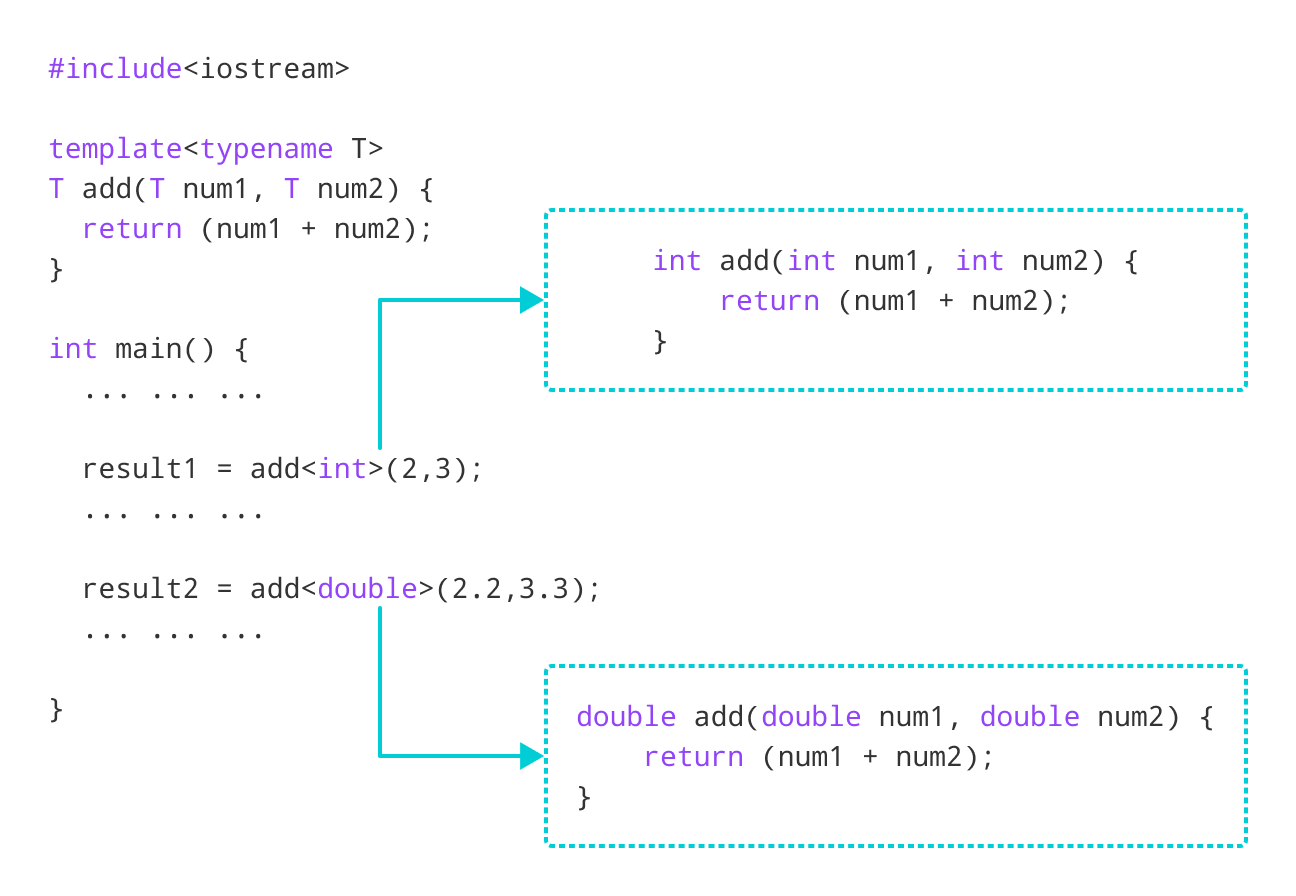
When the compiler encounters a call to max(), like max(3, 5), it sees that the arguments are integers. It then uses the template to generate—or instantiate—a specific version of the function for int, effectively creating the int max(int, int) function behind the scenes. This all happens at compile time.
The following video provides an excellent introduction to this core concept, explaining how templates act as a compile-time code generation mechanism.
This video from The Cherno provides a clear and practical introduction to C++ templates.
Watch the introduction from the beginning to understand what templates are and how they are more powerful than generics in other languages. Next, watch the segment from the code duplication example, which demonstrates the exact problem we discussed and how a template solves it. Finally, watch the explanation from "How does this work?". This section explains template instantiation, type deduction, and the difference between implicit and explicit template arguments.
As the video explains, the compiler can usually infer the template type from the function's arguments. This is called template argument deduction.
max(10, 20);      // Compiler deduces T is int
max(3.14, 2.71);  // Compiler deduces T is double
Sometimes, you may need to specify the type explicitly, especially if there's ambiguity.
max<double>(10, 3.14); // Explicitly tells the compiler to use the double version
3. Beyond Functions: Class Templates and Non-Type Parameters
Templates are not limited to functions. You can also create class templates, which are blueprints for creating entire classes. A familiar example is std::vector from the C++ Standard Library. std::vector<int> and std::vector<std::string> are two distinct classes instantiated from the same std::vector template.
Furthermore, templates can accept parameters that are not types. These are called non-type template parameters. They must be compile-time constants, such as integers or enum values. This is an incredibly powerful feature for performance engineering, as it allows you to embed constants like array sizes directly into a type, enabling significant compiler optimizations.
Let's see how to combine a class template with a non-type parameter to create our own version of std::array, a stack-allocated array whose size is fixed at compile time.
The same video from The Cherno continues to build on the basics, introducing class templates and non-type parameters.
First, watch the section on non-type parameters from the class example. This demonstrates using an int as a template parameter for a compile-time array size. Then, watch the following segment from the combined example, where a type parameter T is added to create a truly generic, compile-time-sized array class.
This example shows how templates allow you to enforce constraints (like array size) at compile time, leading to safer and often faster code because the compiler can reason about fixed sizes and memory layouts.
4. The Performance Advantage: Static Polymorphism
Here we arrive at the most crucial aspect of templates for high-performance computing. In your previous C++ experience, you may have encountered dynamic polymorphism using virtual functions. This allows you to treat objects of different derived classes through a common base class pointer. The decision of which derived class's function to call is made at runtime via a vtable lookup. This lookup introduces overhead: it's an indirect function call that can hinder compiler optimizations like inlining and cause CPU pipeline stalls.
Templates provide an alternative: static polymorphism. Because the type of a templated object is known at compile time, the compiler knows exactly which function to call. There is no runtime lookup and no vtable. The call is as direct and fast as a non-polymorphic function call, and it can be inlined. This is the "zero-cost abstraction" in action.
The following resource provides an excellent, CFD-focused explanation of this concept. The principles are universal and directly apply to AI kernels.
Templates in C++: Boost your CFD solver performance - cfd.university
This article from cfd.university explains the performance difference between dynamic and static polymorphism, which is a key concept for your goals.
Read the section titled Static Polymorphism with Templates. Pay close attention to the discussion of runtime overhead for virtual functions, especially the breakdown of how billions of calls can accumulate significant performance costs due to CPU pipeline stalls. This section clearly articulates why templates are a superior choice for performance-critical loops.
This idea of moving decisions from runtime to compile time is a form of template metaprogramming (TMP). With TMP, you can use the C++ template system to execute code during compilation. A classic example is computing a factorial at compile time.
// Runtime factorial
int factorial_runtime(int n) {
    return n <= 1 ? 1 : n * factorial_runtime(n - 1);
}

// Compile-time factorial using templates
template <int N>
struct Factorial {
    static const int value = N * Factorial<N - 1>::value;
};

template <>
struct Factorial<0> { // This is a "template specialization" to end the recursion
    static const int value = 1;
};

// Usage
int x = factorial_runtime(5);       // Computed at runtime
int y = Factorial<5>::value;        // Computed at compile time. The executable contains 'int y = 120;'
In the Factorial<5>::value case, the compiler actually calculates the result. The final compiled code doesn't contain a function call or a loop; it contains the pre-computed constant. This eliminates all runtime cost for computations where the inputs are known at compile time. This technique, though more complex, is fundamental to many high-performance libraries.
A far more advanced and practical application of this is expression templates. In a library for matrix math, an expression like D = A + B + C could be disastrous if implemented naively. A + B would create a temporary matrix, which is then added to C to create another temporary, which is finally copied into D. This involves huge, unnecessary memory allocations and data movement. Expression templates allow the compiler to analyze the entire expression A + B + C and generate a single, highly optimized loop that computes D(i,j) = A(i,j) + B(i,j) + C(i,j) for all elements, completely avoiding any temporary matrices. This is a core technique in libraries like Eigen and Armadillo, which are heavily used in AI and scientific computing.
5. Overloading and Specialization
Finally, it's important to know how templates interact with C++'s other features, like function overloading. The rules can be nuanced, but the main principles are:
- Overloading: You can have a template function and a non-template function with the same name. If a non-template function is an exact match for the arguments, the compiler will always prefer it over instantiating a template.
- Specialization: If you need a template to behave differently for a specific type, you can provide a full template specialization.
However, as you become an expert, you'll learn that specializing function templates is often discouraged. Overloading is usually clearer and less surprising. The video below provides an excellent guide to these more advanced, practical considerations.
How to use FUNCTION TEMPLATES - a comprehensive guide for modern C++
This video from "Code for yourself" goes into the more advanced rules governing template behavior.
First, watch the segment on function overloading with templates. This will clarify how the compiler chooses between a template and a non-template overload. Next, watch the segment on template specialization. Crucially, it explains why this is often a bad idea for functions and how it can lead to counter-intuitive behavior. Understanding this is a mark of a sophisticated C++ programmer.
A final powerful tool that works hand-in-hand with templates is if constexpr. A regular if statement is checked at runtime. if constexpr, introduced in C++17, is evaluated at compile time. This allows a template to conditionally include or exclude code based on its template parameters, ensuring that only valid code paths are compiled for a given type instantiation. This is another essential tool for writing clean, high-performance generic code.
Conclusion
In this lesson, we introduced C++ templates as a mechanism for writing generic code. We saw that their true power, especially in high-performance contexts, lies in their compile-time nature.
Key Takeaways:
- Generic Programming: Templates allow you to write functions and classes that work with any data type, eliminating code duplication.
- Compile-Time Instantiation: The compiler generates specific versions of your templated code based on how it's used. This process happens at compile time.
- Static Polymorphism: Templates enable polymorphism without the runtime overhead of virtual functions, making them a cornerstone of zero-cost abstractions in C++.
- Template Metaprogramming (TMP): By using type and non-type parameters, templates can be used to perform computations at compile time, moving work from your program's execution to its compilation.
- Practical Considerations: The interaction of templates with overloading and specialization has important nuances. Prefer overloading to specialization for functions.
You've now covered two fundamental pillars of low-level C++: direct data manipulation (bitwise ops) and compile-time abstractions (templates). In our next lesson, we will address a practical necessity for building any non-trivial application: writing and compiling a multi-file C++ program. This will involve managing header files and source files, a topic that is especially relevant when working with templates, as their definitions are typically placed in headers.