Welcome to the fourth lesson in our C/C++ systems programming module. In our previous session, we mastered the mechanics of heap allocation, learning to use malloc/free and new/delete while becoming acutely aware of the pitfalls like memory leaks and dangling pointers. We established a clear mental model of requesting and returning raw blocks of memory from the system.
Today, we're going to zoom in and examine what happens inside those memory blocks. How does a C++ compiler arrange the members of a struct or class? Why is the sizeof a struct sometimes larger than the sum of its parts? This lesson will explore the critical concepts of data alignment and padding. For your goal of mastering high-performance computing, this knowledge is foundational. Efficient memory access is paramount on both CPUs and GPUs, and it all begins with understanding how data is laid out.
1. The "Why" of Alignment: A Hardware Perspective
At a fundamental level, modern processors do not read memory one byte at a time. Instead, they fetch data in larger, fixed-size chunks, often called "words." A word might be 4 bytes on a 32-bit system or 8 bytes on a 64-bit system. Accessing data is most efficient when the entire piece of data (like a 4-byte int or an 8-byte double) lies within a single word that the CPU can fetch in one memory cycle.
If a 4-byte integer were to start at an address that isn't a multiple of 4, it could straddle the boundary between two hardware words. To read it, the CPU would need to perform two memory fetches and then stitch the pieces together. This is either significantly slower or, on some architectures, not allowed at all, causing a hardware exception.
To prevent this, compilers enforce data alignment. The rule is simple: a variable of size must be stored at a memory address that is a multiple of .
char(1 byte): Can be at any address.short(2 bytes): Must be at an even address (a multiple of 2).int,float(4 bytes): Must be at an address divisible by 4.long long,double, pointers (8 bytes on a 64-bit system): Must be at an address divisible by 8.
The following video provides an excellent conceptual journey into the hardware design choices that led to these alignment requirements. It builds a computer from the ground up, showing how organizing memory into banks naturally creates the need for alignment.
Memory Alignment | Beginner Tutorial | Programming Fundamentals
This tutorial from the Mxy channel offers a fantastic "first principles" explanation of memory alignment, which will resonate with your interest in low-level engineering.
Please watch the following segments: The basic rules: This defines memory alignment and the common rules for different data types. The architectural reason: This core section simulates the design of a computer, brilliantly demonstrating how hardware constraints lead to alignment. Consequences of misalignment: This explains the performance penalty or CPU fault that results from unaligned access.
2. Structure Padding: The Compiler's Solution
Now, consider a struct. It's a collection of variables, potentially with different sizes and alignment requirements. How does the compiler ensure every member of the struct is properly aligned, no matter where in memory the struct itself is placed?
The answer is structure padding. The compiler inserts unused bytes between members or at the end of the structure to enforce alignment.
Let's look at a classic example:
struct Example {
    char  a; // 1 byte
    int   c; // 4 bytes
    char  b; // 1 byte
};
You might expect sizeof(Example) to be 1 + 4 + 1 = 6 bytes. However, it will almost certainly be 12 bytes on a typical 32-bit or 64-bit machine. Why?

Let's trace the compiler's logic:
char a: Placed at offset 0. The current size is 1.int c: This needs 4-byte alignment. The next available offset is 1, which is not a multiple of 4. The compiler must insert 3 bytes of padding.cis now placed at offset 4. The current size is 4 + 4 = 8.char b: Placed at offset 8. The current size is 9.- Trailing Padding: The alignment of the entire
structis determined by its largest member, which is theint(4-byte alignment). The total size of the struct must be a multiple of its alignment to ensure that in an array ofstruct Example, every element'sint cis properly aligned. The current size is 9. The next multiple of 4 is 12. So, the compiler adds 3 bytes of trailing padding.
The final memory layout is:
char a(1 byte)padding(3 bytes)int c(4 bytes)char b(1 byte)padding(3 bytes)- Total size: 12 bytes
The following resource provides an excellent, deep dive into the rules of padding.
The Lost Art of C Structure Packing | How Not To Code
This classic article by Eric S. Raymond is a definitive guide to the topic. It's dense but extremely valuable for anyone serious about systems programming.
First, read the section on alignment requirements to solidify the basic rules. Next, focus on the section Structure alignment and padding. Pay close attention to the concepts of a struct's alignment being that of its widest member and the idea of a "stride address" which explains trailing padding.
This image provides a clear before-and-after view of how padding enforces alignment for a larger data type following smaller ones.
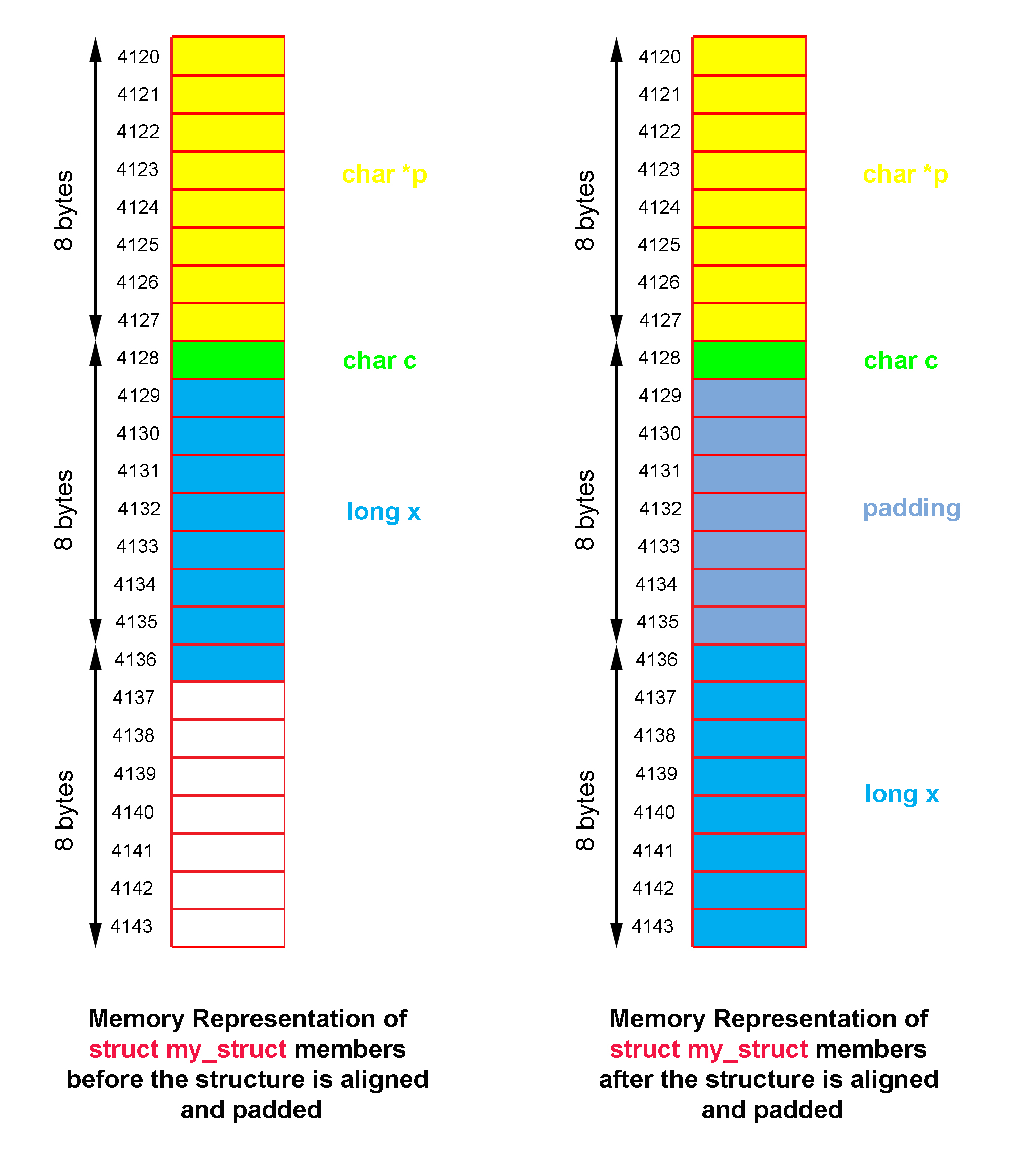
3. The Art of Packing: Minimizing Waste
Since padding consumes memory and can affect cache performance, it's in our interest to minimize it. We can't change the alignment rules, but we can change the order of members in our struct.
The most effective strategy is to declare structure members in decreasing order of size.
Let's reorder our previous struct:
struct ReorderedExample {
    int   c; // 4 bytes
    char  a; // 1 byte
    char  b; // 1 byte
};
Now, let's trace the layout:
int c: Placed at offset 0. Alignment is 4 bytes. Current size is 4.char a: Placed at offset 4.charhas no alignment requirement. Current size is 5.char b: Placed at offset 5. Current size is 6.- Trailing Padding: The struct's alignment is still 4 bytes (from
int c). The current size is 6. The next multiple of 4 is 8. The compiler adds 2 bytes of trailing padding.
The new layout is:
int c(4 bytes)char a(1 byte)char b(1 byte)padding(2 bytes)- Total size: 8 bytes
By simply reordering the members, we reduced the size of the structure from 12 bytes to 8 bytes. For an application creating millions of these objects, this is a significant memory saving.
Structure Padding | C Programming Tutorial
This segment from Portfolio Courses provides a quick, clear demonstration of this reordering technique.
Please watch the section from this timestamp to see member reordering in action.
You might wonder why compilers don't do this automatically. The C standard guarantees that the memory order of struct members will match their declaration order. This is a critical feature for systems programmers who need to define structs that exactly match the layout of hardware device registers or network protocols. Automatic reordering would break this capability.
4. Overriding Alignment: packed Structures
Sometimes, you need to eliminate padding entirely, even at the cost of performance. This is common when you need to conform to a specific file format or network packet structure that does not include padding.
Most compilers provide a non-standard mechanism to create packed structures. With GCC and Clang, you use an attribute:
struct __attribute__((packed)) PackedExample {
    char  a;
    int   c;
    char  b;
};
For this PackedExample, sizeof would be exactly 6 bytes (1 + 4 + 1). There is no padding. While this saves memory, it forces the compiler to generate slower code to handle the unaligned access to member c. This is a deliberate trade-off and should be used judiciously.
The Lost Art of C Structure Packing | How Not To Code
This section of the ESR article briefly discusses compiler-specific directives for overriding alignment.
Read the short section on Overriding alignment rules. Note the strong caution against casual use.
5. Practical Consequences of Padding
The existence of padding bytes, which can contain uninitialized "garbage" data, has important practical consequences beyond just memory usage.
- Struct Comparison: Using
memcmp()to compare two structs can fail unexpectedly. Even if all members are identical, the garbage values in the padding bytes might differ, leadingmemcmp()to report that the structs are not equal. The only safe way to compare structs is member by member. - Serialization and Security: When writing a struct to a file or sending it over a network, the padding bytes are included. This can be a security risk, as the garbage data might contain sensitive information from previous stack frames (a phenomenon called "information leakage"). It also hurts portability if another system has different alignment rules.
- Initialization: When you initialize a struct (e.g.,
struct Foo a = {0};), the C standard does not guarantee that padding bits will be zeroed for local variables (automatic storage). If you need to guarantee a fully zeroed struct for hashing or comparison, the most reliable method ismemset(&a, 0, sizeof(a));.
C Structure Padding Initialization - Interrupt - Memfault
This article from Memfault's Interrupt blog explores the very practical issues that padding can cause.
Read the section "When does this matter?" to understand the dangers of using memcmp and the security implications. Then, read the section on "Best Practice?" which offers advice on how to handle these issues, including the use of memset for reliable zero-initialization.
Conclusion
In this lesson, we've gone deep into the C++ memory model. You've learned that performance-driven hardware constraints are the root cause of data alignment, and that compilers use padding to satisfy these rules within structs. This is not a mere curiosity; it is a fundamental aspect of systems programming that directly impacts memory footprint and performance.
Key Takeaways:
- Alignment: Data of size is fastest to access when its memory address is a multiple of . This is a hardware-level constraint.
- Padding: Compilers insert unused bytes (padding) between or after struct members to ensure each member is correctly aligned.
- Struct Size: The
sizeofa struct is always a multiple of its alignment requirement, which is determined by the alignment of its largest member. - Optimization: You can minimize padding and reduce memory consumption by ordering struct members from largest to smallest.
- Control: For specific cases like matching hardware layouts, you can use compiler attributes like
__attribute__((packed))to force a memory layout without padding, accepting a potential performance penalty. - Safety: Be aware that padding bytes contain indeterminate values, which can cause subtle bugs with
memcmpand create security vulnerabilities.
We've now progressed from memory blocks (lesson 3) to the layout of data within them. The next logical step in our low-level journey is to understand how to manipulate the fundamental units of that data: the bits themselves. In our next lesson, we will cover bitwise operations, a crucial skill for compact data representation, hardware control, and high-performance algorithms.