Welcome back. In our previous lesson, we established the fundamental mechanism a GPU uses to achieve high throughput: latency hiding. We saw that instead of waiting for slow global memory accesses, the Streaming Multiprocessor's (SM) warp scheduler rapidly switches between a large pool of active warps, ensuring its execution units are almost always busy.
This brings us to a crucial question: what determines the size of this "pool of active warps"? And what prevents us from having an infinite supply of work to hide any and all latency? This lesson will formalize that concept through the metric of SM Occupancy. We will define what it is, and more importantly, investigate the physical hardware resources—specifically registers and shared memory—that constrain it. This exploration will take you deeper into the low-level trade-offs that are central to high-performance kernel design.
Defining Occupancy: The Arithmetic of Latency Hiding
At its core, occupancy is a straightforward metric that quantifies how "full" a Streaming Multiprocessor is with active work.
Occupancy is the ratio of the number of active warps per SM to the maximum number of warps that the SM can possibly support.
For example, most NVIDIA GPU architectures from Kepler to Volta can support a maximum of 64 active warps per SM. If a given kernel launch and its configuration result in 48 warps being resident on an SM, the occupancy is , or 75%.
As we discussed, the entire purpose of this is to feed the warp scheduler.
[PDF] CUDA C Best Practices Guide
The official NVIDIA Best Practices Guide provides a concise definition of occupancy and its role.
Read the section titled 10.1. Occupancy. Note the key statement: "low occupancy always interferes with the ability to hide memory latency, resulting in performance degradation." This directly connects our current topic to the previous lesson.
While high occupancy doesn't automatically guarantee high performance, low occupancy almost certainly prevents it for any kernel that is sensitive to memory latency. The question then becomes: what stops a kernel from achieving 100% occupancy? The answer lies in the finite, shared resources available on each SM.
The SM Resource "Tetris"
Achieving high occupancy is like a resource allocation puzzle. When the CUDA runtime schedules thread blocks to run on an SM, it must ensure that the combined resource requirements of all resident blocks do not exceed the SM's physical capacity. Think of it as a game of Tetris: you are trying to pack as many blocks as possible into the SM's resource budget.
The most critical, limited resources for this puzzle are the register file and the shared memory pool.

Let's examine how each of these resources constrains the number of blocks, and therefore warps, that can be active on an SM.
Limiter 1: Register Pressure
Each SM has a large but finite file of 32-bit registers, which are partitioned among all the threads running on that SM. Every variable you declare in your kernel code that isn't stored in global or shared memory will likely be assigned to a register by the compiler. The more complex your kernel and the more live variables it has at any one time, the more registers each thread will require. This is known as register pressure.
Since the total number of registers is fixed, a high register count per thread directly limits the total number of threads that can reside on the SM.
CUDA Guide: Workflow for Performance Tuning
This guide from DigitalOcean provides a clear, quantitative example of how register usage limits occupancy.
Read the section titled Resource Limits and Occupancy. Focus on the concrete calculation for the Volta (CC 7.0) architecture.
Let's formalize the example from the article:
- A Volta SM has 65,536 32-bit registers.
- It supports a maximum of 2048 concurrent threads (64 warps).
Scenario A: Low Register Pressure
If your kernel is simple and the compiler determines each thread needs only 32 registers:
The register file is perfectly sufficient to support the maximum number of threads. Occupancy is not limited by registers and can theoretically reach 100%.
Scenario B: High Register Pressure
If your kernel is complex and requires 64 registers per thread, the maximum number of threads the SM can host is no longer 2048. The register file becomes the bottleneck:
In this case, even if you launch a kernel with millions of threads, each SM can only ever have 1024 threads active at once. Your maximum possible occupancy is capped at .
Limiter 2: Shared Memory
In the same way, the on-chip shared memory is a finite resource partitioned among the resident thread blocks. If each thread block requests a large amount of shared memory (either statically or dynamically), it will limit the number of blocks that can fit on the SM.
The following video gives an excellent visual walkthrough of this resource puzzle, framing it as a game of Tetris.
How CUDA Programming Works | GTC 2022
This video provides an excellent analogy for how resources limit occupancy. The presenter visualizes the SM as a container and thread blocks as objects that consume portions of the SM's resource pools.
Watch the segment from all this is cuda 101. Pay close attention to the animation starting around how this affects performance. Observe how the presenter places blocks onto an SM. Initially, three blocks fit, but a fourth is blocked because it would exceed the available shared memory. This makes the kernel shared memory occupancy limited. By then reducing the shared memory per block, a fourth block fits, but now the SM is full due to register usage, making the kernel register limited.
As the video powerfully illustrates, occupancy is determined by the most restrictive of these limits. Your kernel might be thread-limited, register-limited, or shared-memory-limited.
Analyzing Trade-offs: The CUDA Occupancy Calculator
Manually calculating the exact occupancy can be complex due to hardware-specific details like allocation granularities. To simplify this, NVIDIA provides the CUDA Occupancy Calculator. It's a simple spreadsheet that allows you to perform "what-if" analysis for your kernel's configuration.
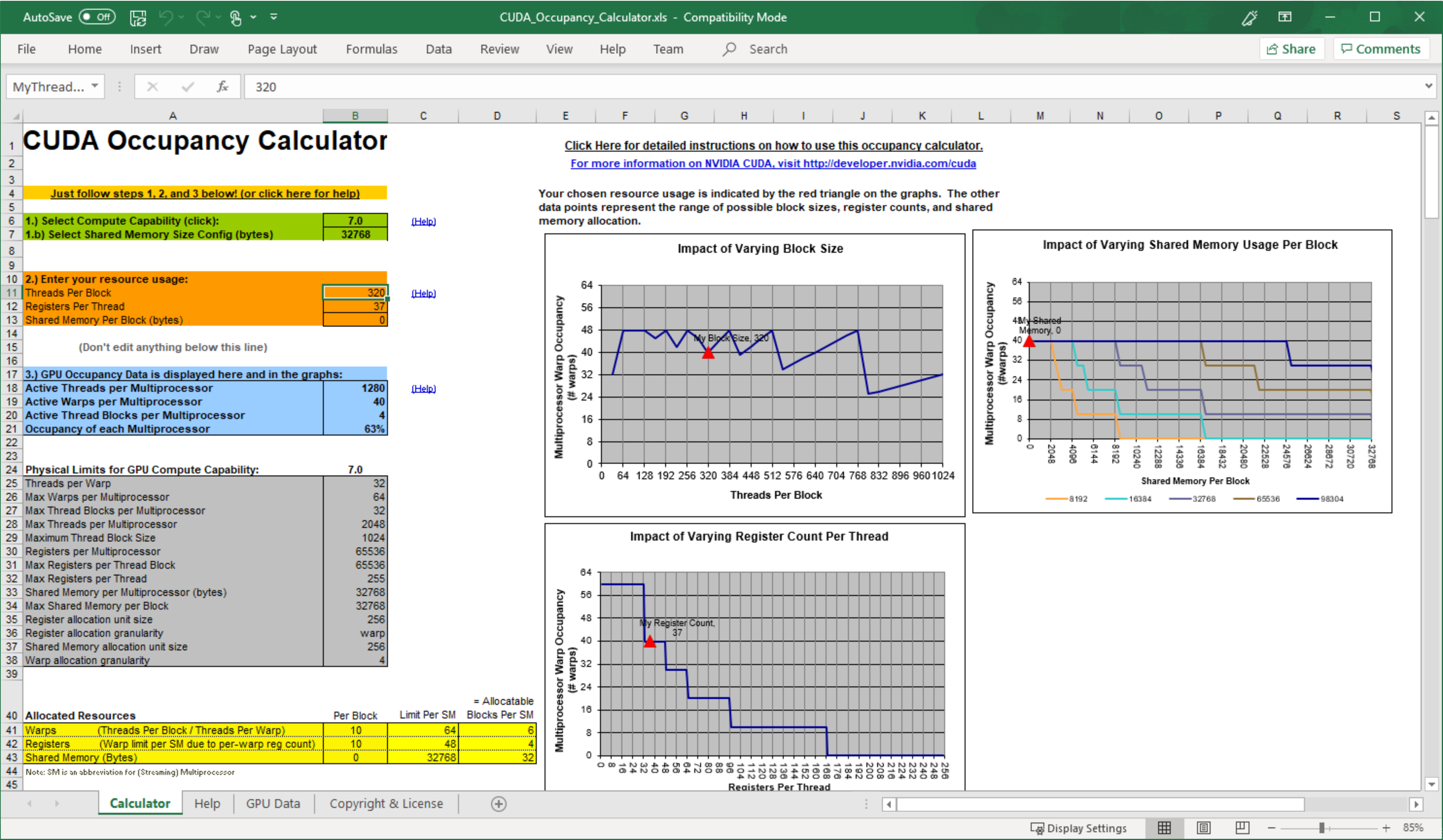
You input your GPU's compute capability, the number of threads per block you plan to use, the registers per thread your kernel requires (which you can get from the compiler), and the shared memory per block. The calculator then instantly shows you the theoretical occupancy and which resource is the limiting factor. This is an indispensable tool for performance tuning, which we will use in later modules.
The Nuance: Is 100% Occupancy Always the Goal?
Given everything we've discussed, it might seem that you should always aim for 100% occupancy. However, the reality is more nuanced. The goal is not occupancy itself, but high performance. Occupancy is merely a means to hide latency.
CUDA Guide: Workflow for Performance Tuning
This article makes the crucial distinction between occupancy and performance, explaining why maximizing occupancy is not always the best strategy.
Read the section Occupancy vs. Latency Hiding and the FAQ entry for "Is high occupancy always good?".
As the article points out, there are diminishing returns. Once you have enough active warps to hide the average memory latency of your kernel, adding even more warps may not increase performance. For many kernels, an occupancy of 25-50% is sufficient.
Furthermore, there can be a direct trade-off between occupancy and other performance factors. For example, aggressively reducing register usage to increase occupancy might force the compiler to "spill" registers—that is, store variables in the much slower local memory (which is physically in global DRAM). In such a case, a lower occupancy with faster-running threads could outperform a higher occupancy with threads that are constantly spilling to memory.
Conclusion
In this lesson, we have quantified the "pool of work" needed for latency hiding with the metric of SM occupancy. You now understand that while massive parallelism is available in principle, it is constrained in practice by the finite hardware resources on each Streaming Multiprocessor.
Key Takeaways:
- SM Occupancy is the ratio of active warps to the maximum supported warps on an SM. It is the primary tool for hiding memory latency.
- Occupancy is limited by the most constrained resource in a "Tetris-like" packing problem. The main limiters are:
- The Register File: High register usage per thread limits the total number of threads that can be resident.
- Shared Memory: High shared memory usage per block limits the number of blocks that can be resident.
- Architectural Limits: Hard limits on threads/warps/blocks per SM.
- The CUDA Occupancy Calculator is the standard tool for analyzing these trade-offs and finding the theoretical occupancy of a kernel.
- 100% occupancy is not the ultimate goal. The goal is performance. "Good enough" occupancy is often sufficient, and sometimes trading occupancy for other benefits (like more registers per thread) can lead to better results.
We've now completed our architectural tour of the modern GPU. You understand the components, the memory hierarchy, and the core principles of latency hiding and occupancy. In our next lesson, we will transition from theory to practice. You will write, compile, and run your very first CUDA program, taking the first concrete step towards applying this architectural knowledge to real code.