Welcome to your first lesson! We're starting your journey to learn HTML from scratch. Over the next week, we'll build a solid foundation for your goal of becoming a web developer. This course is designed to be concise and practical, focusing on exactly what you need to know.
In this introductory lesson, we will focus on the most fundamental question: What is HTML and what is its role? By the end of our session, you will be able to explain how HTML is used to give structure to every web page you see. We won't be writing any code just yet; instead, we'll build a clear mental model of what HTML does, which will be essential for everything that follows.
The Blueprint of the Web
Every website, from the simplest blog to the most complex web application, is built on a foundation of three core technologies: HTML, CSS, and JavaScript. A common and effective way to understand their distinct roles is the house-building analogy.
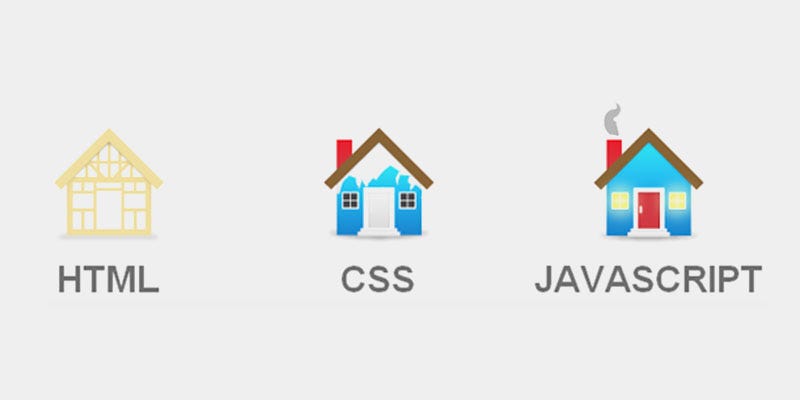
As the image suggests:
- HTML (HyperText Markup Language) is the structure. It's the wooden frame, the foundation, and the roof. It defines the different parts of a house: here is a room, here is a door, here are the windows. Without this structure, there is no house.
- CSS (Cascading Style Sheets) is the presentation. It’s the paint, the wallpaper, and the landscaping. It makes the house look good, but it doesn’t change its fundamental structure.
- JavaScript is the functionality. It’s the plumbing, the wiring, and the appliances. It makes the house interactive—allowing you to turn on lights, open the garage door, or run water.
Our focus in this course is exclusively on HTML. It is the only truly mandatory component of a web page. You can have a functional (if plain) website with only HTML, but you cannot have a website without it.
To explore this analogy further, please read the first section of the following article.
HTML Crash Course for Complete Beginners
This article from Full Stack Foundations reinforces the house-building analogy and clearly separates the roles of HTML, CSS, and JavaScript.
Please read the section titled What is HTML: Building a House Analogy. Pay attention to how the author describes the relationship between the three technologies and why HTML is the essential starting point.
Markup, Not Programming
Now that we have a high-level view of HTML's role, let's get more specific. The name itself—HyperText Markup Language—gives us important clues.
- HyperText refers to text that contains links to other texts, which is the very foundation of how we navigate the web.
- Markup Language means it's a language used to annotate or "mark up" a document to tell a computer how to structure it. This is different from a programming language (like JavaScript), which is used to write instructions and logic for a computer to execute.
This video provides a concise explanation of what HTML is and what it isn't.
What is HTML, CSS, and JavaScript?
In this video, "What is HTML, CSS, and JavaScript?", Tiff in Tech clarifies the definition of HTML.
Watch the segment from the beginning where she introduces HTML and makes the important distinction that it is not a programming language.
Giving Meaning to Content
So, what does it mean to "give structure" to content? Imagine a plain text document. The computer doesn't know what any of it means. Is a line of text a title, a paragraph, or an item in a list? Without structure, it's just a sequence of characters.
HTML solves this by letting us wrap our content in tags to create elements. For example, we can wrap text in a <p> tag to tell the browser, "This is a paragraph." This process gives semantic meaning to our content.
The following video provides an excellent analogy using a familiar tool—a word processor like Google Docs—and then shows what happens when content lacks HTML structure.
HTML & CSS for Absolute Beginners: What is HTML?
Kevin Powell, in his video "HTML & CSS for Absolute Beginners," does a wonderful job of demonstrating the importance of structure.
First, watch the introductory part where he uses Google Docs to explain structure from the beginning. Notice how applying styles like "Heading 1" creates a document outline. This is the same principle as HTML structure. Next, watch the segment from this timestamp. Here, he shows what happens when raw text is viewed in a browser and then introduces the paragraph element (<p>) to fix it. Focus on his explanation of an opening tag (e.g., <p>), a closing tag (e.g., </p>), and how they combine with content to form an element.
As you saw, the browser simply collapses all the text into a single block when it doesn't have any HTML tags to guide it. By adding tags, we are explicitly telling the browser how to interpret and display each piece of content.
The MDN Web Docs, a critical resource for web developers, provides another clear example of this transformation.
HTML: Creating the content - Learn web development | MDN
This article from the Mozilla Developer Network (MDN) is an authoritative source on web technologies.
Read the section titled So what is HTML?. The side-by-side comparison of unstructured text and the same text marked up with HTML provides a simple, powerful illustration of HTML's primary function.
The Document Tree
When you nest HTML elements inside one another, you create a hierarchy. This hierarchy can be visualized as a tree structure, often called the Document Object Model, or DOM.

This tree structure is fundamental. It's how the browser understands the relationships between different parts of your page. For example, it shows that the <title> is part of the <head>, and the <h1> headings are part of the <body>.
More importantly, using the correct elements to build this structure makes your website more semantic. A semantic document is one where the tags accurately describe the meaning of the content they contain. This is crucial for:
- Search Engine Optimization (SEO): Search engines can better understand your content and rank it appropriately.
- Accessibility: Screen readers and other assistive technologies rely on a logical HTML structure to navigate the page and convey its content to users with disabilities.
- Maintainability: A well-structured document is far easier for you and other developers to read, understand, and update in the future.
Let's return to Kevin Powell's video for a final thought on this important concept.
HTML & CSS for Absolute Beginners: What is HTML?
This final clip from "HTML & CSS for Absolute Beginners" introduces the idea of semantic HTML.
Watch the section from this timestamp. The key takeaway here is that HTML tags aren't just for formatting; they carry meaning. This is a core principle you'll apply throughout your web development career.
Conclusion
In this lesson, we established the fundamental role of HTML as the structural layer of the web. You have learned that HTML is not a programming language but a markup language that uses tags to define elements, giving meaning and structure to content. This structure is hierarchical, like a tree, and is essential for browsers, search engines, and assistive technologies to understand your page.
Key Takeaways:
- HTML provides the essential structure for web pages, like the frame of a house.
- It is a markup language that uses tags (e.g.,
<p>) to create elements. - Elements wrap content to give it semantic meaning (e.g., this is a paragraph, this is a heading).
- The nesting of elements forms a tree structure that the browser uses to interpret the page.
In our next lesson, we will look more closely at the building blocks you were introduced to today. We'll formally define elements, tags, and attributes, preparing you to start setting up your tools and writing your very first HTML document.