Hello! Welcome back.
In our last lesson, we focused on crafting detailed, structured prompts using roles and context to give an AI a comprehensive project brief. You learned that providing a rich set of instructions is key to getting high-quality results. However, giving the AI all this information raises a critical question: how much can it actually remember?
This lesson dives into one of the most important technical constraints of any AI model: the context window. Think of it as the AI's short-term memory. We'll explore what it is, how it's measured, and, most importantly, how to identify when its limits are causing your AI assistant to "forget" key details, leading to inconsistencies and bugs in your projects. Understanding this concept is crucial for debugging your interactions with AI and for building anything more complex than a single-shot generation.
Part 1: What is a Context Window?
Imagine you're briefing a new team member on a project. You explain the brand identity, the target audience, the tech stack, and the goal for the day. At first, they remember everything perfectly. But as the conversation goes on for hours, with new tasks, feedback, and code snippets being exchanged, they might start to forget a specific hex code you mentioned at the very beginning.
AI models work in a surprisingly similar way. Their "short-term memory" is called the context window. To get a clear and simple visual for this, let's watch a short clip.
What is a Context Window? Unlocking LLM Secrets
This video from IBM Technology provides a fantastic, non-technical explanation of the context window using a simple analogy.
Watch the first part of the video, from the beginning. The speaker uses the idea of "International Blah Units" to show how, as a conversation gets longer, the earliest parts can fall "out of the window," causing the AI to lose memory of them.
As the video explains, the context window holds the entire history of your current conversation: your prompts, the AI's responses, and any other information you've provided. When this window gets full, the oldest information is pushed out to make room for the new, and the AI effectively forgets it.
Measuring the Window: What are "Tokens"?
The size of a context window isn't measured in words or characters, but in tokens. A token is a chunk of text that an AI model processes. It could be a whole word, part of a word, a single character, or punctuation. As a rough rule of thumb, for English text, 100 tokens are about 75 words.
Different models have different context window sizes, ranging from a few thousand tokens to over a million. Let's dig a bit deeper into this concept.
Context Window: What It Is and Why It Matters for AI Agents
This article from Comet gives a very clear definition of the context window and tokens.
Please read the first main section, "What Is a Context Window?". It reinforces the "working memory" analogy and gives a precise explanation of tokens.
To see this in action, the next video demonstrates an AI model literally forgetting a piece of information when its context window is exceeded, and then remembering it again once the window size is increased.
Why LLMs get dumb (Context Windows Explained)
This video from NetworkChuck shows a practical, hands-on example of the context window limit in action.
Watch the segment from this timestamp. Notice how the user first gives the AI a fact, then fills the context window with a long story, and then asks about the original fact. The AI fails, demonstrating it has "forgotten" the information that was pushed out of its memory.
Part 2: What Fills the Context Window?
It's crucial to understand that the context window doesn't just contain your prompts. In a complex project like building a business app, the context fills up rapidly with many different types of information.
The following infographic gives a great overview of this "information ecosystem."
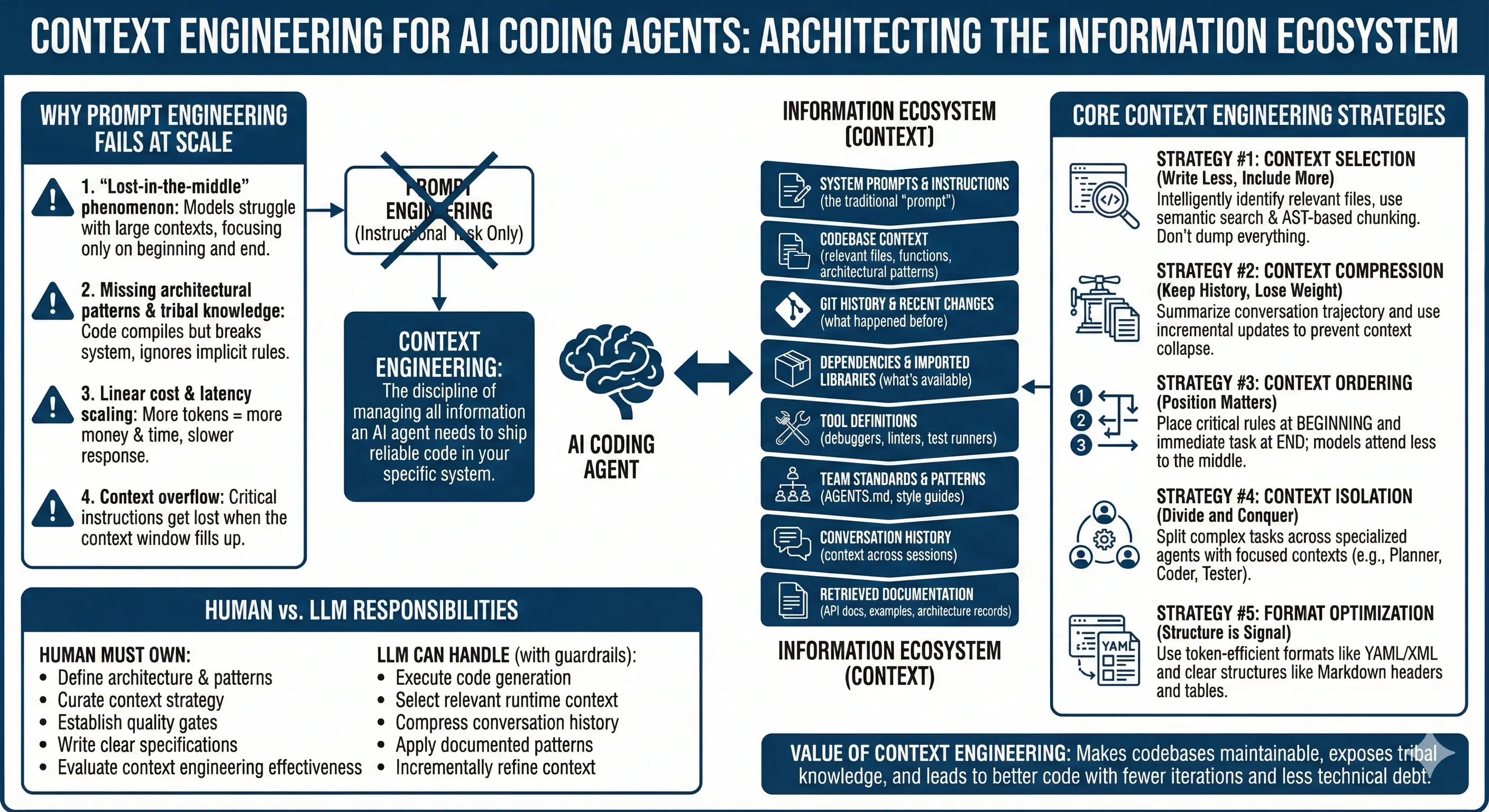
As you can see, every piece of code, every file you attach, every role you set, and every response the AI generates consumes tokens and fills up the window. The diagram below illustrates this difference between a simple query and a complex, multi-turn agent interaction like vibe coding.

This is why, in long projects, the AI can seem to get "dumber" over time. It's not actually losing intelligence; it's losing memory. This phenomenon is often called context rot.
Part 3: Identifying Project Inconsistencies from Context Rot
Now for the most important part: how do you know when the context window limit is causing problems in your project? The errors are often subtle. The AI doesn't usually say "I've forgotten"; it just gives you a confident but incorrect answer. This is where you need to be a detective.
This degradation in quality is what we call context rot. The following article offers an excellent list of symptoms to watch for.
What Is Context Rot? Why Long AI Coding Sessions Produce Worse Results | MindStudio
This article from MindStudio gives a name to the problem—"context rot"—and explains it as a structural consequence of how LLMs work.
First, read the section "What Context Rot Actually Is" for a clear definition. Then, jump down and read the list of symptoms under the heading "The Symptoms."
As you just read, the signs of context rot can be very frustrating. For your vibe coding projects, they might look like this:
- Contradiction: You tell the AI to use your brand's primary color
#1A2B3Cfor all buttons. After a long conversation, it generates a new button with a generic blue color. It has forgotten the original constraint. - Generic Output: You've been refining a unique, minimalist "vibe" for your landing page. Suddenly, the AI suggests adding a cluttered, generic-looking testimonials section that doesn't match the established style. It has lost the "vibe" by defaulting to its training data.
- Inconsistent Naming: In your business app, you decided to name all database functions with a
db_prefix (e.g.,db_addUser). The AI starts generating new functions namedcreateUserorsave_user, forgetting the convention. This creates messy, hard-to-maintain code. - Repetition: You ask the AI to add a "Contact Us" page. It generates the code. Ten prompts later, you ask for a way for users to get in touch, and it suggests building a "Contact Us" page from scratch, completely unaware that it already did.
The "Lost in the Middle" Problem
A fascinating and common cause of these issues is that AIs don't pay equal attention to all parts of the context window. They tend to remember information from the very beginning and the very end of a conversation much better than information stuck in the middle.
Why LLMs get dumb (Context Windows Explained)
This clip from the NetworkChuck video explains this "Lost in the Middle" phenomenon very clearly.
Watch this short segment from the timestamp. The U-shaped curve he describes is a well-documented issue in LLM research.
This means that even if a critical piece of information (like a brand guideline or an architectural decision) is technically in the context window, the AI might still ignore it if it's buried in the middle of a long conversation.
A quick note on a common question: does a bigger context window solve this? While larger windows help by allowing for longer conversations, they don't eliminate the core problem. Attention quality still degrades over distance, and the "lost in the middle" issue can persist. Managing the content of the window is often more important than just having a bigger one.
Conclusion
You've made it through a more technical but absolutely essential lesson today. Understanding the context window is like a developer understanding memory management—it's a fundamental constraint that affects everything you build.
Here are the key takeaways:
- The context window is the AI's short-term memory, measured in tokens.
- It contains the entire conversation, including your prompts, the AI's responses, system instructions, code, and documents.
- When the window gets too full or long, context rot sets in, causing the AI to "forget" earlier instructions.
- You can identify this when the AI produces inconsistent or generic output, contradicts previous decisions, or repeats itself.
- The "lost in the middle" problem means AIs struggle to recall information buried in the middle of long contexts.
Now that you can spot the problem of the AI "forgetting," what can you do about it? In our next lesson, we will explore our first major strategy for combating context rot: using summarization to keep the AI on track. This technique helps you actively manage the context window, ensuring the most important information always stays in the AI's focus.