Welcome back!
In our last lesson, we explored one of the biggest challenges in working with AI on large projects: the limited context window. You learned how to spot the signs of context rot, where the AI starts to "forget" your initial instructions, leading to frustrating inconsistencies. Now that you can diagnose the problem, it's time to learn the solution.
This lesson focuses on a powerful and practical technique to combat context rot: summarization. You will learn how to actively manage the AI's memory by creating concise summaries of your project's progress. This allows you to "reset" the AI's focus, ensuring that your core brand guidelines, design decisions, and project goals remain consistent from the beginning of a project to the end. Mastering this is essential for moving from simple, one-off generations to building complex, multi-part projects like the landing pages and apps you aim to create.
Part 1: The Core Strategy: Summarize and Reset
In the last lesson, you learned that an AI's context window contains the entire history of your conversation. As the project grows, this history becomes bloated with minor tweaks, dead ends, and intermediate code, making it difficult for the AI to find the most important information.
The solution is elegant: instead of letting the history grow indefinitely, we can periodically distill it into a short, dense summary of the most critical information. We then start a new conversation with the AI, using this summary as the initial prompt. This is like giving a project manager a concise status report instead of making them read every email exchanged since the project began.
The diagram below illustrates this concept perfectly. Instead of feeding the AI a long, raw history of every interaction (left), we provide a compact summary (middle) that contains all the essential information in a fraction of the space.
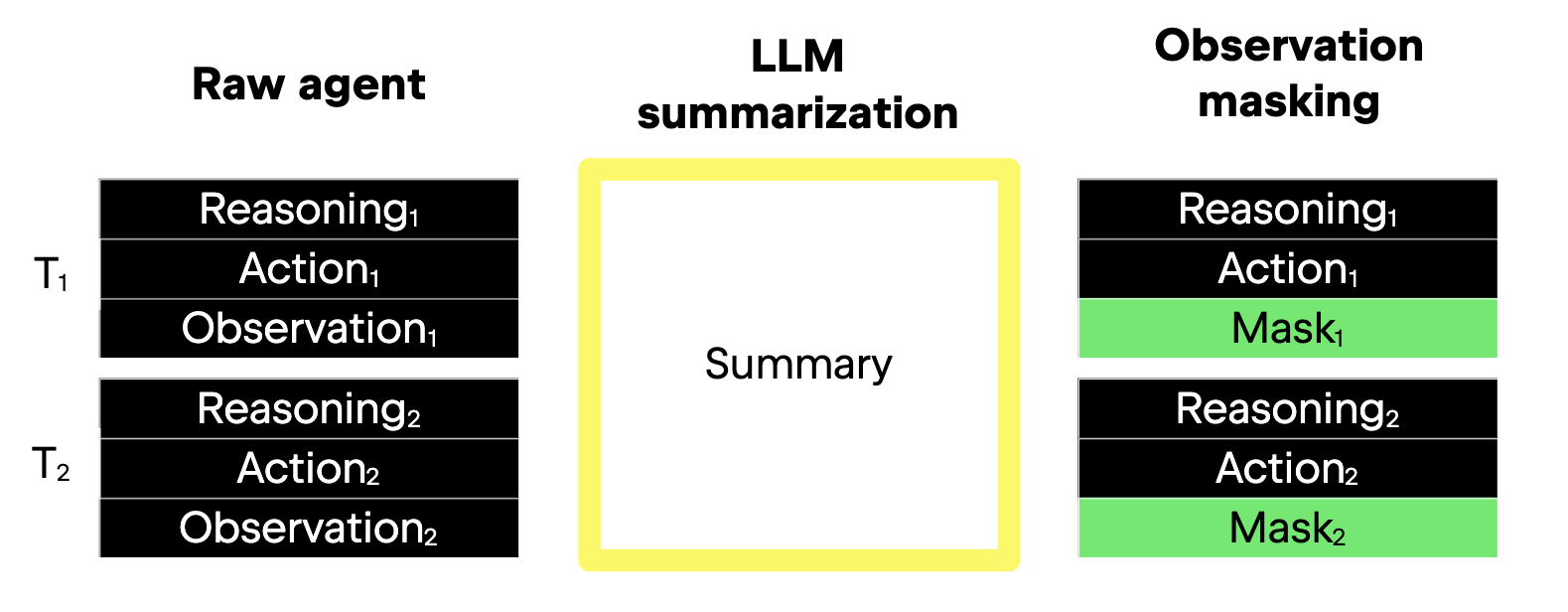
This "summarize and reset" workflow is a fundamental skill for any serious AI prompter. Let's look at how to put it into practice.
Understanding Context Length: 5 Techniques for Maximizing AI Chat Effectiveness
This article provides a clear, practical guide to context management techniques. We'll focus on its explanation of summarization.
Please read the section titled "Advanced Context Techniques." Focus on the first two points it makes: how you can ask the AI to summarize a conversation to use as a starting prompt for a new one, and how you can summarize large documents separately to keep your main chat clean.
As you just read, this isn't just a theoretical idea; it's a hands-on strategy you can use right now. Let's walk through a scenario related to your goals.
Imagine you're 25 prompts into designing a landing page. You've established:
- Brand Vibe: "Modern and minimalist, inspired by Swiss design."
- Color Palette: Primary
#111827(dark gray), Accent#34D399(emerald green). - Typography: Inter for body text, DM Serif Display for headings.
- Progress: You've successfully generated the hero section and a features list.
The conversation is getting long. You now ask the AI to generate a testimonial section, and it comes back with blue text, a generic "Open Sans" font, and a flashy design that clashes with the minimalist vibe. Context rot has set in.
Here is how you use summarization to fix it:
-
Prompt for a Summary: You give the AI this prompt:
"Summarize our project so far into a concise brief. The brief must include:
- The defined brand identity (vibe, colors with hex codes, and font names).
- The target audience (tech startups).
- The HTML and CSS code for the completed hero and features sections.
Format this summary so it can be used as the first prompt in a new chat to continue the project."
-
Reset the Conversation: You copy the AI's complete summary.
-
Start a New Chat: You open a fresh chat window and paste the summary as your very first prompt.
-
Continue Working: Now, you can ask for the testimonial section again. The AI has a clean, focused context containing only the essential information, and will produce a result that aligns perfectly with your established brand identity.
Part 2: How to Write Effective Summarization Prompts
Just asking the AI to "summarize this" is often not enough. A generic summary might miss crucial details. The key is to guide the AI to create a summary that is dense, structured, and tailored to your project's needs.
The following video provides an excellent framework for building better summarization prompts by adding constraints like a target audience, a specific format, and a desired tone.
The BEST Way to Summarize Anything With GPT-4o
This video from The AI Advantage demonstrates how to progressively enhance a basic summarization prompt.
First, watch how a simple prompt is improved by adding a role and a target audience. Notice how this small change forces the AI to tailor the output. Then, watch the next segment on the four "building blocks" you can add to a prompt: tone, goal, length, and the inclusion of quotes.
By applying these building blocks, you can transform a simple request into a powerful instruction. Let's look at some examples for a "vibe coding" project.
-
Simple Prompt (Okay):
"Summarize our conversation." -
Better Prompt (Specific & Structured):
`"Create a bullet-point summary of the key decisions for our app. Include:- Brand Vibe
- Color Palette (with hex codes)
- Typography System
- Data Structure for the 'users' table"`
-
Professional Prompt (Role-Playing & Goal-Oriented):
`"You are the lead developer on this project. Write a 'Project State Snapshot' to hand off to a new team member. The snapshot must be self-contained and include all critical information. Structure it with the following markdown headings:Brand Guidelines
Data Schema
Completed Components (include code)
Next Steps"`
This last prompt is particularly effective because it forces the AI to organize the information logically, making it perfect for starting a new, clean conversation.
For even more structured ways to request summaries, you can use templates. The article below provides several excellent ones.
AI Prompts for Summarizing Reports: Save Time & Effort
This article offers ready-to-use templates for generating different kinds of summaries.
First, review the three templates under the heading "Prompt Templates." Notice how each one specifies a different format (paragraphs, executive summary, bullet points) and asks for different types of information. Then, read the "Tips for Effective Summarization" that follow. These five tips are excellent best practices for any summarization task.
Part 3: Advanced Context Management
While the "summarize and reset" method is your primary tool, there are a few other related techniques that give you even more control.
Manual Checkpointing
Instead of asking the AI to summarize for you, you can maintain your own summary in a local text file (e.g., project_status.md). After every major decision or code generation, you manually copy the key information into this file. This gives you absolute control over what is remembered. When you need to reset the context, you simply copy the contents of your file into a new chat.
The following video discusses this idea of taking manual control versus letting the AI decide what's important.
Master Context in Claude Code in 5 Minutes
This video from GritAI Studio explains why manual control over context is so important in complex coding tasks.
Watch the short segment from this timestamp. The speaker makes a strong case for "manual summarization" into a file to maintain full control over the project's narrative.
Using Specialized Sub-Agents
Some advanced AI tools can delegate tasks to "sub-agents." Imagine your main conversation is for building the UI. When you need to research a complex database integration, you can ask the AI to use a sub-agent. This agent opens a separate, temporary context window to do the research, and then returns only a clean summary of its findings to your main chat. This prevents the research process from cluttering your primary context.

While not all tools explicitly offer this, you can simulate it by using a separate chat window for research and then pasting the summary back into your main project chat.
Conclusion
Today, you've learned the most important strategy for overcoming the limitations of an AI's context window. Instead of being a passive victim of context rot, you can now take active control of the AI's memory.
Here are your key takeaways:
- Summarization fights context rot: By periodically summarizing your project's state and starting a new chat, you keep the AI focused on what's most important.
- Prompting for summaries is a skill: Use roles, formats, and specific goals to guide the AI into creating dense, useful summaries. Don't just ask it to "summarize."
- You are in control: You can choose to manually checkpoint your progress in a separate file for maximum precision, or simulate sub-agents by using different chats for different tasks.
With this new skill, you are now much better equipped to handle the long, complex conversations required to build a complete application.
In our next lesson, we will put these foundational skills to work as we move into the next module: Defining a Brand with AI. You'll start your first multi-step project by drafting a prompt to outline a complete brand identity, setting the stage for generating a full suite of visual assets.